4K Cinematic Video Production Essentials
Introduction: Why 4K Footage Often Fails to Look Cinematic
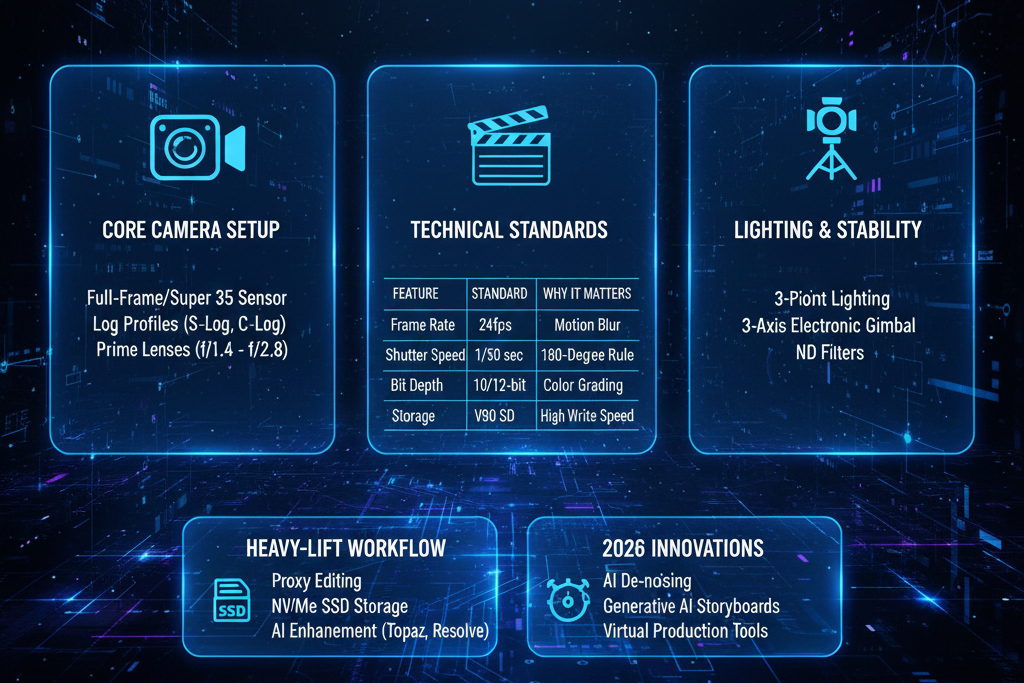
Why does your 4K footage look sharp but not cinematic? This is one of the most common frustrations among semi-professional videographers and serious hobbyists. You invest in a 4K camera, high-resolution lenses, and modern editing software, yet the result still feels like video rather than cinema. The issue is rarely resolution. Cinematic quality comes from motion, depth, light, and control.
This article breaks down the technical foundations of professional 4K cinematic shooting. Using a ranked, practical approach, you will learn the essential elements that separate cinematic images from ordinary footage and how to apply them consistently.
Create now on VidAU
Rank #1: Frame Rates, Shutter Speed, and the 180-Degree Rule
Motion is the fastest way to reveal whether footage is cinematic or not. Incorrect frame rates and shutter speeds create jittery, harsh movement that immediately feels amateur.
Why Frame Rate Matters
Most cinematic content is shot at 24 frames per second. This frame rate introduces natural motion blur that our eyes associate with film. Shooting at 30 or 60 frames per second can look too smooth and clinical unless you are planning slow motion or a specific stylistic effect.
The 180-Degree Shutter Rule Explained
The 180-degree rule states that your shutter speed should be double your frame rate. For example:
- 24 fps → 1/48 or 1/50 shutter speed
- 30 fps → 1/60 shutter speed
- 60 fps → 1/120 shutter speed
Following this rule produces motion blur that feels natural and cinematic. Deviating from it creates either choppy motion (too fast) or smeared motion (too slow).
Practical Example
If you are shooting a walking subject at 24 fps with a shutter speed of 1/250, the movement will look staccato and harsh. Adjusting the shutter to 1/50 instantly smooths motion and adds cinematic realism.
This single adjustment often fixes the “video look” more than any color grading preset.
Rank #2: Lens Selection and Focal Lengths for Cinematic Depth
Resolution does not create cinematic depth. Lens choice does.
- Focal Length and Compression
Cinematic images often use medium to longer focal lengths, such as 35mm, 50mm, or 85mm (full-frame equivalent). These lenses compress the background slightly, separating the subject from the environment in a pleasing way. Wide lenses can feel immersive, but overusing them in 4K makes footage feel distorted and less cinematic unless carefully composed.
- Aperture and Depth of Field
A wider aperture helps isolate subjects, but cinematic depth is not just about shooting wide open. It is about intentional focus control. Shooting at f/2.8 or f/4 often provides enough separation while keeping focus usable during movement.
- Practical Example
For an interview-style shot, using a 50mm lens at f/2.8 with the subject positioned several feet from the background creates natural separation without extreme blur. This setup looks cinematic even before color grading.
Rank #3: Dynamic Range Management and Exposure in a 4K Workflow
4K sensors capture immense detail, but poor exposure destroys cinematic quality faster than any other mistake.
- Protect Highlights First
Cinematic footage prioritizes highlight retention. Blown-out highlights feel cheap and unrecoverable. Slightly underexposing and lifting shadows in post is often safer than clipping highlights.
- Use Log and Flat Profiles Wisely
Log profiles preserve dynamic range but require proper exposure. Exposing too dark introduces noise, especially in shadows. Use exposure tools such as waveform monitors and zebras to place skin tones and highlights correctly.
- Practical Example
When shooting outdoors, expose for the sky first. If the subject becomes too dark, introduce a reflector or fill light rather than increasing ISO. This approach maintains cinematic contrast and clean images.
Rank #4: Controlled Movement and Composition for a Cinematic Feel
Cinematic footage feels intentional. Random movement breaks immersion.
- Camera Movement with Purpose
Slow, deliberate movements such as pans, tilts, and push-ins add production value. Handheld footage can be cinematic, but only when controlled and motivated.
- Composition and Negative Space
Use leading lines, symmetry, and negative space to guide attention. Cinematic frames often feel simple and balanced rather than cluttered.
- Practical Example
Instead of following a subject handheld, place the camera on a tripod and let the subject move through the frame. This single change adds discipline and cinematic restraint.
Step-by-Step: Building a Cinematic 4K Shot from Setup to Capture
- Set frame rate to 24 fps for cinematic motion.
- Lock shutter speed to 1/50 following the 180-degree rule.
- Choose a focal length between 35mm and 85mm.
- Set aperture for controlled depth, not maximum blur.
- Select a log or flat profile if you plan to color grade.
- Expose to protect highlights using waveform tools.
- Stabilize the camera or plan deliberate movement.
- Record a short test clip and review motion and exposure.
Practical Examples: Applying the Essentials in Real Shooting Scenarios
Narrative Scene
A character enters a room. Shoot at 24 fps, 1/50 shutter, with a 50mm lens. Use window light as a key source and expose for the highlights on the face. Add a slow push-in to create emotional emphasis.
B-Roll Sequence
For cinematic B-roll, maintain consistent settings. Avoid switching frame rates. Capture slow, controlled movements and vary focal lengths to add visual interest.
Common Mistakes That Ruin Cinematic 4K Footage
- Shooting at high frame rates without purpose
- Ignoring shutter speed rules
- Overusing wide-angle lenses
- Blowing out highlights
- Relying on color grading to fix poor exposure
- Excessive camera shake
Avoiding these mistakes instantly elevates production quality.
Final Checklist: Cinematic 4K Shoot Essentials
- 24 fps frame rate
- Shutter speed set to double the frame rate
- Medium focal length lenses
- Controlled aperture for usable depth
- Highlight-safe exposure
- Intentional camera movement
- Clean, simple compositions
Master these essentials and your 4K footage will finally look cinematic.
Frequently Asked Questions
Q: Does 4K resolution automatically make footage cinematic?
A: No. Cinematic quality comes from motion, lighting, composition, and lens choice. Resolution only adds detail.
Q: Should I always shoot at 24 fps for cinematic video?
A: Most cinematic projects use 24 fps, but higher frame rates are useful for slow motion when planned intentionally.
Q: Is shooting wide open the best way to get a cinematic look?
A: Not always. Controlled depth of field is more cinematic than extreme blur that makes focus difficult.
Q: Can I fix non-cinematic footage in post-production?
A: Post-production can enhance footage, but it cannot fully fix incorrect motion, exposure, or lens choices.