Autonomous AI Agents: Complete Production Deployment Guide from Concept to 24/7 Operation
Stop prompting AI. Start deploying agents that work while you sleep. The gap between chatting with ChatGPT and running production AI agents is vast—and most developers never cross it. You’ve mastered prompt engineering, built impressive demos, and witnessed AI’s potential. But your AI still requires human intervention for every task. This guide bridges that chasm with a complete implementation workflow from concept to autonomous production systems.
From Chat to Automation: Understanding the Paradigm Shift
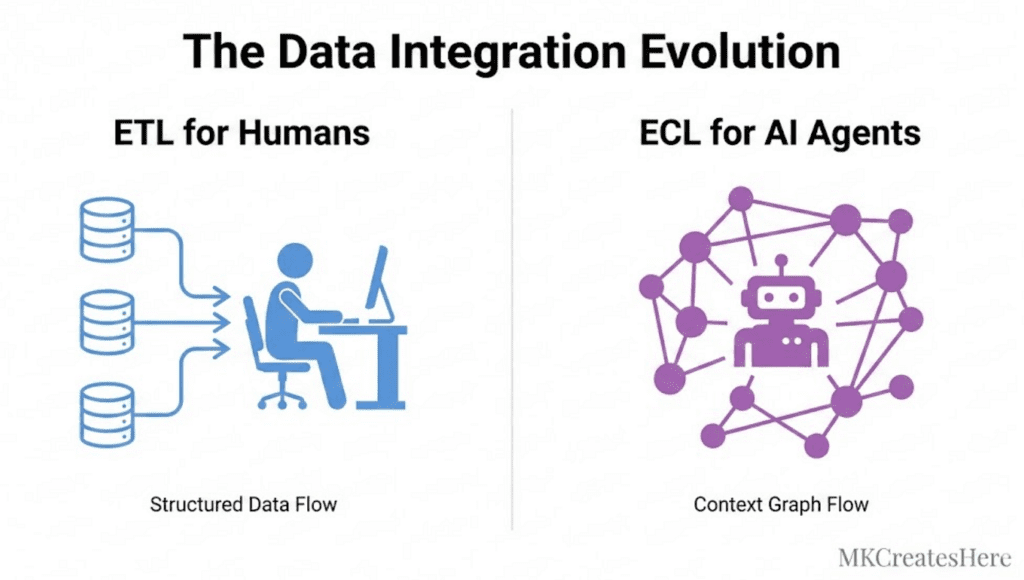
Interactive AI operates in a request-response cycle. You prompt, it responds, you evaluate, you iterate. Autonomous agents invert this model entirely—they observe, decide, act, and adapt without human intervention.
The fundamental shift requires three architectural changes:
Trigger Mechanisms Replace Prompts: Instead of waiting for user input, agents respond to events—webhooks, scheduled intervals, data stream changes, or monitoring thresholds. A production agent monitoring customer support tickets doesn’t wait for you to ask “are there new tickets?”—it subscribes to your ticketing system’s webhook endpoint and processes incoming events in real-time.
Decision Trees Replace Single Responses: Autonomous agents execute multi-step workflows. When your agent receives a support ticket, it must classify urgency, search your knowledge base, determine if it can auto-respond or needs escalation, update your CRM, and potentially trigger follow-up actions—all within a single autonomous execution cycle.
Persistence Replaces Context Windows: Production agents maintain state across sessions. Your agent needs databases, not just conversation history. It must remember what it processed yesterday, track long-running tasks, and maintain operational context independent of any single API call.
Architecture Foundations: Building Event-Driven Agent Systems
Production AI agents are event-driven systems built on three layers:
The Orchestration Layer manages agent lifecycle and execution flow. Use frameworks like LangGraph or AutoGen for complex agent behaviors, or build lightweight custom orchestrators using task queues (Celery, BullMQ, or Temporal for mission-critical workflows).
Your orchestration layer defines agent topology:
python
class AutonomousAgent:
def __init__(self, event_source, llm_provider, action_handlers):
self.event_source = event_source # Webhook server, message queue
self.llm = llm_provider # OpenAI, Anthropic, or local models
self.actions = action_handlers # Tool integrations
self.state_store = StateManager() # Redis, PostgreSQL, or DynamoDB
async def run(self):
async for event in self.event_source.stream():
context = await self.state_store.get_context(event.id)
decision = await self.llm.decide(event, context, self.actions)
result = await self.execute_action(decision)
await self.state_store.update(event.id, result)
await self.emit_telemetry(event, decision, result)
The Intelligence Layer houses your LLM integration with structured output enforcement. Production agents cannot work with freeform text—they need JSON-structured decisions with type validation. Use function calling (OpenAI), tool use (Anthropic), or JSON mode with Pydantic schemas:
python
from pydantic import BaseModel
from enum import Enum
class ActionType(Enum):
RESPOND = “respond”
ESCALATE = “escalate”
RESEARCH = “research”
WAIT = “wait”
class AgentDecision(BaseModel):
action: ActionType
confidence: float
parameters: dict
reasoning: str
This structure enables deterministic execution paths. Your agent’s decision becomes data your system can validate, log, and execute reliably.
The Integration Layer connects agents to external systems—your CRM, databases, APIs, communication platforms, and monitoring tools. Each integration requires idempotent operations (retryable without side effects) and comprehensive error handling.
Integration Patterns: Connecting Agents Across Applications
Production agents orchestrate multiple applications simultaneously. Implement these patterns:
The Webhook Receiver Pattern: Deploy a lightweight HTTP server that ingests events from external systems. Use FastAPI or Express.js with proper authentication (verify webhook signatures), rate limiting, and request validation. Queue incoming events immediately—never block the webhook endpoint with long-running LLM calls.
The API Wrapper Pattern: Create type-safe interfaces for every external service your agent touches. Wrap third-party APIs with retry logic, circuit breakers (prevent cascade failures), and response caching:
python
from tenacity import retry, stop_after_attempt, wait_exponential
class CRMIntegration:
@retry(stop=stop_after_attempt(3), wait=wait_exponential(multiplier=1, min=2, max=10))
async def create_ticket(self, ticket_data):
# Circuit breaker pattern
if self.circuit_breaker.is_open():
raise ServiceUnavailableError(“CRM service degraded”)
response = await self.client.post(“/tickets”, json=ticket_data)
return response.json()
The Bidirectional Sync Pattern: For agents that both consume and produce data across systems, implement eventual consistency with conflict resolution. Use message queues (RabbitMQ, AWS SQS) as buffers between your agent and external systems to handle backpressure and ensure delivery guarantees.
State Management and Persistence Layer Design
Autonomous agents require sophisticated state management:
Short-term State (active task context): Store in Redis or Memcached with TTL expiration. Include conversation history, intermediate results, and execution checkpoints. Structure it for quick reconstruction if your agent crashes mid-task.
Long-term State (operational memory): Persist in PostgreSQL or MongoDB. Track processed items, learned preferences, performance metrics, and audit trails. Design schema for efficient querying—you’ll need to ask “what did my agent do with ticket #12345?” six months from now.
Vector State (semantic memory): Index important information in vector databases (Pinecone, Weaviate, Qdrant) for RAG-based decision making. Your AI agent should remember similar situations it handled previously and apply learned patterns.
Implement state versioning and migration strategies from day one. Your agent’s decision logic will evolve—ensure you can replay historical decisions with upgraded models without losing operational context.
Production Monitoring: Observability for Autonomous Systems

Unattended agents require comprehensive observability:
Structured Logging: Log every agent decision with complete context—input events, LLM responses, actions taken, and outcomes. Use structured formats (JSON) with trace IDs connecting related operations:
python
import structlog
logger = structlog.get_logger()
logger.info(
“agent_decision”,
trace_id=trace_id,
event_type=event.type,
decision=decision.action.value,
confidence=decision.confidence,
latency_ms=execution_time,
llm_tokens=token_count
)
Metrics and Alerting: Track operational metrics—task completion rate, average latency, error rates, LLM token consumption, and cost per operation. Alert on anomalies: sudden error spikes, latency increases, or unexpected cost surges. Use Prometheus + Grafana, Datadog, or CloudWatch.
Decision Auditing: Create dashboards showing what your agent did and why. Product and business stakeholders need visibility into autonomous operations. Build views showing: tasks completed, actions taken, escalations triggered, and confidence distributions.
Error Handling and Recovery Mechanisms
Production agents fail gracefully with these patterns:
Graceful Degradation: Define fallback behaviors for common failures. If your LLM provider is down, can your agent use a backup provider or switch to rule-based logic temporarily? If your CRM is unavailable, queue actions for retry rather than dropping them.
Dead Letter Queues: Route failed operations to DLQs for manual review. Include complete context—what the agent attempted, why it failed, and how many retries occurred. Process DLQs daily to identify systemic issues.
Automatic Rollback: For agents that modify external systems, implement compensation transactions. If a multi-step operation fails halfway through, automatically reverse completed steps to maintain consistency.
Human-in-the-Loop Escalation: Define confidence thresholds triggering human review. Operations below 70% confidence might queue for approval rather than execute autonomously. Implement this as workflow state transitions, not blocking operations.
Deployment Strategies and Infrastructure Considerations
Deploy production agents with these approaches:
Containerized Deployments: Package agents as Docker containers with all dependencies. Use Kubernetes for complex multi-agent systems requiring auto-scaling, or simpler platforms like AWS ECS/Fargate for straightforward deployments.
Serverless Functions: For event-driven agents with intermittent activity, deploy as AWS Lambda, Google Cloud Functions, or Azure Functions. Watch for cold start latency and execution time limits (15 minutes on Lambda).
Always-On Services: Agents requiring persistent connections (WebSocket monitoring, streaming data processing) need traditional server deployments—EC2 instances, VMs, or managed container services with reserved capacity.
Implement blue-green deployments for zero-downtime updates. Test agent changes in production-like staging environments with replayed event data before promoting to production.
Security and Cost Controls for Unattended Agents
Autonomous systems require strict guardrails:
Rate Limiting: Cap agent operations per time window. Prevent runaway execution loops that drain LLM credits or overwhelm external APIs. Implement circuit breakers that pause agent execution when thresholds are exceeded.
Permission Scoping: Grant minimum necessary permissions. Use service accounts with restricted API access, not admin credentials. Apply principle of least privilege to every integration.
Cost Monitoring: Track LLM token consumption and costs in real-time. Alert when daily spending exceeds thresholds. Implement cost attribution per task type to identify expensive operations.
Execution Boundaries: Define hard limits—maximum actions per event, maximum external API calls, maximum execution time. Prevent scenarios where your agent gets stuck in expensive loops.
Your first autonomous agent won’t be perfect. Start with narrow scope—a single well-defined task with clear success criteria. Instrument extensively, monitor constantly, and expand capabilities as you build confidence in your operational patterns. The goal isn’t replacing human judgment entirely—it’s augmenting human capacity by automating the routine, freeing you to focus on exceptions and strategy.
Production AI agents transform how technical teams operate. You wake up to completed work, resolved issues, and processed data—all handled autonomously overnight. The implementation requires engineering discipline, but the operational leverage is transformational.
Frequently Asked Questions
Q: What’s the minimum infrastructure needed to deploy a production AI agent?
A: At minimum, you need: (1) An event trigger mechanism (webhook server or scheduled task runner), (2) LLM API access with error handling, (3) State storage (Redis for sessions, PostgreSQL for persistence), (4) Logging infrastructure (CloudWatch, Datadog, or self-hosted ELK stack), and (5) A message queue or task runner for async operations (AWS SQS, RabbitMQ, or Celery). Start with managed services to minimize operational overhead—AWS Lambda + DynamoDB + SQS provides a complete serverless stack for under $50/month at moderate scale.
Q: How do I prevent my autonomous agent from making costly mistakes in production?
A: Implement multiple safety layers: (1) Confidence thresholds that trigger human review for decisions below 70-80% certainty, (2) Cost limits with circuit breakers that pause execution when spending exceeds daily budgets, (3) Dry-run modes that log intended actions without executing them, allowing review before enabling write operations, (4) Action allowlists that restrict your agent to explicitly approved operations, and (5) Comprehensive testing with replayed production events in staging environments. Start with read-only operations and gradually enable write permissions as you build confidence through monitoring.
Q: What’s the difference between using LangChain/LangGraph versus building a custom agent framework?
A: LangChain/LangGraph provide pre-built abstractions for agent patterns, memory management, and tool integration—accelerating development for standard workflows. Choose frameworks when you need: multi-agent coordination, complex reasoning chains, or rapid prototyping. Build custom frameworks when you require: extreme performance optimization, specialized error handling, tight integration with proprietary systems, or simplified deployment pipelines. Many production teams start with frameworks for proof-of-concept, then migrate critical paths to custom implementations for better control and reduced dependency overhead. The framework decision matters less than architecture fundamentals—proper state management, observability, and error handling are framework-agnostic.
Q: How do I handle LLM non-determinism in production agents that require consistent behavior?
A: Enforce determinism through structured outputs and validation: (1) Use function calling or JSON mode with strict schema validation (Pydantic models) so the LLM must return valid structured decisions, (2) Set temperature to 0 for maximum consistency in decision-making, (3) Implement decision verification layers that validate LLM outputs against business rules before execution, (4) Use prompt templates with few-shot examples demonstrating exact expected output formats, and (5) Version your prompts and log which version produced each decision for reproducibility. For critical operations, implement voting mechanisms—call the LLM multiple times and take consensus action when outputs agree.
Q: What metrics should I monitor to know if my autonomous agent is working correctly?
A: Track four metric categories: (1) Operational health—task completion rate (target >95%), average latency, error rate by type, and uptime percentage, (2) Decision quality—confidence score distributions (flag if too many low-confidence decisions execute), human escalation rate, and action success rate (did the taken action achieve intended outcome), (3) Cost efficiency—LLM tokens per task, cost per completed operation, and comparison against baseline human operation costs, and (4) Business impact—tasks automated (volume), time savings, error reduction versus manual processes. Build dashboards showing 24-hour trends and week-over-week comparisons. Alert on anomalies: sudden drops in completion rate, error rate spikes above 5%, or cost-per-task increases beyond thresholds.