Build Custom AI Agents Without Coding: Complete Copilot Studio Tutorial for Business Automation
Create your own AI assistant in minutes without writing a single line of code. While enterprises spend millions building custom AI solutions, business users and productivity enthusiasts can now deploy specialized AI agents that handle everything from customer inquiries to data processing—all through intuitive no-code platforms like Microsoft Copilot Studio.
Why No-Code AI Agents Are Transforming Business Productivity
The barrier between AI capability and practical implementation has collapsed. Non-technical users historically struggled to create specialized AI assistants tailored to their unique business needs, forced to either hire expensive developers or settle for generic chatbot templates. Copilot Studio changes this paradigm by offering a visual agent builder that abstracts complex concepts like prompt engineering, API orchestration, and workflow automation into drag-and-drop components.
Unlike traditional automation tools that follow rigid if-then logic, modern AI agents leverage large language models (LLMs) to interpret context, make decisions, and adapt responses based on conversational flow. The critical difference lies in agentic behavior—the ability for your assistant to autonomously determine next steps, query multiple data sources, and execute actions without explicit instruction for every scenario.
Getting Started with Copilot Studio: Your AI Agent Foundation
Copilot Studio serves as your visual development environment, functioning similarly to how ComfyUI provides node-based workflows for image generation, but optimized for conversational AI architecture. Access the platform through your Microsoft 365 account and navigate to the Agent Builder interface.
The initial setup wizard guides you through three foundational decisions:
Agent Persona Configuration: Define your assistant’s role, tone, and domain expertise. This acts as the system prompt layer—the persistent instruction set that shapes every interaction. For customer service agents, specify empathetic language patterns and brand voice guidelines. For data analysis assistants, emphasize precision and structured output formats.
Knowledge Base Integration: Upload documents, connect SharePoint libraries, or link external knowledge sources. The platform uses Retrieval-Augmented Generation (RAG) architecture to ground agent responses in your specific content. This prevents hallucinations and ensures factual accuracy—similar to how seed parity maintains consistency across generated video frames.
Capability Scope: Select whether your agent handles simple Q&A, complex multi-turn conversations, or transactional workflows. This determines the underlying model configuration and context window allocation.
Designing Your First Specialized Agent: Parameters and Instructions
The AI Agent Configuration panel exposes critical parameters that control autonomous behavior. Unlike writing code, you’re essentially tuning the decision-making framework through natural language instructions and visual selectors.
System Instructions: Craft the core directive that governs agent behavior. Effective instructions follow a structured pattern:
- Identity statement: “You are a procurement assistant specialized in vendor management”
- Behavioral constraints: “Always verify budget approval before processing requests over $5,000”
- Output formatting: “Provide responses in bullet points with action items clearly marked”
- Escalation protocols: “Transfer to human agent if customer expresses frustration or requests sensitive data modifications”
Think of system instructions as the latent space guidance for conversational flow—they create the probability distribution that shapes which responses the agent favors, similar to how negative prompts steer image generation away from unwanted elements.
Response Temperature Control: Adjust the creativity-precision spectrum. Lower values (0.1-0.3) produce consistent, deterministic responses ideal for compliance-focused agents. Higher values (0.7-0.9) enable more varied, conversational interactions suitable for creative brainstorming assistants. This parallels scheduler selection in diffusion models—Euler a schedulers provide stable, predictable outputs while DDIM schedulers enable more exploratory generation.
Context Window Management: Allocate how much conversation history the agent retains. Extended context (8k-32k tokens) enables sophisticated multi-session interactions where the agent remembers previous discussions, tracks ongoing projects, and builds relationship continuity. Shorter contexts reduce latency and cost for transactional queries.
Defining Autonomous Workflows: Actions, Triggers, and Decision Trees
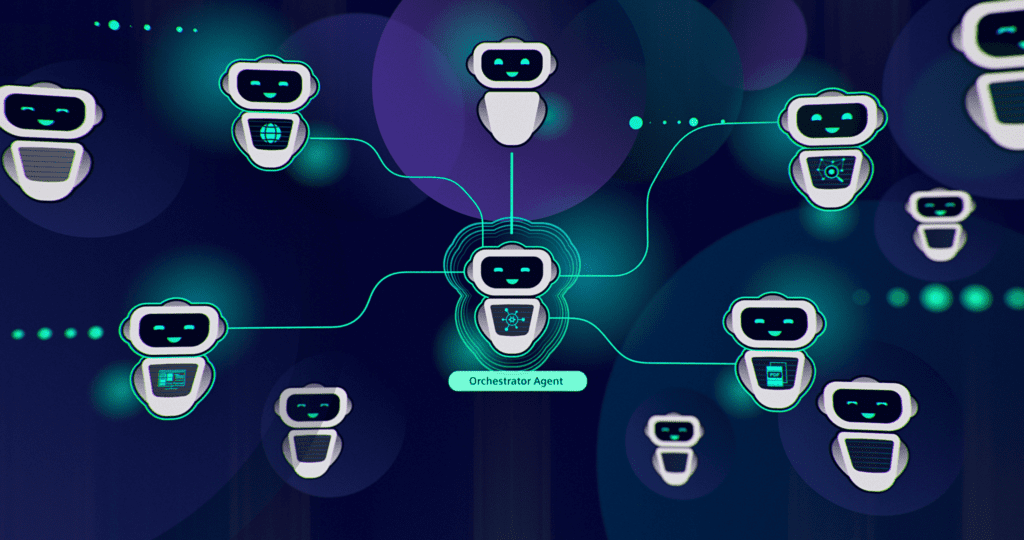
The true power of no-code agents emerges through workflow orchestration—enabling your assistant to perform actions beyond conversation. Copilot Studio’s Action Builder provides a visual canvas for defining agent capabilities.
Power Automate Integration: Connect pre-built flows or create custom automation sequences. When a user requests “Send me last quarter’s sales report,” your agent can:
- Query SharePoint for the relevant document
- Extract summary statistics using AI Builder document processing
- Format results in a table
- Email the report and post notification to Teams
All without requiring the user to navigate multiple applications or remember where files are stored.
Trigger Configuration: Define the conditions that activate specific workflows. Natural language triggers use intent classification—the agent recognizes semantic meaning rather than exact keyword matches. “I need the sales data” and “Can you pull Q4 revenue figures” both trigger the same workflow despite different phrasing.
Decision Trees for Complex Logic: Build branching pathways using the visual logic builder. For approval workflows:
- If request amount < $1,000 → Auto-approve and log
- If $1,000-$5,000 → Notify manager via Teams, await response
- If > $5,000 → Create multi-stage approval chain with CFO escalation
The decision tree functions like a conditional node graph in ComfyUI—each branch processes inputs differently based on evaluation criteria, then merges back to unified output formatting.
API Connections: Extend agent capabilities by connecting to external services through pre-built connectors or custom API definitions. Link to CRM systems (Salesforce, HubSpot), project management tools (Asana, Jira), or industry-specific platforms. Your agent becomes an orchestration layer that unifies disparate systems through conversational interface.
Multi-Application Integration: Connecting Your Agent Ecosystem
The transformative value of no-code agents lies in seamless integration across your application landscape. Rather than context-switching between tools, users interact with a single conversational interface that orchestrates backend systems.
Microsoft 365 Native Integration: Deploy your agent directly within Teams, Outlook, or SharePoint. Users access assistance without leaving their workflow environment. The agent appears as a chat participant in Teams channels, responds to @mentions, and can proactively notify based on scheduled triggers or event monitoring.
Adaptive Cards for Rich Interactions: Move beyond plain text responses by implementing Adaptive Cards—interactive UI components that render within the chat interface. Present approval buttons, data input forms, or multi-select options that capture structured information. When a user requests vacation time, the agent presents a calendar picker, automatically checks team coverage, and submits the request—all within the conversation thread.
Cross-Platform Deployment: Publish your agent to multiple channels simultaneously:
- Web embed for customer-facing websites
- Mobile apps through Bot Framework SDK
- Voice interfaces via telephony connectors
- Custom applications using API endpoints
A single agent configuration adapts its response format based on deployment context—concise for voice interfaces, detailed with visual aids for web chat.
Authentication and Security Layers: Configure Single Sign-On (SSO) and role-based access control. The AI agent inherits user permissions, ensuring data security—an employee can only query records they’re authorized to access. This prevents the common security pitfall of chatbots that bypass established access controls.
Advanced Agent Configuration: Context Management and Memory
Sophisticated agents maintain state across conversations, building a persistent understanding of user preferences and ongoing projects. Copilot Studio’s variable management system enables this memory layer.
Session Variables: Store information during a conversation—collected user inputs, interim calculation results, or workflow state. When helping a user configure a complex order, the agent remembers each selection across multiple conversation turns, building the complete specification before submission.
Global Variables: Persist data across sessions for true continuity. Track ongoing project status, user preferences, or historical interaction patterns. When a user returns days later asking “What was the status of that vendor contract?”, the agent retrieves context from previous conversations.
Entity Recognition and Extraction: Configure the agent to identify and extract structured data from natural language. Define custom entities like product codes, employee IDs, or project names. The agent automatically parses “I need to order 50 units of SKU-2847 for the Phoenix initiative” and maps each element to the appropriate workflow parameters.
Conversation Analytics: Monitor agent performance through built-in analytics dashboards. Track resolution rates, escalation patterns, and common user intents. This feedback loop identifies knowledge gaps—questions the agent struggles to answer—guiding iterative improvement of instructions and connected data sources.
Testing, Debugging, and Iterating Your AI Assistant
The Test Bot panel provides a sandbox environment for validating agent behavior before production deployment. Unlike traditional software testing that requires understanding debugging tools and logs, Copilot Studio offers conversational testing interfaces.
Conversation Simulation: Interact with your agent exactly as end-users would. Test edge cases, ambiguous queries, and workflow transitions. The platform highlights which topics and actions triggered, making the decision-making process transparent.
Intent Recognition Validation: Verify that your agent correctly interprets user requests. If “Show me active projects” fails to trigger the project listing workflow, refine your trigger phrases or add training examples. The system uses few-shot learning—providing 5-10 example utterances significantly improves recognition accuracy.
Error Handling Configuration: Define fallback behaviors when the agent encounters uncertainty. Options include:
- Requesting clarification with suggested options
- Transferring to human agent with context handoff
- Logging the unknown intent for later training
- Providing related topics that might address the query
Effective error handling prevents user frustration and captures improvement opportunities.
A/B Testing Different Configurations: Create agent variants with different instruction sets or response styles. Deploy both to subsets of users and compare satisfaction scores. This empirical approach identifies optimal configurations without guessing.
Real-World Use Cases: From Customer Service to Data Analysis
Customer Support Agent: Deploy an assistant that handles tier-1 support queries, accessing knowledge bases to resolve common issues, creating support tickets for complex problems, and escalating urgent matters. One retail company reduced support ticket volume by 40% by implementing a no-code agent that handled order status, return initiations, and product recommendations.
HR Onboarding Assistant: Guide new employees through their first weeks, answering policy questions, scheduling required training sessions, and collecting necessary documentation. The agent checks completion status and sends proactive reminders, ensuring consistent onboarding experiences across all hires.
Sales Pipeline Manager: Enable sales teams to update CRM records, schedule follow-ups, and retrieve account information through natural conversation. “Set reminder to call Acme Corp next Tuesday and flag the account as high-priority” executes across multiple systems without manual data entry.
Executive Brief Generator: Connect to business intelligence platforms and generate custom reports on-demand. Executives ask “How did the midwest region perform this month?” and receive formatted analysis with key metrics, trend comparisons, and automatically generated insights—no analyst intervention required.
Meeting Preparation Assistant: Automatically gather relevant context before meetings by querying calendar events, extracting participant lists, retrieving related documents from SharePoint, and summarizing recent email threads. Participants receive briefing packages without manual compilation.
Best Practices for Production-Ready AI Agents
Iterative Instruction Refinement: Start with broad instructions and progressively add constraints based on observed behavior. Monitor initial conversations closely and refine guidelines when the agent misinterprets intent or provides incorrect responses. This mirrors the prompt engineering process in image generation—starting with basic descriptions and layering detailed modifiers for precise control.
Graceful Degradation: Design workflows that degrade gracefully when external systems are unavailable. If your CRM connection fails, the agent should acknowledge the issue, log the request, and notify users when service restores—rather than producing cryptic errors.
Transparency in Limitations: Configure your agent to honestly communicate its capabilities. When asked to perform actions outside its scope, it should clearly explain limitations and suggest alternatives. Users appreciate honesty over failed attempts at tasks the agent cannot complete.
Regular Knowledge Base Updates: Establish a maintenance schedule for refreshing connected documents and data sources. Stale information erodes trust faster than no information. Assign knowledge base ownership to domain experts who can ensure accuracy.
Privacy and Compliance Configuration: Review data handling policies, especially when dealing with sensitive information. Configure data retention policies, implement conversation encryption, and ensure compliance with relevant regulations (GDPR, HIPAA, etc.).
User Feedback Loops: Enable in-conversation feedback mechanisms—thumbs up/down buttons or brief satisfaction surveys. This qualitative data identifies specific interactions that succeeded or failed, guiding targeted improvements.
Performance Monitoring: Track response latency, especially for agents orchestrating multiple API calls. Optimize workflow sequences to minimize wait times. Users tolerate brief delays for complex operations but expect instant responses to simple queries.
The no-code AI agent revolution democratizes automation capabilities previously reserved for organizations with substantial technical resources. Business users and productivity enthusiasts can now architect sophisticated assistants that handle nuanced conversations, orchestrate complex workflows, and integrate seamlessly across application ecosystems—all through visual configuration interfaces that abstract underlying complexity while preserving powerful customization options. The result is a new generation of specialized AI assistants tailored precisely to unique organizational needs, deployed in minutes rather than months.
Frequently Asked Questions
Q: Do I need programming experience to build AI agents in Copilot Studio?
A: No programming experience is required. Copilot Studio uses visual builders, natural language instructions, and drag-and-drop components to configure agent behavior. You define what you want the agent to do in plain English rather than writing code. Advanced users can optionally add custom code for specialized integrations, but it’s entirely optional.
Q: How do AI agents differ from traditional chatbots?
A: Traditional chatbots follow rigid decision trees with pre-scripted responses. AI agents use large language models to understand context, interpret varied phrasing, make autonomous decisions, and execute actions across multiple systems. Agents can handle unexpected questions, chain together complex workflows, and adapt responses based on conversation history—capabilities that static chatbots cannot replicate.
Q: Can my AI agent access data from multiple business applications simultaneously?
A: Yes, Copilot Studio agents can integrate with hundreds of applications through pre-built connectors (Microsoft 365, Salesforce, SAP, etc.) or custom API connections. A single agent can query your CRM for customer data, retrieve documents from SharePoint, check inventory in your ERP system, and create tasks in project management tools—all within one conversational workflow.
Q: How do I ensure my AI agent provides accurate information and doesn’t hallucinate?
A: Ground your agent in specific knowledge sources through Retrieval-Augmented Generation (RAG). Upload company documents, connect knowledge bases, and configure the agent to cite sources. Set clear system instructions that prohibit speculating when information isn’t available. Enable the ‘require source grounding’ option to ensure responses are always backed by your provided content rather than the LLM’s general training data.
Q: What happens when my AI agent encounters a question it cannot answer?
A: Configure fallback behaviors in the agent settings. Options include asking clarifying questions, offering related topics that might help, gracefully admitting limitations and suggesting human assistance, or seamlessly transferring to a live agent with full conversation context. The key is transparent communication—users appreciate honesty about limitations rather than incorrect or fabricated responses.
Q: How long does it take to build and deploy a functional AI agent?
A: Simple Q&A agents can be configured and deployed in 15-30 minutes. More sophisticated agents with workflow automation, multiple integrations, and complex decision logic typically require 2-4 hours of initial setup plus iterative refinement based on user feedback. Unlike custom development that takes weeks or months, no-code platforms enable same-day deployment for most business use cases.
Q: Can I test my AI agent before making it available to users?
A: Yes, Copilot Studio includes a built-in test environment where you can simulate conversations, validate workflow triggers, and refine responses before production deployment. You can also deploy to limited user groups for pilot testing, gather feedback, and iterate on the configuration before organization-wide rollout.
Q: Are there security risks with giving an AI agent access to business systems?
A: When properly configured, AI agents respect existing security frameworks. They inherit user permissions through Single Sign-On (SSO)—employees can only access data they’re already authorized to view. Configure role-based access control, implement conversation encryption, and audit agent actions through built-in logging. The security profile is equivalent to users accessing systems directly, but with the added benefit of centralized monitoring.