Generate Realistic Consistent Characters With Nano Banana Pro AI Character Generator
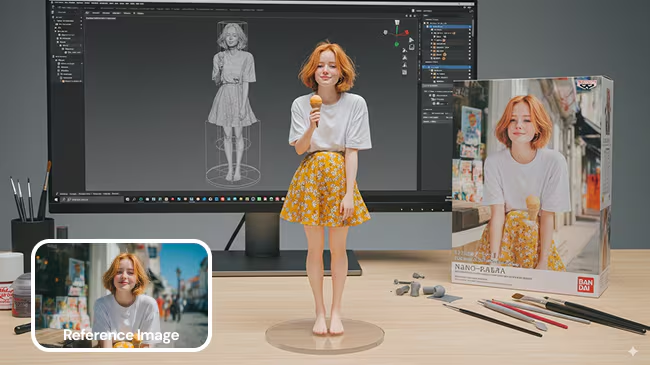
If your characters keep changing face in every image, it is very annoying. That is why many creators now look for an AI character generator that can keep one character stable. If you are searching for an AI character generator that keeps consistent characters across many images, this guide shows you how to do it step by step with Nano Banana Pro. As a result, you can tell better stories and keep your visuals on-brand.
Nano Banana Pro is Google’s advanced image model built on Gemini 3. It creates quality images and also edits them with precise control. In addition, you can keep the same character across many scenes, angles, and outfits.
What Is Nano Banana Pro AI Character Generator?
Nano Banana Pro is a pro grade AI character generator and photo editor from Google. It runs inside Gemini and other partner platforms, so you can access it from different tools.
You can:
- Generate images from text
- Edit existing photos
- Mix several images into a new one
- Keep a person or character consistent across many pictures
Altogether, these options make it very flexible. It also supports 4K output for sharp, detailed visuals.
Why Nano Banana Pro Works Well For Characters
Nano Banana Pro does more than just “make pretty pictures.” Instead, it has a reasoning core plus a strong image head.
That means:
- Faces stay stable across many generations
- Poses and props follow your prompt more closely
- Text on posters or signs is clearer and more accurate
Because of these strengths, it is a solid base if you want one character for a comic, game, or brand.
Who Is This AI Character Generator For?
This kind of AI character generator helps many people. For example, it supports:
- Solo creators and VTubers who need a mascot
- Game devs who need lots of NPCs
- Marketers who want a brand character
- Writers who like visual reference for their cast
So you do not need drawing skills. You just need a clear idea and simple prompts.
How Do You Set Up Nano Banana Pro For Character Work?
You set up Nano Banana Pro by first choosing the right model and then adding good references. This two-step mindset keeps things simple.
Most platforms give two main options:
- Nano Banana (fast, casual)
- Nano Banana Pro (reasoning, 4K, more control)
For serious character work, you should pick Nano Banana Pro.
Basic Setup Steps
First, follow these basic steps:
- Open Gemini or a partner app that includes Nano Banana Pro.
- Next, choose “Create images” → Nano Banana Pro / Reasoning model.
- Then start with a simple prompt like “realistic female hero, 25, short curly hair, denim jacket.”
- Finally, save 2–4 images you like as your anchor looks.
Taken together, this gives you a clean base for your character.
How Do You Keep Consistent Characters Across Many Images?
The secret is reference images plus repeated identity tags. When you use both together, the AI has a much easier time keeping the same look. Nano Banana Pro can use up to 14 reference images, including several human faces, to guide a new result. This is perfect for a consistent AI character generator workflow.
Simple Consistency Workflow
To keep your character stable, follow this pattern:
- First, upload 3–5 anchor images of your character.
- Then tell the tool these are the same person or character.
- Next, create a short tag, like “CHAR_LUNA” or “BRAND_HERO.”
- After that, use that tag in every prompt, for example:
- “CHAR_LUNA walking in a rainy cyberpunk street, 4K, full body shot.”
- Finally, keep using the same tag and similar references as you change scenes.
Because the model reasons over all your references, it is more likely to keep the same face and style.
Things That Break Consistency
However, some things can hurt consistency:
- Very different lighting in every reference
- Extreme style jumps (photo → cartoon → heavy glitch)
- Overloaded prompts with too many details
So, it is better to keep your core style stable. Change only a few variables at a time: pose, background, or outfit.
How Does Nano Banana Pro Compare To Other AI Character Generator Tools?
There are many AI character generator tools now. However, they do not all behave the same way. Here is a very simple comparison focused on characters:
How Does Nano Banana Pro Compare To Other AI Character Generator Tools?
There are many AI character generator tools now. However, they are not all good at consistent characters. This table focuses on how they behave for character work:
| Tool | Best For | Character Consistency | Style / Output | Extra Notes |
| Nano Banana Pro | Realistic brand and story characters | Strong, especially with references | 4K, clean, controlled, readable text | Great when you need one face across many scenes |
| Nano Banana (base) | Fast ideas and casual visuals | Moderate, better in simple scenes | Quick, decent quality | Good for drafts before using Pro for finals |
| Midjourney | Stylish and artistic concept images | Medium, depends on prompt skill | Highly stylised, dramatic lighting | Best when mood and style matter more than strict identity |
| Stable Diffusion | Custom pipelines and local workflows | Depends on model and setup | Very flexible, many community models | Powerful if you are ready to fine-tune and tinker |
| DALL·E-style tools | General-purpose image generation | Mixed, can drift between prompts | Clean, often friendly-looking images | Useful for quick concept art and exploratory ideas |
| Typical web generators | Beginners and quick one-off images | Low to medium, often inconsistent | Varies a lot between sites | Easy to use, but less control over one consistent character |
Nano Banana Pro is not the only option, but it is one of the strongest when you care about realism, control, and consistent characters across a whole set of images.
When To Use Nano Banana Pro
In practice, you should use Nano Banana Pro when:
- You need the same face in many scenes
- You are about sharp 4K output
- Also, when you want clear text on posters, covers, or UI mockups
On the other hand, use lighter or cheaper tools when you just want quick concept art. You can always come back to Nano Banana Pro for your final, polished character set.
How Can You Use These Characters Safely In Real Projects?
AI is powerful, but you still need to use it carefully. In fact, reports show that Nano Banana Pro and other models can reflect bias or include logos you did not ask for. So you must review every image before you publish it.
Safety Checklist
To stay safe, use this simple checklist:
- Avoid prompts that lean on harmful stereotypes.
- Check for random brand logos or watermarks and remove them.
- Do not use real people’s photos without consent.
- Finally, read the terms to confirm what you can do commercially.
This way, your AI character generator workflow stays both powerful and responsible.
Real Project Ideas
Here are a few easy ways to use your consistent characters:
- A recurring hero for YouTube thumbnails
- A brand mascot for ads, email banners, and landing pages
- Comic or visual novel characters that stay on-model
- NPC portraits for games and tabletop campaigns
Because your character stays the same, your whole project feels more professional and memorable.
Conclusion
Consistent characters make your visuals look clean and professional. With Nano Banana Pro as your AI character generator, you can keep the same face in many scenes without complex tools. You only need clear anchor images, a simple identity tag, and careful prompts. When you add good safety checks, you can use these AI characters in real projects and campaigns with confidence.
Frequently Asked Questions
1. Can Nano Banana Pro Really Keep One Character Consistent?
Yes, it can keep one character consistent when you use good reference images and a repeatable tag. So the face and style stay close across many images.
2. How Many Reference Images Do I Need For A Stable Character?
You usually need around 3–5 clear anchor images. They should show the same person with similar lighting and style.
3. Do I Need To Be An Artist To Use This AI Character Generator?
No, you do not need drawing skills. You just need simple prompts and a clear idea of the character you want.
4. Why Should I Use A Short Character Tag Like “CHAR_LUNA”?
A short tag gives the AI a fixed identity to follow. When you repeat it in prompts, it helps the model remember the same character.
5. What Makes My AI Character Change Or Drift Between Images?
Big style changes, very different lighting, and overloaded prompts can cause drift. So it is better to change only a few details at a time.
6. Can I Use These AI Characters In Commercial Work?
Yes, you often can, but you must read the tool’s terms first. Also, avoid real people’s photos without consent and remove random logos.
7. How Can I Use A Consistent AI Character In My Content?
You can use it as a YouTube or TikTok mascot, a brand hero in ads, or a main character in comics and games. Because the look stays consistent, people recognise and remember it more easily.