AI Image-to-Video Workflow: Generate Professional Product Ads from a Single Photo
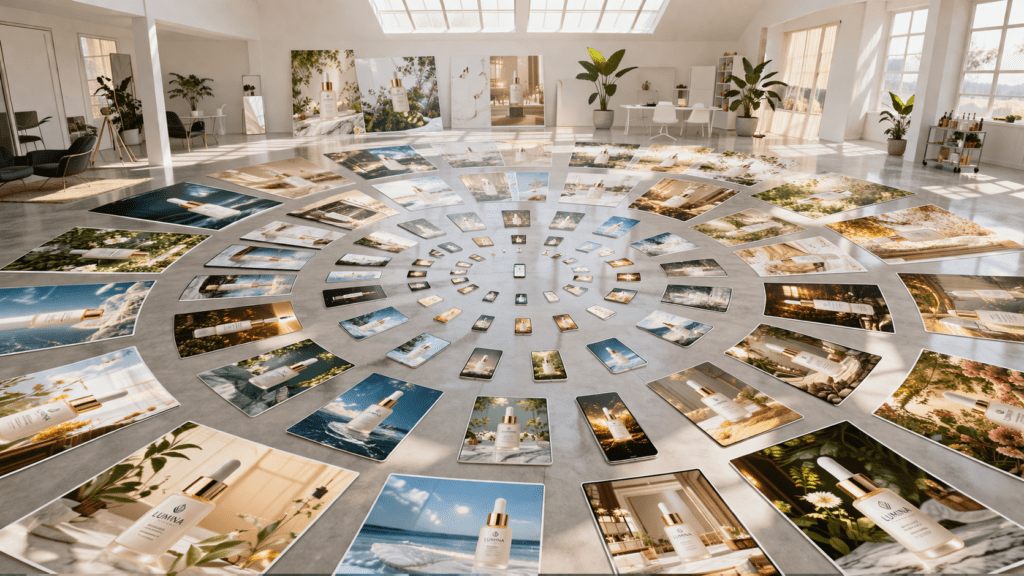
Stop paying thousands for video production – create professional product ads from one image. While traditional video production for a single product commercial costs $3,000-$15,000 and requires photographers, lighting rigs, and weeks of turnaround, AI image-to-video technology now enables marketers to generate broadcast-quality product showcases in under 30 minutes from a single photograph.
The AI Video Revolution: From Static Product Photos to Cinematic Ads
The core challenge facing modern marketers isn’t creating one great video – it’s scaling video production across dozens or hundreds of products without proportionally scaling budgets. A skincare brand with 47 SKUs can’t justify $150,000 in video production, yet video ads consistently outperform static images by 80-120% in conversion metrics across Meta, TikTok, and YouTube platforms.
AI image-to-video technology solves this scale problem through temporal diffusion models that understand motion physics, lighting consistency, and cinematic camera movements. Unlike simple slideshow tools, modern AI video generators analyze your product image’s depth information, material properties, and compositional elements to synthesize realistic motion that appears shot with professional equipment.
Pre-Production: Preparing Your Source Image for Optimal AI Video Generation
Before entering any AI workflow, your source image quality directly determines output fidelity. Apply these technical preparation steps:
Resolution and Aspect Ratio Optimization
Upscale your product photo to minimum 1024×1024 pixels using AI upscalers like Topaz Gigapixel or RealESRGAN before generation. For social media ads, prepare versions in:
- 9:16 portrait (1080×1920) for TikTok and Instagram Reels
- 1:1 square (1080×1080) for Instagram Feed
- 16:9 landscape (1920×1080) for YouTube pre-roll
Most AI video generators perform internal cropping, so compose your product with 15% safe margins on all edges.
Depth Map Pre-Processing
Tools like Runway Gen-3 and Kling AI utilize depth information for parallax effects. Generate a depth map using:
- MiDaS depth estimation models
- ControlNet depth preprocessors in Stable Diffusion
- Native depth extraction in Photoshop’s Neural Filters
A clean depth map enables the AI to calculate realistic camera movements where foreground elements move at different speeds than backgrounds – the hallmark of professional cinematography.
Background Isolation
Products on transparent backgrounds (PNG with alpha channel) give you maximum control. Use:
- remove.bg API for automated background removal
- Photoshop’s Object Selection Tool + Refine Edge
- Segment Anything Model (SAM) for pixel-perfect masks
This allows you to composite products onto AI-generated environments or maintain focus through background blur effects.
The Core Workflow: Step-by-Step AI Image-to-Video Pipeline
Stage 1: Initial Video Generation with Motion Prompting
Select your primary AI video platform (detailed comparison in Tool Stack section). The generation process follows this technical sequence:
1. Image Upload and Analysis
Platforms like Runway ML Gen-3 and Pika Labs perform automatic scene understanding:
- Object detection and segmentation
- Lighting direction analysis
- Depth estimation
- Edge detection for motion boundaries
2. Motion Prompt Engineering
Unlike text-to-video, image-to-video requires precise camera and object motion descriptors:
Effective: “Slow dolly zoom into product, soft rotate clockwise 15 degrees, studio lighting remains consistent, subtle floating upward drift, bokeh background blur increasing”
Ineffective: “Make it look cool and professional”
Technical motion vocabulary that produces superior results:
- Camera movements: dolly in/out, truck left/right, pedestal up/down, pan, tilt, orbit
- Speed modifiers: glacial, slow, moderate, rapid, snap
- Product motion: rotate, levitate, drift, settle, reveal
- Environmental effects: particle drift, light rays, atmospheric haze, depth-of-field shift
3. Seed Control for Consistency
When generating video variations, lock your seed value (typically 0-2147483647 range). Platforms like Kling and ComfyUI implementations expose seed parameters. Using identical seeds with slight prompt variations creates consistent product presentation across A/B test variants – critical for scientific ad testing.
Stage 2: Temporal Consistency and Frame Interpolation
AI-generated videos often suffer from temporal artifacts – objects morphing, lighting flickering, or motion stuttering. Apply these correction layers:
Frame Interpolation for Smoothness
Most AI platforms output 24fps. Upscale to 60fps using:
- FILM (Frame Interpolation for Large Motion) – Google’s open-source model
- RIFE (Real-Time Intermediate Flow Estimation)
- Topaz Video AI’s Chronos AI model
Interpolation creates intermediate frames using optical flow analysis, smoothing AI-generated motion to professional broadcast standards.
Deflicker and Color Stabilization
AI generators sometimes produce frame-to-frame color shifts. Correct using:
- DaVinci Resolve’s temporal color stabilization
- After Effects’ CC Force Motion Blur with color preservation
- Topaz Video AI’s stabilization module with temporal smoothing
Stage 3: Enhancement and Finishing
Upscaling to Export Resolution
AI platforms typically generate 720p-1080p outputs. For premium ad placements, upscale to 4K using:
- Topaz Video AI (Real-ESRGAN models)
- DaVinci Resolve Neural Engine Super Scale
- FFmpeg with waifu2x or Real-CUGAN filters
Color Grading for Brand Consistency
Apply LUTs (Look-Up Tables) matching your brand guidelines:
- Technical LUTs in .cube format for precision color mapping
- Cinematic grading (teal-orange separation for products)
- Platform-specific color spaces (Rec.709 for web, P3 for mobile)
Advanced Techniques: Generating Multiple Video Variations from One Image
The economic power of AI video comes from variation generation – creating 10-20 distinct videos from one source image for multivariate testing.
Variation Strategy 1: Motion Diversity
From identical source images, generate versions with different camera movements:
– Version A: Slow dolly zoom (intimate, detail-focused)
– Version B: 360° orbital rotation (comprehensive product view)
– Version C: Vertical pedestal rise (aspirational, premium feel)
– Version D: Static with product rotation only (classic e-commerce)
– Version E: Dynamic snap zoom (energetic, youth-targeted)
Maintain identical seed values with only motion prompts changed to isolate motion as the testing variable.
Variation Strategy 2: Environmental Contexts
Composite your isolated product onto different AI-generated backgrounds:
Background Generation Workflow:
1. Use text-to-image models (Midjourney, DALL-E 3, Stable Diffusion XL) to create contextual environments
2. Generate matching depth maps for backgrounds
3. Composite product using depth-aware blending
4. Process composite through image-to-video pipeline
Example contexts for skincare product:
- Minimalist marble surface (luxury positioning)
- Botanical greenhouse (natural ingredients story)
- Laboratory setting (scientific credibility)
- Beach sunrise (lifestyle aspiration)
Variation Strategy 3: Temporal Remixing
Generate 5-second base clips, then create variations through:
- Speed ramping: 0.5x slow motion on product reveal
- Reverse playback: Product settling becomes dramatic rise
- Loop creation: Seamless 15-second loops for story ads
- Beat synchronization: Motion timed to music beats using auto-alignment tools
Tool Stack Breakdown: Best AI Platforms for Product Video Generation
Runway Gen-3 Alpha (Premium Choice)
Strengths:
- Superior temporal consistency
- Advanced motion controls with director mode
- 10-second generation length
- Excellent with reflective/transparent products
Technical Specs:
- Resolution: 1280×768 native
- Frame rate: 24fps
- Generation time: 90-120 seconds
- Pricing: $95/month (625 credits)
Optimal Use Case: High-end products requiring photorealistic material rendering (watches, jewelry, cosmetics)
Kling AI (Best Value)
Strengths:
- 10-second clips at aggressive pricing
- Strong physics understanding
- Chinese platform with English interface
- Fast iteration cycles
Technical Specs:
- Resolution: 1080p native
- Frame rate: 30fps
- Generation time: 60-90 seconds
- Pricing: $5/month starter plans
Optimal Use Case: High-volume production for D2C brands testing multiple products
Pika Labs 1.5 (Creative Effects)
Strengths:
- Unique “Pikaffects” for stylized motion
- Inflate/deflate, melt, explode effects
- Camera control parameters
- Active Discord community
Technical Specs:
- Resolution: 1280×720 native
- Frame rate: 24fps
- Generation time: 30-60 seconds
- Pricing: Free tier available, $10/month standard
Optimal Use Case: Snack foods, beverages, youth-targeted products needing energetic effects
ComfyUI + AnimateDiff (Full Control)
Strengths:
- Complete workflow customization
- Seed control and parameter fine-tuning
- Local processing (no usage limits)
- Integration with ControlNet, IPAdapter
Technical Requirements:
- NVIDIA GPU with 12GB+ VRAM
- Technical knowledge of diffusion models
- Setup time: 4-6 hours initially
Technical Specs:
- Resolution: Unlimited (GPU-dependent)
- Frame rate: Configurable
- Generation time: 2-5 minutes (local hardware)
- Pricing: Free (hardware costs only)
Optimal Use Case: Agencies needing workflow automation or unique brand-specific motion styles
Technical Settings That Separate Amateur from Professional Results
Diffusion Model Parameters
When platforms expose advanced settings:
CFG Scale (Classifier Free Guidance): 7-12
- Lower (7-8): More creative interpretation, fluid motion
- Higher (10-12): Stricter adherence to prompt, controlled motion
- Product ads optimal: 8.5-9.5
Sampling Steps: 25-40
- Minimum 25 for coherent motion
- 30-35 sweet spot for quality/speed balance
- Beyond 40 shows diminishing returns
Scheduler Selection:
- Euler a: Fast, slightly unpredictable (good for creative exploration)
- DPM++ 2M Karras: Balanced quality and speed (production workhorse)
- UniPC: Fast convergence with quality (time-sensitive projects)
Motion Magnitude Control
Platforms like Runway and Pika offer motion intensity sliders:
- Low (1-3): Subtle ambient motion, floating products, atmospheric effects
- Medium (4-6): Standard camera movements, product rotations
- High (7-10): Dynamic action, rapid movements (often too aggressive for products)
Product video sweet spot: 3-5 – noticeable motion without distraction from product details
Temporal Coherence Hacks
Prompt Weighting for Consistency:
(product remains centered:1.4), (lighting stays consistent:1.3), slow camera orbit, (no morphing:1.5), (stable background:1.2)
Parentheses with weights (1.0-2.0) emphasize stability requirements to the diffusion model.
Post-Processing and Export Optimization for Ad Platforms
Platform-Specific Export Requirements
Meta (Facebook/Instagram):
- Container: MP4 (H.264 codec)
- Resolution: 1080×1080 (feed), 1080×1920 (stories/reels)
- Bitrate: 8-12 Mbps
- Frame rate: 30fps
- Max file size: 4GB
- Max duration: 60 seconds (feed), 90 seconds (reels)
- Audio: AAC, 128 kbps stereo
TikTok:
- Container: MP4/MOV
- Resolution: 1080×1920 (vertical required)
- Bitrate: 10-15 Mbps
- Frame rate: 30fps minimum, 60fps preferred
- Max file size: 500MB
- Max duration: 60 seconds (ads)
- Audio: AAC, 192 kbps
YouTube Pre-Roll:
- Container: MP4 (H.264)
- Resolution: 1920×1080 minimum, 4K preferred
- Bitrate: 15-25 Mbps (1080p), 40-50 Mbps (4K)
- Frame rate: 24/30/60fps
- Max file size: 256GB
- Duration: 6, 15, or 30 seconds (skippable), 6 seconds (bumper)
- Audio: AAC-LC, 384 kbps stereo
FFmpeg Export Command Template
bash
ffmpeg -i input_ai_video.mp4 -c:v libx264 -preset slow -crf 18 -pix_fmt yuv420p -c:a aac -b:a 192k -ar 48000 -movflags +faststart -vf “scale=1080:1920:force_original_aspect_ratio=decrease,pad=1080:1920:(ow-iw)/2:(oh-ih)/2,fps=30” output_tiktok.mp4
This command:
- Encodes H.264 with high quality (CRF 18)
- Scales to 1080×1920 with letterboxing
- Ensures 30fps consistency
- Optimizes for web streaming (faststart flag)
- Sets broadcast-safe pixel format
Real-World Production: Complete Case Study with Settings
Product: Premium botanical face serum
Goal: Generate 8 video variations for Meta A/B testing
Budget: $95 (Runway monthly subscription)
Timeline: 4 hours total
Production Log:
Hour 1: Asset Preparation
- Source image: Product on white background, 2400x2400px
- Background removal using remove.bg
- Depth map generation using MiDaS v3.1
- Created 3 background environments in Midjourney:
- Minimal marble surface
- Botanical greenhouse
- Morning sunlit bathroom
- Composited product onto backgrounds in Photoshop
Hour 2: Initial Generation (Runway Gen-3)
Variation 1 – Marble Minimal:
- Prompt: “Slow dolly zoom into serum bottle, gentle 20-degree clockwise rotation, studio lighting remains consistent, subtle upward float, background stays sharp, no morphing (1.4)”
- Motion: 4/10
- Seed: 847362
- CFG: 9
- Result: ✓ Smooth, premium feel
Variation 2 – Marble Dynamic:
- Same seed (847362)
- Prompt: “360-degree orbital camera rotation around serum, moderate speed, maintain focus on product, lighting follows camera, depth-of-field shift”
- Motion: 6/10
- CFG: 9
- Result: ✓ Comprehensive product view
Hour 3: Environmental Variations
Generated greenhouse and bathroom variations using same motion prompts, different seeds for environmental variety while maintaining product consistency.
Hour 4: Post-Processing Pipeline
1. Exported all 8 variations as ProRes 422 from Runway
2. Imported to DaVinci Resolve
3. Applied temporal deflicker
4. Color graded to brand guidelines (warm, natural LUT)
5. Upscaled to 1080p with Super Scale
6. Exported 8 final versions:
- 4x vertical (1080×1920) for Instagram Reels
- 4x square (1080×1080) for Instagram Feed
Results from A/B Testing:
- Best performer: Greenhouse + orbital rotation (2.3% CTR)
- Worst performer: Bathroom + static (0.8% CTR)
- Average: 1.6% CTR (vs. 0.9% for static images previously)
- Cost per acquisition: Reduced 34%
- Production cost per video: $11.88 ($95/8)
- Traditional video cost equivalent: ~$24,000 for 8 variations
ROI: 2,020% cost savings while improving performance metrics
Conclusion: Your AI Video Production Checklist
To implement this workflow for your products:
✓ Prepare source images: 1024×1024 minimum, isolated background
✓ Generate depth maps for enhanced parallax
✓ Select AI platform based on budget and quality requirements
✓ Engineer motion prompts with specific camera vocabulary
✓ Lock seeds for controlled variation testing
✓ Generate 8-12 variations per product (motion + environment)
✓ Post-process: interpolate, deflicker, color grade, upscale
✓ Export to platform-specific requirements
✓ Deploy A/B tests to identify top performers
The barrier to professional video advertising has collapsed. A single marketer with these AI tools now outputs what previously required full production teams, democratizing video marketing for businesses of all sizes. Start with one product, master the workflow, then scale across your entire catalog.
Frequently Asked Questions
Q: What’s the minimum image quality needed for AI video generation to look professional?
A: Your source image should be at least 1024×1024 pixels with clear, sharp details. Higher resolution (2400px+) allows the AI to better understand product textures and lighting. Blurry or low-resolution images (below 512px) will produce noticeably degraded video outputs. For best results, use professional product photography with proper lighting and focus, then upscale if needed using AI upscalers like Topaz Gigapixel before processing.
Q: How do I prevent my product from morphing or distorting during AI video generation?
A: Use prompt weighting to emphasize stability: add phrases like ‘(product remains stable:1.4)’ and ‘(no morphing:1.5)’ in your motion prompts. Keep motion magnitude settings between 3-5 out of 10. Select platforms with strong temporal consistency like Runway Gen-3. For critical products, generate a depth map first – this helps the AI understand the product’s 3D structure. Finally, use lower CFG values (7-8) for more fluid motion that’s less prone to artifacts.
Q: Which AI video platform gives the best quality-to-cost ratio for product videos?
A: For 2026, Kling AI offers the best value at $5-20/month with 1080p output and 10-second clips. However, if you’re generating 50+ videos monthly, ComfyUI with AnimateDiff is most cost-effective (free after initial hardware investment of ~$800 for a used GPU). For premium brands requiring absolute best quality, Runway Gen-3 at $95/month delivers superior material rendering and temporal consistency. Start with Kling to test workflows, then upgrade based on quality requirements.
Q: Can I use the same AI-generated video across all social media platforms?
A: No – each platform has different technical requirements and optimal aspect ratios. TikTok requires vertical 9:16 format (1080×1920), Instagram Feed performs best with square 1:1 (1080×1080), and YouTube needs horizontal 16:9 (1920×1080). Generate your master video at highest resolution, then create platform-specific exports with proper aspect ratios, bitrates, and codecs. Tools like FFmpeg or Adobe Media Encoder can batch-process multiple export versions from one source file.
Q: How many video variations should I create from one product image for effective A/B testing?
A: Generate 6-8 variations minimum for statistically meaningful testing. Create variations across two dimensions: (1) camera motion type (dolly zoom, orbital, static + product rotation) and (2) environmental context (minimal, lifestyle, contextual). This creates a testing matrix. Run each variation with identical budget allocations for 3-5 days, then scale spending to the top 2 performers. Avoid creating too many subtle variations – make each version distinctly different in either motion or environment to clearly identify performance drivers.