Make Realistic AI UGC Ads That Don’t Look Fake (2026 Technical Playbook for High-Converting Generative Video)
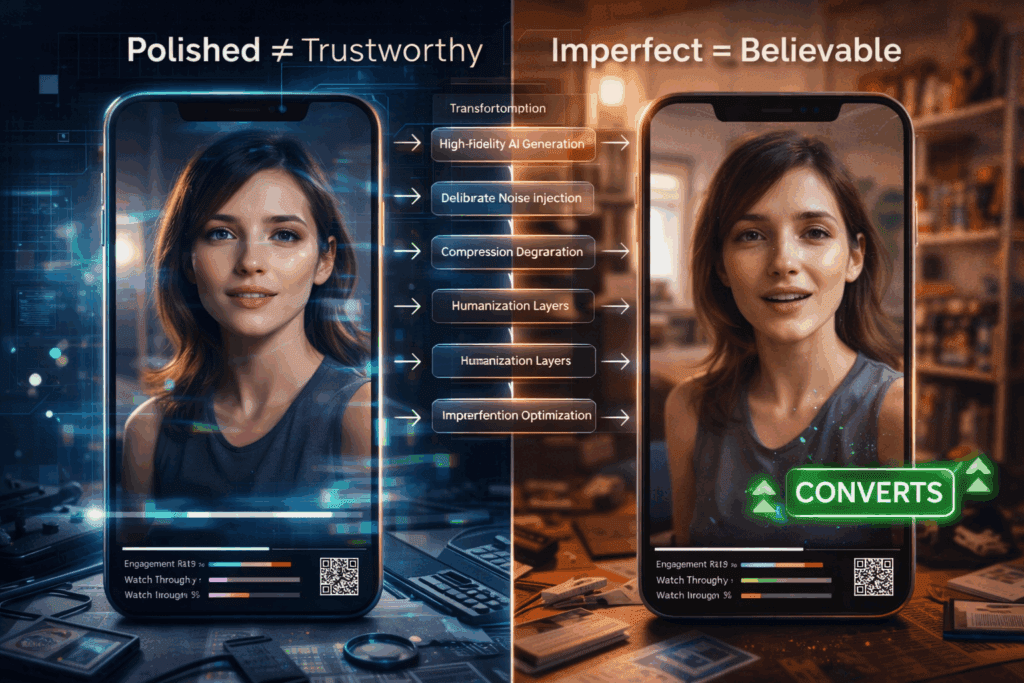
Your AI UGC ads look fake. Here’s how to fix that in 2026:
If your AI-generated UGC isn’t converting, it’s not because AI video “doesn’t work.” It’s because your generation pipeline is optimized for visual novelty, not human believability.
Performance marketers don’t need cinematic perfection. They need trust signals. And most AI UGC ads fail because they violate subconscious authenticity heuristics that viewers use to detect synthetic content.
This deep dive breaks down:
- The technical tells exposing your AI ads
- Exact generation settings inside Runway, Sora, Kling, and ComfyUI
- Human-layer techniques that materially increase conversion rates
1. Why AI UGC Ads Look Fake: The Technical Tells Killing Your Conversions
Before fixing realism, you must understand what’s breaking it.
Tell #1: Over-Smooth Latent Consistency
Most AI video engines optimize for temporal coherence using Latent Consistency models. While this reduces flicker, it also over-smooths micro-movements.
Humans naturally:
- Shift weight unpredictably
- Blink asymmetrically
- Micro-adjust lips and jaw while speaking
- Break eye contact imperfectly
AI models tend to create:
- Perfect head stability
- Robotic eye tracking
- Uniform blinking cadence
- Over-stabilized shoulders
Conversion impact: Viewers subconsciously register this as synthetic, even if they can’t articulate why.
Tell #2: Unrealistic Lighting Uniformity
UGC is messy. Real creators:
- Stand near windows
- Use uneven room lighting
- Have exposure fluctuations
- Produce inconsistent white balance
AI engines often default to:
- Perfect global illumination
- Even skin tone gradients
- Cinematic soft shadows
That “beautiful lighting” is exactly what makes your ad look fake.
Tell #3: Seed-Perfect Facial Symmetry
When you reuse seeds or generate with low variation strength, facial features remain too consistent frame-to-frame.
Humans exhibit:
- Subtle asymmetry drift
- Uneven cheek tension
- Micro-muscle inconsistencies
AI defaults to idealized symmetry unless you introduce controlled noise variance.
Tell #4: Clean Audio–Video Coupling
AI lip-sync systems (especially diffusion-based face reenactment) often produce:
- Perfect phoneme alignment
- No breath noise
- No lip hesitation
Real creators:
- Stumble slightly
- Swallow mid-sentence
- Breathe audibly
- Pause inconsistently
If your audio is too clean, it feels synthetic.
2. Exact Visual Engine Settings for Realistic AI UGC
Now let’s fix it.
Below are platform-specific techniques to create high-converting AI UGC ads that feel human.
A. Runway Gen-3 / Gen-4 Settings for UGC Realism
1. Camera Prompt Engineering
Instead of:
> “Woman talking to camera reviewing skincare product”
Use:
> “Handheld iPhone front camera, slight arm shake, uneven indoor apartment lighting, natural skin texture, subtle exposure shifts, casual UGC selfie video”
Add realism keywords:
- handheld jitter
- rolling shutter artifacts
- imperfect framing
- autofocus breathing
- slight motion blur
These reduce the “studio diffusion look.”
2. Motion Controls
In Runway:
- Lower camera smoothness
- Increase motion randomness
- Avoid cinematic presets
If keyframe-based:
- Add micro keyframe noise every 6–10 frames
- Introduce ±1–2% position drift
This prevents latent over-stabilization.
3. Lighting Degradation Layer
After generation:
In DaVinci Resolve or Premiere:
- Add 3–5% luminance flicker
- Slight temperature oscillation (±150K)
- Subtle ISO grain (NOT film grain LUTs – use sensor-style noise)
Real phone cameras fluctuate. AI doesn’t.
You must add this back manually.
B. Sora Realism Strategy
Sora excels at environmental coherence, which can actually hurt UGC authenticity.
Prompt Stack Structure
Use layered realism constraints:
Layer 1: Context
“Small bedroom apartment, unmade bed, natural daylight”
Layer 2: Device Simulation
“Recorded on front-facing smartphone camera”
Layer 3: Imperfection Constraints
“Slight hand movement, inconsistent lighting, imperfect posture, natural blinking”
Layer 4: Behavioral Prompting
“Speaks casually, slight pauses, conversational tone”
Avoid cinematic descriptors like:
- volumetric lighting
- ultra-detailed
- 8K
- professional lighting
Those are conversion killers in UGC.
C. Kling for High-Fidelity Faces
Kling’s strength is facial realism. But you must avoid overfitting.
Recommended Parameters:
- Variation strength: 0.15–0.25 (prevents frozen symmetry)
- Temporal coherence: Medium (not high)
- Motion intensity: 10–20% above default
Too much coherence = mannequin effect.
D. ComfyUI Advanced Control (For Power Users)
If you want maximum realism control, use:
1. Euler a Scheduler
Euler a introduces slight stochasticity compared to DPM++.
Why it works:
- Adds micro-texture inconsistency
- Reduces plastic smoothness
- Increases human imperfection
2. Controlled Noise Injection
Add latent noise at 3–7% mid-denoise step.
This creates:
- Micro facial tension variation
- Subtle asymmetry
- Organic drift
Avoid full reseeding – use seed parity with controlled offsets.
3. LoRA Stacking
Use LoRAs trained on:
- iPhone UGC creators
- TikTok selfie videos
- Vertical amateur content
Blend strength:
- Base model: 0.7
- UGC LoRA: 0.6–0.8
Too strong = caricature.
Too weak = polished AI look.
3. Human Layering: The Conversion Multiplier
Even with perfect generation settings, you still need human-layer augmentation.
This is where most marketers stop early.
Layer 1: Audio Imperfection Engineering
Use a real human voice whenever possible.
If using AI voice:
- Add breath samples manually
- Insert 200–400ms micro-pauses
- Slightly desync lip sync by 1–2 frames occasionally
Perfect sync feels synthetic.
Layer 2: Behavioral Editing
Cut in:
- Micro stumbles
- Small sentence restarts
- Casual fillers (“honestly,” “okay so,” “wait”)
Scripted perfection destroys trust.
Performance marketers should optimize for:
- Retention curve stability
- Watch-through rate
- Thumb-stop in first 1.5 seconds
Not aesthetic quality.
Layer 3: Environmental Anchors
- Add believable chaos:
- Slight background blur inconsistency
- Imperfect room geometry
- Everyday clutter
- Slight off-center framing
AI tends to generate idealized rooms.
Humans live in asymmetry.
Layer 4: Compression Degradation
This is critical.
Real UGC is:
- Compressed by TikTok
- Re-encoded by Meta
- Damaged by upload pipelines
Before publishing:
- Export at slightly lower bitrate
- Add mild compression artifacts
- Slight chroma subsampling
Polished 4K uploads scream AI.
The Real Optimization Metric: Suspicion Threshold
Your goal isn’t “real.”
It’s below the viewer’s suspicion threshold.
If the brain pauses and thinks:
> “Is this AI?”
You’ve already lost conversion momentum.
The winning formula in 2026:
1. Slight instability
2. Controlled imperfection
3. Behavioral randomness
4. Environmental messiness
5. Non-cinematic lighting
Not higher fidelity.
Final Technical Workflow (Conversion-Optimized Pipeline)
1. Generate base in Runway/Sora/Kling with imperfection prompts
2. Inject micro-noise or use Euler a in ComfyUI for texture realism
3. Add lighting fluctuation + sensor grain in post
4. Humanize audio with breaths and pauses
5. Slightly degrade export quality
6. A/B test against real creator UGC
The best AI UGC doesn’t look better than human content.
It looks slightly worse – in exactly the right ways.
That’s what converts.
In 2026, the edge isn’t access to AI video tools.
It’s understanding how to intentionally break perfection.
Because perfection doesn’t sell.
Believability does.
Frequently Asked Questions
Q: Why do AI UGC ads hurt conversion rates even when they look high quality?
A: Because conversion depends on perceived authenticity, not visual fidelity. Over-smooth motion, perfect lighting, and flawless symmetry trigger subconscious suspicion. Viewers disengage when content feels synthetic, even if they can’t explain why.
Q: Which scheduler is best for realistic AI UGC in ComfyUI?
A: Euler a is often better than highly deterministic schedulers like DPM++ for UGC realism. It introduces subtle stochastic variation that reduces plastic smoothness and increases natural-looking micro-imperfections.
Q: Should I use cinematic lighting prompts for AI ads?
A: No. Cinematic lighting reduces authenticity in UGC-style ads. Use uneven indoor lighting, handheld smartphone framing, and mild exposure inconsistencies to stay below the viewer’s suspicion threshold.
Q: How do I make AI lip-sync feel more human?
A: Introduce micro-desync (1–2 frames occasionally), add breath sounds, insert natural pauses, and avoid perfectly timed phoneme alignment. Real human speech contains irregular rhythm and hesitation.
Q: Is higher resolution better for AI UGC ads?
A: Not necessarily. Slight compression artifacts and lower bitrate exports often improve authenticity because real UGC is compressed by platform pipelines. Overly pristine 4K output can make AI content look synthetic.