AI Video Editing Apps: Complete Mobile & PC Workflow Setup for Cross-Platform Creators
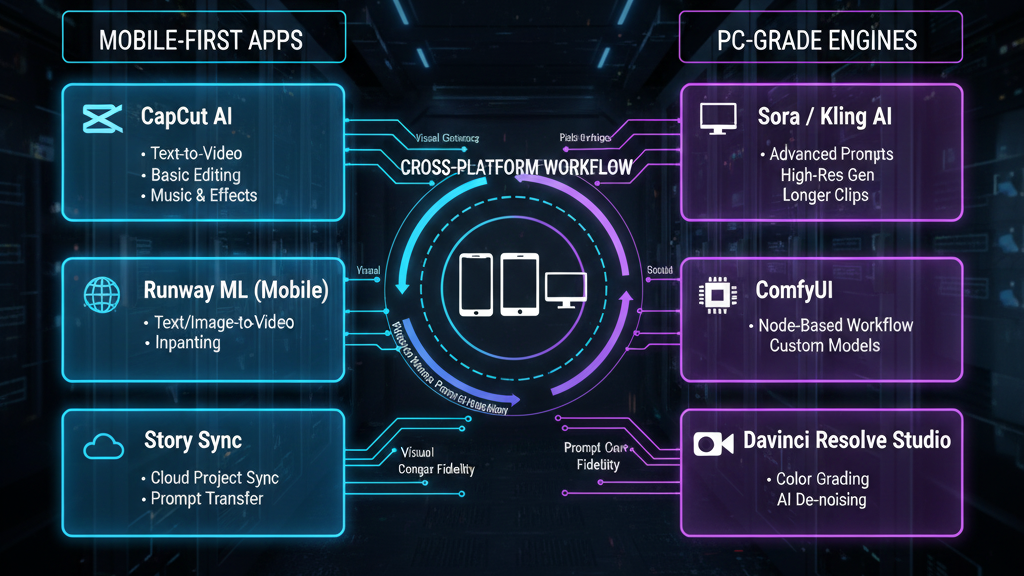
Work on AI videos anywhere, perfect mobile and PC setup. Modern AI video creation no longer lives on a single device. The most effective creators today design workflows that start on a phone, mature on a desktop, and iterate seamlessly across both. The challenge isn’t access to tools, it’s maintaining visual consistency, prompt fidelity, and generation parity* across platforms with very different technical constraints. This guide breaks down a complete cross-device AI video workflow using mobile-first apps, PC-grade engines, and synchronization strategies built around modern visual engines like *Runway, Sora, Kling, and ComfyUI.
Mobile-First AI Video Creation: Best Apps and Capabilities
Mobile AI video apps have evolved far beyond novelty generators. They are now powerful ideation, previsualization, and even final-render tools, if you understand their limits and strengths.
Core Mobile Use Case
Mobile devices excel at:
- Rapid concept generation
- Short-form vertical video (Reels, Shorts, TikTok)
- Prompt iteration and style exploration
- On-the-go revisions and social-native exports
They struggle with:
- Long-form consistency
- High-resolution temporal coherence
- Advanced node-based control
The goal is not to force mobile apps to do everything, but to capture creative intent in a way that translates cleanly to desktop engines.
Top Mobile AI Video Apps (2026 Landscape)
- Runway (Mobile + Web)- Runway’s mobile interface connects directly to its cloud-based Gen-3 and Gen-4 video models.
Strengths:
- Text-to-video and image-to-video with strong motion priors
- Prompt history synced across devices
- Consistent latent space when logged into the same account
Key Tip:
When generating on mobile, lock:
- Seed value (if available)
- Aspect ratio
- Camera motion descriptors
This ensures higher seed parity when continuing work on desktop.
- Kling Mobile –Kling’s mobile version excels at cinematic motion and subject realism.
Strengths:
- High-quality human motion
- Strong physics modeling
- Clean short clips ideal for previsualization
Limitation:
Mobile Kling abstracts many advanced parameters. Use it to define motion language, not final output.
- Sora (Mobile Access via Web Apps)
Sora’s mobile experience is currently best used for:
- Narrative blocking
- Shot list generation
- Temporal pacing tests
Treat mobile Sora outputs as storyboards with motion, not locked assets.
Mobile Prompt Engineering Strategy
To ensure desktop compatibility, write prompts using structured blocks:
- [Subject]:
- [Environment]:
- [Camera]:
- [Motion]:
- [Style]:
- [Lighting]:
- [Duration]:
This structure translates cleanly into:
- Runway advanced prompts
- Kling cinematic modes
- ComfyUI text encoders
Avoid app-specific slang on mobile. Stick to model-agnostic descriptors.
PC-Based AI Video Engines: Text-to-Video, Image-to-Video, and Node Workflows
Desktop systems are where AI video becomes precise, scalable, and production-ready.
Hardware Baseline (Recommended)
For serious PC-based AI video work:
- – GPU: RTX 4080 / 4090 or equivalent
- – VRAM: 16GB minimum (24GB ideal)
- – RAM: 64GB
- – Storage: NVMe SSD (2TB+)
Cloud GPUs can substitute, but local systems offer better iteration speed and cost control.
Core Desktop Engines
- Runway (Desktop/Web)
On PC, Runway unlocks:
- Higher resolution exports
- Multi-pass generation
- Image conditioning and reference blending
Use Runway desktop to:
- Refine mobile-generated clips
- Extend duration
- Improve temporal stability
Runway’s internal latent consistency mechanisms are strongest when you reuse prompts and reference frames from mobile.
- Sora (Desktop)
Sora shines on desktop when handling:
- Longer narrative sequences
- Complex scene transitions
- Multi-shot continuity
Advanced users should:
- Maintain shot-specific prompt variations
- Track camera descriptors per clip
- Export clips for assembly, not direct final cuts
- Kling (Desktop)
Kling’s PC version allows:
- Higher motion fidelity
- Better subject retention across frames
- Cleaner interpolation
Ideal for hero shots and realistic sequences.
- ComfyUI (Advanced Control Layer)
ComfyUI is the backbone of professional AI video workflows.
Why ComfyUI Matters:
- Full control over latent space
- Custom schedulers (Euler A, DPM++, etc.)
- Image, depth, pose, and motion conditioning
Example ComfyUI Video Workflow
- 1. Text Encode (CLIP / T5)
- 2. Latent Video Init
- 3. Motion Conditioning Node
- 4. Scheduler: Euler A* for creative motion or *DPM++ for stability
- 5. ControlNet (Depth / Pose / Optical Flow)
- 6. VAE Decode
By matching:
- Seed
- Sampler
- Steps
You can closely replicate mobile-generated aesthetics.
Cross-Platform Sync: Maintaining Visual Consistency Across Mobile and Desktop
This is where most creators fail, not because tools are weak, but because workflow logic is missing.
The Three-Layer Sync Model
- Creative Layer (Mobile)
- Prompts
- Style references
- Motion intent
- Aspect ratio decisions
Capture these in:
- Cloud notes
- Prompt libraries
- Versioned documents
- Technical Layer (Desktop)
- – Seeds
- – Schedulers
- – Frame rates
- – Resolution
- – Conditioning assets
This layer lives in ComfyUI workflows or desktop engine presets.
- Asset Layer (Shared)
- Reference images
- Mobile-generated clips
- LUTs and color references
Use cloud storage with consistent folder structures.
Seed Parity and Latent Translation
Mobile apps often hide seed values, but consistency can still be achieved by:
- Reusing initial frames
- Feeding mobile outputs as image-to-video inputs
- Matching prompt structure
In ComfyUI, you can anchor a generation by initializing latents from a mobile frame, preserving visual DNA even when exact seed values are unavailable.
Aspect Ratio and Platform Strategy
Always decide early:
- 9:16 (mobile-first)
- 16:9 (desktop-first)
- 1:1 (platform-neutral)
Changing aspect ratios late breaks motion composition and latent continuity.
Version Control for AI Video
Adopt semantic versioning:
- v1.0 — Mobile concept
- v1.1 — Desktop refinement
- v2.0 — ComfyUI controlled generation
This prevents creative drift.
Final Workflow Example: Anywhere-to-Anywhere AI Video
- Ideate on phone using Runway or Kling
- Lock prompt structure and visual intent
- Export reference clips
- Move to PC for Runway/Sora refinement
- Finalize in ComfyUI with controlled schedulers
- Export platform-specific cuts
This approach gives you freedom without sacrificing control.
Conclusion
The future of AI video creation is not mobile versus desktop, it’s mobile plus desktop, unified by intelligent workflow design. By understanding latent consistency, seed parity, and scheduler behavior, creators can move fluidly between devices while maintaining a cohesive visual identity. Master this setup, and your studio is no longer a place — it’s a system you carry everywhere.
Frequently Asked Questions
Q: Can mobile AI video apps produce final professional-quality videos?
A: Mobile apps can produce high-quality short-form videos, but for long-form, high-resolution, or highly consistent outputs, desktop tools or ComfyUI-based workflows are recommended.
Q: How do I maintain consistency if mobile apps don’t expose seed values?
A: Use image-to-video conditioning with mobile-generated frames, match prompt structure, and replicate sampler and step settings in desktop tools like ComfyUI.
Q: Is ComfyUI necessary for all creators?
A: No. ComfyUI is best for advanced creators who need deep control. Casual and intermediate creators can rely on Runway, Sora, and Kling alone.
Q: Which scheduler is best for cinematic motion?
A: Euler A is often preferred for expressive motion, while DPM++ offers better temporal stability for realistic scenes.