Creating Cinematic AI Video with Seedance 2.0: Advanced Prompting, Camera Control, and Film-Quality Workflows
These AI-generated scenes look like they cost $1 million to produce. And yet, they were generated inside Seedance 2.0 using structured prompts, controlled motion parameters, and deliberate cinematic direction.
For filmmakers and visual storytellers, the real question isn’t whether AI can look cinematic—it’s how to consistently produce film-grade visuals with believable motion, intentional lighting, and camera language that feels authored rather than accidental.
This deep dive breaks down exactly how to do that.
Why Seedance 2.0 Outputs Look Like $1M Productions
Seedance 2.0’s cinematic strength comes from three core capabilities:
1. High temporal coherence (reduced flicker and identity drift)
2. Structured motion modeling with improved latent consistency
3. Enhanced camera and lighting interpretation from prompt tokens
Unlike earlier diffusion-based video systems that treated each frame as loosely connected noise refinements, Seedance 2.0 leverages stronger temporal conditioning. This increases latent consistency across frames, meaning subject geometry, lighting direction, and environmental continuity remain stable even during complex motion.
When paired with precise prompting and seed control (Seed Parity across iterations), the result is footage that feels planned—not stochastic.
But the quality isn’t automatic.
You have to direct it.
Advanced Prompt Engineering for Film-Quality Motion and Realism
The biggest mistake creators make is writing prompts like image prompts.
Cinematic video prompting requires temporal intent*, **camera intent**, and *physical plausibility cues.
1. Structure Prompts in Layers
Use this hierarchy:
A. Scene Context
Location, era, atmosphere
B. Subject Behavior
Specific physical actions with weight and timing
C. Camera Language
Shot type, lens, movement
D. Lighting Design
Motivated sources and contrast ratios
E. Texture & Rendering Cues
Film grain, anamorphic flares, diffusion
Example: Weak vs Cinematic Prompt
Weak Prompt:
“A knight walking through fire, cinematic”
Cinematic Prompt:
“Medieval knight in scorched armor walking slowly through a burning cathedral, embers floating in dense volumetric smoke, heavy footsteps with subtle armor weight shift. Low-angle tracking shot, 35mm anamorphic lens, shallow depth of field. Firelight flickers across polished steel, high contrast chiaroscuro lighting, drifting ash particles, cinematic color grading, realistic motion blur.”
Why this works:
– “Heavy footsteps” triggers grounded physics modeling
– “Low-angle tracking shot” guides motion path
– “35mm anamorphic” influences depth compression and bokeh shape
– “Firelight flickers” improves dynamic lighting behavior
Controlling Motion Realism
To achieve film-level motion, focus on three parameters:
1. Latent Consistency
Higher latent coherence reduces:
– Limb warping
– Facial drift
– Texture flicker
If available in advanced settings, reduce stochastic variation between frames and favor consistency-driven schedulers.
2. Euler a vs DPM Schedulers
When configurable:
– Euler a → more dynamic, stylized motion
– DPM++ 2M / consistency-focused schedulers → smoother, more cinematic continuity
For dramatic sequences with camera movement, smoother schedulers often yield better realism.
3. Motion Weighting in Prompt Language
Use kinetic language:
– “slow deliberate turn”
– “subtle breath movement”
– “camera gently pushes in”
– “hand trembles slightly”
Avoid vague verbs like “moves” or “goes.” Specific verbs anchor motion in the latent space.
Lighting, Camera Movement, and Composition Control in Seedance 2.0
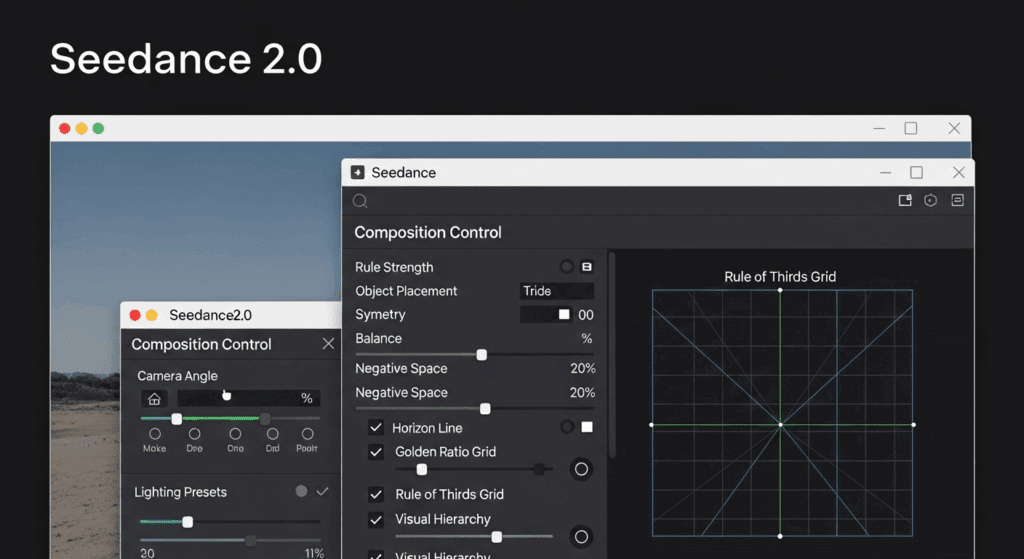
Cinematic quality is 70% lighting and camera logic.
Seedance 2.0 responds exceptionally well to structured cinematography cues.
Lighting Control
Instead of saying “dramatic lighting,” define:
– Source (window light, neon sign, practical lamp)
– Direction (backlit, side-lit, top-down)
– Quality (soft diffusion, hard shadows)
– Color temperature contrast (warm subject vs cool background)
Example:
“Single tungsten practical lamp lighting subject from camera right, soft falloff across face, cool blue moonlight through window behind, high dynamic range, subtle film grain.”
This prevents flat global illumination and produces motivated light.
Camera Movement Design
Seedance interprets cinematic grammar surprisingly well when phrased clearly.
Use professional terminology:
– “Slow dolly in”
– “Steadicam tracking shot”
– “Crane shot rising above subject”
– “Handheld with subtle micro jitter”
– “Locked-off tripod shot”
Add pacing descriptors:
– “gradually”
– “slow build”
– “sudden whip pan”
The more intentional the movement description, the less random the motion becomes.
Lens & Composition
Lens selection dramatically affects perceived production value.
Include:
– 24mm → environmental immersion
– 35mm → cinematic standard
– 50mm → natural perspective
– 85mm → portrait compression
Pair with composition cues:
– “rule of thirds framing”
– “centered symmetrical composition”
– “foreground obstruction”
– “deep layered composition with foreground, midground, background”
Layering creates depth—depth creates cinematic realism.
Viral Cinematic Scene Breakdowns and Reproducible Workflows
Let’s reverse-engineer the types of Seedance 2.0 scenes that go viral.
1. The One-Take War Shot
Scene: Soldier running through battlefield chaos in a continuous tracking shot.
Why It Works
– Continuous motion increases perceived production cost
– Environmental particles (dust, debris) enhance depth
– Motivated camera shake sells realism
Reproducible Prompt Framework
“WWII soldier sprinting through war-torn village, explosions erupting in background, dust and debris flying. Continuous handheld tracking shot following behind subject, subtle camera shake, 35mm lens, shallow depth of field, practical fire lighting, volumetric smoke, realistic motion blur, high dynamic range cinematic look.”
Key elements:
– “Continuous handheld tracking shot”
– Environmental physics cues
– Realistic motion blur token
2. Neo-Noir Cyberpunk Alley
Scene: Lone character under neon rain.
Why It Works
– Strong color contrast (magenta vs cyan)
– Reflective surfaces
– Slow controlled movement
Prompt Strategy
“Rain-soaked cyberpunk alley at night, neon signs reflecting on wet pavement, lone detective standing under flickering magenta sign. Slow push-in camera movement, 50mm lens, shallow depth of field, heavy atmospheric fog, practical neon lighting, cool blue ambient shadows, subtle rain interaction on coat fabric, cinematic grading.”
Critical additions:
– “Rain interaction on coat fabric” improves physical realism
– “Practical neon lighting” prevents global washout
3. Emotional Close-Up with Micro-Expression
Scene: Character processing grief.
Why It Works
– Minimal movement
– Controlled lighting
– Emotional subtlety
Prompt Strategy
“Tight 85mm close-up of woman sitting by window during golden hour, soft warm sunlight hitting one side of her face, subtle tear forming, slight lip tremble, shallow depth of field, background softly blurred, static tripod shot, cinematic color science, natural skin texture.”
The phrase “slight lip tremble” and “subtle tear forming” drives nuanced motion.
Production Pipeline: From Concept to Final Render
Cinematic output isn’t just prompting—it’s workflow.
Step 1: Concept Like a Director
Before generating:
– Define emotional beat
– State camera strategy
– Know your lighting logic
Write it like a shot list.
Step 2: Seed Parity for Iteration
When refining:
– Lock seed
– Adjust only lighting or camera phrasing
– Compare outputs
Seed Parity ensures structural similarity while fine-tuning aesthetics.
Step 3: Generate in Short Segments
Instead of 20-second clips, generate 4–6 second cinematic beats.
Why?
– Better temporal consistency
– Easier correction
– Higher per-shot quality
Then edit traditionally.
Step 4: Post Enhancement
Even AI footage benefits from:
– Subtle film grain overlay
– Color grading in DaVinci Resolve
– Added sound design for realism
– Motion blur refinement if needed
Sound design alone can increase perceived production value by 300%.
Advanced Cinematic Control Tips
Use Environmental Interaction
Add interaction cues:
– “wind affecting hair”
– “fabric reacting to motion”
– “dust disturbed by footsteps”
This increases physical believability.
Control Chaos
If motion becomes unstable:
– Simplify action verbs
– Reduce simultaneous effects
– Emphasize “smooth” and “steady”
– Use consistency-focused scheduler settings
Think Like a Cinematographer
Ask:
– Where is the key light?
– What motivates camera movement?
– Lens tells this emotion best?
– Which is the foreground, midground, background?
If you can answer those, your Seedance output will look intentional.
Final Perspective
Seedance 2.0 doesn’t automatically create cinematic footage.
It rewards:
– Structured prompts
– Physical motion logic
– Lighting specificity
– Camera grammar
– Iterative refinement with seed control
When you combine latent consistency awareness, scheduler choices, lens language, and intentional motion design, the results genuinely resemble million-dollar productions.
The tool is powerful.
But the cinematic quality comes from you directing it like a film set only the set exists inside the latent space.
Frequently Asked Questions
Q: How do I make Seedance 2.0 videos look less AI-generated?
A: Focus on physical realism cues (weight, fabric interaction, environmental particles), specify motivated lighting sources, and use controlled camera language like dolly or tripod shots. Maintain latent consistency and avoid overly chaotic prompts.
Q: Which scheduler is best for cinematic motion?
A: Consistency-focused schedulers like DPM++ variants typically produce smoother temporal coherence. Euler a can create dynamic results but may introduce more visual instability in complex shots.
Q: How important is lens specification in prompts?
A: Extremely important. Lens choice affects depth compression, background blur, and perceived realism. 35mm and 50mm lenses are strong defaults for cinematic storytelling.
Q: Should I generate long scenes in one pass?
A: No. Generate shorter 4–6 second cinematic beats for better temporal consistency and edit them together in post-production.