AI Product Photo Transformation: Turn Existing E-Commerce Images Into Seasonal Campaigns Without Reshooting
Create Valentine’s Day campaign images without reshooting your products. That’s not a promise—it’s now standard operating procedure for forward-thinking e-commerce brands using AI transformation workflows. The economics are straightforward: traditional seasonal photoshoots cost $2,000-$10,000 per session, require 2-4 weeks of planning, and lock you into creative decisions made months in advance. AI-powered product photo transformation delivers seasonal variations in hours, not weeks, at a fraction of the cost.
The Seasonal Content Challenge: Why Traditional Photoshoots Are Becoming Obsolete
E-commerce brands face an impossible trilemma: maintain fresh seasonal content, preserve product accuracy, and control costs. Traditional photography forces you to choose two at best. A Valentine’s Day campaign requires planning in December, shooting in early January, and hoping your creative direction still resonates six weeks later. If market trends shift, you’re locked in.
AI transformation workflows eliminate this constraint by treating your existing clean product shots as foundational assets. A single high-quality product photo on a neutral background becomes the seed for unlimited seasonal variations. The technical breakthrough isn’t just image generation—it’s preservation-grade inpainting that maintains product integrity while transforming everything around it.
Step-by-Step AI Workflow for Adding Seasonal Elements to Product Photos
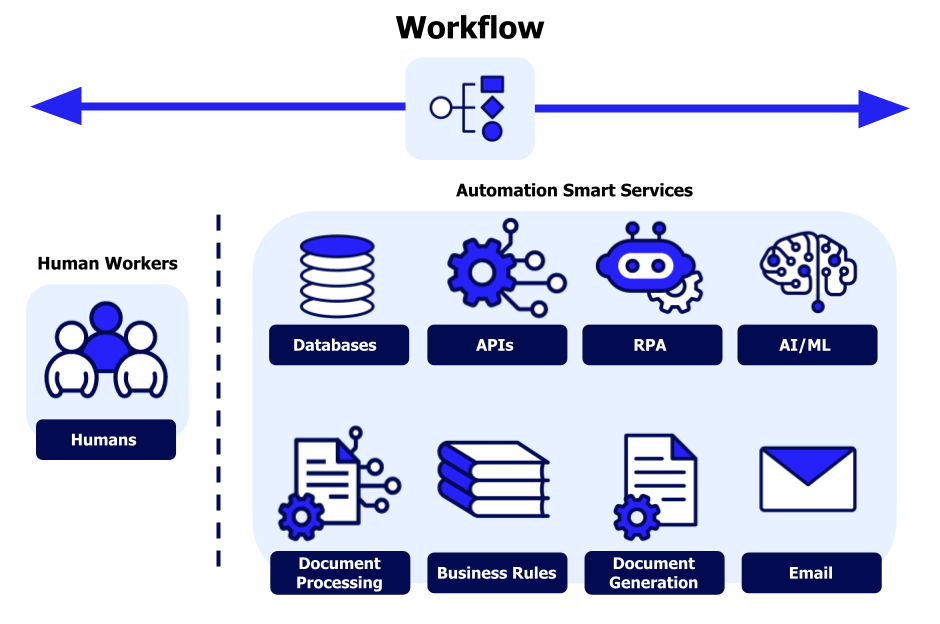
The core workflow operates on a three-layer transformation architecture: product preservation, contextual generation, and compositional harmonization.
Layer 1: Product Isolation and Mask Creation
Begin with your clean product shot—ideally a high-resolution image (minimum 2048x2048px) with the product centered on a neutral background. Your first technical operation is precise mask generation:
- Import your base image into ComfyUI or your preferred node-based AI workflow environment
- Apply semantic segmentation using a SAM (Segment Anything Model) node to create a pixel-perfect product mask
- Expand the mask by 5-10 pixels using a feathering operation to create a blend zone—this prevents hard edges during regeneration
- Invert the mask to isolate the background and prop areas for transformation
This mask becomes your preservation boundary. Everything inside remains untouched; everything outside becomes your generative canvas.
Layer 2: Contextual Prompt Engineering for Seasonal Elements
Your prompt architecture must balance specificity with flexibility. For Valentine’s Day transformations, use this hierarchical structure:
Primary prompt layer:
Product photography, [PRODUCT_NAME], Valentine’s Day theme, romantic setting, soft pink and red color palette, professional studio lighting, commercial quality
Environmental modifiers:
Scattered rose petals, heart-shaped bokeh, silk fabric draping, romantic ambient lighting, premium product presentation
Technical constraints:
8k resolution, sharp focus on product, shallow depth of field, professional color grading, e-commerce photography standards
The critical technique: negative prompts that prevent product alteration:
Negative: product deformation, color changes to product, product blur, distorted proportions, altered branding, modified product features
Layer 3: Generation with Latent Consistency Models
For e-commerce applications, generation speed and consistency matter as much as quality. Implement LCM (Latent Consistency Model) schedulers in your workflow:
- Set your sampler to LCM or DDIM for faster convergence (4-8 steps vs. 20-30 for standard Euler a)
- Configure CFG (Classifier Free Guidance) between 1.5-3.0—higher values increase prompt adherence but risk product distortion
- Use ControlNet with your product mask as a structural guide, ensuring the generation respects product boundaries
- Enable tiled VAE decoding for high-resolution outputs without memory overflow
Generate 4-6 variations per prompt using seed iteration (+1 seed value per generation). This creates a selection pool while maintaining workflow efficiency.
Maintaining Product Accuracy While Changing Background and Props
Product integrity is non-negotiable in e-commerce. Customers must see exactly what they’re buying. The technical solution is differential strength inpainting:
Inpainting Strength Calibration
Your inpainting workflow requires two different strength values:
- Protected product zone: 0.0-0.2 denoising strength – Minimal changes, preserving product details
- Background transformation zone: 0.7-0.95 denoising strength – Full creative freedom for seasonal elements
Implement this in ComfyUI using a masked inpainting node with feathered transitions:
- Create a feather gradient spanning 20-30 pixels at the mask boundary
- Map denoising strength to the gradient (product core = 0.0, feather zone = gradient 0.0→0.7, background = 0.95)
- Apply IP-Adapter for style consistency while respecting the strength map
This gradient prevents the telltale “cut-and-paste” appearance common in simple masking approaches.
Color Harmony Without Product Alteration
Seasonal themes introduce strong color palettes (Valentine’s reds and pinks, Christmas greens and golds) that can bleed into product areas. Implement color-constrained generation:
- Extract product color histogram from your base image
- Apply a ControlNet Color preprocessor that preserves these values in the masked region
- Use reference images (via IP-Adapter) showing seasonal styling with neutral product tones
- Post-process with selective color correction—if any color bleed occurs, use layer-based adjustment curves to restore original product colors
For critical brand colors (logos, packaging), implement color locking by creating micro-masks around these elements with 0.0 denoising strength.
Building a Library of Seasonal Variations from One Base Image

A single product photograph can generate 50+ seasonal variations through systematic seed parity management* and *prompt permutation architecture.
Seed Parity Strategy
Seeds control randomness in diffusion models. Strategic seed management creates variation while maintaining quality:
Sequential seeding for subtle variations:
- Base seed: 1234567
- Variation 1: 1234568 (+1)
- Variation 2: 1234569 (+1)
- Effect: Minor compositional changes, same aesthetic quality
Offset seeding for distinct alternatives:
- Base seed: 1234567
- Variation A: 1244567 (+10,000)
- Variation B: 1254567 (+20,000)
- Effect: Different compositions, same style adherence
Random seeding for exploration:
- Enable random seed generation
- Generate 20-30 images
- Identify successful seeds
- Use successful seeds as new base points for sequential variation
Prompt Permutation Matrix
Create a systematic variation matrix:
Dimension 1 Prop Variations:
- Rose petals scattered
- Heart-shaped chocolates
- Champagne glasses
- Silk ribbon accents
- Candlelight elements
Dimension 2 Color Intensity:
- Soft pastels (light pink, cream, white)
- Medium saturation (rose pink, soft red)
- Bold romantic (deep red, burgundy, gold)
Dimension 3 Composition Style:
- Minimal (single accent element)
- Moderate (2-3 prop elements)
- Abundant (full romantic styling)
Dimension 4 Perspective:
- Straight-on hero shot
- 15-degree elevated angle
- Lifestyle context (table setting, gift presentation)
With 5 options across 4 dimensions, you have 625 possible combinations. In practice, selecting 2-3 options per dimension and combining them systematically yields 40-60 high-quality variations.
Automated Batch Processing
Manual generation of 50 variations is inefficient. Implement workflow automation in ComfyUI:
1. Create a master workflow with variable nodes for:
- Seed value (iterative)
- Prompt components (text list input)
- Strength parameters (value list)
2. Set up batch processing nodes:
- Load Image Batch (your base product photo)
- Text Combination Node (permutes prompt elements)
- Seed Iterator (auto-increment or list-based)
3. Configure queue settings:
- Enable auto-queue on completion
- Set batch size (4-8 images depending on VRAM)
- Output to organized folders with metadata
4. Implement quality filtering:
- Run all outputs through CLIP Interrogator
- Check for product accuracy keywords
- Flag images with unexpected descriptors for review
A properly configured batch workflow generates 50 variations in 30-45 minutes of unattended processing time.
Advanced Techniques: Seed Parity and Consistency Management
For multi-product campaigns requiring visual consistency across different items, advanced seed management becomes critical.
Cross-Product Style Consistency
When transforming multiple products for the same campaign (e.g., Valentine’s Day across your entire jewelry line):
Technique 1: Fixed Seed + Product Swap
- Lock your seed value (e.g., 7654321)
- Use identical prompt for all products
- Only change the product image input
- Result: Different products in nearly identical seasonal styling
Technique 2: Style Reference Anchoring
- Generate one “hero” seasonal image for Product A
- Extract style embedding using IP-Adapter
- Apply this style embedding to Products B, C, D
- Maintain seed parity (+1 increments) across products
- Result: Cohesive campaign aesthetic with controlled variation
Temporal Consistency for Animation
For brands creating animated seasonal content, frame-to-frame consistency requires latent space interpolation:
- Generate keyframe images (frames 0, 30, 60 of your animation)
- Extract latent representations using VAE encode
- Interpolate between latents using spherical interpolation (slerp)
- Decode interpolated latents to create transitional frames
- Apply ControlNet tile to maintain product sharpness through animation
This produces smooth seasonal transitions (e.g., rose petals falling, lighting changes) while keeping products perfectly stable.
Quality Control and Brand Alignment
AI-generated seasonal content must meet brand standards before deployment. Implement a three-stage quality pipeline:
Stage 1: Technical Validation
Automated checks:
- Resolution verification (minimum 2048px longest edge)
- Product mask overlay comparison (>95% product region similarity to original)
- Color accuracy measurement (Delta E <5 in product areas)
- Sharpness metrics (product region must exceed threshold)
Tools: Custom Python scripts using OpenCV and scikit-image for automated validation.
Stage 2: Brand Compliance Review
Human-in-the-loop verification:
- Product accuracy (correct color, proportions, features)
- Brand aesthetic alignment (does it “feel” on-brand?)
- Seasonal theme appropriateness (not too subtle, not overwhelming)
- Competitive differentiation (unique versus generic)
Workflow: Present 4-6 variations per product to brand stakeholders in comparison view, enable single-click approval/rejection.
Stage 3: A/B Testing Framework
Deploy multiple variations in controlled testing:
- Test 3-5 seasonal variations against each other
- Measure engagement metrics (CTR, time on page, add-to-cart rate)
- Identify winning variations within 48-72 hours
- Scale winning aesthetics across remaining product catalog
This data-driven approach eliminates subjective creative debates and optimizes for actual performance.
Scaling Your Seasonal Content Production
Once your workflow is validated, scale systematically:
Month 1: Valentine’s Day (February)
- Transform 10-15 hero products
- Validate workflow and quality standards
- Measure performance impact
Month 2: Spring/Easter (March-April)
- Scale to 30-50 products
- Introduce automated batch processing
- Build prompt template library
Month 3-12: Full Seasonal Calendar
- Mother’s Day, Summer, Back-to-School, Halloween, Thanksgiving, Christmas, New Year
- Process 100+ products per season
- Maintain rolling library of 500+ seasonal variations
Technical infrastructure:
- Cloud GPU instances (AWS EC2 g5.xlarge or similar) for on-demand scaling
- Automated workflow orchestration (ComfyUI API + scheduling)
- Digital asset management system with seasonal tagging
- Version control for prompts and workflow configurations
The investment in workflow development pays dividends across multiple seasonal cycles. A Valentine’s Day workflow adapts to Christmas with modified prompts (swap “rose petals” for “pine branches,” “pink/red” for “green/gold”). The fundamental architecture remains constant.
Conclusion: The New Economics of Seasonal Marketing
AI transformation workflows fundamentally change the economics of seasonal content production. Traditional photography operates on a scarcity model—each shoot is expensive, so you minimize frequency and maximize reuse. AI workflows operate on an abundance model—generation is cheap, so you maximize variation and minimize reuse.
For a 50-product catalog:
Traditional approach:
- One seasonal shoot per year
- 50 seasonal images total
- Cost: $5,000-$8,000
- Time: 4-6 weeks
- Flexibility: None (locked creative)
AI transformation approach:
- Continuous seasonal variations
- 500+ seasonal images (10 per product)
- Cost: $500-$1,000 (GPU time + tooling)
- Time: 1-2 weeks (including workflow setup)
- Flexibility: Complete (regenerate instantly)
The competitive advantage isn’t just cost—it’s creative agility. When a Valentine’s Day trend emerges on February 10th, traditional photography can’t respond. AI workflows regenerate your entire catalog with the new aesthetic in hours.
Your existing product photos aren’t static assets anymore. They’re seeds for unlimited seasonal variations, waiting to be transformed.
Frequently Asked Questions
Q: Will AI-generated seasonal variations make my products look inaccurate or distorted?
A: Not when using proper masking and inpainting strength calibration. By setting denoising strength to 0.0-0.2 in product areas and 0.7-0.95 in background areas, the AI preserves your product while transforming surroundings. Adding ControlNet guidance and color-constrained generation ensures product accuracy exceeds 95% similarity to the original. The key is treating your product photo as a protected zone that guides generation rather than a suggestion the AI can reinterpret.
Q: How do I maintain consistent style across multiple products in the same seasonal campaign?
A: Use fixed seed values and style reference anchoring. Generate one hero seasonal image with a specific seed (e.g., 7654321), then use that exact seed for all other products in your catalog with identical prompts. For more sophisticated consistency, extract the style embedding from your hero image using IP-Adapter and apply it to subsequent products. This creates cohesive campaign aesthetics while allowing controlled variation through seed increments (+1, +2, etc.).
Q: What’s the minimum image quality I need for my base product photos to get good seasonal variations?
A: Your base images should be minimum 2048×2048 pixels, shot on a neutral background with professional lighting and sharp focus. Higher resolution (4K+) is better for large-format use. The AI can’t add detail that doesn’t exist—blurry or low-resolution source images will produce blurry seasonal variations. Invest in one high-quality clean product shoot, then use AI to create unlimited variations from those quality foundations.
Q: How long does it actually take to generate 50 seasonal variations of one product?
A: With automated batch processing in ComfyUI, 50 variations take 30-45 minutes of unattended GPU processing time on a mid-tier GPU (RTX 3080/4070 or cloud equivalent). Setup time for your first product is 2-3 hours (creating masks, testing prompts, calibrating settings). Once your workflow is configured, subsequent products use the same pipeline and require only 5-10 minutes of setup per new item. The time investment is front-loaded in workflow development, then scales efficiently.
Q: Can I use this workflow for video content and animated seasonal campaigns?
A: Yes, using latent space interpolation and temporal consistency techniques. Generate keyframe images at specific intervals, extract their latent representations, then interpolate between them using spherical interpolation (slerp). Apply ControlNet tile to maintain product sharpness through the animation. This produces smooth transitions (falling petals, lighting changes) while keeping products stable. For best results, keep animations short (3-5 seconds) and focus on subtle environmental changes rather than dramatic transformations.
Q: What happens if seasonal trends change after I’ve generated all my content?
A: This is where AI workflows provide massive advantage over traditional photography. Regenerate your entire catalog in hours by modifying prompts and re-running your batch process. If a new Valentine’s Day aesthetic emerges mid-campaign, update your prompt template, use the same seed strategy for consistency, and regenerate. Your workflow infrastructure remains constant—only the creative direction changes. This agility is impossible with traditional photography, which locks you into decisions made months earlier.