Veo 3.0 vs Vidu Q2 — Which AI Video Tool Fits Your Workflow?
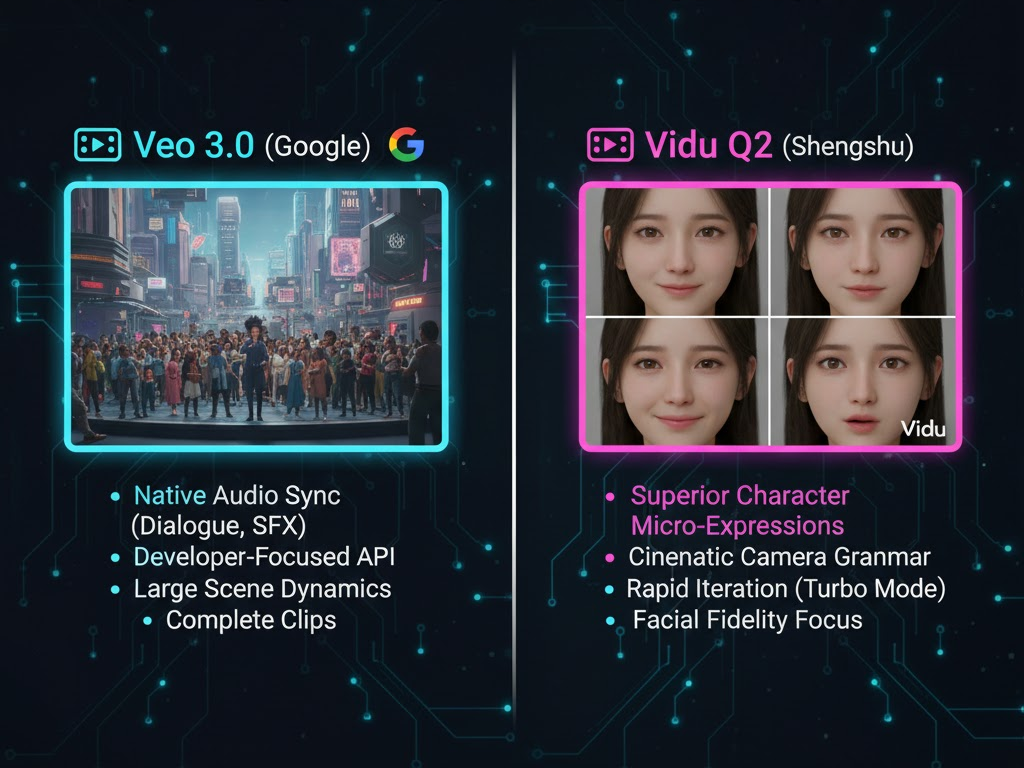
Veo 3.0 and Vidu Q2 are AI video generation tools built for different stages of the content production process. Both turn text, images, and visual references into videos, but they solve different problems for creators and teams.
Veo 3.0 focuses on production quality and control. It delivers high resolution output, stable motion, and consistent characters across scenes. Teams use it for ads, branded campaigns, and narrative content where visual accuracy and continuity matter. It fits agencies, brands, and creators who work on client projects or long-form video assets.
Vidu Q2 focuses on speed and iteration. It generates videos quickly and supports fast visual testing. Creators use it to explore ideas, test hooks, and publish short-form content at scale. It fits solo creators and social teams who prioritize frequency, experimentation, and rapid turnaround.
This comparison breaks down how Veo 3.0 and Vidu Q2 differ in output quality, creative control, generation speed, and real-world use cases, so you choose the tool that matches your workflow and publishing goals.
Key Benefits of Veo 3.0
- Produces high-resolution video up to 4K.
- Strong scene and character consistency using reference frames.
- Reliable dialogue, sound effects, and music sync.
- Handles longer scenes and narrative structure well.
- Fits client work, ads, and premium campaigns.
Key Benefits of Vidu Q2
- Fast video generation for rapid testing.
- Strong prompt understanding for motion and style.
- Flexible visual styles for social and creative content.
- Short learning curve for creators.
- Works well for short-form and experimental videos.
The comparison between Veo 3.0 (Google) and Vidu Q2 (Shengshou Technology) is a fascinating look at two models optimized for different aspects of professional video production: Veo 3.0 prioritizes comprehensive integration and audio, while Vidu Q2 specializes in cinematic performance and facial fidelity.
Both are considered state-of-the-art, but your choice depends on whether your project is focused on character performance or audio-visual completeness.
Veo 3.0 vs. Vidu Q2: Key Feature Comparison
| Feature | 🎬 Veo 3.0 / 3.1 (Google) | 🎥 Vidu Q2 (Shengshu) | Project Priority |
| Native Audio | YES. Generates synchronized dialogue, music, and ambient sounds. | NO (or very limited). Primarily visual. Audio must be added in post. | Veo 3 (For ready-to-publish clips) |
| Character Fidelity | Excellent general realism and consistency. | Superior. Specializes in micro-expressions (blinks, eye darts, subtle smiles) for “believable acting.” | Vidu Q2 (For character-driven ads) |
| Camera Control | Excellent prompt adherence for cinematic shots, movement dynamics. | Excellent “Camera Grammar.” Known for extremely smooth, stable dolly/tracking shots with less “wobble.” | Vidu Q2 (For polished orbits/push-ins) |
| Generation Speed | Moderate/Fast (Offers a Fast tier for rapid drafts). | Fast (Offers Turbo mode for speed and Pro for quality). | Vidu Q2 (For rapid iteration) |
| Max Clip Length | 4, 6, or 8 seconds (API configurable). | 2–8 seconds selectable. | Tie (Both focus on short clips) |
| Consistency Control | Reference Image for character/style; First/Last Frame control. | First/Last Frame control for match-cuts/loops; strong frame-to-frame coherence. | Tie (Both are strong here) |
| Ecosystem Fit | Integrated with the Gemini API and YouTube/Shorts pathways. | Specialized Vidu platform focus, often available via third-party runtimes. | Veo 3 (For developer workflows) |
Choose Veo 3.0/3.1 If Your Project Needs…
Veo is the solution for integrating AI video into a larger production pipeline or when audio integration is non-negotiable.
- Audio-Visual Completeness: If you need a fully polished clip with a voiceover, dialogue, or ambient sound generated in sync with the video, Veo’s native audio generation is the clear winner. This eliminates a crucial step in post-production.
- Developer Workflows: Veo’s strong focus on its Gemini API and built-in pathways to Google’s ecosystem (YouTube/Shorts) makes it a natural fit for teams building applications or automating content pipelines.
- Complex Scene Dynamics: Veo is highly capable of generating photorealistic scenes with complex physics, real-world lighting, and detailed prompt adherence for general cinematic requirements.
Choose Vidu Q2 If Your Project Needs…
Vidu Q2 is a specialist tool for emotional performance, character shots, and polished brand moments where the subtleties of human expression matter most.
- Believable Character Performance: Q2’s core breakthrough is its ability to generate natural micro-expressions (e.g., a subtle smile, a worried blink) that prevent characters from looking “wooden” or “rubbery.”This is vital for talking heads, reaction shots, or fashion videos.
- Cinematic Camera Quality: If your project relies on professional camera moves (like a perfect push-in to reveal a product or a steady orbital shot), Q2 is praised for its stability and precise “camera grammar.”
- Rapid Iteration (Pro & Turbo): The dedicated Turbo mode allows for lightning-fast drafts and ideation, while the Pro mode can be used to lock in the final, highest-quality output, optimizing the speed-vs.-fidelity workflow.
Featured Comparison Table
| Feature | Veo 3.0 | Vidu Q2 |
| AI Video Generation | Text, image, and reference-based | Text and image-based |
| Max Resolution | Up to 4K, 60 FPS | Up to 1080p |
| Speed | Moderate | Fast |
| Creative Control | High, structured sequencing | Medium, prompt-led |
| Motion & Camera | Stable, cinematic, controlled | Expressive and dynamic |
| Audio Integration | Dialogue, music, sound effects | Limited audio control |
| Ease of Use | Intermediate | Beginner-friendly |
| Best Use Case | Ads, storytelling, client work | Social content, idea testing |
Key Differences
- Veo 3.0 prioritizes quality, structure, and consistency.
- Vidu Q2 prioritizes speed and creative freedom.
- Veo 3.0 suits long-form and branded output.
- Vidu Q2 suits short-form and rapid experimentation.
Using Veo 3.0 and Vidu Q2 Together
Start with Vidu Q2 for ideation
- Test visual styles and hooks fast.
- Generate multiple concepts in minutes.
Refine in Veo 3.0
- Rebuild selected scenes with reference control.
- Add dialogue and cinematic pacing.
- Export high-resolution final output.
This workflow balances speed and production quality.
Project Goal and Recommended Tool
| Project Goal | Recommended Tool | Reason |
| High-budget ads | Veo 3.0 | 4K output and consistency |
| Daily social videos | Vidu Q2 | Fast iteration |
| Story-driven content | Veo 3.0 | Scene continuity |
| Concept testing | Vidu Q2 | Rapid generation |
| Branded campaigns | Veo 3.0 | Professional polish |
Tips for Choosing
- Choose Veo 3.0 if you need polished, reliable output.
- Choose Vidu Q2 if you publish often and test ideas fast.
- Use both tools to cover speed and quality.
Final Recommendation
- For Short Ads or Character Reels: Choose Vidu Q2. Its focus on facial fidelity and polished camera moves will make the subject look premium and believable.
- For Explainer Videos or Narrative Clips with Voiceover: Choose Veo 3.0/3.1. The time saved by its synchronized, native audio generation is immense.
- For Integration into a Mass-Production App: Choose Veo 3.0/3.1 due to its superior API support and integration into the Google ecosystem.
Conclusion
Veo 3.0 and Vidu Q2 serve different roles in a modern video production workflow, and each excels when used for the right purpose. Vidu Q2 works best for short ads, character reels, and high-frequency social content. Its strength lies in facial accuracy, smooth camera movement, and fast generation. Creators use it to produce visually clean clips quickly, which makes it ideal for platforms where speed and volume matter.
Veo 3.0 and Veo 3.1 work best for explainer videos, branded narratives, and structured content with voiceover. Native, synchronized audio removes the need for external sound design. High resolution output and scene consistency support professional delivery for clients, campaigns, and long-form storytelling. For teams building mass-production systems or automated video pipelines, Veo 3.0 and 3.1 offer stronger infrastructure. API access and deep integration within the Google ecosystem support scale, reliability, and repeatable output.
The decision comes down to production priorities. Choose Vidu Q2 when speed and iteration drive results. Choose Veo 3.0 when control, polish, and scalability matter. Many creators and teams use both, starting with Vidu Q2 for rapid concepts and finishing with Veo 3.0 for final delivery.
Frequently Asked Questions
- Which tool produces higher-quality video?
Veo 3.0 produces higher-resolution and more consistent output. - Which tool works best for social media?
Vidu Q2 works best for fast social content. - Can both tools support commercial use?
Yes. Both support ads and branded content. - Which tool suits beginners?
Vidu Q2 suits beginners due to simple prompts. - Can both tools work together?
Yes. Use Vidu Q2 for ideas and Veo 3.0 for final delivery.