20 Best Alternative AI Tools Like ChatGPT for Writing, Research, and Productivity
People now use AI tools like ChatGPT for writing, research, coding, sales tasks, and everyday work. You use them for blog posts, emails, reports, data checks, customer support replies, school assignments, and software tasks. As usage grows, users want more than one tool. You want faster replies, stronger privacy, real-time web access, deeper reasoning, and tools built for one clear job.
Many new AI platforms now compete with ChatGPT in useful ways. Some focus on search and live internet results. Some focus on long writing and structured reports. Others focus on code generation, marketing workflows, academic work, or customer service tasks. Each one solves a specific problem, so your choice depends on the result you want.
This guide shows the 20 best AI tools like ChatGPT you can use in 2025. You will see what each tool does well, who it helps, and how it fits into daily work. This helps you choose the right AI assistant for writing tasks, research tasks, development work, business tasks, and personal productivity.
What to Look for in AI Tools Like ChatGPT
When you compare AI tools, you need solid criteria. Every tool targets a different kind of user. Some tools help you write long documents. Some help you search the web and check facts. Some help with spreadsheets, coding, and research. You save time when you match the tool to the outcome you want. The points below help you judge which assistant fits your daily work.
Writing Quality and Reasoning Depth
This shows how well the tool explains ideas, connects facts, and produces clear arguments. You look at how it handles structure, tone, and flow. A strong model gives you clean sentences, proper transitions, and logical movement from point to point. This helps when you prepare reports, blog posts, marketing copy, emails, or any task that needs clarity. Shallow tools repeat phrases, get confused, or give generic answers that waste your time. If you write every day, this becomes your top priority.
Real Time Web Access
Some AI tools pull live data from the internet. Others rely on older training data. Live access makes a difference when you work with news, market trends, prices, reviews, and research updates. You get fresh information instead of outdated text. If your work depends on accuracy, you need this feature. It helps you avoid guessing and gives you direct facts while you work.
Image and File Support
Modern AI tools now process images, spreadsheets, PDFs, and long documents. This expands your workflow into tasks that go beyond plain text. You analyse tables, review contracts, extract key points from papers, or get design feedback. You also handle scanned notes, receipts, charts, and diagrams. Without file support, you limit your work and waste time switching between apps. If you work with documents every day, this feature lifts your speed and accuracy.
Coding and Data Handling
Developers need strong code generation, debugging, and clear explanations. Data teams need help with formulas, charts, queries, and analysis. A strong model helps you build scripts, fix errors, read logs, test functions, and document your work. When you run analysis tasks, it helps you clean data, explain patterns, and prepare summaries. If you work with code or data, this saves long hours of manual effort.
Privacy and Data Control
Every AI tool handles privacy differently. Some store your prompts. Some use your data for training. Some offer private modes or local usage. If you work with client files, confidential plans, or sensitive records, you need strong privacy controls. You reduce legal risk and protect your work. You also avoid the fear of your private information feeding another system. Always check how the tool stores and handles your data before you trust it.
Speed and Daily Usage Limits
Speed shapes your productivity. Slow tools delay your work. Fast tools help you get results in real time. The model, the server load, and your plan level affect this. Many free plans limit messages, uploads, or searches. Paid plans increase speed and remove limits. If you use AI many times a day, these limits affect your output. Match the plan to your workload so you stay efficient.
Cost and Free Plans
Every tool comes with a different price structure. Free plans help you test the platform, but they often restrict features. Paid plans give better models, faster replies, file support, and web access. When you decide, look at how often you use the tool and how much time or revenue it saves you. You need a clear return on your investment. A strong tool pays for itself through faster work, better quality, and fewer errors.
1. Claude AI by Anthropic

Claude stays strong in reasoning and long-form writing. You feel the difference when you ask for structured analysis or multi-page breakdowns. It reads long documents without losing track. It holds context across sections. You use it when your work needs focus, clarity, and depth. It gives you clean sentences and stable logic.
Best for: Long documents
Claude keeps your structure tight when you build reports and research papers.
Strategy writing. You get clearer thinking and stronger argument flow.
Policy and compliance work. You get precise wording and consistent tone.
2. Google Gemini
Gemini works inside Google Search, so you pull new information fast. You get fresh facts, trends, and real-time data. It supports text, image, and files. You handle research, planning, and productivity tasks inside one system.
Best for: Real-time research.
You get updated answers without hunting across websites.
Multimodal tasks. You work with text, images, and files in one place.
Productive work. You stay inside Google tools and reduce friction.
3. Perplexity AI
Perplexity behaves like an AI search partner. It gives you answers backed by sources, so you trust the output. You see citations for each point. You use it when accuracy matters.
Best for: Research.
You collect facts fast with clear references.
Fact-checking. You confirm claims instead of guessing.
Student work. You build essays and reports from verified information.
4. Microsoft Copilot
Copilot sits inside Word, Excel, and Outlook. You write, summarise, and analyse without leaving your document. It saves time for people who live inside Microsoft tools.
Best for: Office work.
You produce clean emails and documents faster.
Data summaries. You turn spreadsheets into simple explanations.
Business writing. You improve tone, structure, and clarity in reports.
5. Jasper AI

Jasper targets marketers. You get ads, emails, landing pages, and brand copy in your exact tone. It speeds up content production for teams and agencies.
Best for: Sales copy
You create strong hooks and calls to action.
Social media captions. You produce quick posts that match your brand
Email campaigns. You set up sequences and product emails faster.
6. Writesonic
Writesonic focuses on SEO writing. It produces search-friendly articles, product descriptions, and website content. You use it when ranking and traffic matters.
Best for: SEO articles
You get structure, keywords, and clarity.
Website copy. You produce simple, clean pages.
Ads. You write short persuasive lines for campaigns.
7. YouChat
YouChat mixes chat responses with live web results. You get updated answers supported by real links. It helps you stay informed while you write or research.
Best for: Quick research.
You collect facts in seconds.
Tech questions. You get direct explanations with sources.
News summaries. You stay updated without scrolling feeds.
8. Poe by Quora
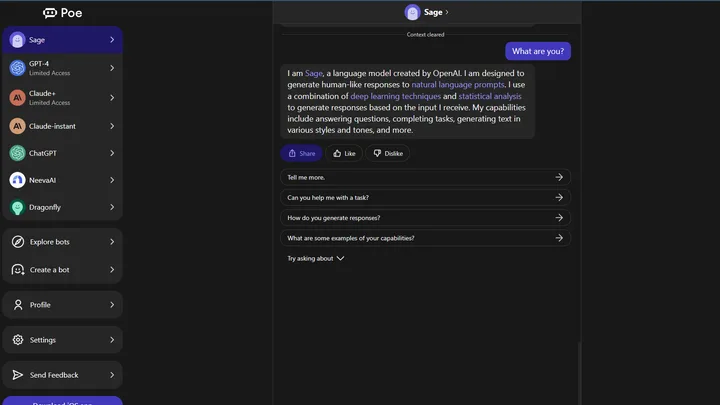
Poe gives you many AI models inside one platform. You switch between Claude, Gemini, and others without opening new tabs. It helps you test prompts and compare output.
Best for: Model comparison.
You see which tool fits your task.
Prompt testing. You refine prompts for better results.
Advanced users. You control your workflow across models.
9. ChatSonic
ChatSonic supports voice input, image generation, and real-time browsing. You use it when you need mixed media assistance.
Best for: Voice prompts.
You speak your ideas and save time.
Visual content ideas. You generate images for posts or ads.
Live research. You get updated answers across topics.
10. DeepSeek AI
DeepSeek focuses on logic, math, and technical thinking. It handles code, structured reasoning, and complex analysis.
Best for: Developers
You write and debug code faster.
Data reasoning. You break down calculations and patterns
Technical problem solving. You handle detail-heavy tasks with less stress.
11. Grok AI by xAI

Grok reads live data from X. You get trending topics, public reactions, and real-time insights.
Best for: Trend research.
You track conversations as they form.
Social analysis. You study reactions and discussions.
Breaking news. You stay informed as events unfold.
12. Replit AI
Replit AI helps you write and test code inside your browser. You build small apps fast. It supports beginners and intermediate developers who want quick results.
Best for : Beginners in coding.
You learn with simple explanations.
Quick testing. You check ideas without setup.
Web app builds. You build small tools and prototypes
13. Phind

Phind targets engineers. It gives structured steps, citations, and detailed explanations for programming tasks.
Best for: Debugging.
You fix errors with short, clear steps.
Code explanation. You understand what each part does.
Software research. You gather technical information fast.
14. Elicit AI
Elicit focuses on academic research. It reviews papers, extracts insights, and summarises findings. You use it when you handle heavy reading loads.
Best for: Students.
You turn readings into clear notes.
Researchers. You collect findings without hours of scanning.
Literature reviews. You see patterns and gaps across studies.
15. Character AI

Character AI lets you chat with personalities and fictional characters. It helps you create stories, scenes, and creative scripts.
Best for: Creative writing.
You develop characters and dialogue.
Roleplay. You explore ideas through conversation.
Story ideas. You break writer’s block.
16. HuggingChat

HuggingChat uses open-source models. It suits people who want transparency and privacy. It also helps developers who want to test different open tools.
Best for: Open source users.
You stay independent of big platforms.
Model testing. You try different models for your tasks.
Local AI workflows. You build private systems.
17. Tidio AI
Tidio builds chatbots for customer support teams. You automate responses, collect leads, and support visitors.
Best for: E-commerce support.
You answer customer questions fast.
Lead capture. You collect contact details from visitors
Website automation. You keep your site active at all times.
18. Forefront AI
Forefront blends chat AI with file uploads and team workspaces. You analyse documents, plan projects, and share ideas across teams.
Best for: Team research.
You collect insights in one place.
Document review. You break down long files with clarity
Startup projects. You organise tasks and ideas.
19. Andi AI
Andi works like a clean AI search partner. You get quick answers without ads or clutter.
Best for: Research.
You collect facts without distractions.
Simple explanations. You get short, direct answers.
Browsing support. You move faster across topics.
20. Open Assistant
Open Assistant is a community-built open-source tool. You control how the model works and how it trains.
Best for: Developers.
You customise features.
Open research. You study model behaviour.
Custom training. You fit the model to your needs.
ChatGPT vs Other AI Tools
ChatGPT stays strong for writing, brainstorming, and coding help. You get stable output and broad features. Other tools perform better in specific areas.
Real-time data access. Tools connected to search give fresher answer.
Academic research. Tools like Elicit handle papers better.
Customer support automation. Tools like Tidio automate replies.
Long document handling. Claude holds long context more comfortably.
Marketing-focused copy. Jasper produces brand content faster.
Most people now use more than one tool. You pick the right assistant for each task and build a stronger workflow.
Which AI Tool Should You Use
Use Claude or Gemini for deep writing and research.
Use Perplexity or Andi for search.
Use Jasper or Writesonic for marketing.
Use Replit or Phind for coding.
Use Tidio for customer support
Use VidAU for Video and AI image generation
Use HuggingChat or Open Assistant for privacy-focused work.
Conclusion
AI tools like ChatGPT now cover writing, research, coding, marketing, and automation. No single tool fits every job. You choose based on your goal. Many professionals now use two to four AI tools per day to handle different tasks with speed and accuracy.
Frequently Asked Questions
What is the key difference between ChatGPT and other AI tools?
ChatGPT handles general writing well. Other tools focus on tasks like research, coding, or marketing.
Which AI tool gives the best real-time information?
Gemini and Perplexity pull fresh data fast and work best for news, trends, and research.
Which tool works best for long writing and research?
Claude handles long documents with strong reasoning and consistent structure.
Which AI tools fit developers the most?
Phind and Replit give clear coding help with accurate steps and fast explanations.
Do you need more than one AI tool?
You use more than one because no single tool gives top results across writing, coding, and research.