AI Image to Video Generator · Free & Paid Options
9 Best AI Image to Video Generators (Free & Paid Options Tested)
Compare the best AI image to video generator tools for animated clips, social media content, commercial video ads, free tiers, no-watermark output, and production-ready workflows.
By the Sarah Iruoje · Updated 2026 · 10 min read
The explosion of AI image to video generator technology has created both opportunity and confusion. While countless platforms claim to offer free conversion, the reality often involves hidden credit limits, watermarked outputs, and wildly inconsistent quality. This guide cuts through the noise with practical comparisons of nine tools that genuinely transform images into videos, tested against real use cases, real free tiers, and real output quality.
Whether you need a quick free AI image to video tool for social content or a production-grade platform for commercial video ads, the right choice depends entirely on matching the tool to the workflow. This guide does that mapping for you, and shows you where VidAU sits as the strongest option for creators who need commercial-ready output, not just animated clips.
By the end, you will know exactly which ai video generator from image to use, when to use each, and how to build a multi-tool stack that maximises free tier capacity.
Quick summary
- No platform offers truly unlimited free access without tradeoffs, so understand credit systems before choosing.
- Kling AI and Luma Labs Dream Machine lead on motion realism for animated clips.
- Runway offers the most comprehensive suite for professional filmmakers.
- VidAU is the strongest tool for turning images into complete commercial video ads with script, voiceover, captions, and multi-format export.
- Best strategy: use free-tier motion tools for social clips, use VidAU for commercial production.
- Always verify commercial usage rights before publishing AI-generated video professionally.
The 9 Best AI Image to Video Generators
1. VidAU — Best AI Tool to Turn Images into Complete Video Ads
What It Is: VidAU is the only tool in this list that combines image-to-video conversion with script generation, AI avatars, voiceover, captions, music, and multi-format export, producing a complete, publish-ready video ad from your images in under 5 minutes.
How it works: Upload product images or AI-generated assets, add a script or paste a product URL, select an AI avatar and voice, choose your format, 9:16, 1:1, or 16:9, and generate. VidAU produces a finished video with all commercial layers applied.
Why it leads for commercial use: VidAU.ai is the best ai tool to turn image into video for marketing applications because it does not stop at animation. It handles the entire production pipeline — from image input to ready-to-run ad. Tools like Kling AI and Runway produce animated clips; VidAU produces deployable video content.
Recognition: Best AI Tool for Ad Creative, Extraordinary Awards 2025. #1 Product of the Month, Product Hunt, September 2025. Google Cloud Startup Program Grant, $350,000. Pricing from $9.99/month.
- Free tier: Available, try at VidAU.
- Best for: E-commerce brands, marketing agencies, teams producing commercial video ads.
- Watermark: No watermark on standard outputs.
2. Kling AI — Best for Motion Realism on a Free Plan
What It Is: Kling AI delivers the strongest image-to-video motion results on a free plan in 2026. The platform excels at animating portraits and product images with natural movement, convincing depth, and smooth frame sequences.
Key features:
- Strong facial movement and body physics, most natural motion in the free tier category.
- Detailed prompt control: camera movements, animation intensity, focus areas.
- Accessible for beginners with advanced options for experienced users.
- Monthly credit allocation.
- Free tier: Monthly refresh, no watermarks.
- Best for: Animating portraits, product visualisation, social media B-roll.
- Limitation: Short clip durations on free tier; not designed for commercial video production.
3. Luma Labs Dream Machine — Best for Photorealistic Output
What It Is: Luma Labs Dream Machine stands out for photorealistic output and scene-level motion generation. The platform processes images quickly and delivers consistently high-quality results across diverse image types.
Key features:
- Photorealistic motion that preserves image detail and lighting.
- Excellent for B-roll from product images or environmental photography.
- Scene composition understanding, camera movements enhance rather than distract.
- Minimal quality difference between free and paid tiers for standard lengths.
- Free tier: Monthly refresh, minimal watermarks.
- Best for: Professional marketing B-roll, high-fidelity animation.
- Limitation: Limited free credits, use for final renders, not exploration.
4. Runway — Best for Professional Creative Control
What It Is: Runway offers the most comprehensive AI creative suite in the category, combining image-to-video with inpainting, motion tracking, style transfer, and video-to-video transformation. Popular with filmmakers and creative directors.
Key features:
- Advanced motion control: specify exact camera movements, animation styles, temporal effects.
- Inpainting, Erase and Replace, for removing or swapping elements in generated video.
- Motion tracking for attaching text or graphics to moving objects.
- Professional export formats and resolutions.
- Free tier: One-time credits only, not a monthly refresh system.
- Best for: Professional filmmakers, complex AI video workflows.
- Limitation: Free credits deplete permanently; paid tier starts at $12/month for regular use.
5. Vidu — Best for Beginners and Quick Social Content
What It Is: Vidu focuses on accessible image animation with fast output optimised for social media formats. It prioritises ease of use over technical depth.
Key features:
- Simple interface: upload image, write basic prompt, generate.
- Automatic format optimisation for TikTok, Instagram Reels, YouTube Shorts.
- Fast processing even on free accounts.
- Preset animation styles reduce learning curve.
- Free tier: Monthly refresh.
- Best for: Social media managers, beginners, quick-turnaround content.
- Limitation: Less granular control than Runway or Kling.
6. Krea AI — Best for Multi-Model Comparison
What It Is: Krea AI integrates multiple AI generation models in one platform, allowing side-by-side output comparison, particularly useful when working with diverse image types.
Key features:
- Unified credit system across multiple generation models.
- Side-by-side comparison of outputs from different AI models.
- Both image-to-video and text-to-video workflows.
- Free tier: Multi-model access on unified credits.
- Best for: Creators who want to experiment before committing to one platform.
- Limitation: Credits apply across all models, compare strategically.
7. Hailuo — Best Free Tier Accessibility
What It Is: Hailuo offers competitive image-to-video capabilities with one of the more accessible free tiers. Web-based with no installation required.
Key features:
- Reasonable monthly free credit allocation.
- Fast processing times on free accounts.
- Supports standard social media video lengths.
- Straightforward interface, low setup friction.
- Free tier: Monthly refresh, web-based.
- Best for: Creators prioritising accessibility and low setup overhead.
- Limitation: Less sophisticated animation than Kling or Dream Machine.
8. Meta AI Imagine Video — Best for Meta Platform Integration
What It Is: Meta AI’s image-to-video tool integrates natively with Facebook and Instagram workflows, convenient for creators already publishing within the Meta ecosystem.
Key features:
- Native integration with Meta’s advertising and publishing tools.
- Social media-optimised output for Meta properties.
- Streamlined publishing for Facebook and Instagram.
- Free tier: Varies by region — rolling out gradually.
- Best for: Meta-ecosystem creators and advertisers.
- Limitation: Limited availability outside core markets; fewer advanced controls than dedicated platforms.
9. Roboneo — Best for Preset-Driven Workflows
What It Is: Roboneo emphasises preset animation styles and guided workflows, reducing the need for detailed prompt engineering. Suitable for creators who prefer consistent, predictable results over creative flexibility.
Key features:
- Preset animation styles for consistent brand output across multiple images.
- Simplified workflow — select a preset, upload, generate.
- Accessible to non-technical users.
| Tool | Free Tier | Watermark | Output Type | Commercial Use | Best For |
|---|---|---|---|---|---|
| VidAU.ai | ✅ Free tier | ❌ None | Complete video ads | ✅ Built for it | Commercial production |
| Kling AI | ✅ Monthly | ❌ None | Animated clips | ✅ Verify ToS | Motion realism |
| Luma Dream Machine | ✅ Monthly | ❌ None | Animated clips | ✅ Verify ToS | Photorealism |
| Runway | ⚠️ One-time | ❌ None | Clips + editing | ✅ Paid tier | Professional control |
| Vidu | ✅ Monthly | Varies | Short-form clips | Verify ToS | Beginners |
| Krea AI | ✅ Unified | Varies | Animated clips | Verify ToS | Multi-model testing |
| Hailuo | ✅ Monthly | Varies | Short clips | Verify ToS | Accessibility |
| Meta Imagine Video | ✅ Regional | Varies | Social clips | Meta ecosystem | Meta publishers |
| Roboneo | ✅ Limited | Varies | Preset clips | Verify ToS | Preset workflows |
- Free tier: Limited monthly generations.
- Best for: Beginners who want consistent results without learning prompt engineering.
- Limitation: Less creative flexibility than Kling, Runway, or Dream Machine.
What Is an AI Image to Video Generator?
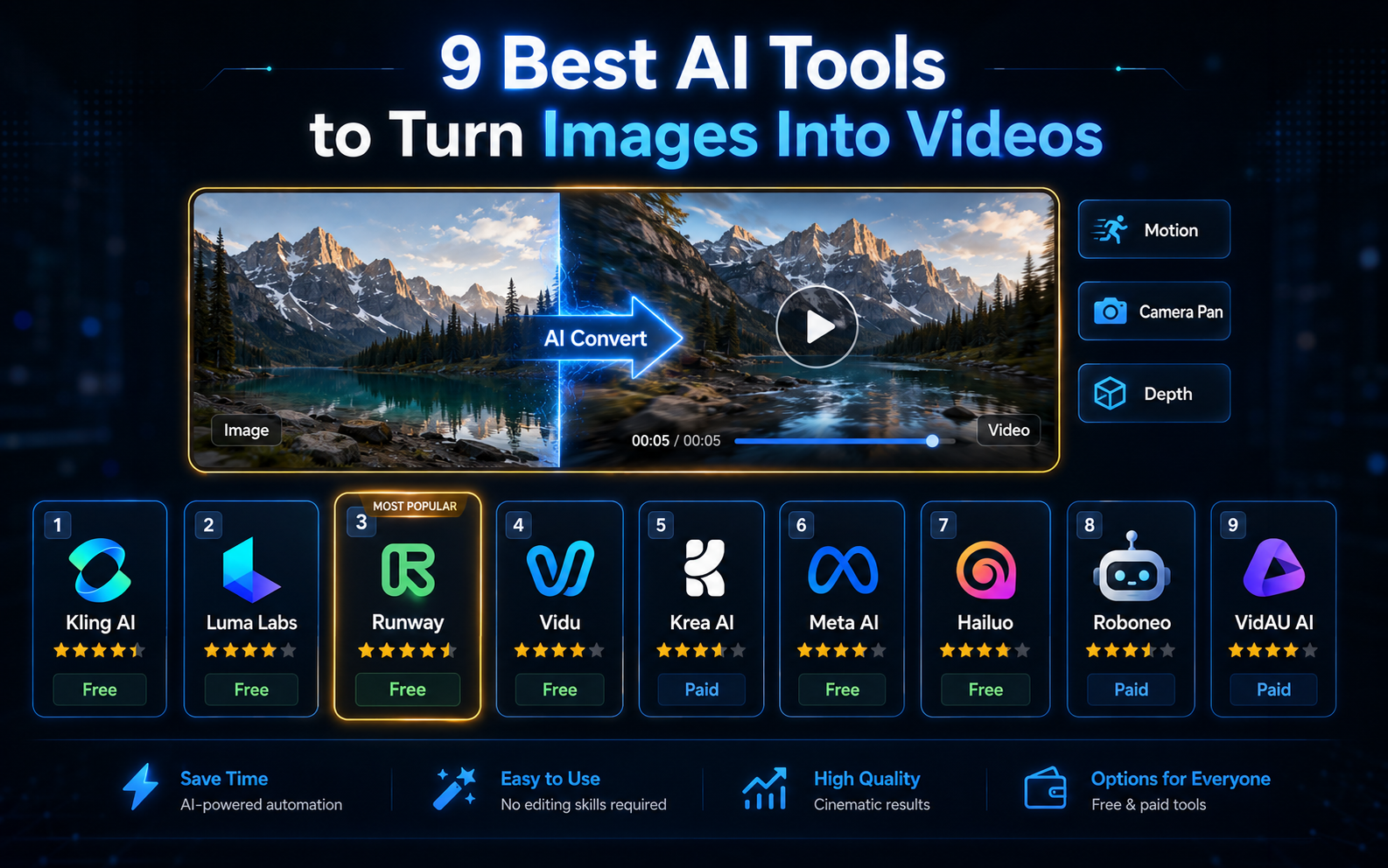
An AI image to video generator uses machine learning models to analyse static images and create motion, camera movements, and animated elements, converting a still photograph or graphic into a short video clip.
The technology interprets image composition, depth, and content to generate realistic motion. The category splits into two distinct types:
- Motion / animation tools: upload an image, get a short animated clip, usually 3–10 seconds. Best for social media B-roll and product visualisation.
- Commercial production tools: upload images, add a script, get a complete ready-to-publish video ad. Best for marketers and e-commerce brands.
Most tools in this list are motion tools. VidAU is the commercial production tool. Understanding which category you need is the most important decision in tool selection.
Key takeaway
Motion tools and commercial video production tools solve different problems. Define your output goal first, animated clip or complete video ad, then select accordingly.
The Reality of Free AI Video Tools
“Free” in AI video generation rarely means unlimited. Here is what free tiers actually deliver in 2026:
- Credit systems: most platforms allocate 20–100 free credits monthly; each video consumes 5–20 credits based on length and complexity.
- Video length limits: free tiers typically cap output at 3–5 seconds.
- Resolution caps: free output is often 720p; 1080p and 4K require subscriptions.
- Watermarks: some platforms watermark free exports, making them unsuitable for professional use.
- Commercial restrictions: free accounts frequently prohibit commercial use.
- Processing priority: free users receive slower processing during peak hours.
Best free strategy for most creators: use free-tier motion tools for social clip testing and exploration, then use VidAU or commercial production output.
Watch out
No platform offers truly unlimited free access without tradeoffs. Before choosing a free AI image to video tool, check credits, clip length, resolution, watermark rules, processing priority, and commercial-use terms.
Turn Your Images into Complete Video Ads
Use VidAU to turn product images, AI-generated assets, scripts, voiceovers, captions, avatars, and multi-format exports into commercial-ready video ads in one workflow.
VidAU workflow
From image assets to commercial-ready video ads
- Upload product images or AI-generated assets: Start with the image material you want to turn into video content.
- Add a script or product URL: Use campaign messaging, a product page, or a script to define the commercial angle.
- Select production layers: Choose an AI avatar, voice, captions, music, and the output format, such as 9:16, 1:1, or 16:9.
- Generate a complete ad: Produce a finished, publish-ready video with all commercial layers applied in one workflow.
- Scale for marketing volume: Use VidAU for teams producing social ads, e-commerce campaigns, and multi-format video assets at scale.
Platform Comparison Table
How to Choose the Right Tool
| If you need… | Use… |
|---|---|
| Complete commercial video ads from product images | VidAU.ai |
| High-quality animated clips for social media | Kling AI or Luma Dream Machine |
| Professional cinematic control | Runway |
| Quick social content with minimal setup | Vidu |
| Multi-model comparison before committing | Krea AI |
| Maximum free tier accessibility | Hailuo |
| Facebook and Instagram-specific content | Meta Imagine Video |
| Consistent brand animations without prompting | Roboneo |
Match content volume to your free tier:
- Occasional social posts, 1–5 per week: Kling AI or Dream Machine free tier is sufficient.
- Regular marketing content, daily posts: VidAU.ai paid tier is the most cost-effective approach.
- Commercial ad production, 10+ per week: VidAU.ai is the only tool built for this volume.
Writing Effective Prompts for Better Results
For Motion Animation Tools: Kling, Dream Machine, Runway
Describe motion explicitly — not aesthetically.
| Vague | Specific |
|---|---|
| Make it move | Slow zoom into the product, depth of field increasing gradually |
| Animate it | Camera pans left across the scene, subjects remain stationary |
| Add effects | Rain falling in the foreground, gentle wind moving subject’s hair |
Include camera direction terms: dolly forward, pan left, zoom out, tilt up, handheld shake.
Use negative prompts where supported: blurry, distorted, flickering, watermark, unnatural motion.
For Commercial Production Tools: VidAU
The image handles the visual. Your script should deliver the hook, benefit, and CTA, not describe what is already visible. Use VidAU’s VidRemix to generate multiple hook variations from the same images and test performance before scaling.
Tip
Prompting changes by tool category. Motion tools need motion instructions. Commercial production tools like VidAU need a clear hook, benefit, and call to action because the image already defines the visual.
Common Mistakes
Mistake 1 — Confusing Clip Animation with Commercial Video Production
Kling AI and Luma Dream Machine produce excellent animated clips, not complete video ads. If your goal is a deployable marketing video with voiceover, captions, and music, those tools will always fall short. Use VidAU.ai for commercial production.
Mistake 2 — Using Low-Resolution Source Images
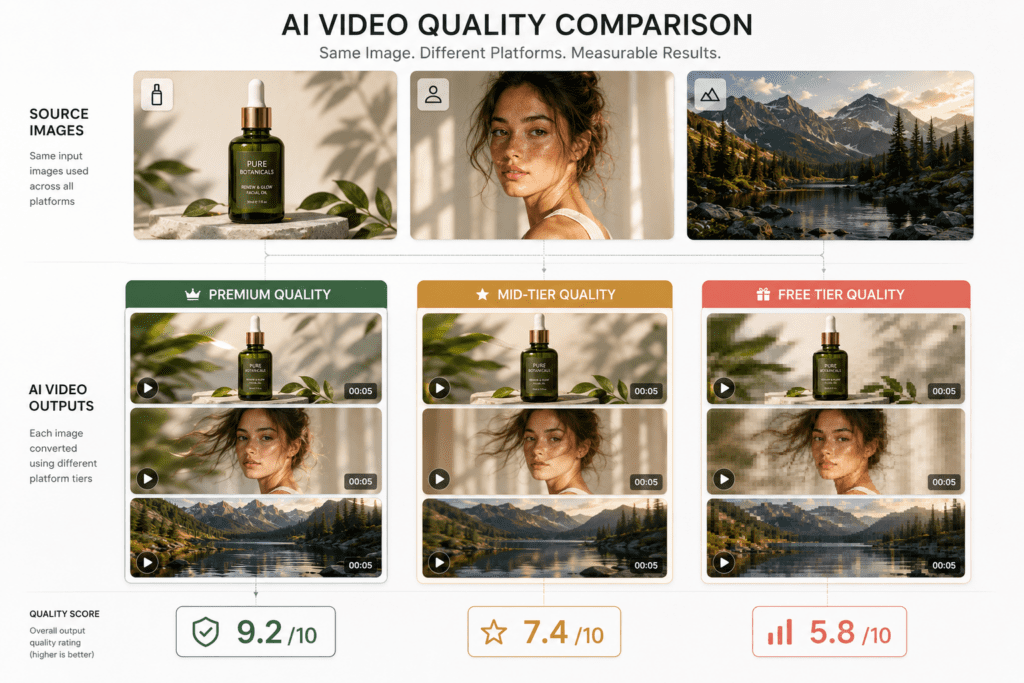
Image quality is the ceiling for video output quality. Always use the highest resolution available, minimum 1024×1024 for animation tools. A blurry input produces blurry output regardless of the platform.
Mistake 3 — Assuming Commercial Rights on Free Tiers
Most free tiers restrict commercial use. Verify current Terms of Service for each platform before using free-tier outputs in paid advertising or client work. Platform terms change, check before each commercial project.
Mistake 4 — Spending Premium Credits on Concept Testing
Use Hailuo, Vidu, or Krea AI for testing. Reserve Kling AI and Dream Machine credits for final renders where quality is the priority.
Mistake 5 — Expecting First-Generation Perfection
Plan to generate 2–3 variations and select the strongest. One iteration with a refined prompt consistently outperforms accepting a weak first output.
Watch out
The biggest workflow mistake is choosing a motion tool when you need a complete ad. Animated clips are useful, but commercial campaigns need voiceover, captions, music, scripts, formats, and deployment-ready output.
Key takeaway
Conclusion
The AI image to video generator category now covers every workflow from quick social media clips to cinematic filmmaking to commercial ad production, with genuine free tier options available across the board.
For creative motion animation: Kling AI and Luma Dream Machine lead the free tier, For professional creative control: Runway is the benchmark. For preset-driven simplicity: Vidu and Roboneo work for non-technical creators.
But for the workflow that defines most marketing use cases, turning ai generated images to video in a complete, commercial-ready format with voiceover, captions, and multi-platform export, VidAU is in a different category from everything else on this list. It is not a clip animation tool. It is a production platform built for volume. For teams producing 10, 20, or 50 video ads per month from existing image assets, it is the only tool built to handle that output.
FAQ
Here are answers to common questions about AI image to video generator tools, free AI image to video workflows, no-watermark exports, commercial usage rights, VidAU, Kling AI, Luma Labs Dream Machine, social media clips, and complete commercial video ads.
What is an AI image to video generator?
An AI image to video generator uses machine learning to analyse a static image and generate motion, camera movements, and animated elements, converting a still photograph into a video clip. The category includes both short clip animation tools, such as Kling AI and Dream Machine, and complete commercial video production platforms, such as VidAU.ai.
What is the best AI tool to turn image into video?
For commercial video production, turning product images into ready-to-publish video ads, VidAU.ai is the strongest option in 2026. For motion animation of a single image, Kling AI delivers the best free-tier quality. Try VidAU.ai free at vidau.ai.
Are there truly free AI image to video tools with no watermark?
Kling AI and Luma Labs Dream Machine provide watermark-free outputs on their free monthly credit tiers. VidAU.ai also offers no-watermark output on its free tier. Verify current platform terms as policies can change.
How do I turn AI generated images into video?
Generate image assets using a free tool, such as Reve AI or Piclumen AI, then upload to your chosen video platform. For animated clips, use Kling AI with a motion prompt. For complete commercial video, upload to VidAU.ai, add a script, select voiceover and format, then generate. Total time in VidAU.ai is under 5 minutes.
What is the best free AI image to video tool for social media?
Kling AI is the strongest free option for quality social media animated clips, with monthly refreshing credits and no watermarks. Vidu is the best option for beginners who need simplicity over quality. For social media ads specifically, VidAU.ai produces complete deployable content including captions, voiceover, and music.
Can I use AI-generated videos commercially?
Commercial rights vary by platform. VidAU.ai is built for commercial advertising. Most other tools allow commercial use on paid tiers, while free tier commercial rights must be verified in current Terms of Service. Always confirm before using in paid advertising or client deliverables.
What image types work best for AI video generation?
Images with clear subjects, good composition, and identifiable depth produce the strongest results. Portrait photographs, product images on clean backgrounds, and landscape photos with clear focal points animate reliably. High-resolution source images consistently produce better output.
What are the main limitations of free AI image to video tools?
Free tiers typically limit monthly generations, cap video length at 3–5 seconds, restrict resolution to 720p or 1080p, apply watermarks on some platforms, prohibit commercial use on others, and offer slower processing. These limitations make free tiers suitable for testing and low-volume social content, not commercial production.
How long does generation take?
Standard animated clips, usually 3–5 seconds, generate in 1–3 minutes on free accounts. Complete commercial video production through VidAU.ai typically takes 3–5 minutes from image upload to finished export. Paid tiers receive processing priority across all platforms.