Build A Social Media Scraper AI Agent With n8n AI Automation Tools
If you are tired of refreshing social feeds and copying links into spreadsheets, you are not alone. Many marketers and creators feel the same way. They now search for AI Automation Tools and n8n AI to stop manual work. So this guide keeps things clear and simple. It shows what these tools do, why teams use them. And how to build a social media scraper AI agent that runs on autopilot.
What Are AI Automation Tools In n8n?
AI Automation Tools in n8n connect your apps and AI models. They join many tools into one smooth workflow. People want a system that does work for them in the background. In n8n, you design that system once. Then let it watch social channels, call AI. And move data into the tools you already use. As a result, your daily tasks become faster and less manual.
Core Building Blocks Of n8n AI Workflows
Your base layer is n8n itself. This orchestrates triggers, logic and integrations. Next you add data sources such as social scrapers, APIs, or webhooks that feed fresh posts into each run. Then you plug in AI nodes or external models. They can summarise, classify, and score the content. Finally, you attach storage and notification nodes so insights land in sheets, dashboards, or chat tools where humans can act fast.
Why Searchers Want Orchestration Not Just Prompts
Most people start by chatting with a single AI model, but they soon hit a wall. They realise that one off prompts do not update their databases, send alerts, or keep watch over live data. So they look for n8n AI and broader AI orchestration tools to orchestrate many steps at once. With orchestration, one workflow can monitor topics, analyse text, and trigger new actions without extra clicks.
Comparison Table
| Tool | Best For | Hosting Style | AI Features Focus | Learning Curve |
| n8n | Power users and teams who want flexibility | Cloud and self-host | Strong workflow engine with n8n AI nodes and agents | Medium |
| Zapier | Non-technical users who want quick automations | Cloud only | AI actions and simple AI steps inside zaps | Easy |
| Make | Visual builders who like complex scenarios | Cloud only | Scenario based flows with AI integrations | Medium |
| Pabbly | Budget friendly marketing and CRM automations | Cloud only | Basic AI and automation for marketing tasks | Easy |
| Custom Stack | Developers who want full control | Self-host or hybrid | Unique AI automation tools built in code | Hard |
How Do You Set Up AI Automation Tools With n8n?
You set up AI Automation Tools with n8n in small steps. First, you connect your main accounts. Then you build a tiny test flow. This flow proves that everything can talk to everything else. After that, you can safely scale the workflow and add more features.
Prepare Your Accounts And APIs
Start by creating or signing in to your n8n workspace. Then gather API keys or credentials for your chosen AI model, any social media scraper or API, and your storage tool such as Google Sheets or a database. Store these keys in n8n credentials rather than hard coding them in nodes. This keeps things safer and easier to maintain when you update or rotate keys.
Create Your First n8n AI Workflow
Open a blank workflow and add a simple schedule trigger so it runs every hour or every day. After that, add your scraper node and run it once to confirm you receive example posts. Then connect an AI node that reads the text and returns a short summary or a sentiment label. You can do all of this with simple no-code and low-code steps, so non-developers can follow along. Finally, send the result to a sheet, database, or notification channel so you can see the first automated insight arrive.
How Do You Build The Social Media Scraper AI Agent?
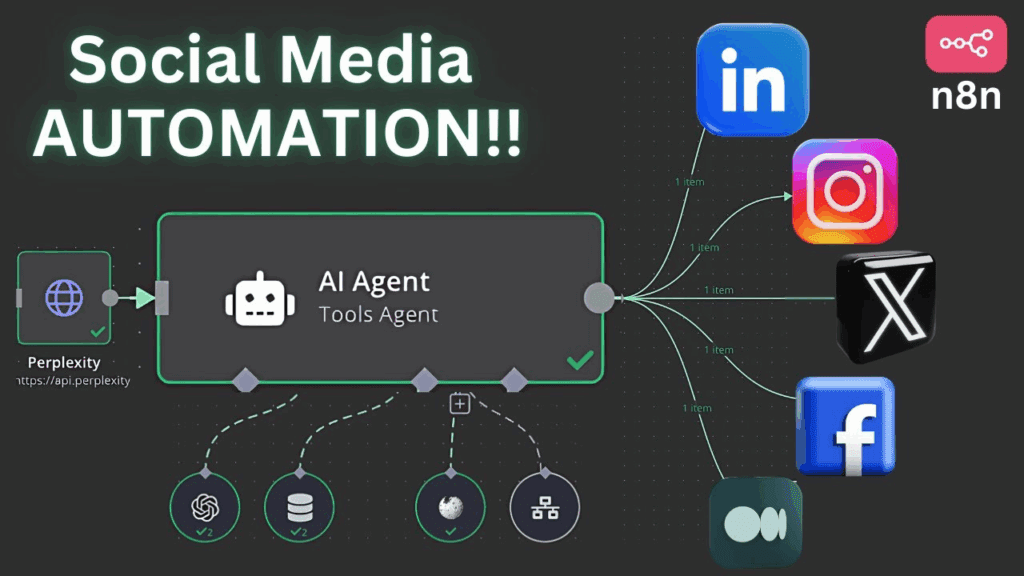
You build the social media scraper AI agent by chaining trigger, scraper, AI, and storage nodes. The agent wakes up on a schedule. It pulls new posts. It then sends them to AI. After that, it stores or forwards the best ones. With a few filters and conditions, you can keep it focused on the signals that matter most for your brand.
Step-By-Step Social Scraper
- Define your goal and decide which platforms and keywords you want to track.
- Add a schedule trigger in n8n so the workflow runs without manual clicks.
- Connect a scraper or API node that collects public posts and comments.
- Pass each post into an AI node that tags, scores, and summarises the text.
- Filter out low quality or irrelevant items so you keep only valuable insights.
- Save the remaining results into a sheet or database and send alerts for top items.
How Do You Turn Scraped Insights Into Videos With AI Automation Tools?
You turn scraped insights into videos with AI automation tools by sending your best ideas into VidAU AI. Once your agent finds winning hooks and repeating pain points, you stop guessing what to create.Instead, you use real audience language for your next batch of video content. This keeps each video rooted in live market data.
From Insight To Script To Video
First, review the rows or records that show strong engagement or emotion. Then turn those snippets into short hooks, bullet point outlines, or simple scripts. Next, feed that text plus your product links or images into VidAU AI. The tool turns them into ready-to-publish short videos. So you move from research to final video in just a few steps.
Closing The Loop On Your Content Workflow
Now you have a closed loop content machine. The scraper agent listens to the market. The AI nodes clean and score the signal. Then VidAU AI converts the best ideas into videos that you can test and refine. Over time, you try new hooks, formats, and calls to action. Meanwhile, the agent keeps finding fresh raw material for you.
Conclusion
AI automation tools and n8n AI help you stop doing repetitive work by hand. With one social media scraper AI agent, you can monitor feeds, get insights, and send ideas straight into VidAU AI for videos. You start small on low-cost plans and scale as you see results. This way, a simple search for AI automation tools turns into a real system that works for you every day.
Frequently Asked Questions
1. Why Are AI Automation Tools Important?
They save time on repetitive tasks and reduce errors. They let you run workflows in the background while you focus on higher value work.
2. How Does n8n Use AI Automation Tools?
n8n connects apps, APIs, and AI models in one visual flow. Data moves through nodes so AI can analyse it and trigger actions.
3. Do I Need Coding Skills To Use n8n AI?
No, basic workflows are drag-and-drop and no-code. Light low-code skills only help when you want advanced logic.
4. Can AI Automation Tools Help With Social Media?
Yes, they can scrape posts, analyse trends, and flag key mentions automatically. So you get structured insights instead of raw noise.
5. How Much Do AI Automation Tools With n8n Cost?
You can start with free or low-cost tiers for n8n, AI models, and scrapers. Costs grow mainly with your usage and scale.
6. Is Social Media Scraping With AI Legal And Safe?
It is generally safe if you follow each platform’s rules and use public data only. You should also respect rate limits and privacy laws.
7. How Do I Turn Scraped Data Into Videos With VidAU AI?
You send the best hooks, pain points, or product mentions into VidAU AI as text, links, or images. Then VidAU AI turns them into ready-to-publish short videos.