Nano Banana 2 Integration Guide: Professional Workflows for Digital Creators in 2024
Most creators download Nano Banana 2, generate a few test images, then abandon it because they can’t figure out where it fits in their production pipeline. The tool isn’t the problem—it’s the integration strategy. This guide shows you exactly how to embed Nano Banana 2 into professional workflows that actually save time and improve output quality.
Strategic Use Cases: Where Nano Banana 2 Delivers Maximum ROI
Concept Visualization for Client Presentations
Nano Banana 2 excels at rapid concept iteration during pre-production. Unlike traditional mood boarding, you can generate style-consistent variations using seed parity techniques. Start with a base prompt and seed value (e.g., seed: 847362), then modify only specific prompt segments while maintaining the seed. This creates variations that share compositional DNA while exploring different aesthetic directions.
Production workflow: Generate 12-16 concept frames in the first client meeting. Use Nano Banana 2’s latent space interpolation to create smooth transitions between approved concepts. Export these as a 24fps preview sequence—clients see motion intent without burning hours in After Effects.
Asset Generation for Motion Graphics Templates
The tool’s strength lies in generating seamless texture maps* and *alpha-ready elements. Configure your prompts with specific technical parameters:
- Append “seamless tileable pattern” for background textures
- Use “isolated on transparent background, studio lighting” for extractable elements
- Specify “8K resolution, extreme detail” then downscale—the detail retention at 1080p is superior to native generation
Pipeline integration: Set up a watched folder system. Nano Banana 2 outputs directly to a designated directory that ComfyUI or your compositor monitors. Apply automated post-processing (contrast normalization, edge detection, alpha extraction) before assets hit your template library.
Storyboard Acceleration for Video Projects
Traditional storyboarding bottlenecks production. Nano Banana 2’s consistency models let you maintain character and environment coherence across frames using ControlNet-style guidance.
Technical approach:
- Generate your hero frame with detailed prompts including camera specifications (“35mm lens, f/2.8, eye-level medium shot”)
- Extract the composition using edge detection or depth mapping
- Feed this control map back through Nano Banana 2 with scene-specific prompts
- Maintain the same scheduler settings (Euler a with 25-30 steps provides optimal quality/speed balance)
This workflow produces 60-80 storyboard frames daily versus 10-15 with manual illustration.
Deep Integration: Connecting Nano Banana 2 to Your Production Pipeline
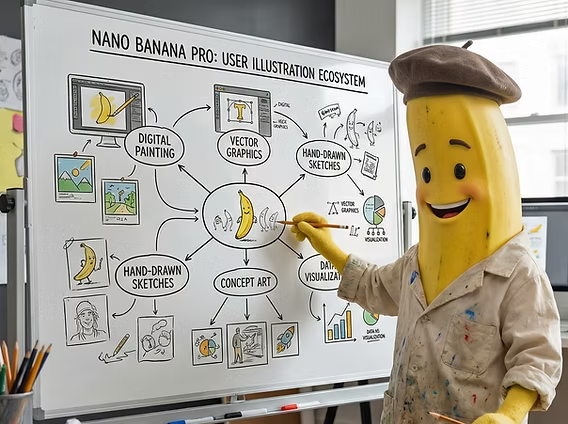
ComfyUI Workflow Nodes
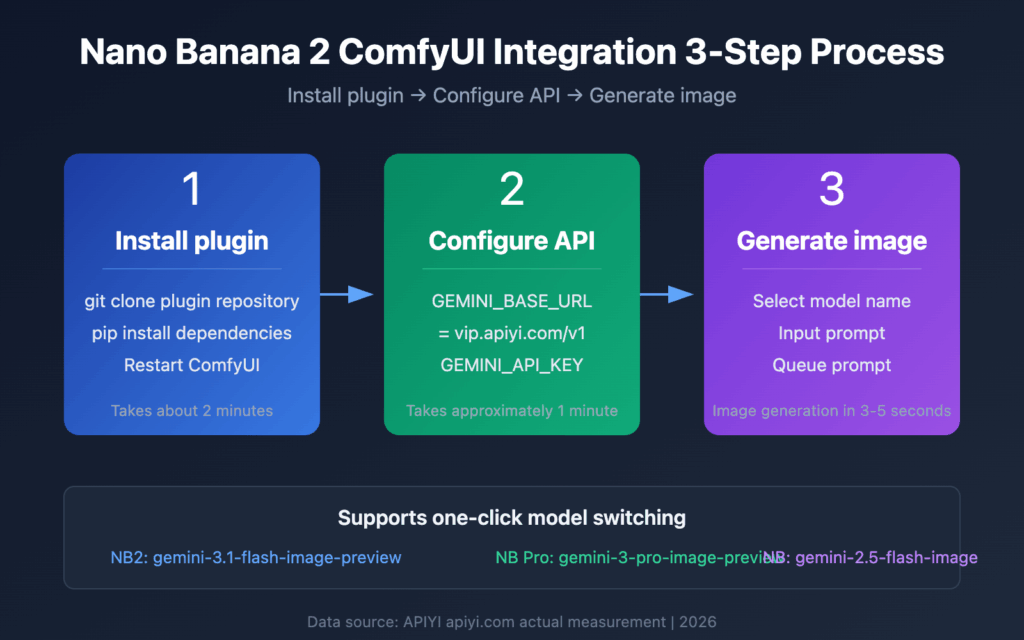
Nano Banana 2‘s API enables deep ComfyUI integration through custom nodes. The critical configuration:
Load Nano Banana 2 Model Node → Prompt Engineering Node (with dynamic variable injection) → Latent Processing Node (for consistency control) → VAE Decode Node → Post-Processing Chain
Key technical considerations:
- Run Nano Banana 2 inference at FP16 precision if VRAM-constrained (minimal quality loss, 40% memory reduction)
- Implement batch processing with different seed ranges to parallelize exploration
- Use the Latent Consistency Module to maintain stylistic coherence across batch generations
Adobe Creative Cloud Bridge
Direct integration requires custom scripting, but the ROI is substantial.
Photoshop ExtendScript automation:
javascript
// Pseudo-code for workflow automation
function nanoBananaIntegration() {
var promptText = app.activeDocument.textLayers[0].contents;
// API call to Nano Banana 2 with extracted prompt
Import generated asset as smart object
// Apply predefined adjustment layers
// Export variations to linked library
}
This script extracts text prompts directly from your Photoshop comp, generates assets, and imports them as smart objects—maintaining editability while automating the generation loop.
After Effects Dynamic Link: Generate background plates and atmospheric elements that update parametrically. Change your Nano Banana 2 prompt in a linked JSON file, and After Effects compositions automatically refresh with new generations.
Figma Plugin Architecture
For UI/UX designers, the Nano Banana 2 Figma plugin transforms asset workflows:
- Selection-based generation: Select a frame, right-click, generate contextual imagery based on frame dimensions and surrounding design elements
- Component variant automation: Create master components with variant properties that trigger different Nano Banana 2 generations
- Design token integration: Link generation parameters to design tokens (colors, spacing values) for systematic visual consistency
Technical implementation: The plugin uses Figma’s REST API to read frame properties, constructs prompts with dimensional constraints (“16:9 aspect ratio, 1920×1080”), and populates frames with generated assets while preserving layout structure.
Advanced Workflows: Prompting Strategies and Time-Optimization Techniques
Structured Prompt Engineering
Professional results require systematic prompt architecture. Use this framework:
[SUBJECT] + [STYLE MODIFIERS] + [TECHNICAL SPECS] + [LIGHTING] + [COMPOSITION] + [QUALITY TAGS]
Example:
“Minimalist product photography of wireless earbuds, Bauhaus design influence, shot on Phase One XF IQ4, soft diffused studio lighting with rim highlights, rule of thirds composition, centered subject, 8K resolution, commercial quality, sharp focus”
Advanced technique—Prompt weighting: Nano Banana 2 supports emphasis syntax. Use parentheses with multipliers:
- (wireless earbuds:1.4) emphasizes the subject
- (minimalist:0.8) applies the style more subtly
Test weight ranges between 0.6-1.6 for optimal control without artifacts.
Negative Prompting for Quality Control
What you exclude matters as much as what you include. Essential negative prompts for professional work:
“blurry, low resolution, artifacts, distorted, oversaturated, watermark, text, signature, frame, border, cropped, out of focus, jpeg compression, pixelated”
Technical insight: Negative prompts influence the diffusion process during denoising steps. Front-load critical exclusions in your negative prompt (first 10-15 tokens have strongest influence).
Seed Management for Iterative Refinement
Professional workflows demand reproducibility. Implement this seed strategy:
- Discovery phase: Random seeds (generate 50+ variations)
- Refinement phase: Lock successful seeds, iterate only on prompt modifications
- Production phase: Document seed + prompt combinations in a version-controlled database
Automation approach: Create a spreadsheet linking project names, prompt versions, seed values, and generation parameters. When a client requests revisions six months later, you can regenerate exact outputs or create consistent derivatives.
Batch Processing Optimization
Time-saving requires systematic batch workflows:
Queue-based generation: Stack 20-30 prompts with varied parameters, run overnight. Use these scheduler settings for quality/speed optimization:
- Euler a scheduler: 25 steps (fast, high quality)
- DPM++ 2M Karras: 20 steps (excellent for photorealistic outputs)
- Latent Consistency Models: 4-8 steps (when speed trumps perfection)
Resource management: If GPU-constrained, implement round-robin processing—alternate between Nano Banana 2 generations and post-processing tasks to maximize hardware utilization.
Style Transfer Workflows
Maintain brand consistency using reference-based generation:
- Generate a “style anchor” image that captures your brand aesthetic
- Extract its latent representation using Nano Banana 2’s embedding tools
- Apply this style embedding to all subsequent generations via the style conditioning parameter
Technical setting: Set style strength between 0.3-0.7 (below 0.3 produces minimal influence; above 0.7 risks overriding prompt intent).
Production-Ready Implementation: From Testing to Deployment
Quality Assurance Checkpoints
Before integrating outputs into client deliverables:
- Resolution verification: Upscale tests—does the image hold detail at 200%+ zoom?
- Artifact inspection: Check problem zones (text regions, fine details, edges) at 100% view
- Color accuracy: Run generations through your color-managed workflow; Nano Banana 2 outputs in sRGB by default
- Consistency validation: Generate 5 variations with identical settings—acceptable outputs should share 70%+ visual similarity
Version Control for AI Assets
Treat AI generations like code:
- Git LFS for storing final outputs
- JSON sidecar files containing full generation metadata (prompt, seed, model version, parameters)
- Tagging system for quick retrieval (client name, project, asset type, generation date)
Performance Benchmarking
Track these metrics to optimize workflows:
- Generation time per image (target: under 15 seconds for standard resolutions)
- Acceptance rate (percentage of generations that meet quality standards without regeneration)
- Iteration count (average prompt refinements needed to reach approved output)
Optimization goal: Professional workflows should achieve 60%+ acceptance rate with under 3 iterations average.
Hybrid Workflows: AI + Traditional Techniques
Nano Banana 2 works best as part of a hybrid pipeline:
- AI generation for base composition and concept
- Manual refinement in Photoshop for critical details
- AI enhancement using targeted inpainting for specific zones
- Final color grading using traditional tools
This approach combines AI speed with human quality control—typically 60% faster than pure manual workflows while maintaining professional standards.
Client Communication Frameworks
When presenting AI-generated assets:
- Transparency: Disclose AI involvement (increasingly required by platforms and regulations)
- Customization emphasis: Showcase the iterative refinement process, not just raw outputs
- Licensing clarity: Ensure your Nano Banana 2 license covers commercial use for client projects
Documentation template: Provide clients with generation reports showing prompt evolution, parameter decisions, and quality assurance steps—this demonstrates professional rigor beyond “AI made it.”
The Integration Imperative
Nano Banana 2 isn’t a replacement for creative skills—it’s a force multiplier. The professionals winning with AI tools aren’t those using them in isolation, but those building systematic integrations that compound efficiency gains across entire production pipelines.
Start with one workflow from this guide. Implement it fully, measure results, refine, then expand. Within 30 days, you’ll have production-hardened systems that reduce concept-to-delivery time by 40-50% while maintaining quality standards that keep clients returning.
The tool is ready. Your workflows are waiting to be transformed.
Frequently Asked Questions
Q: What’s the optimal scheduler setting for professional-quality outputs in Nano Banana 2?
A: For professional work, use Euler a scheduler with 25-30 steps as the baseline. This provides excellent quality/speed balance. For photorealistic outputs, switch to DPM++ 2M Karras scheduler with 20 steps. Only use Latent Consistency Models (4-8 steps) for rapid previews or when speed is critical and you can accept slightly lower fidelity.
Q: How do I maintain visual consistency across multiple Nano Banana 2 generations for a single project?
A: Use seed parity techniques: lock your seed value and only modify specific prompt segments for variations. Additionally, generate a ‘style anchor’ image, extract its latent representation, and apply this as a style conditioning parameter (strength 0.3-0.7) to subsequent generations. This ensures stylistic coherence while allowing content variation.
Q: Can Nano Banana 2 integrate directly with ComfyUI for automated workflows?
A: Yes, Nano Banana 2 supports ComfyUI integration through custom nodes and API calls. Set up a workflow chain: Load Nano Banana 2 Model Node → Prompt Engineering Node → Latent Processing Node → VAE Decode → Post-Processing. Run at FP16 precision if VRAM-limited, and implement batch processing with different seed ranges to parallelize generation and exploration.
Q: What acceptance rate should I target in professional AI generation workflows?
A: Professional workflows should achieve a 60%+ acceptance rate (percentage of generations meeting quality standards without regeneration) with under 3 prompt iterations on average. Track this metric alongside generation time per image (target under 15 seconds for standard resolutions) to optimize your prompting techniques and parameter settings.
Q: How should I structure prompts for consistent professional results?
A: Use this framework: [SUBJECT] + [STYLE MODIFIERS] + [TECHNICAL SPECS] + [LIGHTING] + [COMPOSITION] + [QUALITY TAGS]. Example: ‘Product photography of wireless earbuds, Bauhaus design, shot on Phase One XF IQ4, soft diffused studio lighting, rule of thirds, 8K resolution, commercial quality.’ Use prompt weighting with parentheses (subject:1.4) to emphasize elements, and always include comprehensive negative prompts to exclude artifacts, blur, and compression issues.