AI for Everyone · Claude AI Beginner Guide
AI for Everyone: How to Get Started with Claude AI in 2026
A practical beginner guide to Claude AI, including free access, account setup, first prompts, writing, research, projects, artifacts, file analysis, skills, privacy, paid tiers, and everyday use cases.
By the VidAU Editorial Team · Updated 2026 · 30 min read
Embarking on your AI journey does not have to feel intimidating, especially with tools designed for beginners. This guide to AI for everyone shows how to get started with Claude AI in 2026 using easy-to-follow steps that make advanced AI tools accessible to creators, students, professionals, and everyday users.
Artificial intelligence has become one of the most transformative technologies of our time, yet many people still believe it’s reserved for engineers and technical professionals. That perception changed significantly with tools like Claude AI, developed by Anthropic, which bring sophisticated AI capabilities to everyone regardless of technical background.
Claude AI represents a new generation of AI assistants designed with accessibility in mind. Unlike earlier AI systems that required programming knowledge or complex setup processes, Claude offers an intuitive interface that anyone can navigate.
The philosophy behind making AI accessible to everyone mirrors the educational approach pioneered by AI expert Andrew Ng, who emphasized that AI literacy shouldn’t be limited to technical specialists. In 2026, that vision has become reality with platforms like Claude making powerful language models available through simple conversation.
This guide walks you through everything you need to know to start using Claude AI today, focusing on practical applications you can implement immediately without any coding experience.
Quick summary
- Claude AI is positioned as a beginner-friendly AI assistant that uses natural language conversation instead of coding or technical setup.
- The free tier gives beginners meaningful access to core conversational features, file uploads, artifacts, and useful everyday workflows.
- Claude can support writing, research, learning, document analysis, content creation, customer communication, business planning, and professional productivity.
- Projects, artifacts, files, and skills help users organize work and create reusable AI workflows as they become more comfortable.
- Claude is useful but not flawless: users should verify important information, protect sensitive data, and use human judgment for legal, medical, financial, emotional, and high-stakes decisions.

What Makes Claude AI Different
Claude AI stands out in the crowded field of AI assistants for several reasons that matter to beginners. Understanding these differences helps you appreciate what makes Claude particularly suitable for users taking their first steps with artificial intelligence.
Developed by Anthropic, a company founded by former OpenAI researchers, Claude emphasizes safety and helpfulness as core design principles. This focus translates into an AI assistant that provides thoughtful, measured responses rather than generating content recklessly. For beginners, this means you’re less likely to receive confusing or inappropriate outputs when experimenting with the tool.
Why this matters
The article positions Claude as useful for beginners because it combines a clean interface, natural language instructions, long-context conversations, document analysis, and a safety-focused response style.
Understanding Free Access to Claude AI
The free version of Claude AI grants you access to the core conversational capabilities that define the platform. You can ask questions, request writing assistance, analyze information, and engage in extended dialogues about virtually any topic. These fundamental features alone provide more utility than many people realize, covering the majority of typical use cases.
Free users can interact with Claude’s Sonnet model, which balances performance with accessibility. This model handles most everyday tasks effectively, from drafting emails to explaining complex concepts. While paid tiers offer access to more powerful models, the free tier delivers genuinely useful results that satisfy most beginner requirements.
The free plan includes basic file upload functionality, allowing you to share documents, images, and other files with Claude for analysis. This capability enables practical workflows like summarizing meeting notes, extracting information from PDFs, or getting feedback on written work. You’re not limited to text-only conversations even without paying
Setting Up Your Claude AI Account
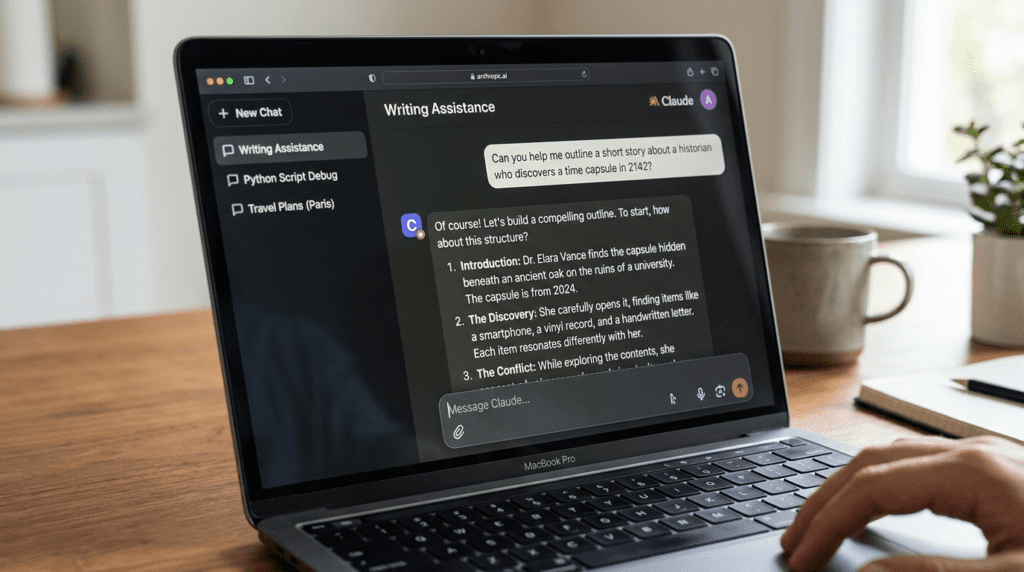
Getting started with Claude AI involves a straightforward setup process that takes just minutes. Following these steps ensures you configure your account properly and understand the basic interface before diving into practical applications.
Visit the official Claude AI website at claude.ai using any modern web browser. The homepage clearly presents the option to get started, either by signing in if you already have an account or creating a new one. Click the sign-up option to begin the registration process.
You’ll see several sign-up methods available. You can create an account using your email address and a password, or you can use single sign-on options through Google or other supported services. Many users find the Google sign-in option fastest, as it eliminates the need to create and remember another password.
If you choose email registration, enter a valid email address and create a secure password. Anthropic will send a verification email to confirm your address. Check your inbox and click the verification link to activate your account. This security step ensures your account remains protected and confirms you control the email address.
Once verified, you’ll land on the main Claude interface. Take a moment to familiarize yourself with the layout. The center of the screen displays the conversation area where you’ll interact with Claude. On the left side, you’ll see a sidebar for starting new chats and accessing previous conversations. The interface intentionally keeps things simple to avoid overwhelming new users.
Your First Conversation with Claude
Starting your first conversation with Claude can feel uncertain if you’ve never used an AI assistant before. Understanding how to frame your initial requests and what to expect from responses helps build confidence and demonstrates the tool’s practical value.
Begin with something straightforward that addresses a real need. Instead of testing Claude with abstract questions, try a practical request that would actually help you. For example, you might ask Claude to help you write a professional email, explain a concept you’re trying to understand, or provide suggestions for a project you’re working on.
Let’s walk through an example. Suppose you need to write an email to a client about a project delay. Simply type in the conversation box: “I need help writing a professional email to a client explaining that our project will be delayed by one week due to unexpected technical issues. The tone should be apologetic but confident that we’ll deliver quality work.”
Tip
Start with a real task instead of a test question. Claude becomes easier to understand when you ask it to help with something practical, such as an email, interview preparation, explanation, list, or brainstorming session.
Practical Writing Applications for Beginners
Writing represents one of the most immediately useful applications of Claude AI for non-technical users. Understanding how to leverage Claude for various writing tasks demonstrates the practical value of AI assistance while building your confidence with the tool.
Email composition stands out as a daily writing task where Claude excels. Most professionals spend significant time crafting emails, and Claude can dramatically accelerate this process while improving quality. Instead of staring at a blank message window, describe what you need: “I need to write an email to my team about moving next Wednesday’s meeting to Friday. Keep it friendly and brief.” Claude generates a complete draft that you can send as-is or adjust to match your personal style.
Using Claude for Research and Learning
Claude AI transforms how beginners approach research and learning by making information accessible through conversation rather than traditional search and reading. Understanding these applications helps you leverage AI for personal growth and knowledge acquisition.
Explaining complex topics in simple language represents one of Claude’s most valuable educational applications. When you encounter a concept you don’t understand, ask Claude to explain it as if you were a beginner: “I keep hearing about blockchain but don’t understand what it is. Can you explain it in simple terms without technical jargon?” Claude breaks down complicated subjects into clear explanations that build understanding progressively.
This ability to adapt explanations to your knowledge level makes Claude an exceptionally patient teacher. If the first explanation still contains confusing elements, ask follow-up questions: “What did you mean by ‘distributed ledger’?” or “Can you give me a real-world example?” Claude continues refining the explanation until you grasp the concept, something difficult to achieve with static written content.
Research tasks become more efficient when you use Claude to process information rather than reading everything yourself. Suppose you’re exploring a new hobby like photography. Instead of reading dozens of beginner guides, describe your situation to Claude: “I’m interested in starting photography as a hobby. I have a DSDSLR camera but no experience. What should I learn first?” Claude provides a structured learning path based on your specific situation.
Understanding Projects and Organization in Claude
Projects in Claude function like dedicated workspaces for specific topics or ongoing tasks. Think of each project as a folder that contains related conversations and context information. When you work within a project, Claude has access to custom instructions and reference materials specific to that project, making responses more relevant and reducing repetitive explanations.
Creating a project starts with clicking the Projects option in Claude’s sidebar. You’ll give your project a name that describes its purpose, such as “Marketing Content,” “Client Communications,” or “Learning Web Development.” The name helps you quickly identify which project to use for different tasks.
For beginners, starting with one or two projects makes sense as you learn the system. You might begin with a general “Work Tasks” project and a “Learning” project. As you become more comfortable, you can create additional projects for more specific needs.
Artifacts: Working with Generated Content
The Artifacts feature in Claude changes how you view and use generated content, making it easier to work with longer documents, code, and structured outputs. Understanding artifacts helps you make better use of Claude’s capabilities, especially for content creation tasks.
When Claude generates certain types of content, it automatically displays that content in the artifacts panel, which appears as a separate section alongside the conversation. This separation keeps the chat focused on your dialogue with Claude while giving generated content a dedicated viewing area where you can interact with it independently.
Artifacts appear when Claude creates content that benefits from isolated viewing, such as complete articles, reports, formatted documents, code snippets, or structured data. The system automatically determines when to use artifacts based on the content type and length, so you don’t need to request this feature explicitly.
Working with Files and Documents
Claude’s ability to read and analyze files transforms how you handle documents, extending the AI’s usefulness far beyond text conversation. Understanding file capabilities helps you leverage Claude for practical tasks involving existing content.
Uploading files to Claude works through a simple attachment button near the message input area. Click this button to select files from your computer, or drag and drop files directly into the conversation window. The process mirrors file sharing in email or messaging apps, making it immediately familiar even for new users.
Claude supports various file types including PDFs, text documents, images, spreadsheets, and presentation files. This broad compatibility means you can share virtually any document you work with regularly. Each file type has size limits, but these limits accommodate typical business documents and personal files without issues.
Once you upload a file, Claude analyzes its content and can respond to questions or perform tasks based on what the file contains. For example, upload a PDF report and ask: “What are the three main conclusions in this report?” Claude reads the document and provides the requested summary, saving you from reading the entire report yourself.
Claude Skills: Creating Reusable Workflows
This represent one of the platform’s more advanced features that beginners can still leverage effectively. Skills let you create reusable templates for tasks you perform regularly, making repetitive work faster and more consistent.
A skill in Claude functions like a custom instruction set for a specific task. Instead of explaining what you need each time you perform a common task, you create a skill once and then invoke it whenever needed. The skill contains all the instructions and preferences that Claude should follow for that particular task.
Comparing Claude AI and ChatGPT for Beginners
Many people exploring AI assistants wonder about the differences between Claude AI and ChatGPT, the two most prominent conversational AI platforms. Understanding these differences helps you choose the right tool for your needs or use both strategically.
Both Claude and ChatGPT use large language models to understand and generate text, meaning they share fundamental capabilities. You can use either platform for writing assistance, question answering, brainstorming, research, and countless other language-based tasks. The core experience of conversing with an AI assistant feels similar between the two platforms.
Interfacial design represents one noticeable difference. Claude emphasizes simplicity with a cleaner, more minimalist interface that some beginners find less intimidating. ChatGPT offers more visible features and options in its interface, which provides quick access to functionality but can feel busier. Your preference here depends on whether you want visible features or maximum simplicity.
Practical Use Cases Across Different Fields
Claude AI’s versatility means it serves valuable functions across numerous fields and use cases. Examining specific applications helps beginners understand how AI fits into their particular situations.
Content creators benefit from Claude across the entire creation process. Brainstorm video ideas, develop scripts, create descriptions and titles, draft promotional social media posts, and analyze audience feedback. YouTubers, bloggers, podcasters, and social media influencers find Claude accelerates content production while maintaining quality.
For video creators specifically, AI video generation tools like VidAU AI complement Claude’s text capabilities by transforming scripts and concepts into visual content. After using Claude to develop your video script and talking points, platforms designed for video production can help bring those ideas to visual life, particularly useful for product demonstrations, advertisements, or educational content where you need consistent video output.
Turn AI Ideas into Videos
Use VidAU AI to transform Claude-assisted scripts, prompts, product ideas, educational concepts, and marketing messages into polished AI videos for ads, tutorials, social content, and multilingual campaigns.
VidAU workflow
From Claude-assisted planning to AI video output
- Use Claude to shape the idea: Brainstorm topics, outline the message, draft scripts, write product descriptions, or simplify complex concepts for a target audience.
- Prepare the video structure: Turn Claude’s text output into a short video script, scene list, voiceover outline, captions, hooks, and call-to-action copy.
- Create with VidAU AI: Convert the script into AI video content using visuals, avatars, voiceover, product messaging, subtitles, or campaign-ready video templates.
- Repurpose across channels: Adapt the same idea into short-form ads, explainers, tutorials, product demos, social posts, and multilingual marketing assets.
Understanding Claude’s Limitations

While Claude AI provides remarkable capabilities, understanding its limitations helps you use the tool effectively and avoid frustration. Knowing what Claude cannot do prevents unrealistic expectations and helps you identify situations where human expertise remains necessary.
Claude operates within knowledge limitations based on its training data. The model was trained on information available up to a specific date, meaning it lacks inherent knowledge of events, developments, or information emerging after that training cutoff. While web search capabilities help address this limitation in some regions, Claude’s core knowledge remains bound by its training period.
Watch out
Claude can be extremely useful, but the article emphasizes that users should verify important information, protect sensitive data, and avoid relying on AI alone for legal, medical, financial, emotional, or high-stakes decisions.
Tips for Writing Better Prompts
The quality of Claude’s responses directly relates to how you frame your requests. Learning to write effective prompts dramatically improves your results and makes Claude more valuable for practical work.
Specificity transforms generic outputs into useful results. Instead of “write an email,” specify “write a 150-word email to a client apologizing for a shipment delay, offering a 10% discount on their next order, and confirming the new delivery date of March 15.” The specific prompt gives Claude all necessary information to create exactly what you need.
Context shapes Claude’s understanding of your needs. Provide background information that helps Claude tailor responses appropriately. “I’m preparing a presentation for senior executives who are not technical but need to understand AI’s business impact” gives Claude crucial context about audience and purpose.
Desired format should be explicitly stated when you have preferences. Specify “create a bulleted list,” “write in paragraph form,” “format as a table,” or “structure as a Q&A” depending on your needs. Claude adapts output format based on your instructions rather than guessing what you prefer.
Examples illuminate what you want better than abstract descriptions. When possible, show Claude an example: “Write something similar to this tone and style: [example text].” Claude learns from examples effectively, making this technique particularly powerful.
Upgrading from Free to Paid Tiers
While the free tier of Claude AI provides substantial value, understanding paid options helps you determine whether upgrading makes sense for your usage patterns and needs. Making this decision involves assessing what additional capabilities justify subscription costs.
Claude offers multiple paid tiers including Pro and Max plans, each providing different levels of access and features. The specific pricing and feature sets may vary by region and change over time, so verify current offerings on Anthropic’s website when considering an upgrade.
Primary differences between free and paid tiers typically involve usage limits, model access, and advanced features. Paid subscribers generally get higher message limits, access to more powerful models, faster response times during peak periods, and early access to new features.
Learning Resources and Community Support
Continuing education about Claude AI and AI tools generally helps you maximize value from these technologies. Various resources support learning at all skill levels, from complete beginners to advanced users developing sophisticated workflows.
Official documentation from Anthropic provides authoritative information about Claude’s features, capabilities, and best practices. The company’s website includes guides, tutorials, and reference materials that explain platform features systematically. Starting with official resources ensures you learn accurate, up-to-date information directly from Claude’s creators.
Video tutorials on platforms like YouTube offer visual learning that many users find more accessible than text documentation. Creators like Kevin Stratvert, Darrel Wilson, and AI Productivity Coach regularly publish detailed tutorials covering Claude features. These videos show exactly how to perform tasks within Claude’s interface, making it easy to follow along.
Online courses focused on AI literacy help build conceptual understanding alongside practical skills. Courses like “AI for Everyone” by Andrew Ng provide frameworks for thinking about AI capabilities and limitations, complementing the hands-on learning you do with Claude itself.
Key takeaway
Conclusion
Claude AI makes artificial intelligence approachable for beginners by replacing technical setup with plain-language conversation. The article’s core message is that anyone can start with practical tasks: drafting emails, summarizing documents, learning new concepts, organizing research, improving writing, analyzing files, creating projects, and gradually building reusable skills.
The most useful approach is to start with the free tier, practice with real tasks, refine outputs through follow-up instructions, use projects and artifacts as your work grows, and stay mindful of privacy, verification, and professional judgment. For creators and businesses, Claude can also support the planning stage of video production, while VidAU AI can help turn those scripts, ideas, product messages, and educational concepts into polished AI videos for campaigns and social media.
FAQ
Here are answers to common questions about Claude AI, free access, coding skills, ChatGPT comparison, artifacts, file uploads, Anthropic, pricing, web search, prompts, privacy, productivity, and fact-checking.
Is Claude AI completely free to use?
Claude AI offers a free tier that provides access to core conversational features, the Sonnet model, basic file upload capabilities, and artifact viewing. Free users can have meaningful interactions and accomplish real work without paying.
Do I need coding skills to use Claude AI?
No coding skills are required to use Claude AI effectively. The platform is designed specifically for natural language interaction, meaning you communicate with Claude using normal conversational English rather than programming languages. You can accomplish writing tasks, research, analysis, and countless other applications without any technical background.
How does Claude AI compare to ChatGPT?
Claude AI and ChatGPT both provide conversational AI capabilities using large language models, but they differ in interface design, response style, and specific features. Claude tends toward longer, more detailed responses and emphasizes a cleaner interface with features like artifacts for viewing generated content separately.
What are Claude AI artifacts and how do I use them?
Artifacts are Claude’s feature for displaying generated content in a dedicated viewing panel separate from the conversation flow. When Claude creates longer documents, code, or structured content, it automatically places these outputs in the artifact panel alongside your chat. This separation keeps conversations focused while giving you a clean workspace to view, copy, and edit generated content.
Can I upload documents to Claude AI for analysis?
Yes, Claude AI supports file uploads across various formats including PDFs, text documents, images, spreadsheets, and presentations. You can upload files by clicking the attachment button near the message input or by dragging and dropping files into the conversation window.
Who created Claude AI and who owns it?
Claude AI was developed by Anthropic, an artificial intelligence safety company founded in 2021 by siblings Dario Amodei and Daniela Amodei, along with several other former OpenAI researchers.
What is the Claude AI subscription price?
Claude AI pricing includes a free tier plus paid subscription options. While exact pricing may vary by region and change over time, Anthropic typically offers Claude Pro and Claude Max as paid tiers.
Can Claude AI search the internet for current information?
Claude AI includes web search capabilities in certain regions and for certain account types, allowing the system to find current information beyond its training data. When web search is available, Claude can look up recent events, current data, and information published after its knowledge cutoff date.
How do I write better prompts for Claude AI?
Effective prompts for Claude include specific details about what you need, context about how you’ll use the output, desired format and length, appropriate tone and style, and any constraints or requirements.
Is Claude AI safe and private to use?
Claude AI implements security measures including encrypted data transmission and operates under Anthropic’s privacy policy governing data handling practices. However, like all cloud-based AI services, Claude requires sending your conversations to Anthropic’s servers for processing, meaning the company has technical access to what you share.
Can Claude AI replace my job or make me more productive?
Claude AI serves as a productivity tool that augments human capabilities rather than replacing workers in most cases. The AI excels at handling routine writing tasks, analyzing information, organizing data, brainstorming ideas, and explaining concepts, which can significantly boost productivity.
What should I do if Claude gives me incorrect information?
When Claude provides incorrect information, first verify facts independently using reliable sources, especially for important decisions or information you’ll share with others. AI systems occasionally generate plausible-sounding but inaccurate content, a phenomenon sometimes called “hallucination.” Don’t assume Claude’s confident tone indicates accuracy.