Best Free AI video generator (Top 18) for long video content

Long video content now drives deeper engagement across YouTube, online courses, and storytelling platforms. At the same time, creators want a free AI video generator that handles long video content without breaking flow, quality, or consistency. This article focuses strictly on the best free AI video generator tools for long video content, showing you how to create extended videos that hold attention from start to finish. You will also see why VidAU stands out as the most reliable option for building long-form videos with stable output and fast generation.
- Best Free AI video generator (Top 18) for long video content
- Why a free AI video generator is essential for long video content today
- 18 free AI video generator tools for long video content that deliver real results
- Free AI video generator tools compared for long video content
- How to create long video content using a free AI video generator step by step
- How to use VidAU Video V2.2 as a free AI video generator for long video content
- How VidAU improves long video workflows with a free AI video generator
- Conclusion
- FAQs
- What is the best free AI video generator for long video content?
- What is the best free AI video generator for long video content?
- How do I create long videos with a free AI video generator?
- Can free AI video generator tools create 1080p videos?
- How long can AI-generated videos be?
- Which free AI video generator is best for beginners?
Why a free AI video generator is essential for long video content today
A free AI video generator helps you create long video content faster while maintaining structure and visual consistency. Long-form videos now perform better across platforms because they increase watch time and retention. As a result, creators, brands, and educators now focus more on long video content instead of short clips.
When you use a free AI video generator for long video content, you reduce production time and cost. You no longer need large teams, expensive editing software, or long production cycles. Instead, you generate scenes, refine them, and build complete videos step by step.
This approach works best for:
- YouTube videos and storytelling content
- Online courses and tutorials
- Product demonstrations and ads
- Educational explainers
With the right workflow, you turn simple prompts into structured long video content that keeps viewers engaged.
18 free AI video generator tools for long video content that deliver real results
Each free AI video generator below supports long video content through clip generation and structured workflows.
VidAU Video V2.2
VidAU ranks first because it delivers stable output and strong scene consistency. You generate multiple variations and keep the best one, which reduces waste.
It supports:
- 1080p export
- Seed control for repeatable results
- First-frame anchoring for consistency
This makes it suitable for storytelling, product videos, and educational content.
Pika Labs
Pika Labs focuses on cinematic motion and visual storytelling. It performs well for longer content when you split scenes.
It offers:
- Smooth camera transitions
- Stylized animation outputs
- Fast generation time
Kaiber AI
Kaiber AI works well for music and visual storytelling. You can create long sequences by linking clips.
It supports:
- Audio-driven visuals
- Style consistency
- Prompt-based control
DomoAI
DomoAI helps with character animation and visual transformation. It works well for storytelling content.
It includes:
- Image to video conversion
- Animation styles
- Facial motion control
PixVerse AI
PixVerse delivers structured outputs with good motion control. It suits creators building educational or explainer videos.
It provides:
- Prompt accuracy
- Scene variation
- Stable rendering
Moonvalley AI
Moonvalley focuses on realism and cinematic output. It works best for narrative-driven videos.
It offers:
- Realistic motion
- Scene depth
- Lighting control
Neural Frames
Neural Frames supports long-form music visuals and looping animations.
It includes:
- Frame-level control
- Visual rhythm matching
- Continuous loop generation
LeiaPix AI
LeiaPix converts images into motion-based videos. You can build long content from multiple image scenes.
It supports:
- Depth animation
- Image-based storytelling
- Smooth transitions
Wonder Studio
Wonder Studio focuses on character integration into scenes. It suits storytelling and cinematic production.
It offers:
- Character tracking
- Scene replacement
- Motion alignment
DeepBrain AI Studios
DeepBrain creates presenter-style videos for long content like courses and tutorials.
It supports:
- AI avatars
- Script-based generation
- Voice integration
HeyGen
HeyGen works well for talking-head videos and training content.
It includes:
- Avatar generation
- Multi-language voice
- Scene templates
Elai.io
Elai focuses on educational and explainer videos.
It offers:
- Text to video conversion
- Presenter-based output
- Slide-style scenes
Runway Gen-3
Runway provides advanced motion control and high-quality visuals.
It supports:
- Cinematic generation
- Scene editing
- Prompt refinement
Luma Dream Machine
Luma generates realistic motion scenes and environmental depth.
It includes:
- Real-world physics motion
- Scene realism
- High-quality rendering
Sora
Sora produces detailed long scenes with strong motion continuity.
It supports:
- Complex prompts
- Realistic movement
- Scene expansion
Veo
Veo delivers high-quality video generation with strong prompt understanding.
It offers:
- Lighting control
- Camera movement
- Scene consistency
Stable Video Diffusion
This tool converts images into motion sequences for long-form content.
It supports:
- Frame interpolation
- Image animation
- Scene expansion
Animoto AI
Animoto focuses on marketing videos and storytelling content.
It includes:
- Drag-and-drop editing
- Scene templates
- Easy export
Free AI video generator tools compared for long video content
Before choosing a tool, you need a quick comparison to understand what each one offers beyond generation.
| Feature | What to expect |
| Video Length | Short clips combined into long videos |
| Output Quality | 720p to 1080p standard |
| Scene Consistency | Controlled through prompts and seeds |
| Audio Support | Voice and background sound integration |
| Workflow | Scene-by-scene generation |
This table helps you choose based on your workflow, not just features.
How to create long video content using a free AI video generator step by step
You create long video content using a free AI video generator by structuring your idea into scenes and generating them in sequence. This process gives you control and reduces errors.
Start with a clear structure before generation:
- Break your video into scenes
- Write short prompts for each scene
- Define camera angles and motion
- Add voice or script guidance
After that, follow this flow:
- Generate each scene separately
- Maintain the same prompt style for consistency
- Export clips in the same resolution
- Stitch clips into a single timeline
- Add voiceover and background sound
This method works across most tools listed below.
How to use VidAU Video V2.2 as a free AI video generator for long video content
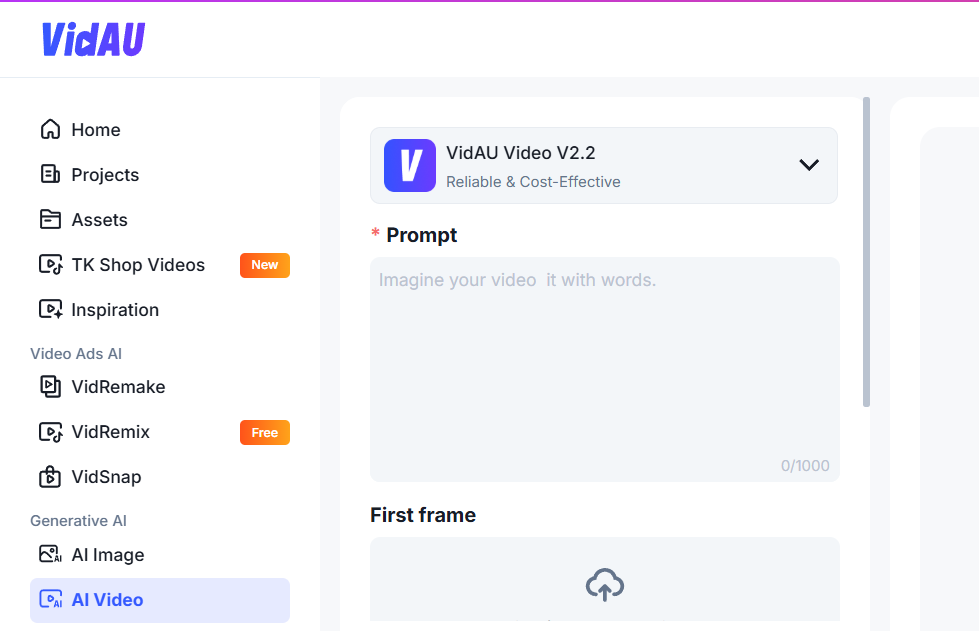
You use VidAU Video V2.2 to create long video content by generating multiple high-quality clips and combining them into a full sequence. VidAU stands out because it maintains visual consistency better than most tools.
VidAU Video V2.2 supports 720p to 1080p output, short clip generation up to 8 seconds, and multiple variations per prompt. This setup helps you build long videos piece by piece without losing quality.
Follow these steps:
- Enter your prompt with clear scene direction
- Use first-frame control to guide consistency
- Generate 4 variations and select the best output
- Keep the same seed for similar scenes
- Export clips in 1080p
- Combine clips into a long video using editing tools
With this process, you create structured long videos that feel continuous.
How VidAU improves long video workflows with a free AI video generator
VidAU improves long video workflows by reducing inconsistencies across scenes and speeding up production time. Many creators struggle with matching scenes, but VidAU solves this with seed control and variation selection.
You get:
- Faster generation cycles
- More consistent visuals
- Less editing time after export
This improves output quality and saves production hours.
Conclusion
Long video creation requires more than fast generation. You need a free AI video generator that keeps your scenes connected, your visuals stable, and your output clean from start to finish. Many tools produce short clips, but only a few help you build long video content that feels complete and structured.
VidAU leads this space because it gives you control over every stage of production. You generate multiple variations, maintain consistency with seed control, and export in high quality without losing detail. This reduces editing time and improves the final output.
Other tools on this list support different goals. Some focus on cinematic visuals, while others work better for education, product videos, or storytelling. When you combine the right tool with a clear scene structure, you produce long videos that keep viewers engaged and increase watch time.
If you want to create long video content consistently, start with VidAU and build your workflow around structured scene generation.
FAQs
What is the best free AI video generator for long video content?
VidAU ranks as the best free AI video generator for long video content because it maintains scene consistency, supports high-quality export, and allows you to generate multiple variations for better cont
What is the best free AI video generator for long video content?
VidAU stands out due to consistency, fast generation, and strong control features.
How do I create long videos with a free AI video generator?
Break your video into scenes, generate each clip, and combine them into a full sequence.
Can free AI video generator tools create 1080p videos?
Some tools like VidAU support up to 1080p export for better quality.
How long can AI-generated videos be?
Most tools generate short clips, but you combine them into longer videos.
Which free AI video generator is best for beginners?
Tools like VidAU and Animoto offer simple workflows and easy setup.