Claude’s Visual Builder vs Paid Design Tools: Complete 2026 Feature Comparison for Developers
This Free Claude Feature Just Killed Your $50/Month Design Subscription
Claude’s new visual builder is eliminating the need for expensive design subscriptions that developers and startups have been paying for years. While Figma charges $15 per editor per month and Adobe XD runs $54.99/month for the full Creative Cloud suite, Claude’s Artifacts visual builder is completely free with your existing Claude subscription—and it’s specifically built for the design-to-code workflow that most developers actually need.
What Claude’s Visual Builder Can Actually Do
Claude’s visual builder, accessible through Artifacts, transforms natural language descriptions into interactive, production-ready components. Unlike traditional design tools that require manual pixel-pushing, Claude generates actual React components, SVG graphics, and interactive prototypes directly from conversational prompts.
Real-Time Component Generation
The visual builder creates fully functional UI components with immediate preview capabilities. When you describe “a responsive pricing card with three tiers, hover animations, and a gradient background,” Claude generates:
- Clean, semantic HTML5 structure
- Modular CSS with custom properties for theming
- Vanilla JavaScript or React code (your choice)
- Responsive breakpoints automatically configured
- Accessibility attributes (ARIA labels, keyboard navigation)
The iteration speed is revolutionary. Instead of opening Figma, creating artboards, configuring auto-layout, exporting assets, and then manually coding the component, you simply refine your prompt. “Make the middle tier more prominent” or “add a subtle pulse animation to the CTA button” produces instant updates.
Interactive Prototype Creation
Claude builds functional prototypes with actual logic, not clickable mockups. Request “a multi-step form with validation” and you receive:
- Working form validation logic
- State management for step progression
- Error handling with user feedback
- Progress indicators that actually calculate completion
- Submission handling with loading states
This bridges the gap between static design files and functional code that traditional design tools struggle with. Figma prototypes can show navigation flows, but they can’t validate email formats or calculate dynamic pricing—Claude’s prototypes can.
SVG Graphics and Data Visualization
The visual builder excels at generating scalable vector graphics and data visualizations. Ask for “an animated loading spinner with three orbiting circles” or “a bar chart showing quarterly revenue with hover tooltips” and Claude produces:
- Optimized SVG code with clean path data
- CSS or JavaScript animations with configurable timing
- Responsive sizing that scales perfectly
- Interactive elements with event handlers
- Customizable color schemes and styling
For data visualization specifically, Claude can generate D3.js charts, Chart.js implementations, or pure SVG/CSS solutions depending on your requirements—all without opening Illustrator or purchasing a specialized charting library.
Rapid Design System Scaffolding
Claude can establish basic design system foundations in minutes. Describe your brand requirements—”Create button variants for a SaaS product: primary (blue), secondary (gray), danger (red), with small, medium, and large sizes”—and receive:
- Complete button component library
- CSS custom properties for consistent theming
- Documentation comments explaining usage
- Variant classes following BEM or utility-first conventions
- Dark mode alternatives automatically considered
While this doesn’t replace mature design systems like Material-UI or Ant Design, it provides the 80% solution for startups and solo developers who need consistent UI components without design team overhead.
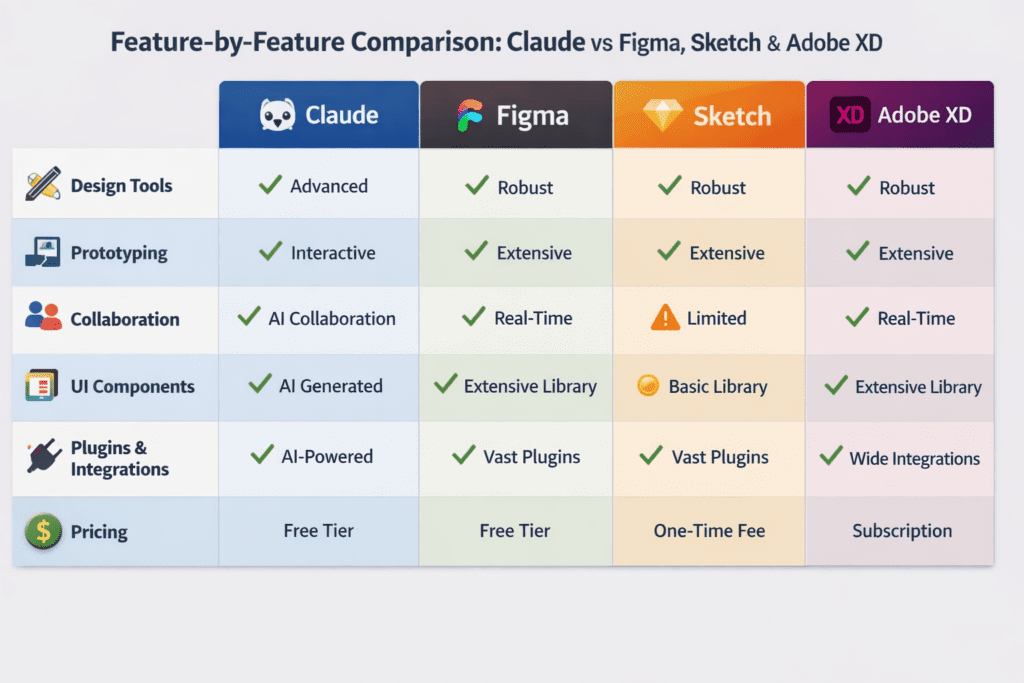
Feature-by-Feature Comparison: Claude vs Figma, Sketch, and Adobe XD
Interface Design Capabilities
Figma Strengths:
- Pixel-perfect visual control with precise positioning
- Advanced vector editing with pen tools and boolean operations
- Collaborative real-time editing with multiplayer cursors
- Extensive plugin ecosystem (over 1,000 community plugins)
- Design system management with shared libraries
- Version history with branching and merging
Claude Visual Builder Strengths:
- Zero learning curve for developers familiar with natural language
- Instant code generation without manual export/translation
- Logic and interactivity built into prototypes from the start
- Rapid iteration through conversational refinement
- Accessibility features included by default
- No file management or organization overhead
Verdict: Figma wins for pixel-perfect visual design, complex illustrations, and large team collaboration. Claude wins for speed-to-code, logic-heavy prototypes, and solo developer workflows.
Prototyping and Interactivity
Adobe XD/Figma Prototyping:
- Click-through prototypes with transition animations
- Preset easing curves and duration controls
- Component states (hover, pressed, disabled)
- Auto-animate for morphing transitions
- Sharing via web links with comment threads
Claude Interactive Components:
- Actual JavaScript logic and state management
- API integration simulation with mock data
- Form validation and data processing
- Conditional rendering based on user input
- Error states and edge case handling
- Direct deployment-ready code output
Verdict: Traditional tools create better visual prototypes for user testing and stakeholder presentations. Claude creates functional prototypes that test actual logic and can transition directly to development.
Asset Generation and Export
Sketch/Figma Export Features:
- Multi-resolution export (1x, 2x, 3x)
- SVG, PNG, JPG format options
- Slice-based selective exporting
- CSS code inspection and copying
- Developer handoff with measurements and specs
Claude Code Generation:
- Generates semantic HTML without export step
- Creates optimized inline SVG code
- Produces modular CSS with custom properties
- Component-based architecture from the start
- No asset management or file organization needed
Verdict: For design-to-developer handoff workflows with separate roles, traditional tools provide better specifications. For developer-designers building their own products, Claude eliminates the handoff entirely.
Collaboration and Design Systems
Figma Collaboration Features:
- Real-time multiplayer editing with cursor tracking
- Comment threads on specific elements
- Shared component libraries across files
- Style guides with enforced constraints
- Permission management for teams
- Version control with automatic saving
Claude Collaboration Model:
- Share conversation links with generated code
- Copy/paste code directly to repositories
- Describe modifications in shared language
- No version conflicts or file locking
- Unlimited free “seats” (anyone with Claude access)
Verdict: Figma is superior for structured design teams with multiple specialized roles. Claude works better for small technical teams where everyone codes.
Learning Curve and Onboarding
Traditional Design Tool Investment:
- 20-40 hours to reach basic proficiency
- 100+ hours for advanced features (components, auto-layout, variants)
- Understanding design principles and best practices
- Learning tool-specific terminology and workflows
- Regular updates with interface changes
Claude Visual Builder Investment:
- 1-2 hours to understand prompt engineering basics
- Immediate productivity if you understand HTML/CSS/JavaScript
- Natural language eliminates tool-specific knowledge
- No interface memorization required
- Conversational refinement instead of tutorial watching
Verdict: Claude has dramatically lower barriers to entry for developers. Designers accustomed to visual tools may find the text-based interface limiting initially.
Cost Analysis
Paid Tool Subscription Costs (Annual):
- Figma Professional: $180/year per editor
- Adobe XD (Creative Cloud All Apps): $660/year
- Sketch: $99/year (Mac only)
- Total for all three: $939/year per user
Claude Cost Structure:
- Claude Pro: $240/year (includes all features)
- No per-project or per-editor fees
- Unlimited artifact generation
- No export limits or usage tiers
Savings Calculation: A solo developer using Figma and Adobe XD saves $600-700/year by switching to Claude. A three-person startup saves $1,800-2,100 annually.
Who Should Switch and Who Shouldn’t: Decision Framework
Ideal Candidates for Switching to Claude
Solo Developer-Designers (Strongest Fit)
If you’re a full-stack developer who handles your own design work, Claude likely replaces 80-90% of your paid tool usage. You should switch if:
- You spend more time implementing designs than creating them
- Your design needs are primarily UI components and layouts
- You prefer iterating in code rather than visual editors
- You’re building functional prototypes, not marketing materials
- You’re comfortable with HTML/CSS/JavaScript fundamentals
- Budget constraints make $50-100/month subscriptions painful
Example workflow: Building a SaaS dashboard with standard components (tables, forms, charts, navigation). Claude generates each component with working logic, you refine through conversation, then integrate into your React/Vue/Svelte application.
Early-Stage Startup Teams (Strong Fit)
Pre-seed and seed-stage startups without dedicated designers should seriously consider Claude if:
- Your team is primarily engineers (2-5 technical co-founders)
- You’re building MVPs where speed matters more than pixel perfection
- You need functional prototypes for user testing, not investor pitch decks
- Your product is developer-facing (DevTools, APIs, technical platforms)
- Everyone on the team codes and can review generated components
- You’re operating on runway-conscious budgets
Example workflow: Testing product ideas rapidly by generating landing pages, signup flows, and dashboard mockups. Each variation takes 10-15 minutes instead of 3-4 hours in Figma plus implementation time.
Freelancers and Consultants Building Client MVPs (Good Fit)
Consultants who deliver working prototypes rather than static designs benefit from:
- Dramatically faster client iteration cycles (same-call revisions)
- Code deliverables that clients can immediately use
- Lower tool overhead that improves project margins
- Ability to handle more concurrent projects
- Reduced handoff friction between design and development phases
Example workflow: Client calls describe desired features conversationally. You use Claude during screenshares to generate components in real-time, showing immediate results and incorporating feedback instantly.
Who Should Absolutely Keep Their Paid Design Tools
Dedicated UI/UX Designers (Not a Fit)
If design is your primary discipline and you rarely code, traditional tools remain essential:
- You need pixel-perfect control for brand consistency
- Your work involves complex custom illustrations or iconography
- You create marketing materials, not just UI components
- You present designs to stakeholders who don’t understand code
- Your workflow depends on visual feedback and precise positioning
- You manage design systems across multiple products
Why: Claude generates functional code but doesn’t provide the visual canvas, layer management, and precise control that design professionals require. You can’t “feel” the design the same way.
Large Product Teams with Specialized Roles (Not a Fit)
Organizations with dedicated design, engineering, and product teams need structured collaboration:
- Design-to-engineering handoff requires specifications and measurements
- Multiple designers work on shared component libraries simultaneously
- Stakeholders review designs before development begins
- Design systems require governance and version control
- Accessibility audits need visual layer inspection
- Developers and designers have distinct workflows and tools
Why: Claude’s conversation-based model doesn’t scale to teams where designs pass through multiple review stages and require formal specifications.
Agencies Creating Brand Identity and Marketing Materials (Not a Fit)
If your work extends beyond digital products into brand design:
- Creating logos, brand guidelines, and visual identity systems
- Designing print materials, packaging, or physical products
- Producing marketing websites with custom illustrations
- Managing client presentations with polished mockups
- Delivering asset packages for non-technical stakeholders
Why: Claude focuses on functional web components and interactivity, not the visual craft and brand work that agencies typically deliver.
The Hybrid Approach: Using Both Strategically
Many developers will benefit from a hybrid workflow:
Keep Figma/Sketch for:
- Initial visual exploration and mood boarding
- Creating custom illustrations and complex graphics
- Client presentations requiring polished mockups
- Design system documentation and style guides
- Collaborating with external designers or agencies
Use Claude for:
- Rapid component prototyping and iteration
- Generating boilerplate UI code quickly
- Testing interaction patterns with real logic
- Building internal tools where aesthetics matter less
- Exploring implementation approaches before detailed design
Example hybrid workflow: Sketch initial dashboard layout in Figma to establish visual hierarchy and spacing. Export a screenshot, share with Claude, and prompt: “Generate a React component that implements this dashboard layout with working data tables and filters.” Claude handles the implementation while Figma provided the visual direction.
Decision Checklist: Should You Cancel Your Design Tool Subscription?
Answer these questions honestly:
- Do you code most of what you design yourself? (Yes = +1 for Claude)
- Are your designs primarily standard UI components? (Yes = +1 for Claude)
- Do you collaborate with non-technical designers? (Yes = +1 for keeping paid tools)
- Is your budget under $10k/month? (Yes = +1 for Claude)
- Do you create custom illustrations regularly? (Yes = +1 for keeping paid tools)
- Are you comfortable reading and modifying HTML/CSS/JS? (Yes = +1 for Claude)
- Do you need to present static mockups to stakeholders? (Yes = +1 for keeping paid tools)
- Are you building MVPs or internal tools? (Yes = +1 for Claude)
Scoring:
- 5+ points for Claude: Strong candidate for switching
- 3-4 points either way: Consider the hybrid approach
- 5+ points for paid tools: Keep your existing subscriptions
Migration Strategy for Switchers
If you’ve decided to try Claude as your primary design tool:
Month 1: Parallel Testing
- Keep existing subscriptions active
- Attempt all new projects first in Claude
- Document what Claude handles well vs. poorly
- Track time savings and frustrations
Month 2: Workflow Refinement
- Develop prompt templates for common components
- Build a personal library of successful generations
- Identify the 20% of tasks still requiring traditional tools
- Create hybrid workflows for complex projects
Month 3: Decision Point
- Review your usage analytics for paid tools
- Calculate actual vs. expected time savings
- Assess quality of shipped work using Claude
- Cancel subscriptions or commit to hybrid model
The key is treating this as an experiment rather than an all-or-nothing switch. Most developers find that Claude handles 70-80% of their design tool usage, allowing them to downgrade from multiple paid subscriptions to one—or eliminate them entirely.
The Broader Implications: AI-Native Design Workflows
Claude’s visual builder represents a fundamental shift in design tooling philosophy. Traditional tools digitized manual design processes—artboards became Figma frames, cutting and pasting became components, redlines became CSS inspection. Claude skips the visual metaphor entirely and goes straight to the output developers actually need: working code.
This “intent-to-implementation” approach eliminates the translation layer between design and code that has created entire job categories (design systems engineers, component library maintainers, design-dev handoff specialists). For small teams and solo developers, this compression of the workflow stack isn’t just cost savings—it’s a competitive advantage in iteration speed.
The question isn’t whether AI will replace design tools entirely (it won’t for many use cases), but whether your specific workflow still requires the manual control that traditional tools provide. For an increasing number of developers, the answer is shifting from “yes, absolutely” to “maybe not anymore.”
Frequently Asked Questions
Q: Can Claude’s visual builder export designs to Figma or Sketch?
A: No, Claude generates code directly (HTML, CSS, JavaScript, React, etc.) rather than design files. The output is production-ready code, not design files that need export. If you need to share designs with team members who use Figma, you’ll need to either stick with traditional tools or use a hybrid workflow where you recreate Claude outputs in Figma for collaboration.
Q: What types of designs is Claude’s visual builder worst at creating?
A: Claude struggles with complex custom illustrations, detailed logo design, precise typography adjustments, and highly stylized marketing materials. It excels at functional UI components, standard layouts, data visualizations, and interactive prototypes. If your work requires pixel-perfect brand design or custom artistic elements, traditional design tools remain necessary.
Q: How does Claude handle responsive design and mobile layouts?
A: Claude generates responsive code with CSS media queries and flexible layouts by default when you request it. You can prompt for specific breakpoints (‘mobile-first responsive design with breakpoints at 768px and 1024px’) and it will implement appropriate responsive patterns. However, you won’t get the visual preview of multiple device sizes simultaneously like Figma’s frame variants provide.
Q: Can multiple team members collaborate on the same design in Claude?
A: Collaboration in Claude works differently than Figma’s real-time multiplayer. You can share conversation links that include the generated artifacts, and team members can continue the conversation or copy the code. However, there’s no simultaneous editing or built-in version control. For teams, the workflow is more like collaborative coding (via Git) than collaborative design (via Figma).
Q: Will learning Claude replace the need to learn design principles?
A: No. Claude executes design instructions but doesn’t teach design thinking, visual hierarchy, color theory, typography, or UX principles. You still need to understand what makes good design to give Claude effective prompts. Think of it as a powerful implementation tool that requires design knowledge to use well, similar to how knowing Figma doesn’t make you a designer—understanding design principles does.