Claude AI Automation: Complete Workflow Setup Guide for 10x Productivity in 2026
Most people use Claude AI wrong. This setup will 10x your productivity. You’ve invested in AI tools, but without proper workflow automation, you’re leaving 90% of Claude’s capability on the table. This guide reveals the exact configuration and automation architecture that transforms Claude from a chatbot into a production-grade workflow engine.
Initial Setup and Configuration for Workflow Automation
Environment Architecture
Before automating anything, establish your technical foundation. Claude operates optimally when integrated into a structured workflow environment, not as a standalone chat interface.
API Configuration Best Practices:
First, migrate from the web interface to API-driven interactions. The Claude API (Anthropic API) provides the foundation for true automation. Set up your environment with these critical parameters:
- Temperature Settings: Use 0.3-0.5 for deterministic outputs in production workflows. Higher temperatures (0.7-1.0) introduce variance that breaks automation reliability.
- Max Tokens Configuration: Set to 4096 for standard workflows. Claude’s 100k+ context window allows batch processing, but response length directly impacts latency and cost.
- Model Selection: Claude 3 Opus for complex reasoning chains, Sonnet for balanced performance, Haiku for high-volume simple tasks. Wrong model selection is the #1 productivity killer.
Prompt Engineering Framework:
Claude’s automation power depends entirely on prompt architecture. Implement the System-Context-Task (SCT) framework:
markdown
SYSTEM: Define Claude’s role with specific constraints
CONTEXT: Provide relevant data, examples, and format specifications
TASK: Explicit instruction with success criteria
This structure ensures consistent outputs across automated runs. Without it, you’ll spend hours debugging inconsistent responses.
Integration Layer Setup:
Connect Claude to your existing tools using middleware automation platforms:
- Make.com (Integromat): Visual workflow builder with 1000+ app integrations. Create Claude-powered scenarios that trigger on webhooks, schedule runs, and route outputs to destination systems.
- Zapier with Code Steps: Simpler interface but less control. Use Python or JavaScript code steps to format inputs for Claude and parse outputs.
- n8n (Self-hosted option): Full control over data flow, ideal for sensitive workflows requiring on-premise processing.
The architecture pattern: Trigger → Data Preparation → Claude API Call → Output Processing → Destination Action. Each node must handle error states or your automation will fail silently.
Context Window Management
Claude’s 100k+ token context window is your competitive advantage, but only if you structure inputs correctly.
Chunk Processing Strategy:
For documents exceeding optimal processing size (20k-30k tokens for best performance), implement sliding window processing:
- Split source material into logical chunks with 10% overlap
- Process each chunk with explicit continuation instructions
- Aggregate outputs with a final synthesis pass
This approach maintains coherence while preventing context dilution that degrades output quality.
Persistent Context Patterns:
Store conversation history in external databases (PostgreSQL, MongoDB) with these fields:
- Session ID
- Timestamp
- User input
- Claude response
- Metadata (model used, tokens, latency)
Retrieve relevant context before each API call to maintain continuity across automation runs. Without persistence, each invocation starts from zero context.
5 High-Impact Workflows You Can Automate Today
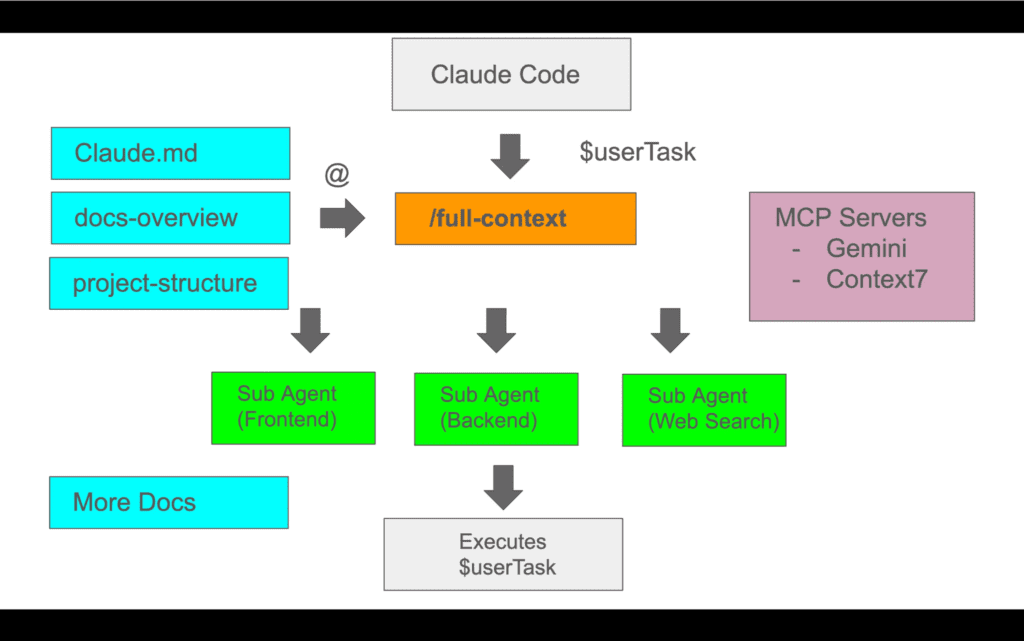
Workflow 1: Intelligent Email Triage and Response Drafting
Implementation:
Connect your email system (Gmail, Outlook) to Claude via Make.com:
- Trigger: New email received with specific label/folder
- Classification Pass: Claude analyzes email content, extracts intent, urgency, and required action type
- Routing Logic: Based on classification, route to appropriate sub-workflows
- Response Generation: Claude drafts contextually appropriate responses using your historical email patterns as examples
- Human Review Queue: Draft saved to designated folder for approval
Optimization Parameters:
- Use Claude Haiku for classification (cost-effective, fast)
- Switch to Sonnet for response drafting (better tone matching)
- Temperature: 0.4 for classification, 0.6 for drafting
- Include 3-5 example email pairs in the prompt for style consistency
Expected Impact: 70% reduction in email processing time, zero inbox by maintaining triage velocity.
Workflow 2: Content Repurposing Pipeline
Implementation:
Transform long-form content into multiple formats automatically:
- Input: Blog post, article, or transcript stored in Google Docs/Notion
- Format Generation Pass: Single Claude API call with structured output request:
- Twitter thread (8-10 tweets with hooks)
- LinkedIn post (professional tone, 1300 characters)
- Email newsletter segment (conversational, 200 words)
- YouTube video script outline (hook, 3 main points, CTA)
- Quality Check Pass: Secondary Claude call validates outputs against brand guidelines
- Distribution: Outputs saved to the content calendar spreadsheet with scheduling metadata
Advanced Configuration:
Use XML-style tags in your prompt to ensure structured outputs:
xml
Hook content
Point development
Claude excels at maintaining XML structure, making output parsing trivial with regex or XML parsers.
Expected Impact: 5x content output velocity, consistent multi-platform presence without manual rewriting.
Workflow 3: Research Synthesis and Brief Generation
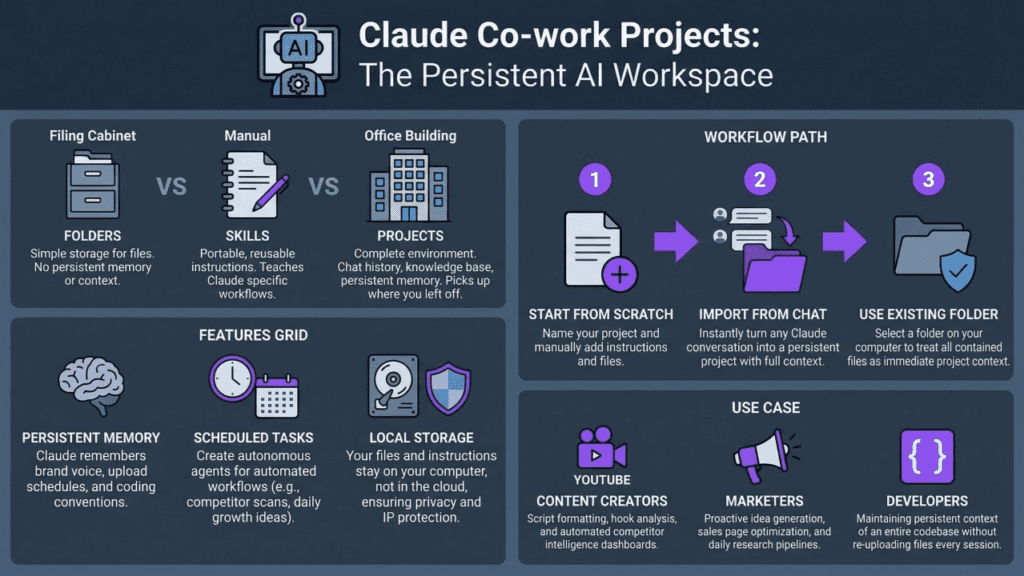
Implementation:
Automate the research-to-insight pipeline:
- Data Collection: Aggregate sources (RSS feeds, saved articles, PDFs) into a staging folder
- Extraction Pass: Claude processes each source, extracting key claims, statistics, and quotes with source attribution
- Synthesis Pass: Claude identifies patterns, contradictions, and insights across all sources
- Brief Generation: Creates an executive summary with categorized findings and recommended actions
- Output Delivery: Generated brief sent via Slack/email with source links
Critical Configuration:
- Process sources in batches of 5-10 to stay within the optimal context window
- Use explicit citation format: [Source Title, Date] after each claim
- Temperature: 0.3 for extraction, 0.5 for synthesis
- Include competitor brief examples for format consistency
Expected Impact: Research time reduced from 4 hours to 30 minutes, higher source coverage, zero missed insights.
Workflow 4: Customer Support Knowledge Base Automation
Implementation:
Transform support tickets into self-service documentation:
- Ticket Analysis: Claude monitors resolved support tickets (via Zendesk/Intercom integration)
- Pattern Detection: Identifies frequently asked questions and common issue patterns
- Documentation Generation: Creates KB articles with:
- SEO-optimized title
- Problem description
- Step-by-step solution
- Prevention tips
- Related articles
- Review Queue: Draft articles submitted to the support team for approval
- Publication: Approved articles are automatically published to the knowledge base
Optimization Strategy:
- Run weekly batch processing of the previous week’s tickets
- Use Claude Sonnet for balanced quality and cost
- Include existing KB articles in context for tone/style matching
- Set a minimum threshold (5 similar tickets) before triggering article generation
Expected Impact: 40% reduction in repeat support tickets, documentation coverage increases from 30% to 85% of common issues.
Workflow 5: Meeting Intelligence System
Implementation:
Transform meeting recordings into actionable outputs:
- Recording Ingestion: Meeting audio/video uploaded to processing folder
- Transcription: Use Whisper API or Rev.ai for accurate transcription
- Analysis Pass: Claude processes the transcript to extract:
- Key decisions made
- Action items with ownership
- Unresolved questions
- Follow-up topics
- Sentiment analysis
- Report Generation: Creates structured meeting minutes with categorized insights
- Task Creation: Action items automatically created in project management system (Asana, Linear, Jira)
- Distribution: Report sent to participants with task assignments
Advanced Features:
- Speaker identification preservation for attribution
- Cross-meeting tracking: Claude identifies recurring themes across multiple meetings
- Risk flagging: Identifies commitments without assigned owners
Critical Settings:
- Temperature: 0.4 for factual extraction
- Include previous meeting summaries for continuity
- Use structured output format for reliable task parsing
Expected Impact: Zero manual note-taking, 100% action item capture, 60% reduction in follow-up meetings due to clear documentation.
Troubleshooting Common Issues and Optimization Tips
Issue 1: Inconsistent Output Formatting
Symptoms:
Claude returns data in varying formats across automation runs, breaking downstream parsing logic.
Root Cause:
Insufficient output specification and the temperature too high.
Solution:
- Use explicit format examples in your prompt (provide 2-3 complete examples)
- Implement XML/JSON structure tags for sections requiring parsing
- Reduce the temperature to 0.3-0.4 for production workflows
- Add a validation step: secondary Claude call or regex check that flags malformed outputs
- Implement retry logic with format emphasis in the retry prompt
Code Pattern:
python
if not validate_output_format(response):
retry_prompt = f”{original_prompt}\n\nIMPORTANT: Your previous response did not match the required format. You MUST use this exact structure: {format_example}”
response = claude_api_call(retry_prompt, temperature=0.3)
Issue 2: Context Window Overflow
Symptoms:
API errors or truncated responses when processing large documents.
Root Cause:
Exceeding model’s context limit or inefficient context usage.
Solution:
- Implement token counting before API calls (use tiktoken library)
- Prioritize context: Remove boilerplate, keep only essential information
- Use document summarization preprocessing for large sources
- Implement hierarchical processing: Summarize subsections, then synthesize summaries
- Monitor token usage metrics to identify inefficient prompts
Optimization Pattern:
python
def prepare_context(document, max_tokens=80000):
if count_tokens(document) > max_tokens:
chunks = split_document(document, chunk_size=20000)
summaries = [claude_summarize(chunk) for chunk in chunks]
return combine_summaries(summaries)
return document
Issue 3: Slow Automation Execution
Symptoms:
Workflows taking 5-10 minutes when sub-minute execution is expected.
Root Cause:
Sequential API calls, wrong model selection, or inefficient prompting.
Solution:
- Parallel Processing: Use async API calls for independent tasks
- Model Right-Sizing: Use Haiku for simple classification/extraction, reserve Sonnet/Opus for complex reasoning
- Prompt Optimization: Remove unnecessary context, combine multiple tasks into a single prompt where logical
- Caching Strategy: Store frequently reused context (style guides, examples) and reference by ID
- Batch Operations: Process multiple items in a single API call when output formats allow
Performance Gains:
Sequential to parallel processing: 70% latency reduction
Haiku vs Sonnet for simple tasks: 60% faster, 95% cost reduction
Prompt optimization: 30-50% token reduction = faster responses
Issue 4: Quality Degradation Over Time
Symptoms:
Automation that worked perfectly begins producing lower-quality outputs after weeks of operation.
Root Cause:
Context drift, accumulating edge cases, or changing input data characteristics.
Solution:
1. Version Control for Prompts: Track prompt changes with dates and performance metrics
2. Output Quality Monitoring: Implement automated quality scoring (secondary Claude evaluation or rule-based checks)
3. Feedback Loop: Collect human corrections and incorporate as few-shot examples
4. Regular Calibration: Monthly review of automation outputs with prompt refinement
5. A/B Testing: Run prompt variations on sample data to identify improvements
Quality Assurance Framework:
markdown
Log every input/output pair with quality score
Weekly review of the bottom 10% quality scores
Identify a pattern in failures
Update prompt with edge case handling
Retest on historical failure cases
Issue 5: Cost Overruns
Symptoms:
API costs exceeding budget, especially with high-frequency automations.
Root Cause:
Inefficient model selection, redundant API calls, or unoptimized prompts.
Solution:
1. Model Tiering: Route tasks to the appropriate model based on complexity
Haiku: <$0.25 per 1M input tokens
Sonnet: ~$3 per 1M input tokens
Opus: ~$15 per 1M input tokens
2. Prompt Compression: Reduce unnecessary verbosity, use abbreviations for repeated concepts
3. Caching Implementation: Use prompt caching for repeated context (reduces costs by 90% for cached portions)
4. Batch Processing: Combine multiple small requests into fewer large requests
5. Rate Limiting: Implement throttling for non-urgent workflows
Cost Optimization Impact:
Switching classification tasks from Sonnet to Haiku: 92% cost reduction
Implementing prompt caching: 70-90% cost reduction for context-heavy workflows
Batch processing: 30-50% reduction through overhead elimination
Advanced Optimization: Prompt Caching
Anthropic’s prompt caching feature is the most underutilized optimization technique. It allows you to cache large context portions (style guides, documentation, examples) that remain static across requests.
Implementation:
1. Structure prompts with static content first, variable content last
2. Mark static sections for caching in API call
3. Cache is valid for 5 minutes (reused across multiple calls in workflow)
4. Cached tokens cost 90% less than standard tokens
Ideal Use Cases:
Long style guides or brand documentation
Few-shot example sets (10+ examples)
Historical conversation context
Product documentation references
Impact: Workflows using 50k tokens of repeated context see 80%+ cost reduction with prompt caching enabled.
Monitoring and Maintenance
Essential Metrics to Track:
1. Latency Distribution: P50, P95, P99 response times identify performance degradation
2. Token Usage: Input/output tokens per workflow execution for cost forecasting
3. Error Rate: Failed API calls, timeout errors, format validation failures
4. Quality Score: Human feedback ratings or automated quality checks
5. Retry Rate: Percentage of requests requiring retry indicates prompt instability
Alerting Thresholds:
Error rate >5%: Immediate investigation required
P95 latency increase >50%: Performance optimization needed
Quality score drop >10%: Prompt recalibration required
Cost increase >25% week-over-week: Efficiency review needed
Maintenance Schedule:
Daily: Monitor error rates and latency
Weekly: Review quality scores and edge cases
Monthly: Comprehensive prompt optimization and cost analysis
Quarterly: Architecture review and model selection validation
Conclusion
Claude AI automation transforms from theoretical potential to production reality through systematic workflow design. The difference between 1x and 10x productivity isn’t Claude’s capabilities—it’s your implementation architecture.
Start with one workflow, perfect the configuration, then expand. The five workflows outlined here represent high-ROI starting points that deliver measurable impact within days of implementation.
Your next step: Choose the workflow with the highest pain point in your current process, implement the basic automation this week, then iterate based on real performance data. Automation compounds—each workflow you perfect creates templates and patterns that accelerate subsequent implementations.
The professionals winning with AI aren’t using different tools—they’re using the same tools with systematic workflow automation that transforms AI from assistant to autonomous workforce.
Frequently Asked Questions
Q: What is Claude AI automation and how does it improve productivity?
A: Claude AI automation uses structured prompts, workflows, and integrations to handle repetitive tasks like writing, analysis, and decision support. When combined with tools like VidAU, it extends beyond text into automated content production, enabling faster execution across both thinking and creation tasks.
Q: Can Claude AI automate content creation end-to-end?
A: Claude can automate ideation, outlining, scripting, and editing. When paired with VidAU, it completes the workflow by turning those scripts into ready-to-publish videos with visuals, voice, and captions, eliminating manual production steps.
Q: Can I generate multiple variations of content using Claude automation?
A: Yes. Claude can generate multiple versions of scripts or messaging angles, which can then be turned into video variations in VidAU, making it easy to test and optimize performance.
Q: What’s the difference between using Claude’s web interface versus API for automation?
A: The web interface is designed for interactive conversations, not automation. API access provides programmatic control, allowing you to integrate Claude into automated workflows, set specific parameters (temperature, max tokens), implement error handling, and connect to other tools via platforms like Make.com or Zapier. For true productivity gains, API-driven workflows are essential, they enable batch processing, scheduled execution, and deterministic outputs that the web interface cannot provide.
Q: Do I need coding skills to set up Claude automation workflows?
A: No. Most workflows can be created using structured prompts and tools. VidAU further simplifies execution by handling video production automatically, reducing the need for technical skills.
Q: How can Claude help generate better video scripts for VidAU?
A: Claude can create conversion-focused scripts with hooks, storytelling, and CTAs. These scripts can then be used in VidAU to generate videos that are structured for engagement and performance.
Q: Can I automate UGC content creation using Claude and VidAU?
A: Yes. Claude can generate UGC-style scripts such as reviews or testimonials, and VidAU can convert them into realistic avatar-based videos that mimic user-generated content.
Q: Which Claude model should I use for different automation tasks?
A: Model selection directly impacts cost and performance: Use Claude Haiku for high-volume simple tasks like classification, data extraction, and basic formatting (fastest, 92% cheaper than Sonnet). Use Claude Sonnet for balanced workflows requiring moderate reasoning, content generation, email drafting, and synthesis tasks. Reserve Claude Opus for complex reasoning chains, nuanced analysis, and tasks where quality is critical regardless of cost. Wrong model selection is the #1 cause of cost overruns in Claude automation.
Q: How does Claude help with A/B testing in automation workflows?
A: Claude can generate multiple variations of headlines, hooks, or scripts, which VidAU can convert into different video versions, allowing you to test and identify top-performing content quickly.
Q: How can I reduce Claude API costs without sacrificing quality?
A: Five high-impact cost optimizations: (1) Route tasks to appropriate models, use Haiku instead of Sonnet for simple tasks (92% cost reduction). (2) Implement prompt caching for repeated context, like style guides or examples (90% cost reduction on cached portions). (3) Compress prompts by removing verbosity and using abbreviations for repeated concepts (30-50% token reduction). (4) Batch multiple small requests into fewer large requests to reduce overhead. (5) Monitor token usage metrics to identify inefficient prompts. These techniques typically reduce costs by 60-80% while maintaining output quality.
Q: What should I do when my automation’s quality degrades over time?
A: Quality degradation indicates context drift or accumulating edge cases. Implement this maintenance framework: (1) Version control all prompts with performance metrics. (2) Log every input/output pair with quality scores. (3) Weekly review of the bottom 10% quality scores to identify failure patterns. (4) Incorporate human corrections as few-shot examples in updated prompts. (5) A/B test prompt variations on historical data before deploying changes. (6) Monthly calibration sessions where you refine prompts based on real-world performance. This systematic approach prevents quality decay and continuously improves automation reliability.