Snowflake AI Agent · Step-by-Step Guide
How to Build an AI Bot Agent Using Snowflake, Step-by-Step with ChatGPT
Learn how to build an AI bot agent using Snowflake with safe SQL tools, ChatGPT function calling, RAG, Cortex Agents, testing, and secure deployment.
By the VidAU Editorial Team · Updated 2026 · 10 min read
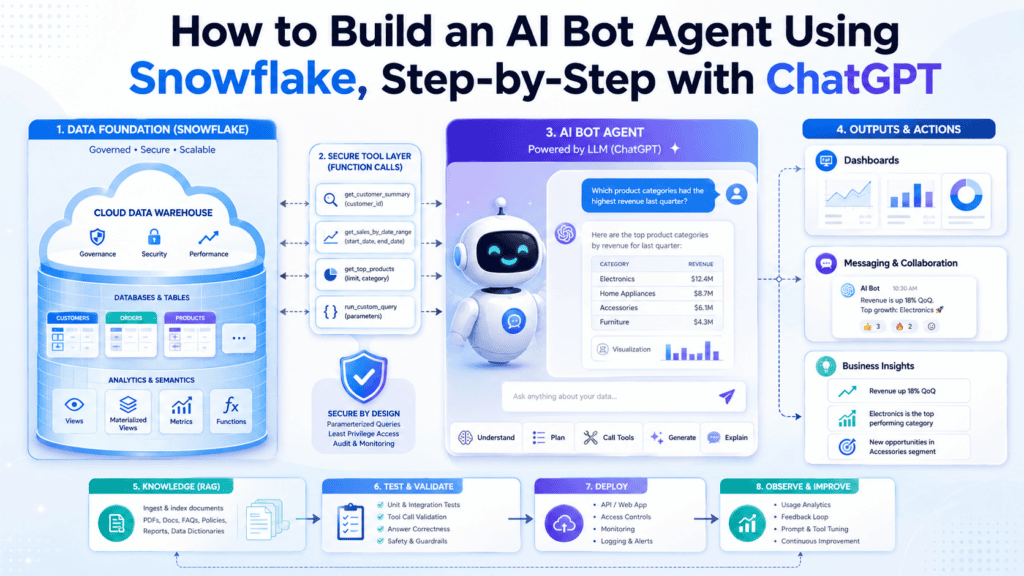
You build AI bot agent using Snowflake by connecting a ChatGPT-style assistant to approved Snowflake tools instead of letting the model write raw SQL.
The safe workflow is simple. Define the agent’s job. Create a least-privilege Snowflake role. Build approved tools. Validate every input. Add RAG for metric definitions. Test the agent with real questions. Then deploy it to one internal channel first.
This matters because teams now need more than dashboards. They need AI agents that answer business questions from trusted data without exposing the warehouse to risky prompts.
Snowflake also has Cortex Agents for teams that want a Snowflake-native route. Snowflake says Cortex Agents use Cortex Analyst for structured data and Cortex Search for unstructured data, together with LLMs, to analyze data and deliver insights.
This guide explains the practical ChatGPT route, where Snowflake Cortex Agents fit, and how VidAU GEO Agent helps teams turn technical AI workflows into content that Google and AI answer engines understand.
Quick summary
- To build an AI bot agent using Snowflake, create a ChatGPT-style agent that calls approved Snowflake tools.
- Each tool should use parameterized SQL, stored procedures, semantic models, or approved API endpoints.
- Do not allow the model to write raw SQL.
- Add RAG for approved definitions, test the agent with business questions, and deploy it first to one controlled channel such as Slack or Teams.
Quick Answer
To build AI bot agent using Snowflake, create a ChatGPT-style agent that calls approved Snowflake tools. Each tool should use parameterized SQL, stored procedures, semantic models, or approved API endpoints. Do not allow the model to write raw SQL. Add RAG for approved definitions, test the agent with business questions, and deploy it first to one controlled channel such as Slack or Teams.
Want your AI agent content to rank in AI search results?
VidAU GEO Agent helps teams structure technical articles for answer engines, improve entity coverage, strengthen FAQs, and turn complex AI topics into content that AI search tools understand.
What Is an AI Bot Agent Using Snowflake?
An AI bot agent using Snowflake is a conversational assistant that answers business questions by calling approved tools connected to Snowflake data.
The key idea is control.
The agent should not write free-form SQL. Instead, it should call tools that your team defines in advance. Each tool maps to a safe query, stored procedure, semantic model, or API endpoint.
For example, a user asks:
“What was revenue in Q2 2026?”
A safe agent does not invent SQL. It calls a tool like:
get_kpi(metric, period)
The tool receives:
metric: revenue
period: 2026-Q2
Then it returns:
value: 12,843,000
unit: USD
The agent turns that output into a short answer:
“Revenue in Q2 2026 was $12.84 million. This uses the approved finance revenue metric.”
This setup reduces SQL injection risk, limits data exposure, and gives your team clear logs for every answer.
Core principle
The model should choose from approved tools. It should not have open-ended access to write and run arbitrary SQL against the warehouse.
How a Snowflake AI Bot Agent Works
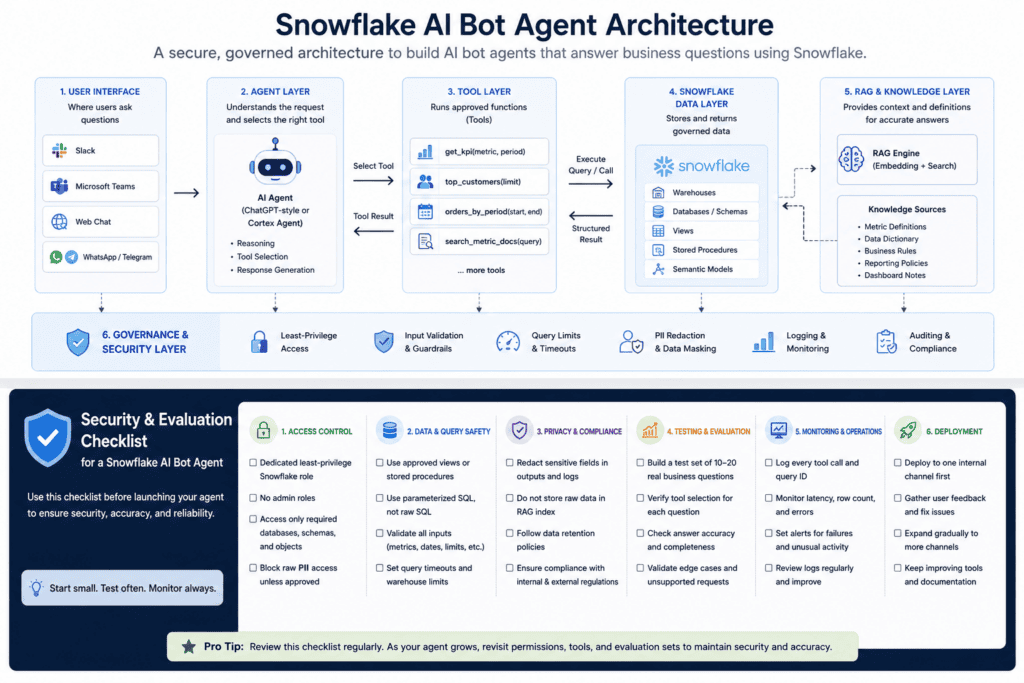
A Snowflake AI bot agent has five main layers.
| Layer | What it does | Example |
|---|---|---|
| User interface | Where the user asks a question | Slack, Teams, website chatbot |
| Agent layer | Understands the request and selects the right tool | ChatGPT-style agent or Cortex Agent |
| Tool layer | Runs approved functions | get_kpi, top_customers, orders_by_period |
| Snowflake data layer | Stores and returns governed data | Views, stored procedures, semantic models |
| Governance layer | Controls access, logs, testing, and privacy | Roles, query limits, redaction, monitoring |
OpenAI describes agents as applications that plan, call tools, collaborate across specialists, and keep enough state to complete multi-step work. OpenAI’s Agents SDK also explains that tools let agents fetch data, run code, call APIs, and interact with external systems.
ChatGPT Agent vs Snowflake Cortex Agents
ChatGPT WorkSpace Agents are insanely useful.
Both options work, but they fit different needs.
| Option | Best for | When to choose |
|---|---|---|
| ChatGPT-style agent | Slack, Teams, WhatsApp, Telegram, website chat, and custom apps | Choose this when users need Snowflake answers outside Snowflake |
| Snowflake Cortex Agents | Snowflake-native analytics workflows | Choose this when your data team already uses Snowflake Cortex |
| Hybrid setup | Governed Snowflake access plus external chat channels | Choose this when you need Snowflake governance and flexible deployment |
When to Use a ChatGPT-Style Agent
Use a ChatGPT-style agent when your team needs a flexible assistant that connects to business apps and chat channels.
The flow is simple:
User asks a question. The agent selects a tool. The backend queries Snowflake. Snowflake returns structured data. The agent summarizes the answer.
When to Use Snowflake Cortex Agents
Use Snowflake Cortex Agents when your team wants to keep the agent workflow closer to Snowflake.
This works well for internal analytics, structured data, unstructured documents, and Snowflake-native governance. Snowflake’s documentation says Cortex Agents combine Cortex Analyst, Cortex Search, tools, and LLMs to analyze data.
Publishing content around AI agents?
If your team is publishing content around AI agents, Snowflake, ChatGPT tools, or automation workflows, VidAU GEO Agent helps you optimize each article for Google search and AI answer engines before publishing.
How to Build an AI Bot Agent Using Snowflake
1
Define the Agent’s Job
Start with one clear job.
Do not launch with “answer anything in the warehouse.” That creates risk and weak answers.
Good first use cases include:
- answering KPI questions
- explaining revenue changes
- showing top customers
- summarizing orders by period
- retrieving metric definitions
- supporting sales or finance reporting
Example agent purpose:
“This agent helps internal sales and finance teams answer approved revenue, order, and customer performance questions from Snowflake.”
2
Create a Least-Privilege Snowflake Role
Create a dedicated Snowflake role for the agent.
Give it only the permissions it needs.
| Permission area | Recommendation |
|---|---|
| Warehouse | Grant usage only on the required warehouse |
| Database | Grant usage only on the required database |
| Schema | Grant usage only on required schemas |
| Data access | Grant select only on approved views |
| Procedures | Grant execute only on approved stored procedures |
| Admin access | Do not use admin roles |
| PII access | Block raw PII unless approved |
Use approved views or stored procedures to control what the agent sees.
3
Create Safe Snowflake Tools
Start with three to five tools.
| Tool | Purpose | Example input | Example output |
|---|---|---|---|
| get_kpi(metric, period) | Returns one approved KPI for a time period | metric: revenue, period: 2026-Q2 | value: 12843000, unit: USD |
| top_customers(limit) | Returns top customers by revenue | limit: 10 | customer_id: C0192, revenue: 934211 |
| orders_by_period(start_date, end_date) | Returns orders and gross sales for a date range | start_date: 2026-01-01, end_date: 2026-03-31 | date: 2026-01-05, orders: 421, gross_sales: 18420.55 |
| search_metric_docs(query) | Searches approved metric definitions and policy docs | query: revenue definition | title: Revenue Definition, summary: Revenue excludes refunds |
Each tool should map to parameterized SQL, a stored procedure, a semantic model, or an approved API endpoint.
The agent should call these tools instead of writing raw SQL.
4
Validate Every Input
Validation is required.
The agent should only pass clean, approved inputs into tools.
| Input type | Validation rule |
|---|---|
| Metric | Must match approved metric list |
| Date | Must follow ISO format |
| Limit | Must stay within a safe range, such as 1 to 100 |
| Period | Must match approved reporting format |
| Region | Must match approved region list |
| Empty values | Should fail before query execution |
If the user asks for an unsupported metric, the agent should return the available options.
5
Add RAG for Definitions
RAG means Retrieval-Augmented Generation.
In this workflow, RAG helps the agent retrieve approved documents before answering.
Use RAG for:
- metric definitions
- data dictionary entries
- business rules
- dashboard notes
- reporting policies
- compliance rules
Do not put raw row-level data into the RAG index.
Use RAG for context. Use Snowflake tools for live data.
Example:
User asks:
“What does revenue mean for Q2 reporting?”
The agent searches approved metric docs, retrieves the revenue definition, then answers:
“Revenue means completed paid orders excluding refunds and cancelled transactions. For Q2 reporting, finance uses booked revenue by order date.”
6
Test and Deploy to One Channel
Before launch, test the agent with 10 to 20 real business questions.
| Test question | What to check |
|---|---|
| What was revenue in 2026-Q2? | Correct KPI tool and period |
| Show top 5 customers by revenue | Correct limit and ranking |
| How many orders came in between 2026-01-01 and 2026-03-31? | Correct date handling |
| What does active customer mean? | Correct RAG result |
| What metrics are available? | Correct supported metric list |
After testing, deploy to one internal channel first.
Slack or Teams is usually best for the first rollout. Start small, review logs, fix weak answers, then expand to other channels.
GEO tip
GEO works the same way for content. Your article needs clear definitions, source-backed sections, FAQs, and structured answers. VidAU GEO Agent helps you prepare technical content for AI search visibility.
Security Checklist for a Snowflake AI Bot Agent
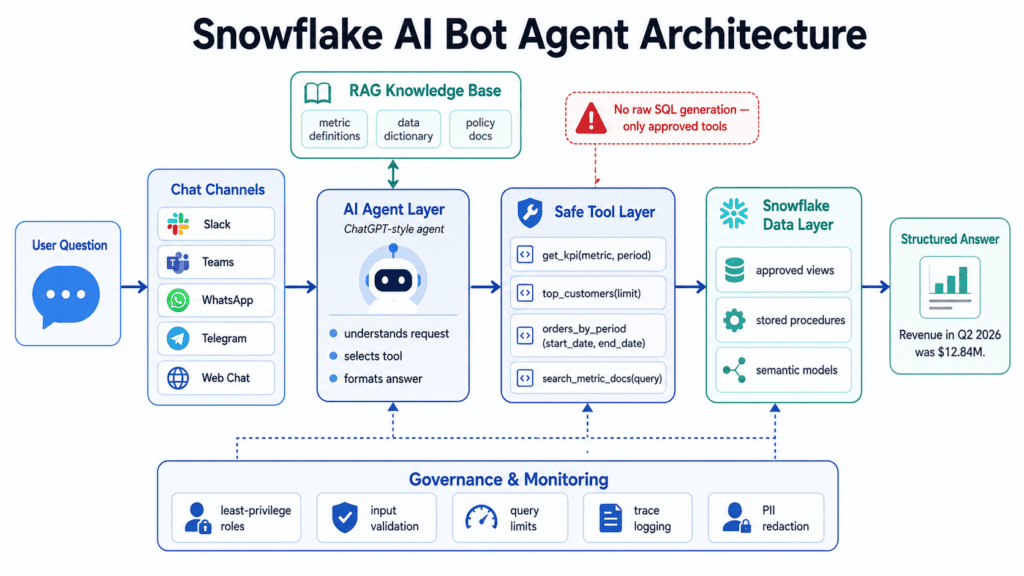
Use this checklist before launch.
| Area | What to check |
|---|---|
| Access control | Use a dedicated least-privilege Snowflake role |
| Data access | Use approved views or stored procedures only |
| Query safety | Use parameterized SQL, not raw SQL |
| Input control | Validate metrics, dates, regions, and limits |
| Cost control | Set query timeouts and warehouse limits |
| Privacy | Redact sensitive fields in outputs and logs |
| Testing | Build a regression set with 10 to 20 questions |
| Monitoring | Log tool calls, query IDs, latency, row count, and errors |
| Rollout | Start with one internal channel before wider release |
Watch out
Do not give the model free access to your warehouse. Use a few approved tools, validate every input, return structured outputs, and log the agent’s activity before wider rollout.
Turn AI workflows into answer-engine-ready content
VidAU GEO Agent helps teams improve answer blocks, entity coverage, FAQs, source clarity, product positioning, comparison sections, internal links, and AI-search readability.
How VidAU GEO Agent Helps
Building a Snowflake AI bot agent solves the data access problem. It does not solve the visibility problem.
If your company wants people to find, understand, and trust your agent workflow through AI search engines, you also need GEO.
GEO means Generative Engine Optimization. It focuses on making content easier for AI answer engines to understand, summarize, and cite.
VidAU GEO Agent helps teams improve:
💬
Direct answer blocks
Shape technical sections so AI answer engines can quickly identify the direct answer.
🧩
Entity coverage
Strengthen topic clarity across Snowflake, ChatGPT agents, tools, RAG, Cortex Agents, and deployment channels.
❓
FAQ depth
Build concise but complete FAQ answers around common implementation, security, and platform-choice questions.
🔗
Source clarity and internal links
Improve comparison sections, product positioning, source-backed explanations, and internal link structure.
- direct answer blocks
- entity coverage
- FAQ depth
- source clarity
- product positioning
- comparison sections
- internal link structure
- AI-search readability
For a technical topic like Snowflake AI agents, GEO Agent helps turn complex implementation notes into structured content that answer engines can parse.
Key takeaway
Final Thoughts
The best way to build an AI bot agent using Snowflake is to start small and safe.
Do not give the model free access to your warehouse. Give it a few approved tools, validate every input, and return structured outputs. Add RAG for definitions, not raw data. Use Snowflake Cortex Agents when your team wants a native Snowflake workflow. Use a ChatGPT-style setup when you need flexible deployment across Slack, Teams, or a custom app.
The strongest setup combines governed Snowflake access, safe tool calling, clear testing, and strong content visibility.
Try VidAU GEO Agent to make your AI agent content easier for Google, ChatGPT, Perplexity, Gemini, and other AI answer engines to understand and cite.
Create stronger AI-search content with VidAU GEO Agent
Make your AI agent content easier for Google, ChatGPT, Perplexity, Gemini, and other AI answer engines to understand and cite.
FAQ
Here are concise answers to common questions about safely connecting Snowflake to a ChatGPT-style agent, choosing between Cortex Agents and external chat agents, avoiding raw SQL, and using VidAU GEO Agent for AI-search visibility.
How do I connect Snowflake to a ChatGPT agent safely?
Create a least-privilege Snowflake role, expose approved tools through an API, and connect those tools to the ChatGPT-style agent. Each tool should use parameterized SQL or stored procedures. Validate inputs, set timeouts, log every tool call, and block raw SQL generation.
Should I use Snowflake Cortex Agents or a ChatGPT-style agent?
Use Snowflake Cortex Agents when you want a Snowflake-native workflow for governed analytics. Use a ChatGPT-style agent when you need flexible deployment across Slack, Teams, WhatsApp, Telegram, or a custom app. Use a hybrid setup when you need both Snowflake governance and external channels.
Why should the agent avoid raw SQL?
Raw SQL from a model creates security, accuracy, and cost risks. The model might query the wrong table, expose sensitive data, or run expensive queries. Safe tools reduce those risks because each tool has approved inputs, limits, and query logic.
What tools should I create first for a Snowflake AI bot agent?
Start with tools for common business questions. Good first tools include get_kpi(metric, period), top_customers(limit), orders_by_period(start_date, end_date), and search_metric_docs(query). Keep the first version narrow and expand after testing.
How does VidAU GEO Agent help with this topic?
VidAU GEO Agent helps structure technical content so AI search engines understand it better. For Snowflake AI agent content, it improves answer blocks, FAQs, comparison sections, entity coverage, internal links, and source clarity.