
AI Agent Training · 2026
How to Train an AI Agent: Context, Memory, MCP Tools, and Skills (Step-by-Step)
Stop guessing with prompts, here is how to train an AI agent that actually works: engineer a rich agents.md, add a compounding memory.md, wire tools through MCP, and package SOP-style skills so the agent runs the observe–think–act loop reliably across Claude Code, Codex, Cowork, Antigravity, Manus, and OpenClaw. This setup shifts you from chat to agentic execution with human-in-the-loop checks and scheduled runs.
By the VidAU Editorial Team · Updated July 2026 · 11 min read
Stop guessing with prompts, here is how to train an AI agent that actually works: engineer a rich agents.md, add a compounding memory.md, wire tools through MCP, and package SOP-style skills so the agent runs the observe–think–act loop reliably across Claude Code, Codex, Cowork, Antigravity, Manus, and OpenClaw. This setup shifts you from chat to agentic execution with human-in-the-loop checks and scheduled runs.
Stop guessing with prompts, here is how to train an AI agent that actually works: engineer a rich agents.md, add a compounding memory.md, wire tools through MCP, and package SOP-style skills so the agent runs the observe–think–act loop reliably across Claude Code, Codex, Cowork, Antigravity, Manus, and OpenClaw. This setup shifts you from chat to agentic execution with human-in-the-loop checks and scheduled runs.
Our team reviewed recent agent courses and platform demos and saw the same pattern everywhere: context engineering beats prompt tinkering, explicit memory reduces repeat errors, MCP unlocks tools like Notion, Gmail, Calendar, and Stripe, and SOP-style skills compound over weeks. We also noted public moves like Runway signaling MCP access in 2026—another sign that agents will call creative tools directly from their loop.
Quick summary
- A cross-platform workflow using agents.md, memory.md, and skills.md plus MCP tool links is the most reliable way to train an AI agent for real work.
- When needed, start with a simple ReAct + RAG baseline and then add memory and skills to reduce errors and increase autonomy.
- Use Markdown context files, least-privilege MCP scopes, audit logs, and human-in-the-loop approvals for high-risk actions like sending email or charging Stripe.
- Operators, marketers, and team leads get the biggest gains by onboarding agents like employees and scheduling recurring skills on a cron.
Jump to section
- What training an AI agent is and how it works
- How agentic AI vs AI differs in practice
- Who should use this approach
- How to train an AI agent with context engineering
- How to connect tools via MCP safely
- How to train an AI agent in a repeatable loop
- How much an AI agent can cost and how to control it
- AI-powered SEO agents example workflow
- Best-fit tools by stage
- Common mistakes and quick fixes
- Advanced strategies
- Final thoughts
- FAQ
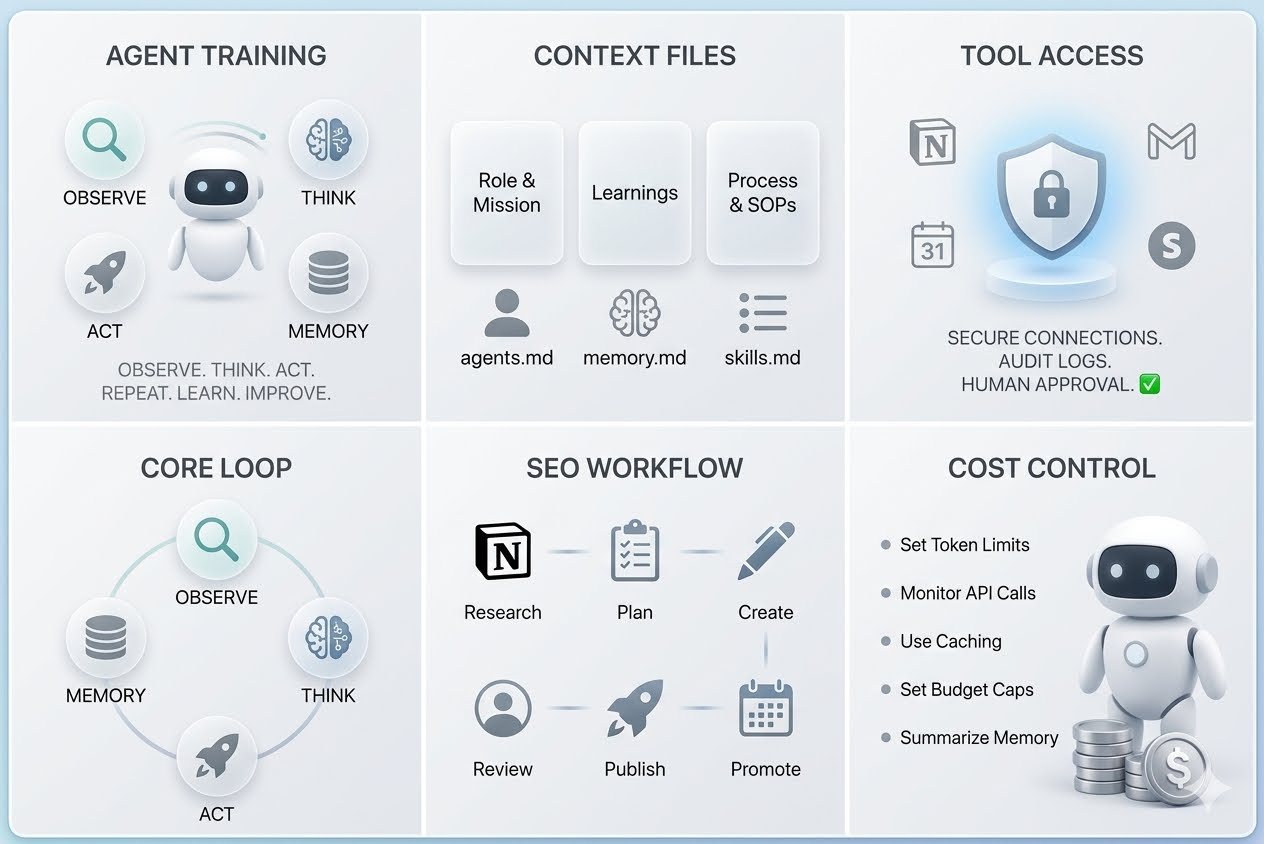
What Is Training an AI Agent?
Training an AI agent is the process of making a general model reliably perform your workflow by loading persistent context, adding compounding memory, connecting real tools via MCP, and packaging SOPs as reusable skills. Instead of one-off prompts, you onboard the agent like an employee and improve it through a repeated observe–think–act loop.
Suggested visual
A one-page diagram showing agents.md, memory.md, skills.md feeding an observe–think–act loop, with MCP connections to Gmail, Calendar, Notion, and Stripe.
How Is Agentic AI vs AI Different in Practice?
Agentic AI runs an explicit agent loop, observe, think, act across steps and sessions, while basic AI chat answers a single prompt with no tool use or memory plan. In agentic AI, context engineering replaces prompt fiddling, memory compounds preferences, MCP enables actions, and skills encode SOPs for repeatable results.
Who Should Use This Training Approach?
Use this if you want an assistant that executes business workflows with consistency. It suits operators, marketers, and team leads who need multi-step outcomes—briefs, reports, emails, calendar updates, invoices; without building custom ML models. It also fits teams standardizing SOPs and adding human-in-the-loop approvals.
How to Train an AI Agent with Context Engineering?
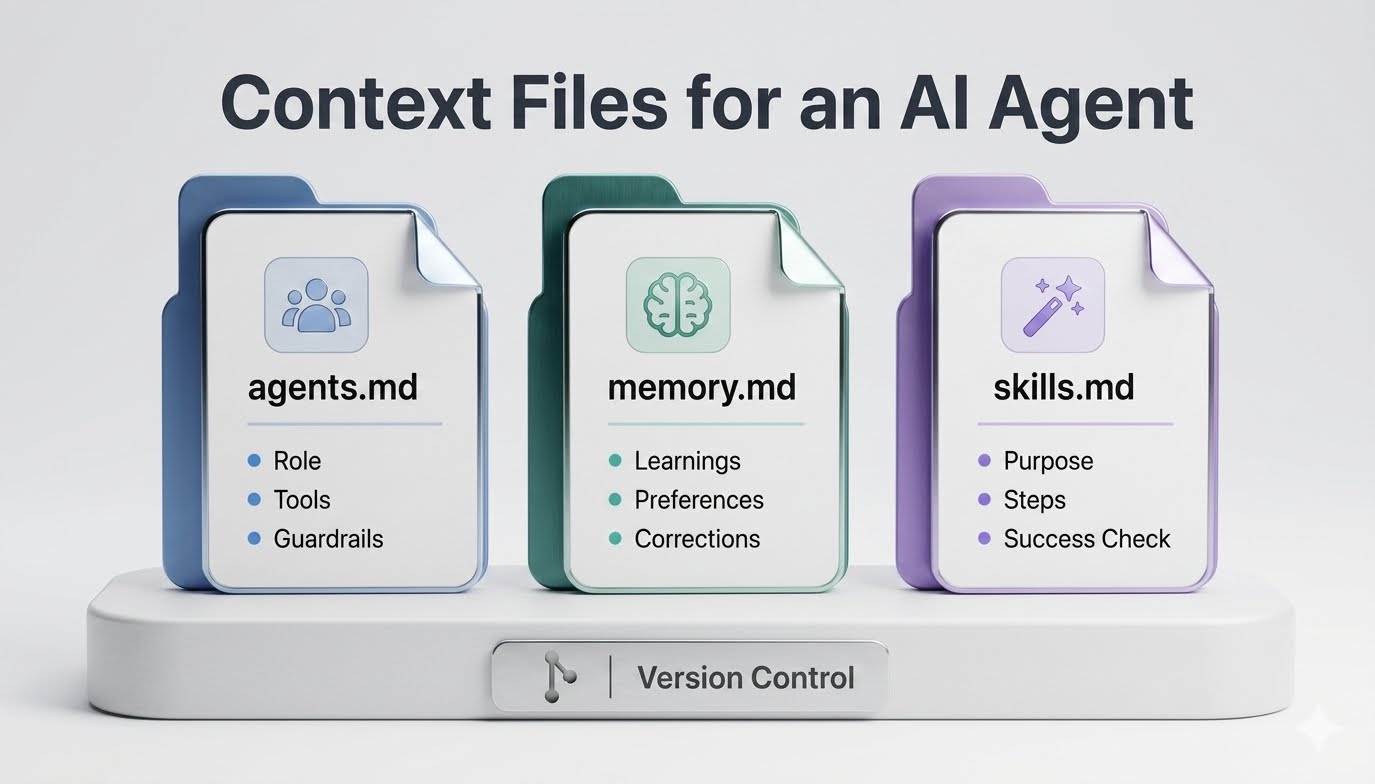
Context engineering means you preload the agent with who you are, how you work, and what good output looks like. Create three Markdown files and keep them under version control.
agents.md (persistent context)
- Role and mission: your company, product, audience, and priorities
- Voice and tone: writing style, sign-offs, formatting rules
- Tools: what systems exist (Notion, Gmail, Calendar, Stripe) and how to use them
- Guardrails: what to escalate, what to never do, and data-safety rules
- Memory policy: when to update memory.md
memory.md (compounding preferences)
- Accumulated learnings: preferred templates, do/don’t examples, naming conventions
- Corrections history: what went wrong and the chosen fix
- Known contacts, recurring events, and approved sources to cite
skills.md (SOPs as skills)
- Each skill has: purpose, inputs, steps, success check, and handoff
- Start with 2–3 SOPs you already use weekly; add new ones gradually
In our review of hands-on agent demos, this simple folder made two-word prompts produce fully informed outputs across platforms like Claude Code, Codex, and Antigravity.
How to Connect Tools via MCP Safely?
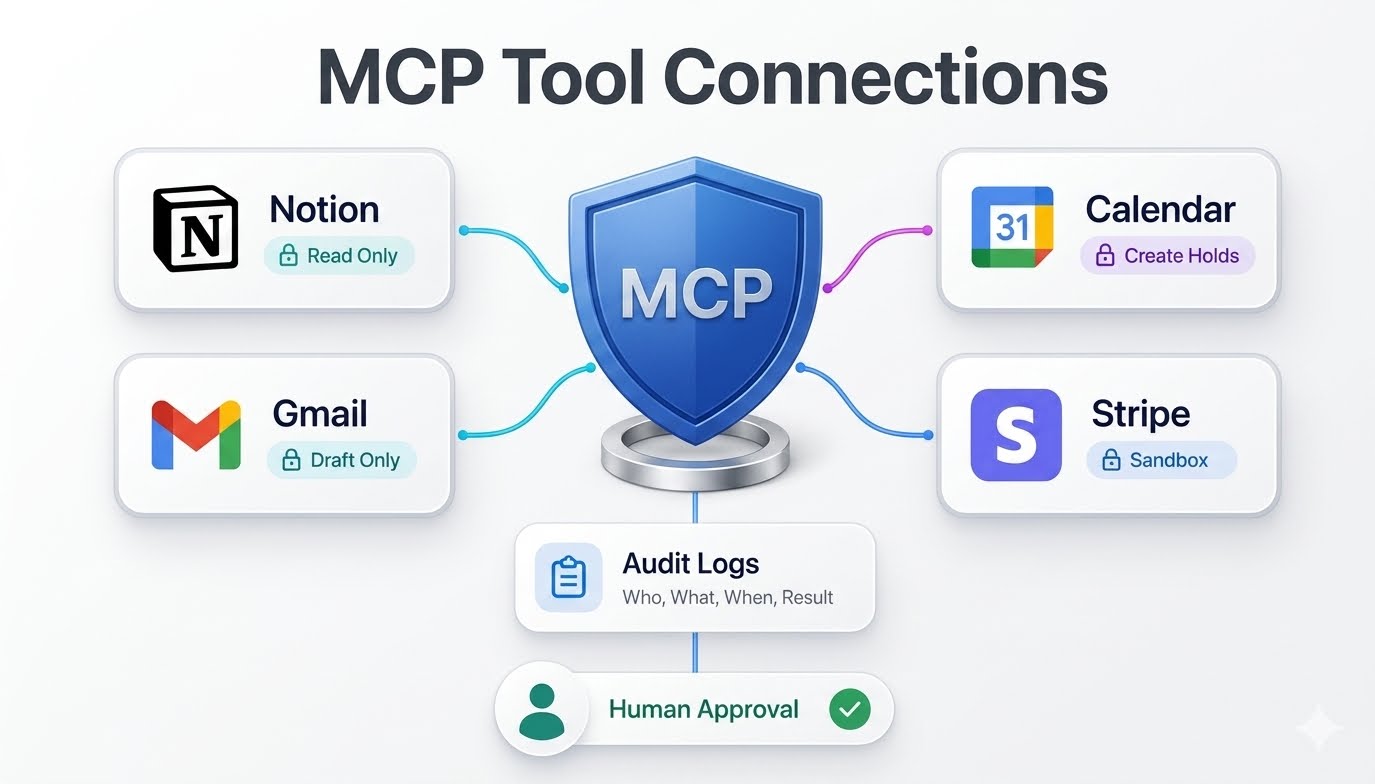
MCP (Model Context Protocol) lets your agent browse and act in systems like Notion, Gmail, Calendar, and Stripe through standardized tool definitions. Configure connections with least-privilege and safety by default.
- Use sandbox credentials and a separate workspace for initial training
- Grant read-only first; upgrade only the specific actions a skill needs
- Add lightweight audit logging: who, what, when, result
- Gate high-risk actions with human-in-the-loop approvals
From our internal analysis of ecosystem shifts, we expect more creative and business tools to expose MCP servers. Runway’s public MCP signal in 2026 shows how agents will increasingly trigger generation tools without switching apps.
Example MCP scope plan
- Notion: read pages in a project database; write to a single output database
- Gmail: read a label; draft emails but require approval before send
- Calendar: read busy/free; create holds with a specific tag
- Stripe: read customers; create test invoices only in sandbox
VidAU workflow
Create SEO videos with VidAU
How to Train an AI Agent in a Repeatable Loop?
How to Build an AI Agent with Claude Code (Claude AI Agent Tutorial)
To make the agent dependable, run a tight observe–think–act loop with logs and small improvements each cycle.
- Seed context: Load agents.md, memory.md, skills.md at session start.
- Choose a task: Pick one outcome, such as a weekly report.
- Observe: Pull inputs via MCP (e.g., Notion pages, Gmail label, Calendar window).
- Think: Use a ReAct-style plan and, if needed, RAG over your docs.
- Act: Execute the minimal next action; produce a draft output.
- Check: Validate output against the skill’s success criteria.
- Learn: Append corrections to memory.md; refine the skill.
- Approve: If risky, route to a human for approval.
- Schedule: When stable, add a cron or platform scheduler for autonomy.
Key Takeaways
- Small, frequent runs teach the agent faster than big, complex jobs.
- Write issues and fixes to memory.md every cycle.
- Keep skills atomic; chain them when each is reliable.
How Much an AI Agent Can Cost and How To Control It
The real cost comes from model tokens, tool API calls, storage, and monitoring. Estimate per-run tokens and API actions, multiply by expected schedules, and put hard caps and alerts in place.
Cost control checklist
- Set per-run token and tool-call limits; fail gracefully when exceeded
- Use read-only fetches and cache results to avoid repeat calls
- Compress memory.md by summarizing stale learnings monthly
- Run in sandbox during training; promote to production only after passing checks
- Add a monthly budget cap and email alerts; pause schedules when hit
Many searches blend pricing with definitions—phrases like agentic ai vs ai how much ai agent costagents show up. The short answer: cost depends on usage. Start with strict limits, then relax them as success rates improve.
AI-Powered SEO Agents: A Quick, Practical Example
Here is a compact example your team can stand up in a day and then improve weekly.
Goal: Produce a Monday SEO brief and execution checklist.
MCP connections
- Notion: read Research DB; write to SEO Briefs DB
- Gmail: read a vendor label; draft outreach emails for approval
- Calendar: place a 30-minute review hold every Monday
Skills (in skills.md)
- SERP scan skill: inputs keyword set; outputs top results summary and gaps
- Brief drafting skill: takes gaps and produces H2s, FAQs, and internal links
- Outreach skill: drafts one vendor email and one partner update, approval required
Loop
- Observe: Pull last week’s posts, search trends, and competitor changes
- Think: Plan ReAct steps; if docs needed, use RAG over your playbooks
- Act: Draft brief in Notion, queue emails as drafts, place a Calendar hold
- Check: Confirm internal links and on-page elements are present
- Learn: Add corrections to memory.md, such as preferred FAQ style
VidAU workflow
Scale content workflows with VidAU
Best-Fit Tools by Stage (Cross-Platform)
| Stage | Recommended Tools | Why |
|---|---|---|
| Context & memory | Claude Code, Codex | Easy file mounting, quick edits |
| Skills authoring | Cowork, Manus | SOP focus, chaining tasks |
| Tool actions | MCP servers | Standardized access to apps |
| Autonomy | Antigravity, OpenClaw | Scheduling and agent hosting |
| Reviews | Notion, Gmail | Human approvals and logs |
| Payments (sandbox) | Stripe | Safe test invoices |
Common Mistakes and Quick Fixes
- Skipping agents.md: The agent acts like a stranger; write who you are and how you work.
- No memory policy: Errors repeat; add simple update rules to memory.md.
- Over-broad MCP scopes: Risky and costly; start read-only and specific.
- Giant first project: Reliability tanks; start with a single, atomic skill.
- No human-in-the-loop: Emails or charges slip through; add approvals on risky paths.
- Never pruning memory: Bloat increases costs; summarize stale notes monthly.
Advanced Strategies That Compound Over Time
- Split global vs project-level skills and memory for clarity
- Use short skill chains rather than monolithic workflows
- Add scorecards: precision, recall, and turnaround time per skill
- Create error taxonomies: tag issues to spot systemic fixes
- Promote skills from sandbox to production only after N clean runs
Final Thoughts
Training an AI agent is less about prompts and more about operational design: explicit context, compounding memory, safe tool connections, and SOP-style skills. Start small, measure each loop, and let memory and skills mature week by week.
Build smarter AI workflows with VidAU
Use VidAU to add structured video creation to stable agent workflows, then route outputs through human review.
Key takeaway
Training an AI agent is less about prompts and more about operational design: explicit context, compounding memory, safe tool connections, and SOP-style skills. Start small, measure each loop, and let memory and skills mature week by week.
FAQ
Practical answers to common questions about context, memory, MCP, cost control, scheduling, and agent workflows.
What files do I need to train an AI agent?
Use three Markdown files. Agents.md stores who you are, your tools, tone, and guardrails. Memory.md keeps learnings and corrections across runs. Skills.md packages SOPs as reusable steps with inputs, checks, and handoffs. Load these at session start so prompts map to your real workflow.
How does the Model Context Protocol (MCP) help agents?
MCP standardizes how agents call tools like Notion, Gmail, Calendar, and Stripe. You define capabilities, auth, and scopes once, then the agent uses those actions during the observe–think–act loop. Start with least-privilege scopes, sandbox credentials, audit logging, and human approvals for risky actions.
How much does an AI agent cost to run?
Costs depend on model tokens, API calls, storage, and monitoring. Estimate tokens and tool actions per run, multiply by scheduled frequency, then add a budget cap. Control spend with read-only fetches, cached results, token and call limits, and pausing schedules when alerts trigger.
What is the difference between agentic AI vs AI?
Basic AI chat responds to single prompts without tools or persistent memory. Agentic AI uses an observe–think–act loop, preloaded context, compounding memory, and MCP-connected tools to perform multi-step tasks. It plans, takes actions, checks outputs, learns corrections, and can run on a schedule with approvals.
How do I give an agent memory that improves over time?
Create memory.md and instruct the agent to append learnings after each task. Log preferences, corrections, reusable examples, and known contacts. Summarize stale items monthly to keep memory compact. Refer back to memory.md at the start of each run so improvements persist.
How do I schedule autonomous agent runs safely?
Only schedule after several clean supervised runs. Add cron or a platform scheduler, keep least-privilege MCP scopes, and require human approvals for sending email or payments. Log each run with inputs, outputs, and actions taken so you can audit and roll back if needed.
Which platforms work for beginners?
Claude Code and Codex are approachable for context files and quick iteration. Cowork and Manus are helpful for SOP-style skills and chaining. Antigravity and OpenClaw can host more autonomous agents. All still rely on the same agent loop once your context, memory, and skills are in place.
How do I build ai-powered seo agents?
Wire MCP to Notion, Gmail, and Calendar. Create a SERP scan skill, a brief drafting skill, and an outreach skill. Run a weekly loop: observe trends and competitor moves, draft a Notion brief, queue outreach emails for approval, and place a calendar review hold. Update memory.md with corrections each cycle.
Do I need RAG or ReAct to start?
ReAct is a good planning scaffold even for small tasks. RAG becomes useful when you have a library of docs and playbooks to cite. Start simple with ReAct and selective RAG, then expand as skills and memory reveal consistent information gaps.
When should I add external video creation to my agent?
Add it after your core brief or campaign steps are stable. Have the agent send structured prompts to tools like VidAU for draft creatives, then route outputs to human review. This keeps the creative step predictable while your agent handles timing, specs, and version control.






