Image Editor AI: Free All in One Image to Video Generator Tool

AI tools now help you turn a single photo into a clean video. You no longer need many apps. Modern image editor AI tools now handle editing, prompting, and video generation in one workflow. This guide shows the best free options and how to use them to create fast, realistic videos for ads, social content, and viral clips.
What Is Image Editor AI and Why It Matters Today?
Image editor AI tools combine photo editing and AI image generation with video motion. You start with a simple photo. The tool improves lighting, fixes flaws, boosts detail, and prepares the image for video.
Ultra-realistic AI models like Nano Banana PRO, Seedream 4.5, and updated Gemini prompts now create sharper faces and better skin texture. These tools help you generate clean image inputs that make your video look more stable and professional.
The Shift to Ultra-Realistic AI Visuals
Users want sharper images, stronger lighting, and natural skin. New models solve this. Nano Banana PRO now produces lifelike portraits. Seedream 4.5 improves textures and color depth. Gemini prompts help you control small details with simple text instructions.
Why Image to Video Tools Are Now Essential
Short videos now drive reach. This includes AI ads, creator content, review videos, and talking clips. With AI tools, you can turn a picture into a video in seconds without cameras, studios, or editors.
Free Image to Video Tools You Should Try
These AI tools help you turn any photo into a video. Each one works for different needs.
Zimage: Fast Image Enhancement + Motion Setup
Zimage improves your photo before video creation. It sharpens faces, fixes lighting, removes noise, and prepares your picture for motion. It uses low VRAM, so it works on many devices.
VidAU: Simple Image to Video Pipeline for Creators
VidAU is easy to use. You upload an image, add motion, and export clean clips. It helps with resizing, captions, and sound. This makes it helpful for AI ads and social content.
HeyGen: Talking Avatar and Face Animation
HeyGen turns an image into a speaking avatar. It lip-syncs voice tracks and creates face motion. This works well for explainer clips and video messages.
Fllow.AI: Storyboard to Video Automation
Fllow.AI builds simple story clips. You type a prompt. It creates scenes and connects them. This is useful for storytelling videos.
Viddo.AI: Creative Short Video Generator
Viddo.AI creates motion scenes and creative edits. It works for TikTok-style content, product videos, and short visual ads.
Pollo.AI: Identity-Safe AI Video Generator
Pollo.AI keeps identity stable across scenes. This helps when you want a consistent character. It also focuses on safe generation.
How Ultra-Realistic AI Models Improve Image-to-Video Quality
Realistic photos produce smooth videos. When the input image has clean lighting and sharp features, the video model can capture more details. This reduces flicker and frame errors.
Nano Banana PRO and Seedream 4.5 Upscaling
These models improve the base image. They sharpen eyes, improve lighting, and smooth edges. A better image leads to stronger video results.
Gemini Prompting for Better Detail Control
Gemini helps you control realism. You can adjust:
- Lighting direction
- Skin texture
- Clothing detail
- Background depth
Simple prompts fix issues before the video engine runs.
How to Turn Any Image Into a Video Using Free AI Tools
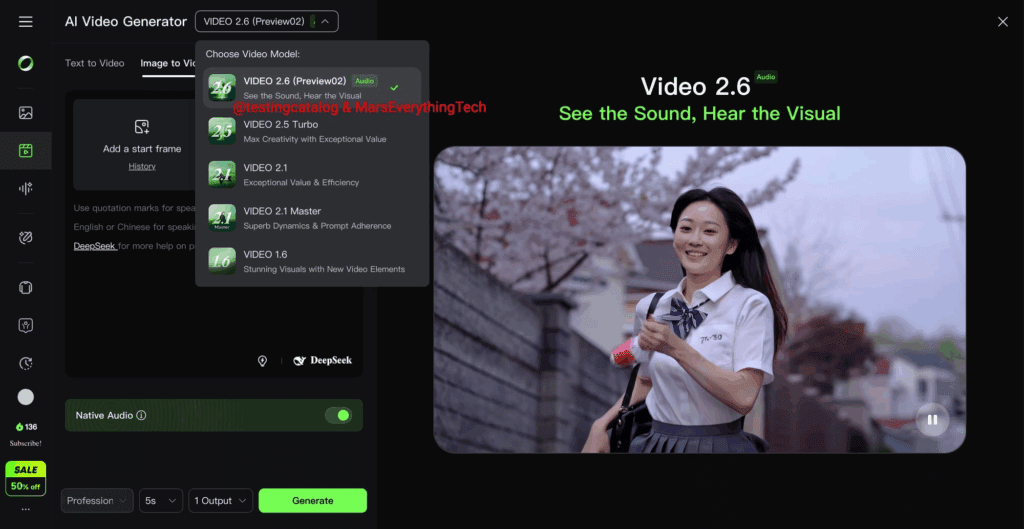
You can turn any photo into a video with a simple 3-step process.
Step 1. Edit Image Using an AI Image Editor
Use Zimage or Nano Banana PRO to clean the picture. Fix lighting and sharpen edges.
Step 2. Add Motion to a Video Model
Tools like VidAU, HeyGen, Fllow.AI, or Viddo.AI add motion. You can choose talking motion, walking motion, or simple camera movement.
Step 3. Polish and Export
Use VidAU or another editor to add subtitles, audio, or sizing. This prepares the video for TikTok, Instagram, or ads.
Comparison Table of the Top Tools
Here is a simple comparison of the most popular image editor AI tools:
| Tool | Best For | Strength | Free Option |
| Zimage | Pre-video editing | Sharp detail, low VRAM | Yes |
| VidAU | Full image-to-video workflow | Captions, audio, resize | Yes |
| HeyGen | Talking avatars | Clean lip sync | Free tier |
| Fllow.AI | Storyboard videos | Fast scene generation | Yes |
| Viddo.AI | Creative short clips | Motion scenes | Yes |
| Pollo.AI | Identity-safe videos | Consistent characters | Yes |
This table helps you pick the right tool for your workflow.
How to Use Gemini Prompts for Ultra-Realistic Image Editing
Gemini prompts help you refine a photo before creating a video.
Lighting Prompts
Use commands like “soft daylight on face” or “studio lighting.”
Face Detail Prompts
Try “sharp eyes,” “clean skin texture,” or “natural shadows.”
Background and Scene Prompts
Set a location. Example: “city street at sunset” or “soft indoor lighting.”
Better prompts lead to stronger videos.
Conclusion
AI image editor tools now combine photo editing and video generation in one flow. Tools like Zimage, VidAU, HeyGen, Flow AI, Viddo AI, and Pollo AI help you turn any photo into a clean video fast. Ultra-realistic models like Nano Banana PRO and Seedream 4.5 make your base image sharper. Gemini prompts help refine details. With this setup, you can create strong videos for ads, storytelling, or social posts in minutes.
FAQs
1. Which tool is best for simple image-to-video work?
VidAU works well because it combines motion, captions, audio, and export sizes in one place. It is simple and fast for creators.
2. What tool should I use to clean my image before generating a video?
Zimage, Nano Banana PRO, and Seedream 4.5 produce strong base images. They fix lighting and boost realism.
3. Is HeyGen good for talking videos?
Yes. It creates clean talking avatars with stable lip sync. It works well for reviews, promo clips, and education.
4. How do I get more realistic image details?
Use Gemini prompts to adjust lighting, face sharpness, and background. Better detail leads to better video results.
5. Can I use these tools for free?
Yes. Each tool listed has a free tier or free mode. Some features may need upgrades, but basic image-to-video workflows remain free.