
ChatGPT AI Agents · Agent Mode, Agent Builder, Skills & Connectors
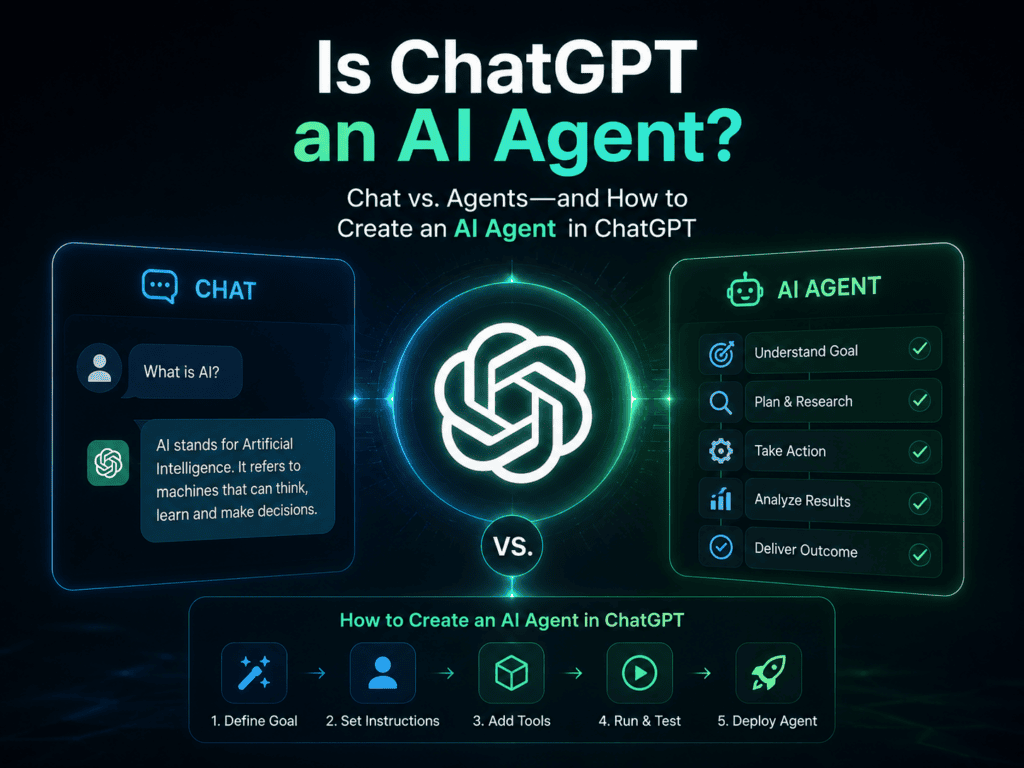
Is ChatGPT an AI Agent? Chat vs. Agents and How to Create an AI Agent in ChatGPT
Learn when ChatGPT is just standard chat, when it becomes an AI agent, and how to build safe Workspace Agents with scopes, connectors, approvals, and logs.
By the VidAU Editorial Team · ChatGPT agent guide · Standard Chat, Custom GPTs, Workspace Agents, Agent Mode, Agent Builder, Skills, Memory, connectors, ReAct-style planning, RAG, human approvals, logging, meeting prep, research, admin workflows, and downstream video handoffs
Is ChatGPT an AI agent? In standard chat, no. It predicts text within a conversation. With Workspace Agents (Agent Mode) and the Agent Builder, ChatGPT can become an AI agent that plans steps, uses tools, and completes tasks with guardrails. I reviewed recent demos and tutorials and distilled a practical build you can follow today without heavy coding.
ChatGPT in standard chat is not an AI agent. With Workspace Agents (Agent Mode) and the Agent Builder, it can function as an AI agent that plans, uses supported tools, and executes multi-step tasks under your rules. I reviewed OpenAI Build Hour demos and current tutorials to map a safe, repeatable build process you can use today.
Quick Summary
- ChatGPT Workspace Agents (Agent Mode) turn chat into an AI agent that can plan steps, use Skills and connectors, and complete tasks with approvals.
- Custom GPTs and standard chat remain useful for one-off drafting; Workspace Agents are better for recurring, tool-connected workflows in 2026.
- Successful agents use scoped roles, ReAct-style planning, explicit permission boundaries, human approval steps, and logging.
- Operators, team leads, and ICs who want automation for meeting prep, research, and admin tasks benefit most.
In This Guide
- What an AI agent in ChatGPT is and how it works
- Is ChatGPT an AI agent? Direct answer and when it is not
- Chat vs. Agents: when to use each mode
- How to build an AI agent with ChatGPT step-by-step
- How to create an AI agent in ChatGPT: example builds
- Safety, guardrails, and limits to set before rollout
- Is ChatGPT an AI agent for every workflow?
- Next steps and resources
- FAQ
What Is an AI Agent in ChatGPT?
An AI agent in ChatGPT is a configured system that plans tasks, chooses tools, and takes actions toward a goal with rules and approvals. In practice, Workspace Agents use instructions, Skills, Memory, and supported connectors to operate steps like browsing, data gathering, and drafting outputs within defined boundaries.
Definition
An AI agent in ChatGPT is a configured system that plans tasks, chooses tools, and takes actions toward a goal with rules and approvals.
Is ChatGPT an AI agent?
In standard chat, ChatGPT is not an AI agent; it is a conversational model that generates text. With Workspace Agents (Agent Mode) enabled and configured in the Agent Builder, ChatGPT can act as an AI agent that plans, uses Skills and connectors, and executes multi-step workflows with scope and guardrails.
I reviewed and analyzed current tutorials and OpenAI Build Hour demos. The throughline: Agent Mode shifts ChatGPT from single-turn replies to goal-driven, tool-connected execution, especially for meeting prep, planning, research, and admin tasks.
Direct answer
In standard chat, ChatGPT is not an AI agent. With Workspace Agents and Agent Mode configured in Agent Builder, it can function as an AI agent for scoped, multi-step, tool-connected workflows.
Chat vs. Agents: when to use each
You do not need an agent for every task. Our team compared Standard Chat, Custom GPTs, and Workspace Agents and documented the fit below.
| Mode | Best for | Why |
|---|---|---|
| Standard Chat | One-off drafting, quick Q&A | Fast, zero setup, no connectors |
| Custom GPTs | Repeatable content styles | Fixed instructions, uploads, light tools |
| Workspace Agents | Multi-step, tool-connected work | Plans, uses Skills, connectors, approvals |
Key Takeaways
- Use Standard Chat for ad-hoc writing and brainstorming.
- Use Custom GPTs when you want a reusable voice or template.
- Use Workspace Agents when tasks span steps, tools, or schedules.
How to build an AI agent with ChatGPT step-by-step
This section addresses how to build an AI agent with ChatGPT using Agent Mode. The flow reflects current demos; avoid assuming specific plans or app availability and rely on supported connectors.
1) Choose a narrow, valuable job and scope
- Pick a single outcome, not a department. Example: Prepare a daily brief from Google Calendar, Slack mentions, and Asana due-today tasks.
- Define boundaries: What data can it read? What actions require human approval? What outputs and formats are expected?
- Sample identity prompt: You are a specialist agent for daily planning. You only read today’s Google Calendar, Slack mentions to me, and Asana tasks due today. You produce a one-page brief and stop for approval before any scheduling.
2) Open Agent Builder and set identity
- Create a new agent. Add a short purpose line, success criteria, and off-limits rules.
- Add reference files such as SOPs or style guides for a lightweight RAG setup. Keep documents concise and current.
- Decide if Memory is helpful. Enable it only if your use case benefits from learned preferences.
3) Add Skills and connectors
- Select needed Skills and supported connectors. Common picks in demos: Google Calendar, Slack, Asana, Gmail, and GitHub.
- Keep permissions least-privileged. Grant read-only first. Require approvals for any sending or booking.
- Tip: Structure expected outputs (checklist, CSV, Markdown brief) so downstream systems can consume them.
4) Encode ReAct-style planning and constraints
- Add instructions that force the plan: Think step by step, list tools you will use, then execute.
- Require self-checks: Validate data sources, confirm dates and time zones, and summarize assumptions before action.
- Example planning block: Plan steps, cite which Skill or connector you will use per step, run steps in order, and log actions.
5) Add human approvals and logging
- Add request-run steps for risky actions: emails, calendar changes, file writes, code changes.
- Require a preview artifact for approvals: email draft, calendar diff, or PR summary.
- Ensure logs include data sources used, tools invoked, and a final summary for audit.
6) Test with canned scenarios
- Provide 3 to 5 scripted test cases: no meetings, double-booked meetings, conflicting tasks, missing doc links.
- Validate outputs with a checklist: correct sources read, approvals triggered, formats match, no out-of-scope actions.
- Iterate on instructions and permissions until results are consistent across cases.
7) Share and monitor
- Share the agent with your workspace. Document usage, inputs, output formats, and known limits.
- Monitor early runs and collect user feedback. Tighten rules where drift appears.
I reviewed recent how-to videos that highlight two patterns: manager agents that route tasks and specialist agents that do one lane. You can mirror this inside ChatGPT by creating a manager agent that triages requests and hands off to scoped specialists with tighter instructions.
Build tip
Pick a single valuable job, keep permissions read-only first, require approval for risky actions, test with canned scenarios, and document usage before sharing the agent with a workspace.
How to create an AI agent in ChatGPT: example builds
This section shows how to create an AI agent in ChatGPT with concrete prompts and connectors typical in demos. Use supported connectors and keep approvals on for actions.
1) Meeting Prep agent
- Scope: Read today’s Google Calendar, scan Slack mentions to you, list Asana tasks due today, and compile a one-page brief.
- Connectors: Google Calendar (read), Slack (read mentions), Asana (read due-today).
- Output: A Markdown brief with time blocks, conflicts, and a top-3 priority list.
- Sample core prompt: You are a Meeting Prep specialist. Read only today’s calendar, Slack mentions to me, and Asana tasks due today. Produce a one-page brief with headings: Schedule, Conflicts, Priorities, and Draft replies to 3 urgent Slack threads. Stop and ask for approval before drafting any external email.
2) Competitor Research agent
- Scope: Visit specified competitor sites, collect product pages, and produce a one-page market brief with a CSV of feature comparisons.
- Skills: Browsing and file generation.
- Output: A succinct brief and a CSV attachment.
- Sample core prompt: You are a Research specialist. From the provided list of competitor URLs, extract price ranges, headline claims, and 5 key features. Cross-check at least two independent sources. Return a one-page summary and a CSV with columns: brand, plan, headline claim, notable feature.
Manager and specialist pattern
- Manager agent prompt (routing): You are the Manager. You never perform tasks. For each job, choose the correct specialist agent, hand off a scoped instruction, and collect the result. If a job spans areas, split it into separate specialist requests. Summarize outcomes for approval.
- Specialist agent prompt (focused): You do one job only and never leave scope. You must stop and request approval before any outbound action.
What I found from current demos: supported connectors like Google Calendar, Gmail, Slack, Asana, and GitHub appear often in real builds. Agents still benefit from explicit outputs and guardrails. Known issues include CAPTCHAs, occasional browsing friction, and processing time on larger tasks.
Mid-pipeline handoff to video
- Our team reviewed ecosystem signals showing media tools exposing agent-accessible capabilities. One public example: a Runway announcement about calling generation from assistants. If your agent outputs ad copy or a storyboard, you can hand off to AI video tools for production.
- For ad-ready videos, structure your agent’s output as a script or shot list, then pass it to VidAU AI Video, Text to Video, or URL to Video. VidAU is an AI video ad platform that generates video ads from product URLs, images, or scripts in 49 languages. Note: if you require a direct ChatGPT connector, keep this as a manual or API handoff.
Turn ChatGPT Agent Outputs Into Ad-Ready Videos
If your agent produces scripts, briefs, or storyboards, use VidAU AI Video, Text to Video, URL to Video, UGC Avatars, Text to Speech, Video Enhancer, VidAU Vid Remix, and VidAU Vid Remake as manual or API handoff steps for production.
VidAU workflow
Where VidAU Fits In ChatGPT Agent Workflows
- Use ChatGPT standard chat for quick drafts: Keep simple one-off writing, brainstorming, and single-turn Q&A in standard chat or a Custom GPT.
- Use Workspace Agents for multi-step work: Move recurring, tool-connected workflows into Agent Mode with scoped instructions, Skills, connectors, Memory, approvals, and logs.
- Use manager and specialist agents for clarity: Let manager agents route requests and specialist agents handle one scoped lane with approval gates.
- Use VidAU after scripts or storyboards are ready: Pass structured outputs to VidAU AI Video, Text to Video, URL to Video, UGC Avatars, Text to Speech, Video Enhancer, VidAU Vid Remix, or VidAU Vid Remake for ad-ready video production.
- Keep the handoff governed: If you require a direct ChatGPT connector, keep VidAU as a manual or API handoff and review all public-facing video outputs before publishing.
Safety, guardrails, and limits to set before rollout
An agent is only as safe as its scope. Set these controls before sharing widely.
- Permission boundaries: Start read-only. For actions like send, book, or write, require approval.
- Blocklists and whitelists: Restrict domains, repos, channels, and calendars.
- Rate and budget limits: Cap frequency and size of actions.
- Logging and audit: Record data sources, tools invoked, and final artifacts.
- Human-in-the-loop: Always preview emails, schedule changes, or file writes.
- Testing: Use edge-case scripts. Fail fast and visibly when data is missing.
Known constraints from current tutorials and demos
- CAPTCHAs and login walls can stall browsing.
- Security prompts or MFA can require manual intervention.
- Processing speed may slow on large jobs or heavy file ops.
- Browsing can vary by site complexity; require source citation and cross-checking.
Guardrail warning
Start read-only, restrict domains and tools, require approvals for sends or writes, log sources and final artifacts, and test edge cases before sharing agents widely.
Is ChatGPT an AI agent for every workflow?
No. ChatGPT is not an AI agent for quick drafting, brainstorming, or single-turn tasks; standard chat or a Custom GPT is faster. Use an agent when the job is recurring, multi-step, tool-connected, and benefits from approvals, logs, and repeatability.
When to keep it simple
- One-off copy, outlines, or quick code reviews.
- Exploratory research where connectors add little.
- Low-stakes tasks where setup overhead outweighs value.
When an agent pays off
- Daily or weekly workflows with the same steps and data sources.
- Tasks that must check multiple tools and return a single artifact.
- Jobs requiring audit trails, approvals, or scheduled runs.
Decision tip
Use standard chat for quick drafting, brainstorming, and single-turn tasks. Use Workspace Agents when the workflow is recurring, multi-step, tool-connected, and benefits from approvals, logs, and repeatability.
Key takeaway
Final Thoughts
The short answer: ChatGPT by itself is not an agent; with Workspace Agents it can become one for scoped, multi-step work. Start with a single valuable job, wire only the Skills and connectors you need, enforce approvals, and test against edge cases before team rollout.
If your workflow produces scripts, briefs, or storyboards, turn them into ad-ready videos with VidAU AI Video Text to Video or URL to Video. For UGC-style spokespeople or voiceovers, see UGC Avatars and Text to Speech. For quality polish, use Video Enhancer or repurpose assets with VidAU Vid Remix and VidAU Vid Remake
FAQ
Here are answers to common questions about whether ChatGPT is an AI agent, the difference between standard ChatGPT and Agent Mode, how to build an AI agent with ChatGPT, meeting prep agents, supported connectors, coding requirements, current limits, manager and specialist agents, video handoffs, RAG, and ReAct.
Is ChatGPT an AI agent?
In standard chat, no. ChatGPT is a conversational model that generates text. With Workspace Agents (Agent Mode) configured in the Agent Builder, ChatGPT can operate as an AI agent by planning steps, invoking Skills and supported connectors, and producing goal-focused outputs under guardrails and approvals.
What is the difference between standard ChatGPT and Agent Mode?
Standard ChatGPT handles one-off prompts and drafting without tool-connected actions. Agent Mode adds an Agent Builder, Skills, Memory, and supported connectors so the system can plan, use tools, and execute multi-step workflows with approvals and logs. Agents are best for recurring, multi-source tasks.
How to build an AI agent with ChatGPT?
Define a narrow job and scope, create the agent in the Agent Builder, add Skills and supported connectors such as Google Calendar, Slack, Asana, Gmail, or GitHub, encode planning and constraints, require human approvals for risky actions, test with canned scenarios, and share with documentation and monitoring.
How to create an AI agent in ChatGPT for meeting prep?
Create a specialist agent that reads today’s Google Calendar, scans Slack mentions to you, lists Asana due-today tasks, and returns a one-page brief with conflicts and priorities. Keep permissions read-only and require approval before any scheduling or outbound emails. Validate with edge-case test days.
Can ChatGPT agents connect to Google Calendar, Slack, Asana, Gmail, and GitHub?
Agents can use supported connectors that appear in the Agent Builder. Common examples in demos include Google Calendar, Slack, Asana, Gmail, and GitHub for read and draft actions. Use least-privilege access, approvals for sends or writes, and logging to track which tools were invoked.
Do I need coding to create a ChatGPT agent?
No heavy coding is required for common workflows. You design identity, instructions, and connectors in the Agent Builder, then add approval steps and testing. For advanced integrations or custom Skills, technical help can improve reliability and enforce more granular policies.
What are common limits of ChatGPT agents?
Agents can stall on CAPTCHAs, secure login flows, or sites that block automation. Processing can slow on large tasks or heavy file operations. Browsing may vary by site complexity. Use human approvals, narrow scopes, and explicit output formats to manage risk and maintain reliability.
What is the manager and specialist agent pattern?
A manager agent routes tasks and never does the work itself; it splits multi-area jobs into single-lane specialist agents and summarizes results. Specialist agents have tight scope and explicit outputs. This pattern improves safety, clarity, and testability for real-world automations.
Can ChatGPT agents create videos or ads automatically?
Agents can produce structured scripts or shot lists that downstream tools can consume. For ad-ready video creation, pass the output to tools such as VidAU AI Video Text to Video or URL to Video. If you require a direct connector, keep this as a manual or API handoff.
What is RAG or ReAct in the context of agents?
RAG adds retrieval from your uploaded or approved documents so the agent can ground answers with references. ReAct is a prompt pattern that forces the agent to reason about steps and choose actions in sequence. Together, they improve correctness and traceability in multi-step workflows.






