Kling AI Video: What’s New in the 2.6 Audio-Visual Model
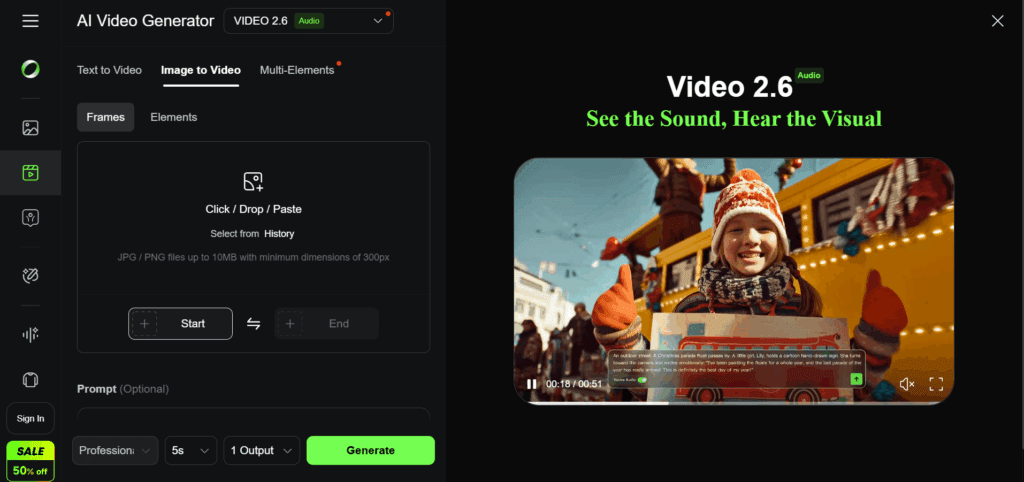
Kling AI Video keeps getting better. The new 2.6 audio-visual model brings major upgrades in sound, motion, and realism. Creators want smoother characters, better lip-sync, and cleaner movement. Version 2.6 delivers these features and makes AI video feel closer to real production.
This guide explains what changed, why these updates matter, and how you can use Kling 2.6 to create stronger videos for ads, short content, or storytelling.
What Is Kling AI Video 2.6?
Kling AI Video 2.6 is the newest version of Kling’s audio-visual engine. It improves sound control, motion accuracy, and overall scene quality.
How Version 2.6 Works
Kling 2.6 reads your audio, your image, or your text prompt. It then builds motion around the voice, rhythm, or scene description. The model uses improved frame mapping to keep characters stable and reduce distortions.
Why Kling 2.6 Matters Now
Creators want fast, clean videos without heavy editing. Version 2.6 makes AI video more reliable, more natural, and easier for beginners and pros. And because UGC ads and talking videos keep rising, better audio sync became important.
New Audio-Visual Features in Kling AI 2.6
Kling 2.6 brings new sound-driven animation, better lips, and cleaner camera movement.
Better Lip Movement
Lip-shapes match speech more closely. Mouth timing feels natural even in long sentences.
Smoother Camera Motion
Scene transitions now feel steady. Fast motion has fewer jumps or blur issues.
Lighting and Texture Enhancements
Shadows look more real. Skin and fabric textures stay consistent across frames.
Small listicle of upgrades:
- Cleaner lips
- Better audio timing
- Stabilized camera paths
- Improved lighting control
How Kling AI 2.6 Improves Realism and Motion
Kling 2.6 reduces frame flicker and keeps characters stable even in busy scenes.
Frame Stability Improvements
The model reduces jitter. It keeps arms, faces, and objects locked to their correct shapes.
Better Physics Simulation
Movement feels heavier and more grounded. Characters bend, turn, and shift weight more naturally.
Motion Accuracy for Fast Scenes
Scenes that include running, turning, or quick camera shifts now look smoother. This is important for ads, short films, and action shots.
What’s New with Sound and Audio-Driven Video Creation
Kling 2.6 connects sound directly to movement.
Audio-to-Animation Mapping
Voice, beats, and rhythm guide the scene. This allows music-driven animations.
Music-Driven Edits
You can animate characters based on the rise and fall of sound. Great for music clips, TikTok edits, and storytelling.
Improved Voice Lip-Sync
The sync now lines up with speech timing. Words look more accurate, even in complex sentences.
Kling AI 2.6 vs Older Versions (2.0, 2.3, Master Mode)
Kling 2.6 offers the best balance of detail, audio control, and motion stability.
Feature Comparison Table
| Version | Strength | Weakness |
| 2.0 | Basic text-to-video | Motion errors |
| 2.3 | Better realism | Weak audio control |
| Master Mode | High detail | Higher credit cost |
| 2.6 | Best audio + motion | Still credit-dependent |
Upgrade Differences
2.6 improves frame stability. Audio sync is sharper. The lighting is cleaner. Character motions hold shape better than in 2.0 and 2.3.
Which Version to Use
Use 2.6 for talking videos, music-based videos, ads, and complex scenes. Older versions suit simple prompt-based clips.
Best Use Cases for Kling AI Video 2.6
Kling 2.6 works well for social videos, ads, avatars, and story clips.
Social Media & UGC
Better lips and motion make UGC ads look more real. Scenes flow well for TikTok and Reels.
Talking Videos & Avatars
The new audio engine makes it easy to produce talking characters or presenters.
Cinematic & Motion Scenes
Smoother physics help creators build film-style shots with fewer distortions.
CTA: Create Videos Faster With VidAU.
How to Use Kling AI 2.6 to Generate High-Quality Video
Creating videos in Kling 2.6 is simple.
Step-by-Step Process
- Upload audio or write a prompt
- Choose the animation style
- Set video duration and quality
- Preview motion
- Render and export
Best Prompt Styles
Short, clear prompts work well. Describe lighting, clothing, and camera motion.
When to Use VidAU
After generating the base animation in Kling, you can use VidAU for clean captions, audio fixes, and final polishing.
CTA: Start Creating Today With VidAU.
Conclusion
Kling AI Video 2.6 brings major upgrades to sound, motion, and realism. It supports better lips, better physics, and cleaner scenes. These improvements help creators make stronger ads, UGC clips, and talking videos.
Version 2.6 shows how fast AI video is moving, and it gives everyone — beginners and experts — a more stable way to produce content.
FAQs
1. What makes Kling AI Video 2.6 better than older models?
It delivers smoother motion, better lip-sync, and cleaner lighting. Character stability is higher than before, making videos feel more real.
2. Does Kling AI 2.6 support long videos?
Yes. It supports longer clips than older versions. The exact length depends on your account tier and credit plan.
3. How accurate is the new audio sync?
Version 2.6 gives more precise timing. Lip movement lines up better with words, music, and rhythm.
4. Is Kling AI Video 2.6 free?
There is a free tier, but full-quality video and longer outputs require credits. Some features only unlock in paid plans.
5. Who should use Kling AI 2.6?
UGC creators, marketers, editors, and influencers. Anyone who wants smooth talking videos or audio-driven scenes will benefit the most.