Nano banana 2 Update: Everything you need to Know
Nano banana 2 update is attracting strong attention among creators because image generation now produces visuals that look structured and usable. Creators now use nano banana 2 update to generate thumbnails, product scenes, marketing graphics, and storytelling visuals that fit directly into modern content workflows. Instead of experimenting with random visuals, creators generate images that work inside real campaigns, advertisements, and short videos.
The article explains what changed in the nano banana 2 update, how the model compares with nano banana 1, and how creators use the system inside VidAU to build visual content.
What Changed in the Nano Banana 2 Update

The nano banana 2 update introduces improvements that focus on structure, stability, and clearer prompt interpretation. Instead of producing experimental visuals, the model now generates scenes that align better with real design and marketing workflows.
Creators notice improvements in image resolution, object stability, and typography rendering. These changes help reduce the amount of editing required after image generation.
Several upgrades define the nano banana 2 update.
- Higher image clarity for product and marketing visuals
- Improved scene structure with stable object placement
- Better prompt interpretation for descriptive instructions
- Clearer typography generation inside images
- Stronger support for multi subject scenes
These improvements explain why many creators replace nano banana 1 with nano banana 2 when generating visual assets.
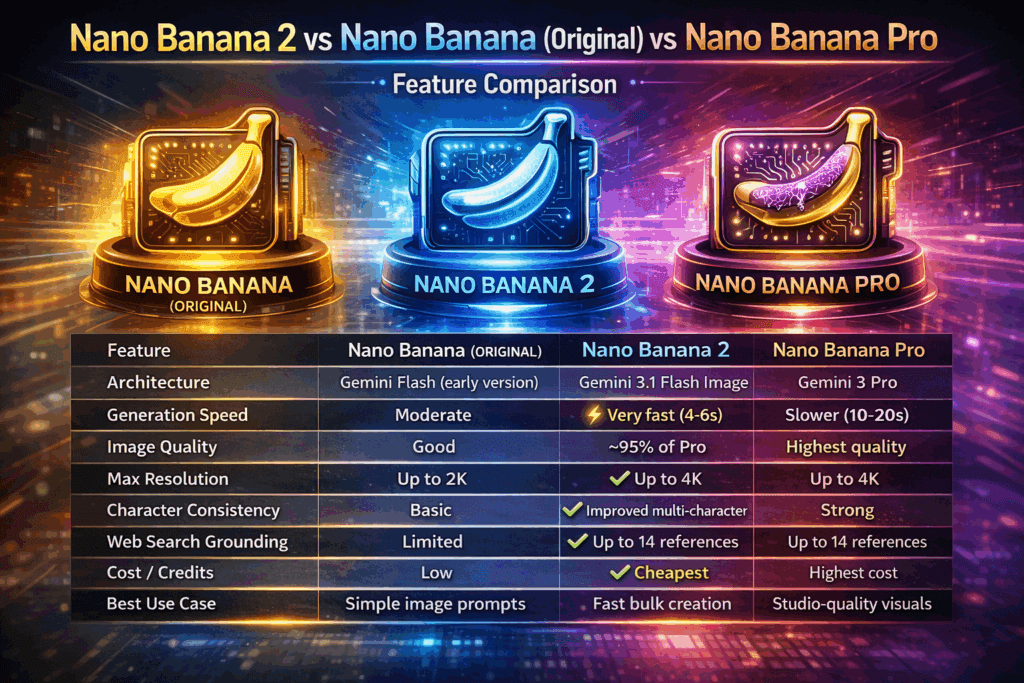
Nano banana 1 vs Nano banana 2 features comparison
Comparing nano banana 1 and nano banana 2 shows how much progress occurred between both versions. The table below highlights the main differences between the two models.
| Feature | Nano banana 1 | Nano banana 2 |
| Image resolution | Standard resolution | Higher resolution output |
| Scene consistency | Objects often distort | Stable object placement |
| Typography | Text appears distorted | Text appears readable |
| Prompt interpretation | Basic scene generation | Improved scene reasoning |
| Multi subject scenes | Layout confusion | Organized scene structure |
| Creator usability | Artistic experiments | Marketing ready visuals |
These improvements explain why creators quickly migrate from nano banana 1 to nano banana 2 when generating visuals.
The new model focuses less on experimental artwork and more on images that support real production workflows. Designers use it for marketing graphics, creators use it for thumbnails, and brands use it for visual campaigns.
Popular Nano Banana 2 Prompts That Generate Strong Visual Results
A strong prompt helps nano banana 2 produce clear and structured visuals. The model performs best when instructions remain simple and descriptive.
Creators often use prompts that describe scene composition, lighting, and subject focus. This helps the system understand what the final image should look like.
Below are examples of prompts creators commonly use when generating visuals with nano banana 2.
- “modern product showcase on a clean white table with soft lighting”
- “cyberpunk city street at night with neon reflections and rain”
- “minimal workspace desk with laptop coffee and natural sunlight”
- “cinematic portrait lighting with dark background and dramatic shadows”
- “stylish sneaker product scene with soft studio lighting”
These prompts guide the model toward structured images instead of chaotic results. Clear instructions usually produce stronger outputs. Many creators generate several images from one prompt and then choose the best visual for content creation.
How nano banana 2 Supports Short Video Ads
One of the biggest advantages of the nano banana 2 update appears in marketing content. Many creators now use generated visuals to support short video ads.
Short videos dominate modern social media. Platforms like TikTok, Instagram Reels, and YouTube Shorts rely on fast visual storytelling. Nano banana 2 helps creators produce the first stage of this content pipeline.
Creators generate product scenes, storytelling visuals, or promotional graphics with nano banana 2. These visuals then act as the base for short video ads.
Short video campaigns often require several visual assets.
- product visuals
- Promotional scenes
- Background environments
- Character images
- Storytelling frames
Nano banana 2 helps generate these assets quickly. Instead of organizing a full photoshoot, creators produce visual scenes from prompts.
This speed allows marketers and creators to test new visual ideas faster when building ad campaigns.
Limitations inside the nano banana 2 update
Even though the nano banana 2 update introduces strong improvements, some limitations still exist. These limitations appear mostly when prompts become extremely complex.
Very long prompts that include too many instructions sometimes confuse the system. In those cases the model may simplify certain scene elements.
Character consistency across multiple images also remains challenging. Maintaining the exact same character across several scenes requires careful prompting.
Some additional challenges still appear in areas such as:
- Large crowd scenes
- Extremely detailed mechanical objects
- Complex typography layouts
Despite these limitations, nano banana 2 still produces more structured visuals than many earlier image models.
How to Use Nano banana 2 Inside VidAU

Nano banana 2 sits inside VidAU as one of the core image generation models. You use it when you want clean scenes, stable objects, and visuals that fit into short video workflows. The model improves the first frame quality so your final video looks stronger.
You follow this process inside VidAU.
- Open the image generation tool inside VidAU.
- Select nano banana 2 as your preferred model.
- Type a short prompt with clear scene structure.
- Generate your images in the size you need.
- Pick the frame you want to animate.
- Move the image into VidAU’s video tools.
- Add motion, captions, pacing, and export settings.
- Export a clean vertical or horizontal video.
Nano banana 2 improves this workflow because your images start with higher resolution and stronger layout. You spend less time fixing distortions and more time adding motion.
Conclusion
The nano banana 2 update marks an important step in the evolution of visual creation. Image generation now focuses on structure, clarity, and real production use.
Creators value nano banana 2 because the model produces visuals that work well for marketing graphics, storytelling scenes, and product visuals. Instead of generating experimental art, the model now creates structured images suitable for real content workflows.
At the same time, visual generation continues to expand into video production. Many creators generate images first, then convert them into motion content. Platforms like VidAU support this workflow by allowing creators to turn images into complete videos quickly.
Frequently Asked Questions
- What is nano banana 2?
Nano banana 2 is an image generation model that converts written prompts into structured visuals. The nano banana 2 update focuses on improved scene structure, clearer typography, and stronger prompt interpretation.
- How is nano banana 2 different from nano banana 1?
Nano banana 2 improves image resolution, prompt interpretation, and scene stability compared with nano banana 1.
- Is nano banana 2 useful for marketing visuals?
Yes. Many creators generate posters, advertisements, and social media graphics using nano banana 2.
- Can nano banana 2 images become videos?
Yes. Creators often upload nano banana 2 images into VidAU to convert them into video clips for social platforms.
- Why is the nano banana 2 update trending?
The nano banana 2 update attracts attention because it improves prompt interpretation, scene stability, and typography rendering compared with earlier models.