Nano Banana Pro vs Vidu Q2 — What Creators Should Know
Artificial Intelligence is fundamentally changing the content creation pipeline, enabling creators and marketing teams to bypass traditional bottlenecks like studio lighting, camera logistics, and lengthy editing cycles. Today two specialized tools, Nano Banana Pro and Vidu Q2 on VidAU, emerged as leaders. While both deliver exceptional output, they are engineered to solve distinct creative challenges. One is the benchmark for high-detail, commercial-ready still images; the other is focused on cinematic video and motion control. This article provides a strategic breakdown of each tool’s core function, optimal use cases, and how to select the right platform for your visual project needs.
What are these tools
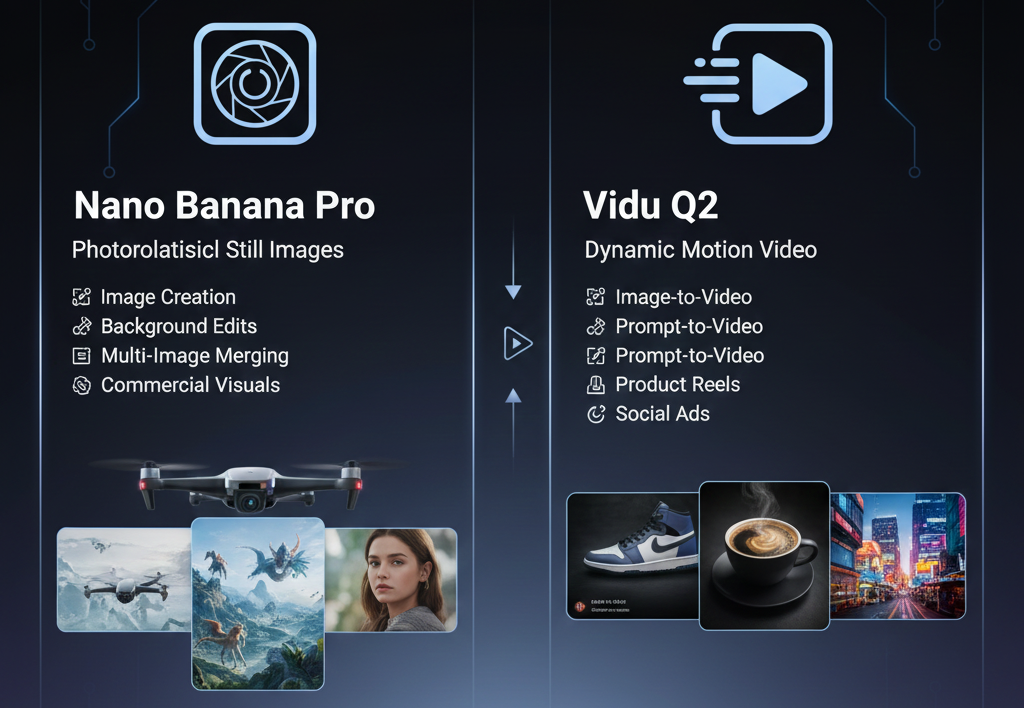
Nano Banana Pro is an AI image-generation and editing model. It helps you create photorealistic still images. You upload a photo or write a prompt, and the model delivers high-resolution images with clean lighting, sharp detail, and consistent rendering. It works for image creation, background edits, multi-image merging, and refined commercial visuals.
Vidu Q2 is a next-generation AI video model focused on motion. It generates short videos (2–8 seconds, up to 1080p) from a single image, a prompt, or reference frames. It offers two modes — “Turbo” for quick motion prototypes, and “Pro” for high-fidelity, cinematic video output. It supports image-to-video, reference-to-video and prompt-to-video workflows.
In short: Nano Banana Pro serves still images and commercial-ready visuals. Vidu Q2 targets motion — animated scenes, product reels, social ads, and short video clips.
What each tool does well
Nano Banana Pro — Visual precision and commercial polish
- Produces sharp, high-resolution images suitable for product photos, branding, marketing assets.
- Offers strong control over lighting, texture, composition, and backgrounds. Ideal if you need clean, realistic visuals with consistent color and detail.
- Great for static deliverables: product catalogs, banners, mockups, ad images.
Vidu Q2 — Motion, consistency and cinematic video output
- Delivers smooth camera motion, cinematic lighting and stable frame-to-frame consistency. It handles dolly shots, tracking, depth and fluid motion.
- Supports reference-to-video: you can upload one or multiple reference images to preserve subject, background or style across frames.
- Provides two modes: Turbo for fast drafts and idea testing, Pro for polished, social-ready, ad-quality deliverables.
- Output works well for social content, short product promos, ads, reels and storytelling clips.
Real world testing scenarios
Prompt 1. Nano Banana Pro Output for Product Shot
Create a sharp product image of a black wireless earbud case on a matte grey slab. Add soft top light. Highlight the smooth curve on the case. Keep reflections tight and clean. Maintain a simple background with a light falloff. Aim for a commercial result suited for ads and product listings.

Prompt 1. Vidu Q2 Version for Animated Product Clip
Produce a 6 second video of the same black wireless earbud case opening slowly on a matte grey slab. Add soft top light that shifts slightly as the lid lifts. Highlight the glossy edge on the earbuds inside. Keep the background simple with a clean gradient. Add a light click sound when the lid opens. Maintain a premium look for marketing videos.
Prompt 2. Nano Banana Pro Output for Lifestyle Scene
Create a lifestyle image of a man reading on a tablet in a living room. Add warm window light from the left. Keep the sofa clean with a blanket folded on one side. Show balanced shadows on the tablet screen. Maintain a calm, realistic style suited for brand storytelling.

Prompt 2. Vidu Q2 Version for Story Clip
Produce an 8 second video of the same man scrolling through a tablet in the living room. Add warm window light that shifts gently as he moves. Show small actions like his finger scrolling and the screen adjusting brightness. Add a soft room ambience. Keep the clip steady and warm for lifestyle marketing.
Prompt 3. Nano Banana Pro Output for Outdoor Portrait
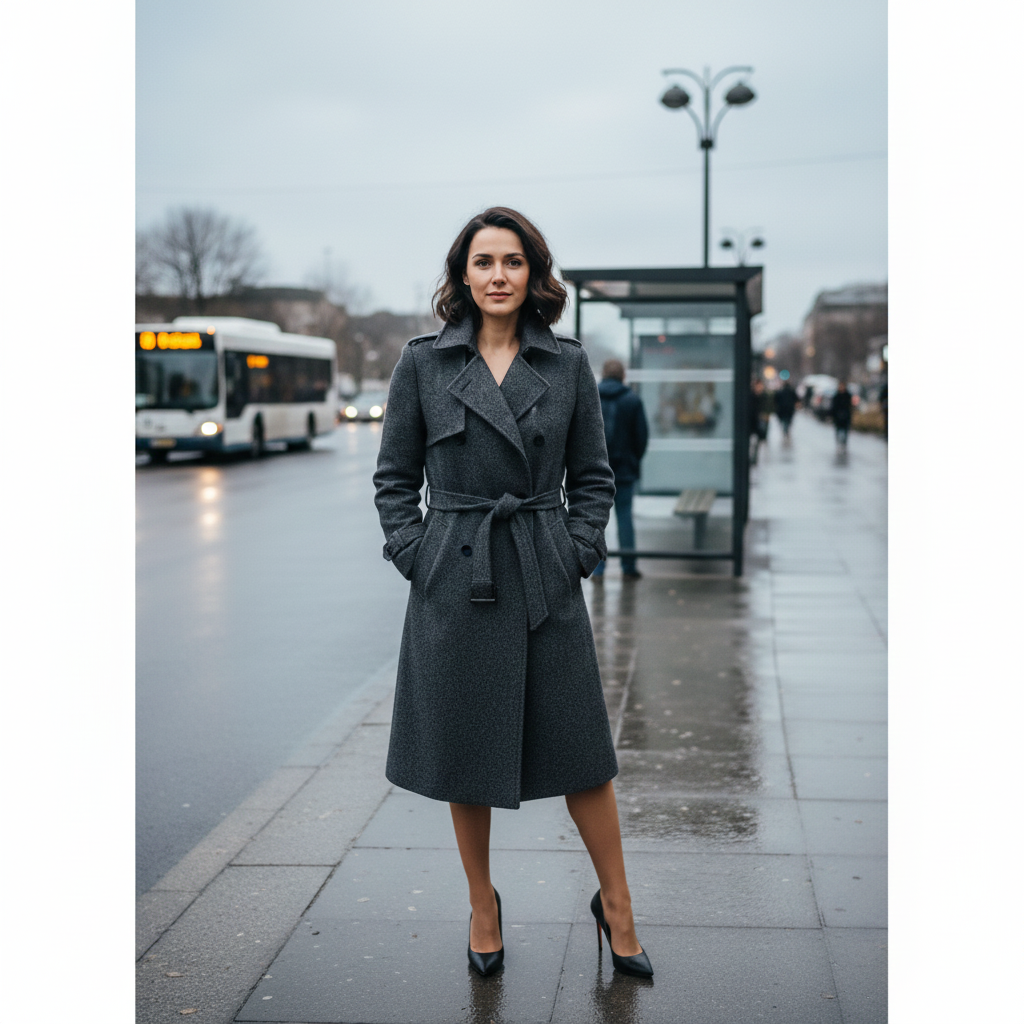
Prompt 3. Vidu Q2 Version for Motion Portrait Clip
Produce a 8 second video of the same woman near the bus stop. Add soft cloud light with slight changes as vehicles pass. Show a small head turn and a natural blink. Add faint street ambience. Keep the clip grounded for short creator intros.
When to use which: key use-case comparison
Side by side comparison
Combined workflow: Strength in sequence
You can combine both tools for maximum value. For example:
- Use Nano Banana Pro to create a clean, polished product render or base image.
- Upload that image into Vidu Q2 as a reference frame.
- Generate a short animated clip with motion, lighting and cinematic camera work.
This workflow gives you a high-quality base image plus motion. Good for ads, social posts, product promos, mock campaigns.
How VidAU fits the pipeline
VidAU acts as the production layer around models like Nano Banana Pro and Vidu Q2. Use VidAU to:
- Orchestrate prompt templates.
- Add captions, translations and voice.
- Export platform specific formats.
- Run A/B tests and deliver asset variants.
VidAU helps you take a model output and make it platform ready.
What to watch out for
With Nano Banana Pro
- It generates still images only. No motion or video capabilities.
- For video-based campaigns, you will need separate tools or video generation models.
With Vidu Q2
- Clips are short (2–8 seconds). For longer format videos, you will need editing or stitching.
- Final polish such as captions, subtitles, voice-over or overlays might still need a full video editor or additional processing.
Verdict: Choose based on your output goal
If your goal is clean, high-quality still visuals for branding or marketing assets, choose Nano Banana Pro. If you need motion — dynamic videos, social ads, promo clips — choose Vidu Q2. If you want both: use Nano Banana Pro to build your base imagery and then feed that into Vidu Q2 for motion.
For many creators, marketers and agencies, the hybrid workflow gives the best balance: high-quality visuals plus easy motion without filming or heavy editing.
Conclusion
- If you need photorealism and pixel level control, choose Nano Banana Pro. Use it for product shots, print assets and campaign stills.
- If you need a short, convincing video with motion, choose Vidu Q2. Use it for reels, social ads and short storytelling clips. t
- For the most impact, use a hybrid process. Create your base in Nano Banana Pro, then animate with Vidu Q2. Finalize with VidAU for captions, CTAs and publishing. This reduces shoot days and speeds A/B testing.
FAQ
Q. Which tool is faster for final delivery?
A. For stills, Nano Banana Pro delivers the final asset faster. For motion prototypes, Vidu Q2 Turbo delivers drafts fast. Final high fidelity renders take longer.
Q. Can I keep the same subject across both tools?
A. Yes. Export a high resolution reference from Nano Banana Pro and upload it into Vidu Q2. The reference improves subject continuity.
Q. Are there brand safety risks?
A. Yes. Both models may add unintended elements or biased depictions. Run legal and cultural checks.
Q. Can I generate long videos with Vidu Q2?
Q. Which formats do they export?
A. Nano Banana Pro exports high res stills in common image formats. Vidu Q2 exports short clips up to 1080p. Check each provider for exact format options.
Q. Can I use outputs commercially?
A. Check the license and terms of service for each model before commercial use. Providers update TOS frequently.