Blog AI Ads Tool Seedream 5.0: How to Get More Accurate AI Images Right Now

Seedream 5.0: How to Create Smarter, More Accurate AI Images for Ads

Seedream 5.0 AI Images

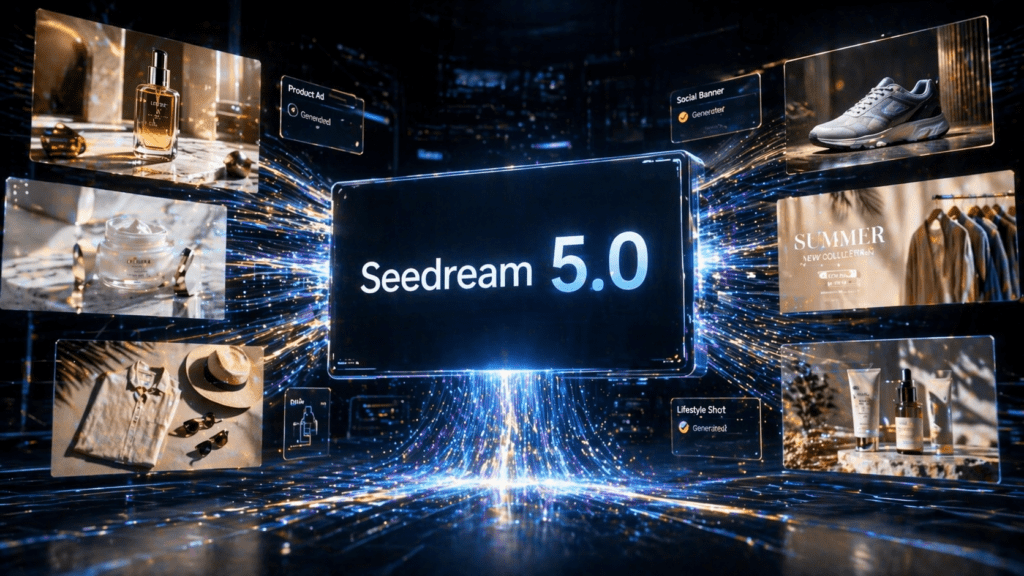
Seedream 5.0 is ByteDance’s most advanced Image generation model, released in February 2026. Unlike previous models that simply interpret a prompt and generate, the Seedream 5.0 image generator reasons through your brief before producing a single pixel, mapping spatial relationships, applying world knowledge, and understanding what you actually meant from the words you used.

The result is images that match complex briefs precisely, not loosely. For marketers, e-commerce brands, and content creators, this ByteDance image model means fewer regenerations, more accurate outputs, and commercial-ready visuals from the first generation.

Using VidAU, you can access Seedream 5.0 directly inside your ad production workflow,  generate product images, ad creatives, brand visuals, and social graphics optimised for AI image generation for ads, then feed them into AI Video, AI Avatar, or VidRemix without switching platforms.

What Makes Seedream 5.0 Different

Seedream 5.0 represents a significant architectural departure from earlier image models. Rather than treating image generation as a pure prompt-to-output task, this ByteDance image model integrates chain-of-thought reasoning, live web search, and multimodal reference understanding into a single unified system.

Previous models, including Seedream 4.5, would interpret your prompt and generate based on training data alone. The Seedream 5.0 image generator goes further in three ways.

First, it thinks before it generates. The model uses chain-of-thought visual reasoning to plan the composition, spatial layout, and physical logic of your image before rendering begins. Complex briefs, multi-element scenes, layered compositions, specific spatial instructions, execute accurately from the first generation rather than requiring multiple attempts.

Second, it searches the web in real time. Most image models are limited to their training data, which means prompts referencing current events, recent trends, or time-sensitive context produce outdated or inaccurate results. Seedream 5.0 can retrieve live information before generating, keeping outputs current and contextually accurate, a major advantage for AI image generation for ads tied to seasonal campaigns, product launches, or trending formats.

Third, it accepts up to 14 reference images in a single generation. Define visual style from one image, character identity from another, lighting conditions from a third. The model reads every reference, understands each one’s role, and applies them all coherently in one output.

Why Seedream 5.0 Works for Ad Creative

The Seedream 5.0 image generator is specifically optimised for commercial and professional scenarios, the outputs reflect this focus directly.

  • Strongest Prompt-Following Model Ever Built ByteDance’s own description of Seedream 5.0 is precise: the strongest prompt-following image model ever. Complex briefs with multiple elements, specific spatial requirements, and detailed instructions execute accurately. What used to require multiple regeneration attempts now resolves in the first generation.
  • Commercial-Grade Visual Quality Natural skin texture, fabric weave, glass reflections, shadow falloff, and accurate lighting. Human proportions feel natural. Product photography conventions are understood and applied automatically, making outputs immediately usable for e-commerce, AI image generation for ads, and brand campaigns without post-processing.
  • Bilingual Text Rendering Accurate Chinese and English text rendering built directly into this ByteDance image model. Generate ad creatives with on-image text in both languages without a separate design pass or translation layout correction.
  • Real-Time Relevance For campaigns tied to current events, seasonal trends, or time-sensitive promotions, toggle on web search and Seedream 5.0 pulls live context into your generation. Toggle it off for stable, brand-consistent output.
  • Native Image Editing Mark a region, describe the change, and the Seedream 5.0 image generator modifies that specific area while leaving everything else completely untouched. Background replacement, object swap, and lighting correction all execute from a short natural language instruction, no separate editing software required.

Creating Images with Seedream 5.0 on VidAU

VidAU integrates the Seedream 5.0 image generator directly into its Image to Image workflow. The interface is designed so any marketer, seller, or creator can produce commercial-ready images without design skills or technical setup.

  • Prompt up to 2,000 characters: detailed, complex briefs execute accurately. 
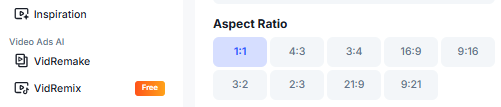
  • 8 aspect ratios: 1:1, 4:3, 3:4, 16:9, 9:16, 3:2, 2:3, 21:9. 
  • Resolution: 2K or 3K. 
  • Generate quantity: 1, 2, 3, or 4 images per run. 
  • Creativity toggle: on for interpretive output, off for precise instruction following. 
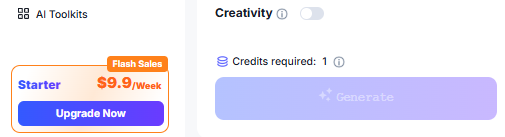
  • Credits: 1 credit per image.

Step-by-Step Guide to Creating Images with Seedream 5.0 on VidAU

Step 1: Open the Seedream 5.0 Tool


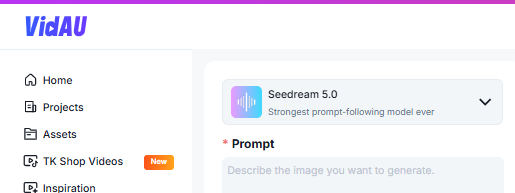
Sign in to your VidAU dashboard. Navigate to AI Image from the left sidebar. Select Seedream 5.0 from the model dropdown, labelled as the Strongest prompt-following model ever. The workspace will display a Prompt field, Reference Image upload area, and parameter controls.

Step 2:  Upload Your Reference Image 

Seadream 5.0 AI Images

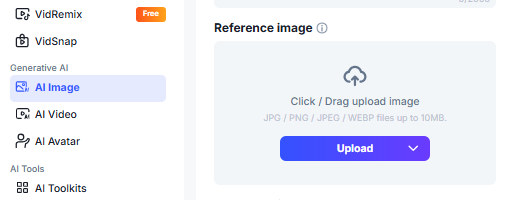
Click or drag your reference image into the upload area. Supports JPG, PNG, JPEG, and WEBP files up to 10MB. This image acts as your visual anchor, the Seedream 5.0 image generator reads it and uses it to guide composition, style, lighting, and character consistency throughout the generation.

Step 3:  Write Your Prompt 

image


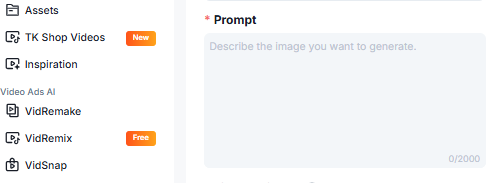
Describe the image you want to generate in the Prompt field, up to 2,000 characters. Include details about the subject, background, lighting, style, composition, and any specific elements you want included or excluded. Seedream 5.0 is built to follow complex, detailed briefs accurately, especially for AI image generation for ads where precise brand alignment matters.

Example prompt:
Create a commercial product photograph of a white ceramic skincare bottle placed on a marble surface. Soft studio lighting from the upper left. Shallow depth of field with the product in sharp focus and the background softly blurred. Clean, minimal aesthetic. Natural shadow beneath the bottle. Suitable for a premium beauty brand’s paid social campaign. 16:9 aspect ratio. Toggle Creativity on for more interpretive, stylistically flexible output. Keep it off when you need precise instruction following for brand-accurate commercial work.

Step 4: Set Your Aspect Ratio 

Seedream 5.0 AI Aspect Ratio

Choose from 8 aspect ratios based on where the image will be used. 1:1 for Instagram Feed and product thumbnails. 9:16 for TikTok and Instagram Stories. 16:9 for YouTube thumbnails and landing page banners. 4:3 for Facebook and general ad placements. 21:9 for wide-format hero images.

Step 5: Select Resolution 

Seedream 5.0 Resolution

Choose 2K for standard commercial output, suitable for social media, paid ads, and product pages. Choose 3K for premium placements, landing page hero images, full-bleed banners, and print-adjacent digital formats where maximum sharpness is required.

Step 6: Set Generate Quantity 


Seadream 5.0 AI Images

Select how many image variations to generate in a single run, 1, 2, 3, or 4. Generating multiple variations supports A/B testing before committing to a final creative for your campaign.

Step 7: Check Credits and Generate 

Seedream 5.0 AI Images Creativity

Review the credits required, 1 credit per image. Confirm your account has sufficient credits, then click Generate. The Seedream 5.0 image generator will reason through your brief and produce your images. Review the outputs, adjust the prompt or toggle Creativity if needed, and regenerate.

Step 8:  Export and Use Download your generated images in the correct format and resolution. Use them directly in your VidAU workflow, feed into AI Video to animate them, use as reference inputs for AI Avatar backgrounds, or export platform-ready for TikTok Ads, Meta Ads, Google Display, and landing pages.

What You Can Create with Seedream 5.0 on VidAU

The Seedream 5.0 image generator covers every image use case performance marketers and e-commerce brands run.

  • Product Photography Upload a product photo as your reference image. Describe the scene, surface, lighting, background, styling, and camera angle. This ByteDance image model applies commercial product photography conventions automatically, producing studio-quality visuals without a photographer, a studio, or a post-processing budget.
  • Ad Creative and Social Visuals Generate scroll-stopping creatives optimised for AI image generation for ads. The 8 available aspect ratios cover every platform format, one generation session produces creatives for TikTok, Instagram, Facebook, YouTube, and Google simultaneously.
  • Brand Campaign Visuals Upload your brand reference as a reference image. Describe the campaign aesthetic. The Seedream 5.0 image generator locks character identity, colour grading, and visual style across every image in the set, producing brand-safe, consistent output across your entire campaign without a designer.
  • Style Transfer Upload any reference image that captures the aesthetic you want, a competitor ad, a brand shoot, a mood board. Seedream 5.0 transfers the palette, texture, lighting, and mood onto your new creative automatically. No lengthy style prompts needed.
  • Multilingual Ad Creative Generate ad images with accurate on-image Chinese and English text from a single generation, a core strength of this ByteDance image model. Expand to multilingual markets without a separate design or translation pass.
  • Infographics and Technical Visuals Seedream 5.0’s expanded world knowledge and chain-of-thought reasoning support accurate scientific diagrams, data visualisations, and technical cross-sections, suitable for education, SaaS, and technical product marketing.

Best Practices for Seedream 5.0

  1. Use Detailed Prompts: The Seedream 5.0 image generator is built to follow complex briefs. Use the full 2,000-character allowance when your brief requires it. Include lighting direction, surface material, camera angle, depth of field, colour temperature, and brand tone.
  2. Upload a Strong Reference Image: The reference image is your visual anchor. Use your best product photo, brand asset, or style reference, the more clearly it communicates your visual intent, the more accurately this ByteDance image model applies it.
  3. Toggle Creativity Strategically: Turn Creativity on for exploratory work and stylistic range. Turn it off for precise, brand-accurate AI image generation for ads where every detail needs to match your brief.
  4. Generate Multiple Variations: Use the 1–4 quantity setting to produce variations per run. A/B test different outputs before selecting your campaign creative, this maximises the value of each credit spent.
  5. Match Aspect Ratio to Platform First: Set your aspect ratio before writing your prompt. It shapes how the composition is framed and ensures the output is immediately usable without cropping or reformatting.
  6. Use Web Search for Time-Sensitive Content: Toggle web search on for any brief referencing current trends, seasons, events, or time-specific context. Toggle it off for evergreen brand content where stability matters more than currency.

Who Should Use Seedream 5.0 on VidAU

E-Commerce Brands Generate product photography and ad creatives without booking a photographer or studio. The Seedream 5.0 image generator produces commercial-ready output at 2K or 3K resolution, reference your product image, describe the scene, and publish.

Performance Marketers and Media Buyers Generate multiple ad creative variations per run for structured AI image generation for ads. A/B test visual angles before scaling spend. 1 credit per image keeps testing costs low across every campaign.

Creative Agencies Deliver client visual assets faster and at higher volume. Reference client brand assets in your upload, describe the campaign brief in the prompt, and produce brand-consistent creative sets with this ByteDance image model without additional design resources.

Content Creators Generate social graphics, thumbnail images, and visual content in any style from a text prompt. Upload a mood board reference and let Seedream 5.0 apply the aesthetic across every piece of content.

Global and Multilingual Brands Generate ad creatives with accurate bilingual Chinese and English text rendering a built-in strength of the Seedream 5.0 image generator. Expand markets from the same creative workflow without a localisation pass.

Conclusion

The Seedream 5.0 Image generator changes what’s possible from a single image generation. Chain-of-thought visual reasoning, real-time web search, and up to 14 reference inputs mean complex briefs execute accurately from the first generation, reducing iteration time, lowering production costs, and delivering commercial-ready output at 2K and 3K resolution.

As a ByteDance image model built specifically for commercial performance, Seedream 5.0 on VidAU sits inside a complete ad production workflow, generate your image, animate it, add a spokesperson, and publish across every platform, all without switching tools. At 1 credit per image, it is the most efficient way to produce professional AI image generation for ads at any scale.

CTA: Create with Seedream 5.0 on VidAU  

FAQ: Seedream 5.0 on VidAU

Q: What is Seedream 5.0?

Seedream 5.0 is a ByteDance image model released in February 2026. It uses chain-of-thought visual reasoning, real-time web search, and support for up to 14 reference inputs, positioned by ByteDance as the strongest prompt-following image model ever built.

Q: How is the Seedream 5.0 image generator different from other models on VidAU?

It reasons through your brief before generating, planning composition, spatial logic, and physical accuracy before rendering begins. It also supports real-time web search and up to 14 reference inputs in a single generation. No other image model in VidAU’s stack combines all three.

Q: What file formats does the reference image upload support?

JPG, PNG, JPEG, and WEBP up to 10MB per file.

Q: How long can my prompt be?

Up to 2,000 characters. The Seedream 5.0 image generator is built to follow complex, detailed briefs accurately, use the full allowance when your brief requires it.

Q: What aspect ratios are available?

1:1 · 4:3 · 3:4 · 16:9 · 9:16 · 3:2 · 2:3 · 21:9. Eight formats covering every major platform and placement.

Q: What resolution options are available?

2K for standard AI image generation for ads and social media. 3K for premium placements requiring maximum resolution, landing pages, hero banners, and high-quality ad formats.

Q: Can I generate multiple variations at once?

Yes , 1, 2, 3, or 4 images per generation run. Use multiple variations to A/B test outputs before selecting your campaign creative.

Q: What is the Creativity toggle?

When on, the Seedream 5.0 image generator interprets your brief more freely, producing stylistically varied, exploratory outputs. When off, it follows your instructions precisely, ideal for brand-accurate commercial production.

Q: How many credits does it cost?

1 credit per image, the most credit-efficient model in VidAU’s image stack.

Q: Is the output commercial-ready?

Yes. Every image generated with this ByteDance image model on VidAU is fully licensed for commercial use, ads, social media, product pages, landing pages, and paid campaigns.

Q: Can I use Seedream 5.0 outputs in other VidAU tools?

Yes. Generated images feed directly into AI Video for animation, into AI Avatar as background references, and into VidRemix as source assets,  all within your VidAU subscription.

Scroll to Top