
AI Sales Automation · 2026
AI Sales Agents: How to Replace Your Contact Form with a 24/7 Closer
Stop losing high‑intent visitors to a dead‑end form. With AI sales agents embedded on your pricing page, you can run discovery, handle objections, enforce accurate pricing with a safety lock, and book meetings in one session.
Author not specified · Updated July 2026 · 8 min read
AI sales agents on your pricing and product pages can qualify, pitch, and book meetings in one conversation. Built with structured prompts, a pricing safety lock, and CRM/calendar integrations, they replace static forms and reduce time-to-first-response to seconds.
I reviewed and analysed recent public demos from Vendasta’s AI Workforce and MuleRun’s ai agent marketplace. The consistent wins came from embedded chat on pricing pages, strong discovery flows, and strict price controls for external visitors.
Quick summary
- Embedded AI sales agents with structured prompts and a pricing safety lock convert pricing-page visitors into booked meetings in a single session.
- If you prefer a prebuilt route, start with an ai agent marketplace like MuleRun or platform options such as Vendasta’s AI Workforce for faster setup.
- External-facing agents must follow a safety lock that pulls approved tiers from a knowledge base, and connect to CRM and a real booking link.
- US-based sales leaders, agencies, and SMB/SaaS teams with high-intent traffic on pricing pages benefit most from this build.
Jump to section
- What AI sales agents are and how they work
- Who should deploy them on pricing/product pages
- Step-by-step build: plan, prompt, guardrail, embed, integrate
- How to add a pricing safety lock that prevents discount drift
- Embedded vs floating placement and what to A/B test
- Best agentic AI tools and ai agent marketplace options
- KPIs to prove success and iterate
- Common mistakes to avoid
- Final thoughts
- FAQ
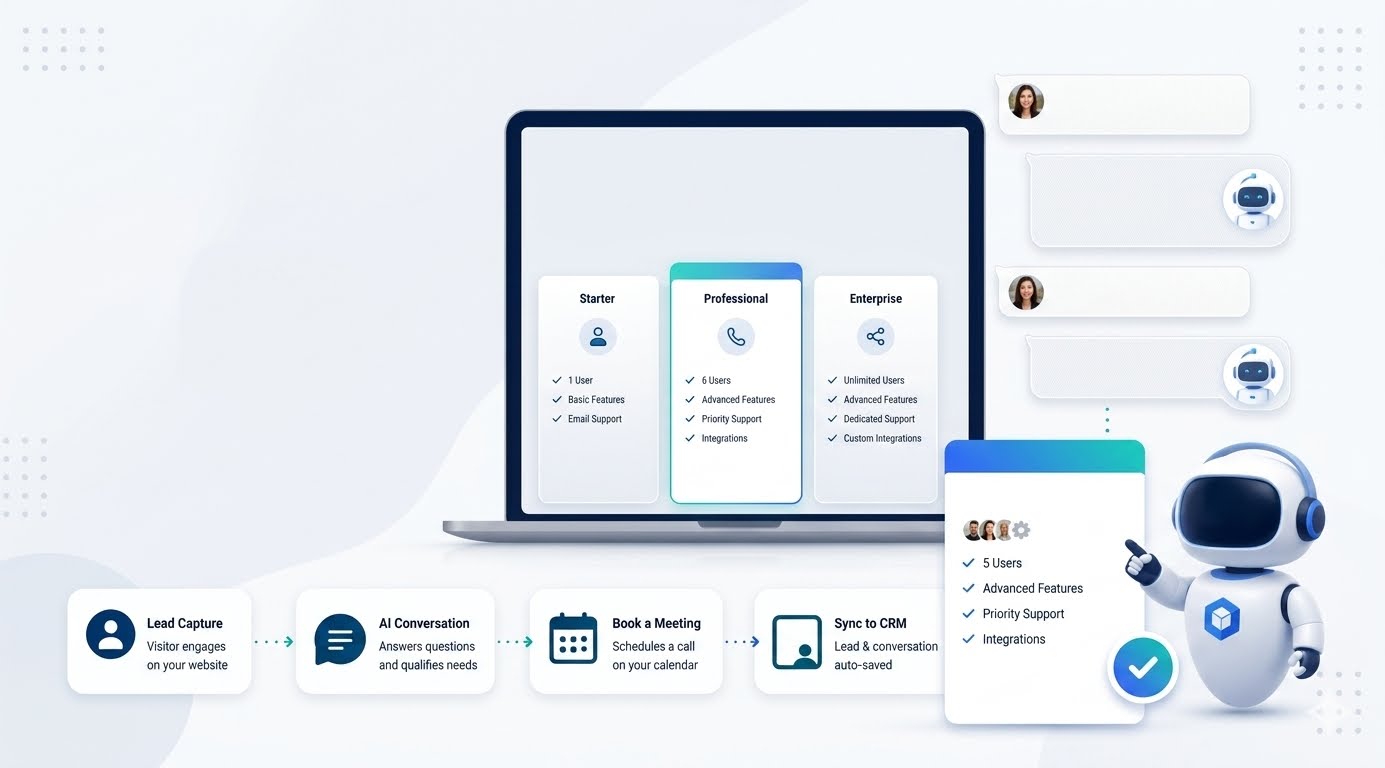
What Is AI Sales Agents?
AI sales agents are external-facing, agentive AI assistants that run discovery, handle objections, present accurate offers, and book meetings directly on your site. Unlike generic chatbots, they follow a structured sales flow, use a vetted knowledge base, obey a pricing safety lock, and integrate with your CRM and calendar.
Who Should Use AI Sales Agents on Pricing Pages?
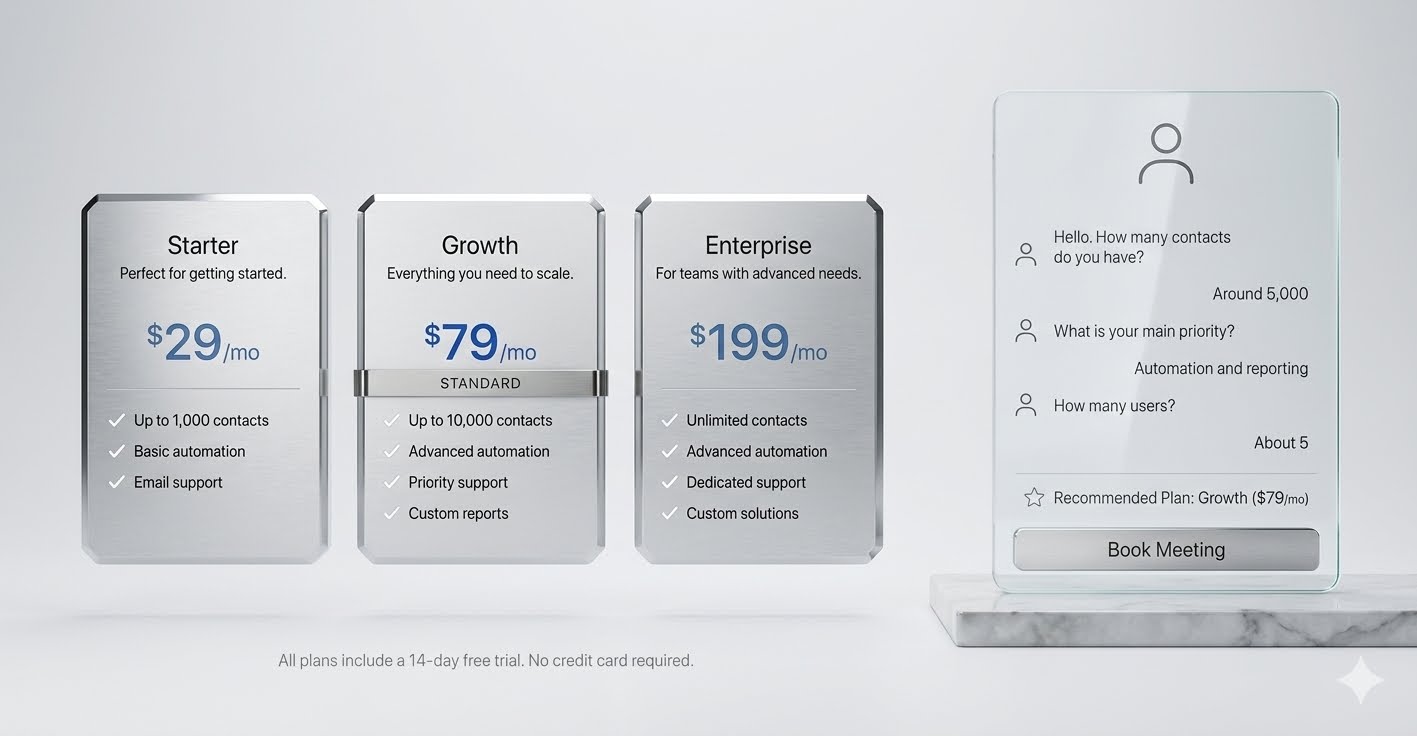
Teams with steady, high-intent traffic that hits pricing or product pages and stalls at a static form should deploy ai sales agents. This includes US-based agencies, SMB/SaaS founders, RevOps leads, and marketing managers who need 24/7 qualification, objection handling, and instant booking.
How Do I Build And Deploy AI Sales Agents Step By Step?
Here is a tool-agnostic, implementation-first workflow I recommend after reviewing the strongest public examples:
STEP 1
Define your ICP and disqualifiers
- Write 5 to 7 discovery questions that map to Gap Selling: problem, impact, current state, desired state, budget, timeline, authority.
STEP 2
Prepare your knowledge base
- Include product tiers, non-negotiables, case studies, SLAs, and compliance notes. Mark any internal-only data as private.
STEP 3
Design a structured prompt flow (Markdown or JSON)
- Force order: discovery → value recap → tailored offer → booking link.
- Example flow outline (plain text):
- Step 1: Ask discovery question 1. Wait.
- Step 2: Ask discovery question 2. Wait.
- Step 3: Summarize pain and goals in 3 bullets.
- Step 4: Present 1–2 relevant tiers pulled from KB.
- Step 5: Offer booking link; confirm meeting objective.
STEP 4
Implement the pricing safety lock (see next section)
- Constrain the agent to approved pricing tables only; block unlisted discounts.
STEP 5
Connect systems
- CRM: create/update lead with transcript and qualification fields.
- Calendar: insert the real booking link and pass meeting context.
- Notifications: alert Slack or email when qualified.
STEP 6
Deploy as an embedded chat widget on pricing/product pages
- Pre-open the widget with a short value line and first discovery question.
- Keep the floating trigger off or secondary for this test.
STEP 7
Measure, tune, and expand
- Track qualified-rate, time-to-first-response, meeting rate, and objection resolution rate. Iterate questions and snippets weekly.
How Do I Add A Pricing Safety Lock That Prevents Discount Drift?
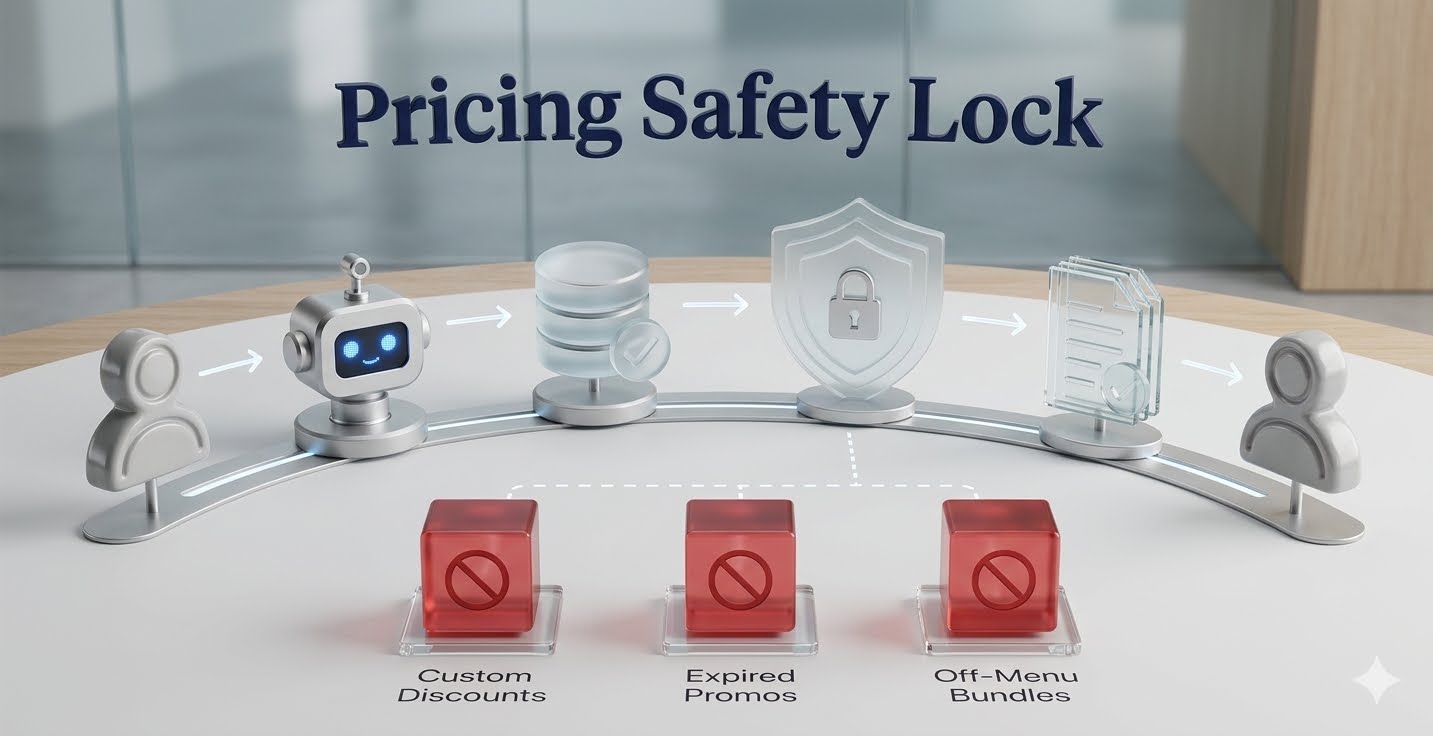
A pricing safety lock is a strict rule set that forces the agent to reference only approved pricing tiers and offer language from your knowledge base. It prevents hallucinated discounts, expired promos, and off-policy concessions.
Use a clear instruction block, for example:
- Pricing source of truth: Pricing_KB_V3 only.
- Allowed outputs: Tier name, monthly price, annual price, included features.
- Forbidden: Custom discounts, off-menu bundles, competitor price claims.
- If a user asks for a discount: Respond with approved escalation text and offer to book a call.
Pricing control
Add a validation step in your prompt: before displaying any price, the agent must confirm the tier exists in Pricing_KB_V3. For extra control, store tier IDs and require the agent to surface the corresponding ID with each price.
Where Should I Place The Agent And What Should I A/B Test?
Place the embedded chat widget on pricing and high-intent product pages, because that is where buyers are deciding. In my review of marketplace and vendor demos, embedded placement outperformed generic site-wide floating widgets for qualification and bookings.
A/B test:
- Embedded (auto-open) vs floating (click-to-open)
- First-line hook: pain-focused vs offer-focused
- Booking timing: right after recap vs after a brief feature match
- Presence of a short product video snippet inside the chat
Practical tip
Create proof videos with VidAU.
Which Agentic AI Tools And Marketplaces Fit This Build?
Build an AI Sales Agent That Makes $50k/Month
Agentive AI options fall into two buckets: build-your-own and marketplace prebuilt agents. Start with what shortens your time-to-value.
- Build on platforms that let you enforce knowledge base rules, price guardrails, and CRM/calendar integration.
- For a faster start, explore an AI Agent marketplace like MuleRun for business-focused agents, or vendor ecosystems like Vendasta’s AI Workforce for a sales-focused employee model. I analysed these examples and found the safest external builds always used explicit safety locks and staged discovery.
Key Takeaways
- Choose tools that support strict knowledge base scoping.
- Prioritize native calendar and CRM sync.
- Fewer features beat flimsy guardrails for public agents.
What KPIs Prove My AI Sales Agent Works?
Measure weekly, then tune prompts and assets:
- Qualified-rate: percent of chats that meet ICP criteria
- Time-to-first-response: under 3 seconds is ideal
- Booking rate from pricing page sessions
- Objection resolution rate: answered within one turn
- Form-to-meeting lift: compare pre/post baseline
- Lead data completeness: all required fields present in CRM
Common Mistakes To Avoid With AI Sales Agents
Watch out
A public-facing agent needs staged discovery, a pricing safety lock, secure source material, calendar context, and proof assets. Skipping those controls creates avoidable sales and trust risks.
- Letting the agent pitch before discovery questions are answered
- No pricing safety lock, leading to discount drift or bad quotes
- Missing calendar context; meetings lack recap notes
- Training on insecure or internal-only docs
- Floating-only placement; no embedded test on pricing pages
- No proof assets; the agent cannot show real outcomes
Recommended Tool Stack
| Stage | Recommended Tools | Why |
|---|---|---|
| Knowledge base prep | Docs/Notion/Drive | Centralize tiers, case studies |
| Prompt design | Any LLM builder | Control flow and safety lock |
| Chat widget | Site builder/plugin | Embed on pricing pages |
| Calendar | Google/Microsoft/Calendly | Book instantly with context |
| CRM | HubSpot/Salesforce/Pipedrive | Persist transcripts and fields |
| Video proof | VidAU AI Video suite | Share concise product proof |
Optimize with VidAU GEO Agent
Create concise proof videos and approved assets your AI sales agent can surface during discovery, recap, and offer stages.
Key takeaway
Final Thoughts
Replacing static forms with ai sales agents is a practical win when you control the flow, protect pricing, and connect to booking and CRM. Start with an embedded widget on pricing pages, a tight discovery script, and a safety lock tied to a clean knowledge base.
FAQ
Answers to common questions about deploying AI sales agents on pricing and product pages.
What is the difference between AI sales agents and chatbots?
AI sales agents are agentive AI designed to run discovery, summarize value, present approved pricing, and book meetings. Generic chatbots answer FAQs and collect messages. Sales agents follow a structured prompt flow, use a vetted knowledge base, enforce a pricing safety lock, and integrate with CRM and calendar.
How do I stop AI sales agents from making up discounts?
Implement a pricing safety lock. Constrain the agent to a single source of truth for tiers, require validation of tier IDs before display, forbid custom discounts, and provide escalation language instead. Keep expired promos out of the knowledge base and test price prompts before going live.
Where should I deploy AI sales agents for the best conversion?
Embed the agent on high-intent pricing and product pages. In reviewed examples, embedded chat that auto-opens with the first discovery question outperformed generic floating widgets. You can still run a floating trigger site-wide, but make embedded your primary test for buyers.
Which discovery questions work best for qualification?
Use a Gap Selling structure: current state, problem impact, desired outcome, timeline, authority, and budget. Keep to 5–7 questions, ask one at a time, and summarize back what you heard before proposing a tier. This earns permission to present an offer and a booking link.
What CRM and calendar integrations are essential?
At minimum, create or update a lead with transcript, qualification fields, and source page. Pass a structured recap to your calendar event so sales shows up prepared. Use webhooks or native integrations for HubSpot, Salesforce, or Pipedrive, and Google/Microsoft-based calendars or scheduling tools.
How do I measure the success of an AI sales agent?
Track qualified-rate, time-to-first-response, booking rate from pricing sessions, objection resolution rate, and form-to-meeting lift versus your baseline. Also audit lead data completeness in the CRM. Review a small sample of transcripts weekly and refine prompts and assets accordingly.
Can AI sales agents share videos or assets during chat?
Yes. Host approved assets in your knowledge base and reference them by title or ID. Short product explainers and case clips help with objection handling. You can produce fresh proof content using tools like VidAU AI Video, then let the agent surface those assets at the recap or offer stage.
Should I build my own agent or use an ai agent marketplace?
If speed matters, start with an ai agent marketplace such as MuleRun or vendor ecosystems like Vendasta’s AI Workforce. If you need deeper control, build-your-own on a platform that supports strict knowledge scoping, safety locks, and native CRM/calendar integrations. Choose the fastest path to safe deployment.






