AI Video Generators · Animation YouTube
Free AI Video Generators: Complete Comparison of the Best Animation YouTube Tools in 2026
Compare the top free AI video generator styles for animation YouTube workflows, beginner publishing, creator-style videos, and scalable social content.
By the VidAU Editorial Team · Updated 2026 · 13 min read
I tested every free AI video generator so you do not have to. If you are trying to grow in animation youtube, the wrong tool can waste hours, lower your video quality, and leave you stuck in testing mode instead of publishing.
For budget-conscious creators and beginners, that is the real problem. Most free tools look similar at first, but their output style, workflow, and editing limits are very different. The best choice is not the one with the longest feature list. It is the one that matches the kind of channel you want to build.
Quick summary
- The best free AI video generator is not always the one with the longest feature list. It is the one that matches the kind of animation YouTube channel you want to build.
- Beginners lose time when they test tools without a decision framework. A comedy channel, fact channel, faceless explainer videos channel, and product review channel do not need the same generator.
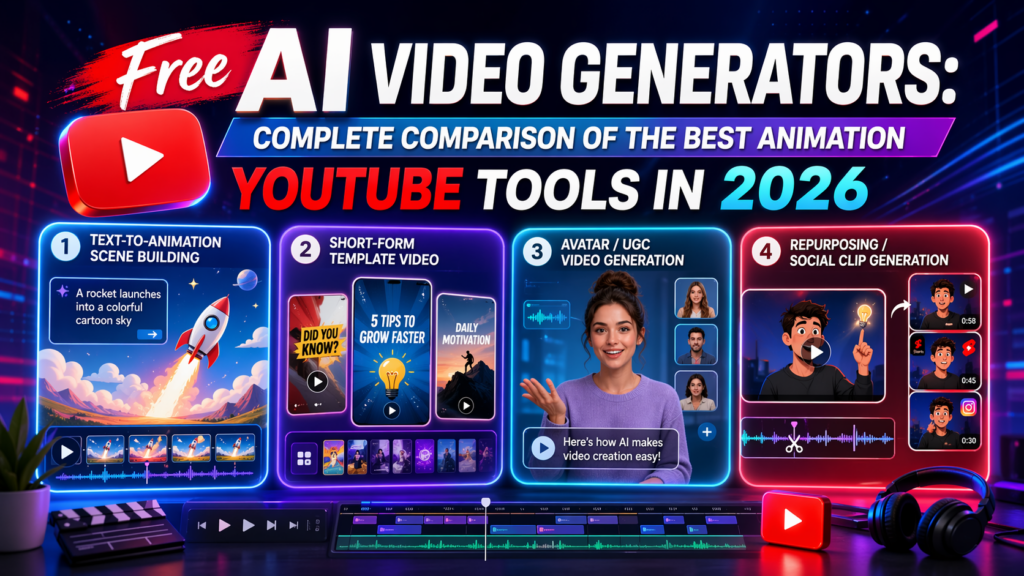
- The four useful generator styles are text-to-animation scene builders, template-first short-form generators, avatar and UGC video generators, and repurposing and social clip generators.
- VidAU AI fits creator-style workflows when YouTube content also needs to become UGC content, viral videos, video ads, and social media content.
Contents
- What you’ll get from this article
- Why creators lose time with free AI video tools
- The top 4 unlimited free AI video generator styles compared
- Quality differences in output videos
- Best Use Cases for Each Generator for Animation YouTube Workflows
- Text-to-Animation Scene Builders for Structured YouTube Animation Videos
- Template-First Generators for Fast YouTube Animation Output
- Avatar and UGC Generators for Creator-Style YouTube Animation
- Repurposing Generators for Scaling YouTube Animation Videos
- A Practical Way to Choose the Right Tool for Animation YouTube
- A Simple Decision Framework for Beginners
- The questions most beginners ask before committing
- What can go wrong with free AI video generators
- Common mistakes when making animation youtube videos
- Assumptions and limitations
- Conclusion
- FAQ
What you’ll get from this article
- A side-by-side comparison of the top 4 unlimited free AI video generator styles
- A clear breakdown of quality differences in the videos they produce
- Best use cases for each option based on creator goals
- A simple way to choose the right tool without trial-and-error
- Straight answers to common monetization and niche questions
Why creators lose time with free AI video tools
Most beginners start with the same hope: type a prompt, click generate, upload to YouTube. In practice, free tools rarely work that smoothly.
The problem is not that free AI video generators are useless. The problem is that creators often test them without a decision framework. One AI video tool may be better for simple explainer scenes. Another may be better for social clips. Another may create fast talking-head style videos but struggle with original animation flow.
That matters because how to make animations for youtube depends on your format. A comedy channel, a fact channel, a faceless explainer videos channel, and a product review channel do not need the same generator.
Instead of chasing every trending tool, it is smarter to compare four creator-friendly generator types and choose based on output, speed, and fit.
Why this matters
Most free AI video generators look similar at first, but each one supports a different channel format. Choosing by output, speed, and fit is more useful than chasing every trending tool.
The top 4 unlimited free AI video generator styles compared
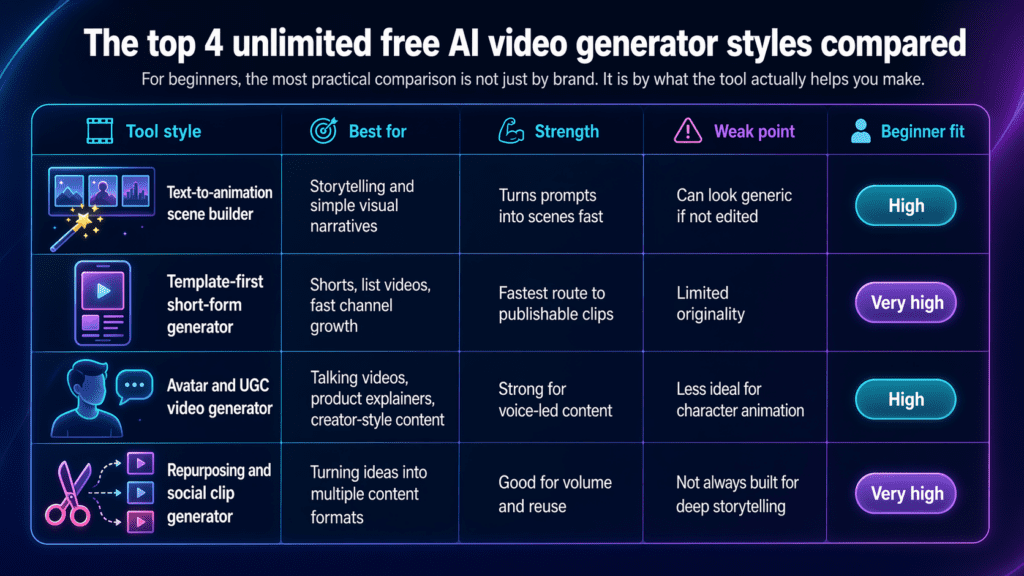
For beginners, the most practical comparison is not just by brand. It is by what the tool actually helps you make.
| Tool style | Best for | Strength | Weak point | Beginner fit |
|---|---|---|---|---|
| Text-to-animation scene builder | Storytelling and simple visual narratives | Turns prompts into scenes fast | Can look generic if not edited | High |
| Template-first short-form generator | Shorts, list videos, fast channel growth | Fastest route to publishable clips | Limited originality | Very high |
| Avatar and UGC video generator | Talking videos, product explainers, creator-style content | Strong for voice-led content | Less ideal for character animation | High |
| Repurposing and social clip generator | Turning ideas into multiple content formats | Good for volume and reuse | Not always built for deep storytelling | Very high |
1. Text-to-animation scene builder
This is the closest match for creators learning how to create a youtube animation from scratch without drawing every frame. You enter a script or scene idea, generate visuals, and assemble them into a basic narrative.
It works well for educational storytelling, light humor, list videos, and visual explainers. The main benefit is speed. The main risk is sameness. If you use default prompts, your channel can start to look like everyone else’s.
2. Template-first short-form generator
This is the easiest entry point for beginners. It is built for speed, not deep control. You choose a template, swap text, add visuals, and export. If your goal is consistent publishing, this can help you learn rhythm before you learn advanced editing.
This is also useful when you want youtube animation videos that feel simple, fast, and repeatable instead of cinematic.
3. Avatar and UGC video generator
This style is a strong fit when you want animated or presenter-led content that still feels creator-friendly. It is especially useful for channels that mix storytelling with commentary, tutorials, product content, or short educational clips.
This is where VidAU AI fits naturally for many beginners. If your YouTube strategy overlaps with video ads, UGC content, viral videos, or social media content, VidAU AI supports that workflow well because it helps turn ideas into creator-style videos faster than a traditional animation pipeline. That makes it valuable for channels that want YouTube content that can also be repurposed across reels, shorts, and other social formats.
4. Repurposing and social clip generator
Some creators do not need full animation control. They need a fast engine for turning one idea into multiple publishable assets. This type of generator is best for creators testing topics, packaging hooks, and building distribution around one core script.
If your plan is to make one YouTube video, three short clips, and several social cutdowns from the same idea, this style can save more time than a pure animation-first tool.
Generate Avatar Videos
Create avatar-led videos, creator-style content, UGC clips, and social-ready assets that support your animation YouTube workflow.
Quality differences in output videos
Free AI video generators do not fail in obvious ways. They fail in subtle ways that affect retention.
The first difference is motion quality. Some tools create smooth scene progression. Others feel like a slideshow with transitions. For beginner viewers, that may be acceptable in short clips. For longer-form YouTube animation, it becomes a problem quickly.
The second difference is visual consistency. Character appearance, background style, and scene tone can shift from one segment to the next. That makes videos feel less intentional.
The third difference is editing flexibility. A tool may generate quickly, but if it does not let you fix pacing, timing, captions, or scene order, you end up exporting something that feels unfinished.
The fourth difference is audio fit. Some videos look good until the voiceover and scene timing stop matching. That mismatch hurts watch time.
Watch out
A simple rule helps here: if the output saves time on the first draft but creates more cleanup work later, it is not actually the best free tool for your channel.
Best Use Cases for Each Generator for Animation YouTube Workflows
Choosing the right generator depends on what you want to achieve with your animation youtube strategy. Most creators slow down because they pick tools based on features, not output goals. Each generator type supports a different stage of content creation, from storytelling to scaling.
Text-to-Animation Scene Builders for Structured YouTube Animation Videos
You use text-to-animation scene builders when your focus is storytelling. This approach works best if you are learning how to make animations for youtube and want to build content that follows a clear sequence.
These tools convert scripts into structured scenes. Each part of your narration becomes a visual segment, which helps you explain ideas step by step. This makes them ideal for educational content, explainer videos, and tutorials.
If your goal is how to create a youtube animation, this category gives you the most control over pacing and narrative flow. You define how each scene looks and how it connects to the next.
The strength here is clarity. You produce youtube animation videos that feel organized and easy to follow. The trade-off is speed. You spend more time building each scene, which slows down production.
This approach works best when your priority is depth and storytelling rather than volume.
Template-First Generators for Fast YouTube Animation Output
Template-first tools focus on speed and repeatability. You use them when your goal is to produce content quickly and test different formats.
If you are figuring out how to create an animation for youtube at scale, this category helps you move faster. Instead of building each video from scratch, you plug your content into pre-designed templates that follow proven structures.
These tools work well for short-form content and rapid experimentation. You can test different tones, hooks, and formats without spending hours on production. This is useful when you are still refining your niche or content style.
The main advantage is consistency. You create multiple youtube animation videos that follow a recognizable format. The limitation is flexibility. You have less control over detailed storytelling.
This approach fits creators who want speed and testing over deep customization.
Avatar and UGC Generators for Creator-Style YouTube Animation
Avatar and UGC generators focus on presenter-led content. You use them when your videos rely on a human-like delivery but you do not want to film yourself.
If your goal is how to make a youtube animation video that feels personal and engaging, this category provides a strong solution. You generate a digital presenter that delivers your script, which removes the need for recording setups and on-camera performance.
This is where VidAU AI becomes practical. You can create creator-style animation youtube content and then adapt the same idea into ads, short clips, and social media posts. You do not need to rebuild the content for each platform.
This approach gives you flexibility. You produce one core video and repurpose it across multiple channels. It also helps maintain consistency in tone and delivery.
Repurposing Generators for Scaling YouTube Animation Videos
Repurposing tools focus on volume. You use them when your strategy depends on turning one idea into multiple pieces of content.
If you already understand how to create a youtube animation, the next step is scaling. These tools allow you to take one script or video and generate variations. You can adjust format, length, or style without starting from scratch.
This approach works well for creators who publish frequently. You maintain output without increasing workload. Instead of creating new ideas constantly, you expand existing ones.
The trade-off is creative depth. These tools prioritize efficiency over detailed animation control. They work best when consistency and speed matter more than complex visuals.
A Practical Way to Choose the Right Tool for Animation YouTube
The best way to choose a generator is to match it to your immediate goal.
If your focus is storytelling and structure, start with a text-to-animation builder. This helps you learn how to make animations for youtube while maintaining control over your narrative.
If your focus is speed and testing, choose a template-first generator. This allows you to experiment with different formats and improve quickly.
If you want creator-style content that works across YouTube and ads, use an avatar and UGC system like VidAU AI. This gives you flexibility and reduces the need for multiple tools.
If your goal is scale, use a repurposing tool. This helps you turn one idea into several youtube animation videos without increasing effort.
A Simple Decision Framework for Beginners
Before you choose a tool, focus on your workflow.
Ask yourself what type of content you want to produce and how fast you want to produce it. If speed matters most, go with a template-first or repurposing tool. These help you publish consistently and test ideas quickly.
If storytelling matters more, choose a text-to-animation builder. This gives you the structure you need to create engaging content.
If you want a system that supports both YouTube content and marketing use, an avatar and UGC workflow like VidAU AI is the better option. It allows you to create once and distribute across platforms without rebuilding your assets.
The goal is to build a system that supports consistent output. Once you understand how to create an animation for youtube, the next step is choosing tools that help you scale without slowing down.
Create Scroll-Stopping AI Videos
Turn ideas into avatar videos, UGC-style clips, social media content, and video ads that help your audience stop scrolling and start watching.
Tip
The goal is to build a system that supports consistent output. Once you understand how to create an animation for youtube, choose tools that help you scale without slowing down.
The questions most beginners ask before committing
Is animation a good niche for youtube
Yes, animation can be a strong YouTube niche because it gives creators flexibility. You can build around humor, storytelling, education, commentary, explainers, or even faceless brand content. The real advantage is format freedom. You are not limited by your camera setup or filming location.
The challenge is consistency. Animation channels usually grow when their visual style and topic promise are easy to recognize.
Can you make money from youtube on animation
Yes, you can make money from YouTube on animation, but monetization depends on more than visuals. You still need watch time, audience retention, repeatable topics, and clear channel positioning. For many beginners, the smarter path is to combine ad revenue goals with related income options such as sponsored segments, creator services, or repurposed content assets.
That is another reason tools like VidAU AI matter. If one production workflow can support YouTube videos, UGC content, video ads, and social media content, your channel becomes more useful as a business asset.
Which youtube channel is best for animation
The best YouTube channel for animation is the one with a clear style, consistent format, and a strong fit between story and audience. For beginners, the better question is not which channel is best overall. It is which channel model is best for your skills and speed.
A simple benchmark helps:
- If you like storytelling, build a scene-based channel
- Commentary, use an avatar-led format
- Fast growth testing, start with short-form animated clips
- You want multi-platform content, choose a workflow that supports YouTube and social reuse
What can go wrong with free AI video generators
Free tools are useful, but they come with trade-offs.
One common issue is weak pacing. The generator gives you scenes, but the video still feels slow. Another is overused visuals. If too many creators use the same style, viewers stop paying attention.
You can also run into quality drift. The first 20 seconds look strong, then the rest feels repetitive. Some tools are good at hooks but weak at sustaining a full video.
There is also the workflow trap. A tool may be free, but if it takes too long to rewrite prompts, fix captions, and re-export scenes, you lose the time you were trying to save.
Brief safety note: when publishing AI-generated videos, stay careful with music, third-party assets, likeness use, and disclosure expectations. YouTube policies and FTC guidance matter most when your content includes reused material, endorsements, or realistic creator-style messaging.
Watch out
A tool may be free, but if it takes too long to rewrite prompts, fix captions, and re-export scenes, you lose the time you were trying to save.
Common mistakes when making animation youtube videos
The biggest mistake is picking a tool before choosing a format.
Other common mistakes include:
- Trying to make long videos before testing short ones
- Using AI visuals without a strong script
- Chasing polished visuals instead of clear storytelling
- Ignoring voiceover timing
- Publishing videos that look fine but do not match a defined audience
If you are wondering how to make a youtube animation video that people actually finish, start with a short script, a simple visual pattern, and one clear audience promise.
Assumptions and limitations
- This comparison is written for budget-conscious content creators and beginners
- It focuses on unlimited free-use workflows, not premium feature stacks
- The best choice depends on your content format, not just raw features
- Free AI tools change quickly, so workflow fit matters more than hype
Create Scroll-Stopping AI Videos
Use VidAU AI to create creator-style videos, UGC content, video ads, and social media content that can support your animation YouTube workflow.
VidAU workflow
From YouTube idea to multi-platform creator content
- Start with the channel format: Decide whether your animation youtube strategy needs storytelling, short-form testing, avatar-led commentary, or repurposed social clips.
- Create the core video: Use a generator style that matches your output goal so your first draft saves time without creating more cleanup work later.
- Use VidAU AI for creator-style expansion: Turn ideas into UGC content, viral videos, video ads, social media content, and YouTube-ready creator-style videos.
- Repurpose and test: Build one YouTube video, three short clips, and several social cutdowns from the same idea when your strategy depends on volume and reuse.
Key takeaway
Conclusion
Free AI video generators are not all solving the same problem. Some help you publish faster or help you tell stories. Some help you build creator-style videos that can stretch beyond YouTube into UGC content, viral videos, video ads, and social media content.
If you want better results in animation youtube, stop testing tools randomly. Choose based on output quality, use case, and how easily the tool fits the channel you want to build.
FAQs
Here are answers to common questions about free AI video generators, animation YouTube channels, beginner workflows, monetization, VidAU AI, and choosing the right generator style.
Do I need animation skills to start an animation YouTube channel?
No. You need a clear idea, a usable script, and a tool that matches your format. Editing judgment matters more than advanced animation skill at the start.
Are free AI video generators good enough for YouTube growth?
They can be, especially for beginners. Growth depends more on topic, hook, pacing, and consistency than on perfect visuals alone.
What type of animation content is easiest for beginners?
Simple explainers, list videos, narrated stories, and short educational clips are usually easier than complex character-driven storytelling.
Should I start with Shorts or long-form videos?
Shorts are often the easier testing ground. They help you learn hooks, pacing, and audience response before you commit to longer production cycles.
How long should my first animation YouTube video be?
Keep it short enough to finish strong. For most beginners, that means starting with a tight, focused video instead of an ambitious long episode.
Can I use AI-generated voices in animation videos?
Yes, if the voice fits the tone and sounds natural. Poor voice quality can weaken even a good script and decent visuals.
What matters more: visuals or script?
The script. Strong visuals cannot rescue a weak idea, but a strong script can still work with simple animation.
Is VidAU AI only useful for ads?
No. It is also useful for UGC content, creator-style videos, social media content, and short-form formats that can support a YouTube workflow.
How do I make my videos look less generic?
Use better prompts, tighter scripts, custom timing, stronger captions, and a repeatable visual style instead of default outputs.
Can animation channels be monetized without huge production budgets?
Yes. A focused niche, clear audience promise, and efficient workflow can outperform expensive visuals that lack consistency.
What is the best publishing workflow for beginners?
Script first, choose the right generator, edit pacing, check captions and audio, then publish and learn from retention patterns.
How many tools should I test before choosing one?
Usually no more than two or three. Too much testing delays publishing and makes it harder to build a repeatable process.