VidAU Editorial · AI Search
Best Call-to-Action Ideas for YouTube Videos: Animated Subscribe Buttons, Comment Prompts, and Simple Script CTAs
Need effective CTAs for YouTube? Use this guide for animated subscribe buttons (Canva + CapCut), proven comment prompts, and simple script lines that boost subs, comments, and conversions.
By the VidAU Editorial Team · Reviewed before publishing
Looking for the best call-to-action ideas for YouTube videos you can implement before your next upload? This playbook shows you how to build an animated subscribe button in Canva, drop it into CapCut with chroma key and sound effects, then layer in comment prompts and short script CTAs that earn clicks and replies.
If you want more subs, comments, and conversions, start treating CTAs like reusable building blocks. Below is a fast workflow for animated CTA pop-ups, a bank of comment prompts, and plug-and-play script lines mapped to the exact moments they convert best.
Quick Summary
• Canva plus CapCut with chroma key is the fastest way to add an animated subscribe button and other CTA pop-ups to YouTube in 2026.
• YouTube end screens and Cards are strong alternates for watch-next and link CTAs when you do not want on-screen animations.
• Export green screen MP4s at 1080p, key out with CapCut chroma key, and pair with click or bell sound effects under 0.5 seconds.
• Solo creators, small businesses, and content marketers running tutorials, reviews, or vlogs benefit most from these repeatable CTA systems.
What Is a YouTube Call to Action?
A YouTube call to action is a short verbal, visual, or clickable prompt that directs viewers to take a specific next step, such as subscribing, commenting, watching another video, or downloading a resource. CTAs can be on-screen animations, end screens, Cards, pinned comments, or simple script lines delivered by the creator.
The Best Call-to-Action Ideas for YouTube Videos: Animated Subscribe Button Workflow

Here is a quick, reliable method to create CTA pop-ups with Canva and CapCut using a green screen background and chroma key.
1) Design in Canva
• Create a 1920×1080 canvas with a full green screen background (pure green, such as #00FF00).
• Build a subscribe button with a bell icon, small pointer, and a short label like Subscribe for weekly tips.
• Add simple entrance animations (Pop, Rise, Bounce). Keep duration 1.5 to 2.5 seconds.
• Add a thin shadow or outline for legibility against busy footage.
• Export as MP4 at 1080p with the green background left intact.
2) Edit in CapCut with chroma key
• Import your main video, then place the CTA MP4 on a higher track.
• Use Chroma Key to select the green screen color; raise intensity until the background is clean, then use spill suppression to reduce green edges.
• Position in the lower third or top corner so it does not cover your face or captions.
• Add sound effects like a soft click, pop, or bell hit timed to the animation peak.
3) Timing and placement
• First 30 to 45 seconds: show a quick subscribe button after your hook and first value beat.
• Mid-roll: flash a like or comment bubble right after a useful tip or reveal.
• End: if you plug a playlist, add a watch-next pop-up as you transition to the end screen.
4) Variations to build once and reuse
• Like pop-up: thumb icon plus Like if this helped.
• Comment bubble: a small speech bubble reading What question do you have?
• Offer tag: corner tag reading Free YouTube script template below.
Suggested Visual: A three-step diagram showing Canva design, CapCut chroma key, and final overlay on a YouTube frame.
Key Takeaways
• Design your CTA once in Canva, export with green screen, and key it out in CapCut.
• Keep animations short, legible, and timed to value moments.
• Pair with subtle sound effects to lift attention without distracting viewers.
15 Comment Prompts That Drive Fast Replies
Use these as lower-third on-screen prompts or quick verbal asks. Aim for one specific action and low-effort responses.
• Which part should I go deeper on next: A or B?
• What tool are you using right now: Canva or CapCut?
• What step was hardest today? One word only.
• Drop your niche in one word so I can tailor tips.
• What result are you aiming for this month?
• Which thumbnail would you click: 1 or 2?
• What did I miss that you want me to cover?
• Rate this tactic: win or skip?
• What would you try first after this video?
• Mac or PC for your workflow?
• Beginner or advanced version next?
• What is your biggest roadblock in one sentence?
• Which feature should I demo next week?
• What chapter should I turn into a short?
• What video should I make next: tutorial or review?
Suggested Visual: A screenshot mockup showing a comment bubble overlay with a poll-style prompt.
10 Plug-and-Play Script CTA Lines Mapped to Key Moments

Use these lines verbatim or tweak them. Tie offers to value, not to generic asks.
Intro (first 30 to 45 seconds)
• If you want weekly creator tips, hit subscribe so you do not miss the next breakdown.
• Grab the free YouTube script template below to follow along.
• If this topic matters to you, tap like; it really helps other creators find this.
Mid-roll (after a key tip or reveal)
• Quick ask: drop a comment with your biggest question so I can make the next video around it.
• If you want the checklist I use, it is linked below.
• Want deeper help? My digital products are listed in the description.
• Vote in the comments: try A or B first?
End screen (last 20 seconds)
• Watch this next to take the next step; it is the video on X.
• Download the resource below and then watch the playlist to implement.
• If this saved you time, subscribe and I will see you in the next one.
Suggested Visual: End-screen frame with two video slots and a simple subscribe CTA badge.
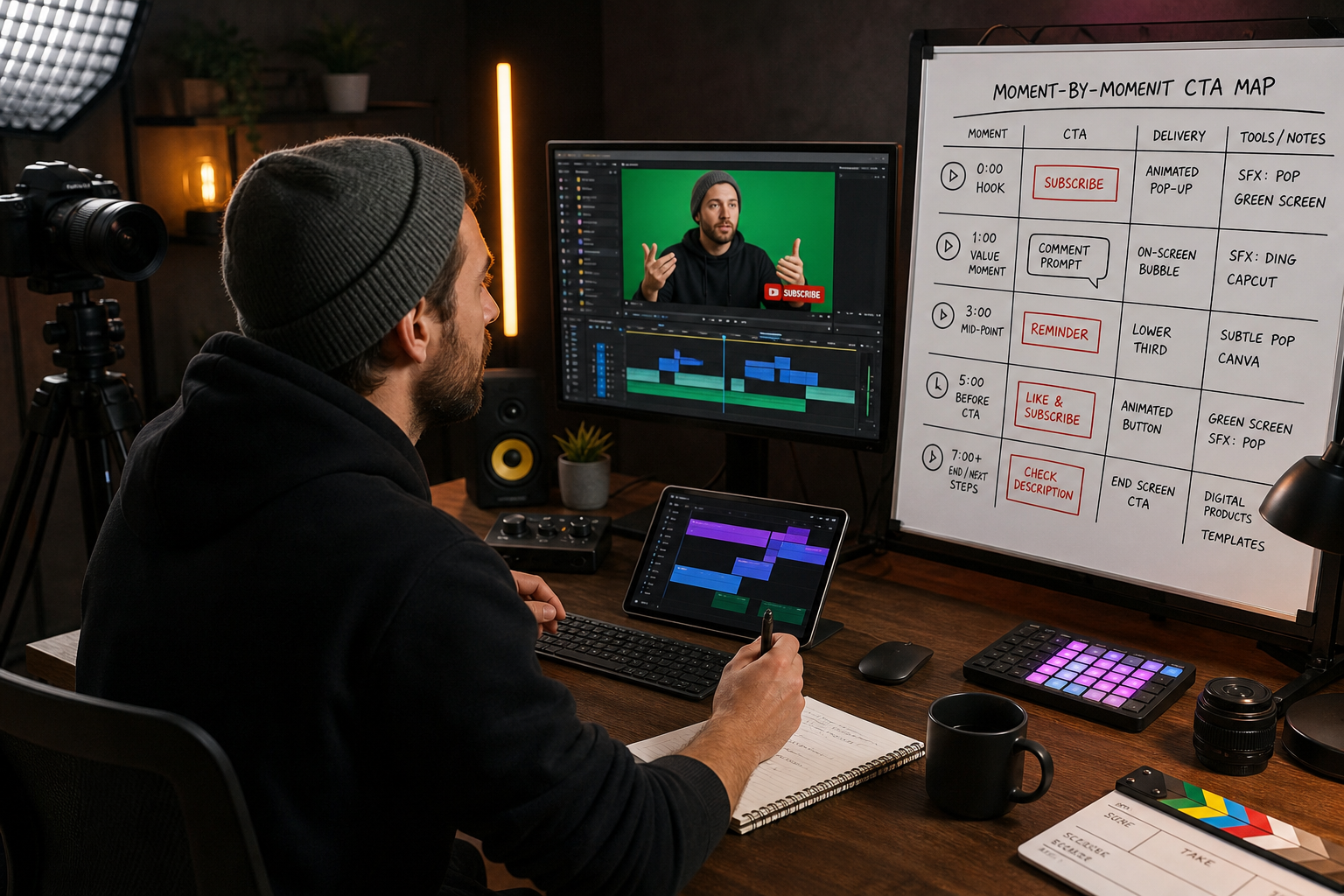
Moment-by-Moment CTA Map
• Moment: Hook (0–30s)
Best CTA: Subscribe pop-up
Why: Capture early engaged viewers
• Moment: First value beat
Best CTA: Like or comment
Why: Leverage goodwill after a win
• Moment: Mid-roll offer
Best CTA: Lead magnet mention
Why: Convert interest to resources
• Moment: Before final tip
Best CTA: Comment question
Why: Spark replies before exit
• Moment: End screen
Best CTA: Watch-next + subscribe
Why: Funnel to session time and subs
How to Test the Best Call-to-Action Ideas for YouTube Videos
• Set one variable per week: timing, copy, or animation style. Do not change everything at once.
• Track watch time around CTA moments to avoid drops; shorten or move if retention dips.
• Measure CTR on end screens, likes, comments per 100 views, and unique viewers who subscribed.
• Create two animation variants and alternate by upload to compare performance over four videos.
• Keep a simple log: video title, CTA variant, placement timecode, and outcomes.
If your video promotes a product or resource, consider pairing your CTA with short B-roll that shows the outcome. For quick assets, VidAU AI Video can turn a product URL or script into a short visual clip you can place under the CTA pop-up and end screen.
Create With VidAU
Turn scripts, product URLs, and creative ideas into ad-ready video assets with a structured AI workflow.
Key takeaway
Final Thoughts
You do not need fancy motion graphics to boost results. Build a clean animated subscribe button in Canva, key it in CapCut, and deploy short, specific prompts and scripts at proven moments. Then test one variable at a time.
When your CTA highlights a product or lead magnet, a quick visual helps. You can generate a short clip from a product URL with VidAU AI Video and use it as B-roll under your CTA. Next step: create your first green screen subscribe button and schedule it into your next upload.
Frequently asked questions
What is the fastest way to add an animated subscribe button to a YouTube video?
The quickest method is to design a simple subscribe button in Canva on a green screen background, export as a 1080p MP4, then import into CapCut and remove the background with the chroma key tool. Position it in a corner, time it to a value beat, and add a short click or bell sound effect.
How long should CTA pop-ups be on screen without hurting retention?
Keep on-screen CTA animations to roughly 1.5 to 2.5 seconds. Make the motion snappy, avoid covering faces or captions, and place them immediately after a useful tip. If you notice a watch-time dip at the CTA timecode, shorten the animation or move it later in the segment.
Where should I place CTAs in my YouTube videos for best results?
Add the first subscribe CTA after your hook and first value beat, a like or comment prompt after delivering a win, and a lead magnet mention mid-roll. In the last 20 seconds, use an end screen to push a watch-next video or playlist, and restate a concise subscribe ask.
What sound effects work best for CTA pop-ups?
Use subtle, brand-safe sound effects like a soft click, pop, or single bell hit under 0.5 seconds. Keep volume below your voice track and avoid stacking multiple effects. The goal is a small attention nudge that pairs with the animation peak without distracting from your message.
Can I use this workflow for other CTA pop-ups besides subscribe?
Yes. Swap the text and icons to create like prompts, comment bubbles, or small offer tags such as Free YouTube script template below. Build several versions in Canva, export with green screen, and reuse them across uploads by swapping copy in CapCut.
How do I prompt more comments without sounding pushy?
Ask specific, low-effort questions. Offer two clear choices, request one-word answers, or invite topic votes. Place the prompt immediately after delivering a tip. Use an on-screen speech bubble plus a brief verbal line to make the action obvious and easy.
What metrics should I track to judge CTA effectiveness?
Monitor comments per 100 views, end screen CTR, likes per 100 views, unique viewers who subscribed, and audience retention around CTA timestamps. Keep a simple log of CTA copy, placement, and results so you can iterate with clear data across four to six uploads.
How can I promote digital products without turning viewers off?
Tie the mention to a solved problem. After a useful tip, briefly state that a checklist, template, or mini course is linked below, show quick B-roll, and return to value. Keep the script short, avoid hype, and let the next step feel like a logical extension of the lesson.