UGC Ads Software · AI Video Generators for Social Ads
Best UGC Ads Software and Tools for Creating High-Converting Video Ads
Compare the best UGC ads software and AI video generators for high-converting creatives, talking-head videos, avatars, and social ads.
By the VidAU Editorial Team · UGC ads software guide · AI avatar and social ad workflow comparison
AI UGC video generators in 2026 let performance teams produce custom AI influencers, realistic voices, and ad-ready talking-head clips without booking real creators for every test.
The best UGC ads software in 2026 helps performance marketers produce realistic talking-head video ads fast, using AI avatars, natural voice synthesis, and product-shot generation instead of booking a new creator for every test. The strongest tools cover scripting, avatar selection, voiceover, and ad-ready export in one workflow. VidAU is an AI video ad platform that generates video ads from product URLs, images, or scripts in 49 languages.
This guide is for performance marketers, social advertisers, DTC owners, and agencies who need to scale ad creative for Facebook, Instagram, and TikTok. We compare AI UGC tools by realism, avatar quality, and fit for ad campaign testing, with honest notes on where AI still falls short.
Quick Summary
- VidAU AI Video is our top pick for UGC ads because it builds ad creatives from a URL, image, or script with avatars and voiceover in one place.
- Arcads, HeyGen, and Synthesia are strong alternates when you want a large library of AI UGC actors for talking-head spots.
- Export vertical 9:16 for TikTok and Reels and 1:1 for feed placements, and keep clips under 30 seconds for cold testing.
- DTC brands and agencies running high creative volume benefit most, since AI UGC lets them test more hooks per week at lower cost.
In This Guide
- What UGC ads software is and how it works
- Why AI UGC ads matter for performance marketing
- How to compare AI avatars for UGC video ads
- Best UGC ads software compared by use case
- Step-by-step workflow to produce a UGC ad
- Platform-specific optimization for TikTok, Reels, and feed
- Common mistakes marketers make with UGC ads
- When to use AI UGC versus real creators
- Final Thoughts
- FAQ
What Is UGC Ads Software?
UGC ads software is a tool that helps you create user-generated-content-style video ads, usually talking-head clips that feel like a real person reviewing or recommending a product. Modern AI versions generate the presenter, voice, and scene from a script, image, or product URL instead of filming a creator.
These platforms sit at the center of the ad-creative pipeline. You bring the offer and angle, and the software handles avatars, voice synthesis, captions, and ad-ready formatting. For paid social teams, that turns creative production from a booking problem into a workflow problem.
Key Takeaways
- UGC ads software produces creator-style video ads without filming.
- AI tools generate the avatar, voice, and scene from text or a URL.
- The output is meant for paid social, not polished brand films.
Why AI UGC Ads Matter for Performance Marketing
AI UGC ads matter because creative volume now drives paid social results more than targeting alone. Most ad accounts fatigue creatives within days, so teams need a steady supply of fresh hooks to test. Filming new UGC for every variation is slow and expensive.
The 2026 shift is in realism and scope. Tools that once made stiff avatars now offer emotion modeling, natural voice synthesis, custom AI influencers, image animation, and clean product shots inside a single workflow. That lets a small team ship 10 to 20 ad variations a week.
For video ad creation, this matters most in the testing phase, where you need many angles cheaply before committing budget to the winners.
Performance principle
AI UGC matters most in the testing phase, where performance teams need many angles cheaply before committing budget to the winners.
How to Compare AI Avatars for UGC Video Ads
When you compare AI avatars for UGC video ads, judge them on four things: lip-sync accuracy, voice naturalness, facial emotion, and how staged the background looks. A flat read or robotic mouth kills the UGC effect, which is the whole point.
Based on community signals we reviewed, realistic avatars are rarely plug-and-play. In one r/aitubers thread, a creator said an early HeyGen trial gave poor results, while another reported far better output after refining inputs and using a paid creator package. The lesson is consistent: avatar quality depends on tool plus setup, not the tool alone.
Use this checklist when testing UGC avatars for ads:
- Does the mouth match the audio at normal and fast speech?
- Does the face show micro-expressions, or stay frozen?
- Does the voice carry emotion that fits the script?
- Does the framing look like a phone selfie, not a studio?
Avatar testing tip
Avatar quality depends on tool plus setup, not the tool alone. Test lip-sync, voice emotion, facial movement, and selfie-style framing before scaling spend.
Best UGC Ads Software Compared by Use Case
The best UGC video software for ad campaign testing depends on whether you prioritize avatar variety, end-to-end ad assembly, or speed from a product page. Below is how the top-rated UGC video makers for social ads fit different jobs.
| Tool | Best For | Notable Strength |
|---|---|---|
| VidAU AI Video | URL and script to ad | Builds full ad creatives fast |
| Arcads | UGC actor library | Custom AI influencer style |
| HeyGen | Talking-head avatars | Broad avatar selection |
| Synthesia | Scripted spokesperson | Clean corporate-style reads |
| Canva | Quick layout edits | Easy templates and text |
VidAU AI Video
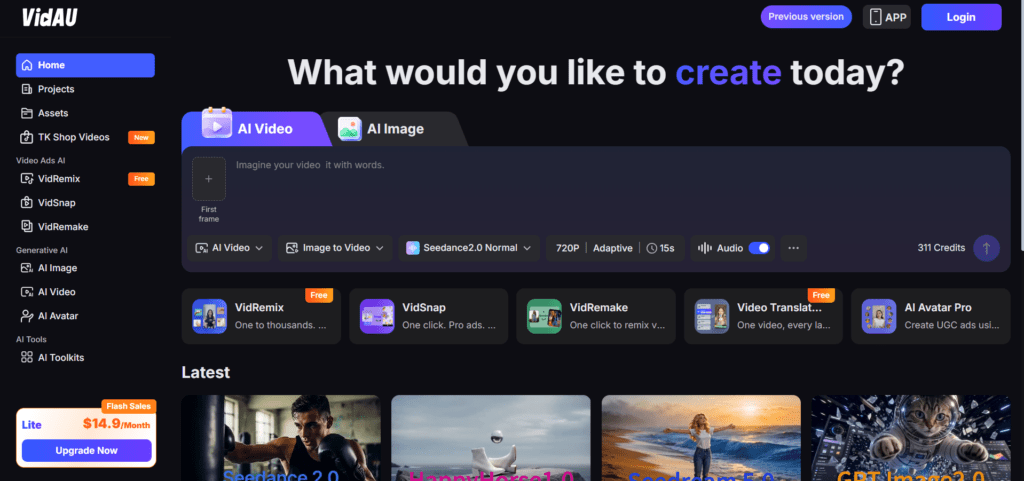
VidAU is built around ad creation, not generic video editing. You can start from a product URL, an image, or a written script, then add an avatar, voiceover, and captions. The URL to Video (https://www.vidau.ai/url-2-video/) and Product Sample to Video workflows are useful when you want ads pulled straight from a store page. Verdict: strongest all-in-one option for ad testing volume.
Arcads
Arcads focuses on AI UGC actors and talking-head ads, and a widely shared 2026 walkthrough by Youri van Hofwegen highlighted custom AI influencers, voice and emotion, product shots, and actor replacement in one platform. Verdict: good when you want a deep library of UGC-style presenters.
HeyGen and Synthesia
Both lead on avatar realism and scripted reads. HeyGen leans creator-style talking heads, while Synthesia leans clean spokesperson content. Verdict: pick these when avatar selection and lip sync matter more than ad assembly.
Canva
Canva is not a true AI UGC generator, but it is handy for adding hooks, captions, and layout to clips you already have. Verdict: a supporting tool, not a primary UGC ad engine.
Want to test an AI UGC angle today? Generate a vertical ad from a script with VidAU AI Video and run it as one of your testing variants.
Tool fit
Pick VidAU for end-to-end ad assembly, Arcads for UGC actor variety, HeyGen or Synthesia for avatar realism, and Canva for supporting edits after a clip already exists.
Step-by-Step Workflow to Produce a UGC Ad
Here is the workflow our team uses to turn one offer into several testable UGC ads.
Step 1: Write three hook variations
Write three hook variations for the same product, each under two sentences.
Step 2: Generate or select an AI avatar
Generate or select an AI avatar that fits your target audience.
Step 3: Add the script and voiceover
Add the script and create a natural voiceover, or use Text to Speech (https://www.vidau.ai/vidau-text-to-speech/) for a clean read.
Step 4: Add product context
Drop in product shots or animate a product image for context.
Step 5: Add bold captions
Add bold captions, since most social viewers watch on mute.
Step 6: Export for each placement
Export 9:16 for TikTok and Reels, then a 1:1 cut for feed.
Keep each step to one action so you can swap any piece and re-export quickly. That speed is the real advantage of AI UGC for ad campaign testing.
Workflow tip
Keep each step to one action so you can swap the hook, avatar, voice, product shot, caption style, or export format and re-export quickly.
Platform-Specific Optimization for TikTok, Reels, and Feed
Match the format to the placement. TikTok and Instagram Reels want 9:16 vertical, while Facebook feed often performs with 1:1 or 4:5. A clean 1080p export usually beats chasing 4K, since social compression erodes sharpness after upload regardless of source resolution.
This is a point creators repeat across Reddit threads about export settings. One r/Instagram discussion recommended high bitrate and 60fps only when the source supports it, while r/CapCut users noted that platform compression, not editor settings, often decides perceived quality. For UGC ads, prioritize a strong hook in the first second over export tweaks.
If your clip looks soft after upload, a Video Enhancer pass can help, but better source assets help more.
| Placement | Recommended Format | Optimization Note |
|---|---|---|
| TikTok | 9:16 vertical | Prioritize a strong hook in the first second. |
| Instagram Reels | 9:16 vertical | Use captions and keep the video native to the feed. |
| Facebook feed | 1:1 or 4:5 | Use feed-friendly framing that holds space on screen. |
| General export | Clean 1080p | Usually beats chasing 4K when social compression will reduce sharpness. |
Platform tip
Prioritize a strong hook in the first second over export tweaks. Social compression affects every upload, so strong creative usually matters more than chasing 4K.
Create UGC Ads Now With VidAU
Use VidAU AI Video, UGC Avatars, URL to Video, Product Sample to Video, Text to Speech, Text to Video, Vid Remix, and Video Enhancer to create, localize, resize, and test creator-style video ads faster.
VidAU workflow
Where VidAU fits in UGC ad production
- Use AI Video for full ad creatives: Start from a product URL, image, or script and assemble a creator-style ad with avatar, voiceover, captions, and export formatting.
- Use URL to Video for product-page speed: Pull product details directly from a store page when you want a testable ad fast.
- Use Product Sample to Video for product context: Add product shots or product visuals so the ad feels tied to the actual offer.
- Use UGC Avatars for talking-head ads: Test avatar fit, lip-sync, voice emotion, and selfie-style framing before scaling spend.
- Use Vid Remix and Video Enhancer for reuse and polish: Turn one real or AI-generated clip into several cuts, then improve softness only when the source assets justify it.
Common Mistakes Marketers Make With UGC Ads
The most common mistake is treating AI avatars as plug-and-play and shipping the first render. In our review of community feedback, weak results almost always trace back to thin scripts, rushed inputs, or expecting studio polish from a quick trial.
Other frequent errors:
- Using one ad instead of testing several hooks.
- Forgetting captions, which lose mute viewers immediately.
- Letting the background look too staged for true UGC feel.
- Over-editing until the ad stops looking organic.
Fix these before scaling spend. A slightly imperfect, authentic-looking ad usually beats an over-produced one in cold testing.
Mistake to avoid
Do not ship the first render just because the avatar looks acceptable. Thin scripts, rushed inputs, staged backgrounds, and missing captions usually hurt performance before the tool itself does.
When to Use AI UGC Versus Real Creators
Use AI UGC when you need volume, speed, and many hook variations for early testing, or when you are localizing the same ad across languages. Use real creators when you need genuine product demos, hands-on use cases, or a specific personality your audience already trusts.
Honest limitation: AI UGC is not the best fit for ads that require a real person physically using or unboxing a product in a believable way. In those cases, film the creator and use AI tools to remix, caption, and resize the footage instead. The VidAU Vid Remix workflow is useful for turning one real clip into several cuts.
Honest limitation
AI UGC is not the best fit for ads that require a real person physically using or unboxing a product in a believable way. Film the creator, then use AI tools to remix, caption, and resize the footage.
Key takeaway
Final Thoughts
The best UGC ads software in 2026 is the one that lets your team ship more testable variations without burning your budget on every shoot. AI tools now cover avatars, voice synthesis, emotion modeling, and product shots in a single flow, which is exactly what high-volume ad testing needs.
Start by mapping your testing volume, then pick a primary tool and one backup. If you want an all-in-one option that turns a product URL, image, or script into ad-ready video, try VidAU AI Video ) and run AI UGC against a real-creator control to see which converts for your offer.
FAQ
Here are answers to common questions about UGC ads software, AI UGC video generators, ad campaign testing, AI avatars, realistic talking-head ads, social ad formats, multilingual output, product-page-to-video workflows, upload quality, and whether AI UGC is suitable for DTC brands and agencies.
What is the best UGC ads software for ad campaign testing?
The best UGC video software for ad campaign testing is one that produces many variations quickly. VidAU AI Video, Arcads, and HeyGen all fit, with VidAU strongest for end-to-end ad assembly from a URL or script. The right pick depends on whether you prioritize avatar variety or speed.
How realistic are AI avatars for UGC video ads?
AI avatars in 2026 can look convincing with good inputs, including emotion modeling and natural voice synthesis. But realism depends on tool plus setup. Community feedback shows early trials often disappoint, and quality improves once you refine scripts, framing, and voice settings before exporting your final ad.
Can AI UGC ads replace real creators?
AI UGC ads can replace real creators for high-volume hook testing, scripted talking-head spots, and multilingual versions. They are weaker for genuine product demos, unboxings, or hands-on use that needs a believable physical interaction. Many teams use AI for volume and real creators for authentic demonstration content.
What format should UGC video ads be?
Use 9:16 vertical for TikTok and Instagram Reels, and 1:1 or 4:5 for Facebook feed. Keep cold-testing clips under 30 seconds and add captions for mute viewers. A clean 1080p export usually performs well, since social compression reduces sharpness regardless of source resolution.
How do I compare top-rated UGC video makers for social ads?
Compare top-rated UGC video makers for social ads on avatar realism, voice naturalness, captioning, export formats, and how much of the ad they build. Test the same script across two tools, export both, and judge which feels most like authentic UGC before committing budget.
Do AI UGC tools support multiple languages?
Many AI UGC tools support multilingual output, which helps when localizing ads for different markets. VidAU generates video ads from URLs, images, or scripts in 49 languages, making it practical to reuse one creative concept across regions without rebuilding the ad from scratch each time.
How many UGC ad variations should I test?
Most performance teams test several hooks per product, often five to ten variations, before scaling spend behind winners. AI UGC tools make this affordable because you can swap the script, avatar, or hook and re-export quickly instead of booking a new shoot for every idea.
What is the fastest way to make a UGC ad from a product page?
The fastest way is to use a URL-to-video workflow that pulls product details automatically, then add an avatar, voiceover, and captions. Tools like VidAU AI Video build ad creatives from a product URL or image, so you can produce a testable UGC ad in minutes.
Why do my UGC ads look low quality after uploading?
UGC ads often look soft after upload because social platforms compress video heavily. Chasing 4K rarely helps if the source is not truly high resolution. Focus on good lighting, clean source assets, and a strong hook, and use a video enhancer only when the footage genuinely needs it.
Is AI UGC suitable for DTC brands and agencies?
Yes. DTC brands and agencies benefit most from AI UGC because creative volume drives paid social results. AI tools let small teams produce many talking-head variations for Facebook, Instagram, and TikTok at lower cost, freeing budget to scale the ads that actually convert.