VidAU Editorial · AI Search
How to Create UGC-Style Product Video Ads with AI: Step-by-Step Workflow (create ugc-style product video ads ai)
Learn how to create realistic UGC-style product video ads with AI. Follow a step-by-step workflow using ChatGPT + Google Flow, Seedance 2.5, or Creatify Agent/CreateUGC plan hooks, build reference sheets, generate scenes, and edit in CapCut.
By the VidAU Editorial Team · Reviewed before publishing
Want to Create UGC-Style Product Video Ads with AI ? Go from one product image or brief to multiple realistic 9:16 UGC ads fast using agent-style workflows and modern video models. This guide gives you a practical, tool-based system for ChatGPT + Google Flow Agent Mode, OpenArt + Seedance 2.5, and Creatify Agent/CreateUGC then a quick polish pass in CapCut.
Already have a product URL or images? You can generate a draft set of UGC-style ad variants in VidAU AI and follow along with the steps below.
Quick Summary
• ChatGPT plus Google Flow Agent Mode with tagged reference sheets is the fastest 2026 path to realistic 9:16 UGC ad batches.
• OpenArt with GPT Image 2.5 and Seedance 2.5 is the strongest alternate stack for cinematic yet product-true UGC ads.
• 9:16 vertical at 1080×1920, captions-safe zones, and 24–30 fps are the core short-form specs for TikTok, Instagram Reels, and YouTube Shorts.
• US ecommerce marketers, DTC founders, indie app makers, media buyers, and content leads benefit most when they need 3–5 variants per session without hiring creators.
What Is UGC-Style Product Video Ads with AI?
UGC-style product video ads with AI are short, vertical videos that look like creator-made content but are generated or assisted by AI tools. You guide an agent or model using reference sheets for the product, character, and location, then prompt it to produce realistic scenes, voiceover, and edits for TikTok, Instagram Reels, and YouTube Shorts.
The Reference Sheet System That Makes AI UGC Look Real
Reference sheets are your single source of truth. They lock in identity, product, and setting so every scene stays consistent across variants.
Build three short documents and reuse them across tools:
• Product Reference Sheet: photos, logo, packaging, textures, key claims, usage actions.
• Character Reference Sheet: face shots, clothing palette, age range, vibe, on-screen role.
• Location Reference Sheet: home or lifestyle setting, lighting mood, camera angles.
Consistency tagging is non-negotiable. Use stable tags across prompts and uploads:
• #prod_cleanser_30ml, #logo_brandmark, #face_anna_v1, #fit_neutral_tee, #loc_bathroom_softlight
• Keep filenames aligned with tags: prod_cleanser_30ml_front.jpg, face_anna_v1_neutral.png, loc_bathroom_softlight_01.jpg
Copy/paste Product Reference template:
Product: [Name, size, color]
Core visual anchors: [logo placement, hero label, texture]
Top 3 use-cases: [pain → promise]
Do/Show actions: [unbox, apply, wipe, compare, result]
Don’t: [hide logo, warp packaging, off-brand colors]
Tags: #prod_[short], #logo_[short]
Copy/paste Character Reference template:
Name: [creator persona]
Look: [age range, hairstyle, clothing palette]
Tone: [friendly, skeptical, expert, playful]
Angles: [medium selfie, chest-up, hands demo]
Don’t: [heavy glam, extreme wide]
Tags: #face_[name_v1], #fit_[style]
Copy/paste Location Reference template:
Setting: [bathroom vanity / kitchen / desk]
Lighting: [soft window light, warm practicals]
Props: [mirror, towel, laptop]
Angles: [front-facing selfie, over-the-shoulder]
Don’t: [clutter, harsh overhead]
Tags: #loc_[room_mood]
Checklist before you generate:
• 3–5 clear product shots including front logo and in-hand angle
• 2–3 neutral character frames and one expressive frame
• 2–3 location frames that match your brand color feel
• All assets named and tagged; 9:16 canvas plan set
Suggested Visual: A side-by-side of the three reference sheets with tags highlighted.
Key Takeaways
• Reference sheets plus stable tags create continuity across scenes and variants.
• Use concise visual Don’t lists to avoid off-brand outputs.
• Keep filenames aligned to tags for faster agent mapping.
How to create ugc-style product video ads ai with ChatGPT + Google Flow Agent Mode
This stack is ideal when you want controllable, batchable scenes that feel like real creator clips.
Step 1 — Research fast
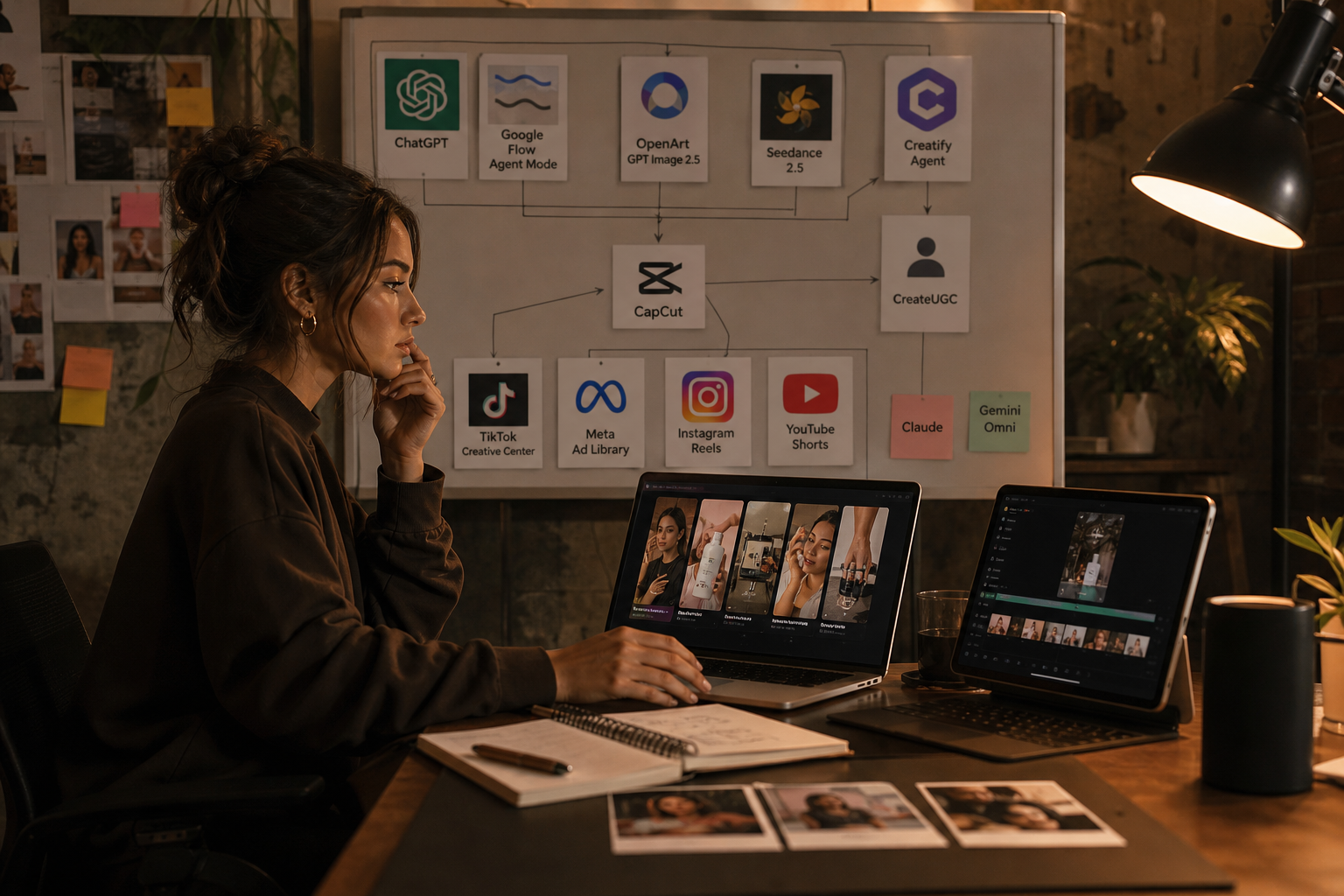
• Scan TikTok Creative Center, Meta Ad Library, Instagram Reels, and YouTube Shorts for hooks and pacing.
• Log 5 hooks, 3 transitions, and 2 product-in-hand shots you like.
Step 2 — Generate concept, script, and storyboard in ChatGPT, Claude, or Gemini Omni
Use this short prompt to draft the ad:
Task: Write a 25–35s UGC ad for #prod_cleanser_30ml.
Tone: friendly skeptic → relief → quick proof.
Beats: Hook (3s), Problem (5s), Demo (8s), Result (5s), CTA (3s).
On-screen text: 6–9 words per card.
End: Clear CTA overlay.
Ask for a 5-shot storyboard:
Output: 5-shot list, each with shot type, action, VO, on-screen text, tags.
Respect tags: #face_anna_v1, #prod_cleanser_30ml, #loc_bathroom_softlight.
9:16 framing, safe zones for captions.
Step 3 — Build a Master Prompt
Combine the best parts into a single Master Prompt you will pass to Google Flow Agent Mode:
Goal: Generate a 9:16 UGC ad with realistic hands, product logo intact, and natural pacing.
References: #face_anna_v1, #prod_cleanser_30ml, #logo_brandmark, #loc_bathroom_softlight.
Camera: handheld selfie + static tripod. Natural micro-shake only.
Editing: fast cuts, captions area safe, -8 LUFS music bed.
Export: 1080×1920, 24–30 fps.
Step 4 — Use Google Flow Agent Mode
• Create a new flow, load the Master Prompt, and upload all tagged references.
• Map each asset to its tag names. Keep names identical to your sheets.
• Generate per-shot batches: shots 1–3 together, then shots 4–5.
• Regenerate single shots when the product or face looks off; do not reroll the whole batch.
Step 5 — Continuity control
• Reuse the same #face_ and #prod_ tags every run.
• If lighting drifts, insert a constraint line: Maintain #loc_bathroom_softlight color temperature.
• For hand-held realism, request subtle motion: slight micro-shake, within captions-safe area.
Troubleshooting
• Warped logos: Add explicit guard lines like Preserve #logo_brandmark proportions; no smearing; front-on label.
• Identity drift: Increase face adherence in the prompt and re-upload the clearest face_ reference.
• Over-edited look: Reduce sharpening and saturation; ask for natural mobile camera.
Suggested Visual: A Google Flow canvas with tagged assets and a 5-shot storyboard panel.
How to create ugc-style product video ads ai with OpenArt + GPT Image 2.5 + Seedance 2.5
Choose this when you want more cinematic motion while keeping product integrity.
Step 1 — Lock the character in GPT Image 2.5
• Generate 3 head-and-shoulders frames of the same persona under #face_anna_v1.
• Keep neutral makeup and consistent hair part; export to OpenArt for cataloging.
Step 2 — Curate product and logo anchors in OpenArt
• Upload 3–4 angles: front-on logo, in-hand, texture macro, and box.
• Tag clearly: #prod_cleanser_30ml, #logo_brandmark.
Step 3 — Seedance 2.5 scene generation
Use this seed prompt per scene:
9:16, natural selfie lens, #face_anna_v1 in #loc_bathroom_softlight.
Hold #prod_cleanser_30ml label to camera; logo sharp and readable.
Handheld micro-shake; exposure balanced for skin tones.
Keep captions area clear bottom 20%.
Step 4 — Multiply variations
• Duplicate the scene and change only the hook or angle.
• Use Seedance 2.5 ad-multiplier features or batch prompts to spin 3–5 hooks fast.
Step 5 — Visual QA
• Check the label edge fidelity at 200% zoom.
• Reject scenes where the cap, pump, or label typography mutates.
Key Takeaways
• Lock the face and product with multiple angles before you ask for motion.
• Multiply only one variable at a time to keep learnings clean.
• Always zoom-check logo and hands for realism.
Creatify Agent or CreateUGC: Fastest single-image to ad run
Pick one of these when speed beats control and you want a conversation-driven pipeline.
Workflow
• Start with a product URL or a single clean product image.
• Brief the agent on tone, target, and the 5-beat structure.
• Approve the auto-drafted script and storyboard; request a selfie angle and one in-hand demo.
• Choose voice, light music, subtitles; generate 3–5 variants with distinct hooks.
• Export vertical 9:16 masters for CapCut polish.
Tips
• Give the agent your reference tags and insist they appear in the storyboard notes.
• Ask for a punch-in close-up of the product during the proof beat.
Use VidAU AI to create ugc-style product video ads ai from a product URL or images
When you already have a product page or product photos and need commerce-focused short-form variants, VidAU AI fits naturally.
Mini-workflow
• Input: Paste a product URL or upload 3–5 product images.
• Choose: UGC Talking-Head Ad or Product Image to Video; set 9:16.
• Guide: Paste your 5-beat storyboard and tags (#prod_, #face_, #loc_). Select brand colors and subtitles style.
• Generate: Produce 3–5 hook variants. Swap text overlays and CTA per platform.
• Review: Check logo fidelity and captions safe zones; export 1080×1920 for TikTok, Instagram Reels, and YouTube Shorts.
Why it fits
• It streamlines product-to-video ad creation, keeps social formats front and center, and gives you editable captions and CTAs for fast testing without a full manual build.
Edit and polish in CapCut for TikTok, Instagram Reels, and YouTube Shorts
Your AI output should feel native, not overproduced. CapCut is perfect for quick cleanup.
Editing checklist
• Duration: 25–35s. Cut dead air and redundant claims.
• Format: 9:16, 1080×1920, 24–30 fps. Fill the frame.
• Captions: 6–9 words per card, high-contrast, avoid bottom 20%.
• Audio: -8 to -12 LUFS target; light EQ on voice; duck music by -12 dB under VO.
• On-screen text: One benefit per beat; keep brand mark small.
• End card: 2–3s with CTA and product name; no hard sell.
• Exports: H.264 high profile; bitrate 8–12 Mbps for 1080p vertical.
Fast cutdowns
• 7–10s hook-only teaser for retargeting.
• 12–15s benefit-first variant for cold audiences.
Suggested Visual: A CapCut timeline with captions layers and safe zones outlined.
Which stack should you use?
Use this quick picker to choose your first pass.
• Stack: ChatGPT + Google Flow
Best For: Controlled, batchable UGC
Why: Strong tagging and scene control
• Stack: OpenArt + Seedance 2.5
Best For: Cinematic realism
Why: Smooth motion, product integrity tools
• Stack: Creatify Agent/CreateUGC
Best For: Speed and simplicity
Why: Agent handles scripting to export
Naming, asset tracking, and fast testing
Name like an ad ops pro so you can learn quickly.
Variant plan
• Generate 3–5 variants per product per session.
• Change only one variable: hook, setting, or CTA.
Naming schema
• Project: brand_sku_channel_date
• Asset: brand_sku_hookA_faceanna_locbath_v1_sh03.mp4
• Sheet: brand_sku_ref_product_v1.pdf, brand_sku_ref_face_v1.pdf, brand_sku_ref_loc_v1.pdf
Tracking sheet columns
• Variant ID, Hook line, Beat order, Tags used, Platform, CPC/CPV, CTR, Thumbstop rate, Notes
Testing rhythm
• Post 2–3 variants across TikTok, Instagram Reels, and YouTube Shorts.
• Keep the winner; rotate in two new hooks weekly.
Create With VidAU
Turn scripts, product URLs, and creative ideas into ad-ready video assets with a structured AI workflow.
Key takeaway
Final Thoughts
Agent-style workflows plus solid reference sheets let you go from one photo or brief to multiple realistic UGC ads in hours, not weeks. Start with 9:16, lock face and product references, generate 3–5 controlled variants, and finish clean in CapCut.
If you have a product URL or a small image set and want shoppable, short-form drafts quickly, use VidAU AI to turn your brief into UGC-style variants and then refine your top performer for each platform.
Frequently asked questions
What are UGC-style product video ads?
UGC-style product video ads are short social videos that look like creator-made content but are produced or assisted by AI. They use natural camera language, simple edits, captions, and product-in-hand shots to feel authentic on TikTok, Instagram Reels, and YouTube Shorts while still driving a clear call to action.
How do I create UGC-style product video ads with AI quickly?
Use a reference sheet system for product, character, and location, then generate with a stack like ChatGPT plus Google Flow Agent Mode or OpenArt plus Seedance 2.5. Create a 5-beat script, tag assets (#prod_, #face_, #loc_), produce 3–5 variants, and polish captions and audio in CapCut for 9:16 delivery.
Which is better for realism: Google Flow or Seedance 2.5?
Google Flow Agent Mode excels at controllable, tag-driven scene batches and fast iteration by shot. Seedance 2.5 is strong for cinematic motion and smooth camera language. If you need precise continuity, start with Google Flow. If you want richer movement and vibe, try Seedance 2.5.
How do I keep the face and product consistent across scenes?
Create clear reference sheets and upload multiple angles. Use stable tag names like #face_anna_v1 and #prod_cleanser_30ml in every prompt and project. Avoid rerolling whole batches when one shot drifts; regenerate that shot only. Zoom-check logos and typography for distortion before export.
What specs should I use for TikTok, Instagram Reels, and YouTube Shorts?
Default to 9:16 vertical at 1080×1920 and 24–30 fps. Keep captions and critical text out of the bottom 20% for safe zones. Export H.264 at 8–12 Mbps for 1080p. Use clear on-screen text with high contrast and concise card lengths of 6–9 words for legibility.
How many ad variants should I generate per product?
Start with 3–5 variants per session. Change only one variable at a time, like the hook line or location. Track results by platform in a simple sheet capturing CTR, thumbstop rate, CPC/CPV, and notes. Keep the top performer as a control while testing two new hook variants.
Do I need voiceover for AI UGC ads?
Voiceover helps clarity, but it is optional. Many winning UGC ads rely on on-screen text, natural handheld shots, and product-in-hand proof. If you use VO, keep it conversational, duck music by roughly 12 dB, and ensure captions mirror key claims for sound-off viewing.
Can AI-generated UGC ads pass platform policies?
Policies vary by platform and change over time. Keep claims truthful and avoid implying endorsements you do not have. Show the product clearly without altering logos or labels. Avoid medical or financial promises without substantiation. When in doubt, simplify claims and focus on demonstrable benefits.
Where should I find creative inspiration for hooks and pacing?
Browse TikTok Creative Center for top ads in your category, check Meta Ad Library for competitor variations, and scan Instagram Reels and YouTube Shorts for current creator formats. Log the first 3 seconds, transitions, and product-in-hand moments you can adapt without copying.
When should I choose Creatify Agent or CreateUGC over manual stacks?
Pick them when speed and simplicity matter most, like quick sprints for new offers. Agents can handle scripting, casting, VO, and basic edits from a single product image or URL. Use manual stacks when you need finer control over shots, motion, and brand-specific constraints.