How Much Is Canva Pro? 2026 Pricing and Value Guide
How much is Canva Pro? Canva Pro pricing depends on your country and whether you choose monthly or annual billing. In many US-facing pricing references, Canva Pro is listed around $15 per month or $120 per year for one person, while Canva’s official pricing page now localizes the final price by region and checkout currency. Always confirm the exact amount on Canva’s pricing page before you subscribe.
This guide explains what Canva Pro costs, what you get for the upgrade, how Pro compares with Free and Business, and whether it is worth paying for if you create social posts, ads, presentations, or video assets regularly.
Quick Answer: Canva Pro Price in 2026
Canva’s official pricing page shows different prices by region, but the plan structure is simple: Free costs $0, Pro is the paid plan for one person, Business is priced per person for teams, and Enterprise uses custom sales pricing. The annual Pro plan is usually the better value if you know you will use Canva every month.
| Plan | Typical cost structure | Best for | Main reason to choose it |
|---|---|---|---|
| Canva Free | $0 | Casual users and simple designs | Basic design tools, templates, and exports |
| Canva Pro | Paid monthly or annually; final price varies by region | Solo creators, marketers, students, freelancers, and small business owners | Premium assets, Brand Kits, Background Remover, Magic Resize, content scheduling, and more AI access |
| Canva Business | Paid per person | Teams that need collaboration and brand controls | More Brand Kits, approvals, team admin, and higher storage/AI allowances |
| Canva Enterprise | Custom quote | Larger organizations | Security, SSO, provisioning, dedicated support, and scaled brand governance |
If your main goal is to turn finished Canva designs into campaign videos, product clips, or faceless social ads, you can pair Canva assets with VidAU’s text-to-video tool or convert product pages into videos with VidAU URL to Video.
What Is Canva Pro?
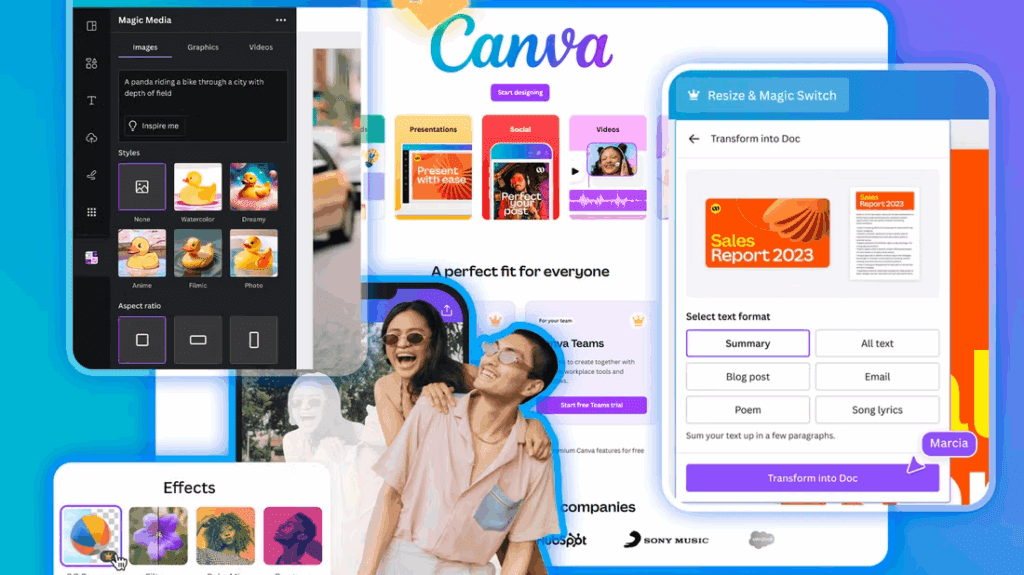
Canva Pro is Canva’s paid plan for individuals who need more than the free design editor. It adds premium templates and assets, Brand Kits, Background Remover, Magic Resize, social scheduling, more AI usage, and extra storage compared with the free plan.
- Premium assets: access to a much larger library of photos, videos, graphics, audio, and templates.
- Brand control: multiple Brand Kits for colors, fonts, logos, and reusable visual identity.
- Faster editing: tools such as Background Remover, Magic Resize, and Translate help reduce manual design work.
- AI features: paid plans include a larger shared AI allowance than Canva Free.
- Publishing support: social content scheduling and more storage for ongoing content production.
Canva Pro Monthly vs Annual Billing
The annual Canva Pro plan is normally cheaper over a full year than paying month to month. Monthly billing is better if you only need Pro for a short project, while annual billing makes more sense if Canva is part of your weekly content workflow.
| Billing option | Best for | Pros | Tradeoff |
|---|---|---|---|
| Monthly | Short campaigns, testing Pro, one-off design projects | Lower upfront commitment and easier cancellation timing | Usually costs more over a full year |
| Annual | Creators and businesses using Canva every month | Better yearly value and fewer billing interruptions | Higher upfront payment |
Before you subscribe, open the official Canva pricing page in your own country. Canva displays localized currency and may update included features, AI allowances, storage, and plan names over time.
Canva Free vs Canva Pro: What Changes?
The free version is strong enough for simple posts and presentations. Canva Pro becomes more useful when you need brand consistency, frequent exports, premium stock assets, background removal, resizing, or faster campaign production.
| Feature | Canva Free | Canva Pro |
|---|---|---|
| Templates and stock assets | Large basic library | Expanded premium library |
| Brand Kit | Limited brand setup | More Brand Kits and brand controls |
| Background Remover | Limited or unavailable depending on feature access | Included as a premium tool |
| Magic Resize | Limited | Included for faster multi-format publishing |
| Cloud storage | Lower storage allowance | Higher storage allowance than Free |
| AI usage | Smaller shared allowance | Larger shared allowance than Free |
| Social scheduling | Limited | Available for planned campaigns |
Is Canva Pro Worth It?
Canva Pro is worth it if it saves you enough time or asset costs to justify the subscription. For a freelancer, marketer, or small business owner, the biggest value is usually speed: templates, Brand Kits, Background Remover, Magic Resize, and premium assets help you produce more designs with fewer extra tools.
Canva Pro is probably worth it if you:
- Create social posts, thumbnails, pitch decks, ads, or presentations every week.
- Need a consistent brand kit across multiple designs.
- Frequently remove backgrounds, resize designs, or export in different formats.
- Would otherwise pay separately for stock assets or basic design tools.
- Use Canva files as starting points for videos, ads, or product content.
You may not need Canva Pro if you:
- Only create occasional personal designs.
- Do not need premium templates, stock assets, or brand controls.
- Already use another paid design suite.
- Only need one quick design and can complete it during a free trial.
Canva Pro vs Business: Which Plan Should You Choose?
Choose Canva Pro if you are one person managing your own designs. Choose Canva Business if multiple people need shared brand controls, approvals, admin features, more storage, and team workflows. For larger organizations that need SSO, provisioning, advanced security, and dedicated support, Canva Enterprise is the better fit.
How to Get the Best Value From Canva Pro
- Start with the free plan: confirm that Canva fits your workflow before upgrading.
- Use the trial carefully: test premium templates, Brand Kits, Background Remover, Magic Resize, and AI tools before the trial ends.
- Pick annual billing only if you use Canva consistently: it usually lowers the effective monthly cost.
- Check education and nonprofit options: eligible schools and nonprofits may get premium features for free or at a discount.
- Use Canva with a video workflow: after designing images, turn them into campaign videos with Canva AI video workflows and VidAU.
Canva Pro Alternatives for Video Creators
Canva Pro is strongest for design assets, presentations, social graphics, and lightweight video edits. If your priority is creating AI product videos, influencer-style ads, faceless videos, or product-page-to-video campaigns, VidAU can be a better fit because it is built around video generation and marketing workflows.
For example, you can use Canva to create thumbnails, product graphics, or brand assets, then use VidAU AI Video Generator to turn your message into a campaign-ready video. If your Canva design needs motion, also see this guide on Canva Pro animation for image transitions.

Final Verdict: Should You Pay for Canva Pro?
Canva Pro is a strong upgrade if you design regularly and need premium assets, brand consistency, faster resizing, background removal, and more AI access. For occasional users, Canva Free may be enough. For creators and businesses producing weekly content, the annual Pro plan usually offers better value than monthly billing.
The best approach is simple: check your local Canva checkout price, test the features during the trial, then decide based on how often Canva saves you time. If you also need AI videos for ads, product pages, or social content, combine Canva designs with VidAU to move from static assets to finished video campaigns faster.
FAQs About Canva Pro Pricing
How much is Canva Pro per month?
Canva Pro monthly pricing varies by country and currency. In many US-facing references, Canva Pro is shown around $15 per month for one person, but Canva’s official pricing page localizes the final amount at checkout.
How much is Canva Pro per year?
The annual plan is usually cheaper than paying monthly for a full year. Many US-facing references list Canva Pro around $120 per year for one person, but you should confirm your current local price on Canva’s pricing page.
Is Canva Pro free?
No. Canva Pro is a paid plan, although Canva may offer a free trial. Canva Free remains available at no cost with fewer premium features and lower allowances.
Can I cancel Canva Pro anytime?
Canva subscriptions can generally be managed from your account billing settings. Check your renewal date and cancellation terms before the next billing cycle.
Is Canva Pro worth it for small businesses?
Yes, if the business creates content often and needs branded templates, faster resizing, background removal, social scheduling, and premium assets. If several team members need approvals and admin controls, Canva Business may be a better fit.
What is the difference between Canva Pro and Canva Business?
Canva Pro is mainly for one person. Canva Business is designed for individuals and teams that need stronger collaboration, brand management, approvals, admin controls, and higher plan allowances.