

AI UGC Ads · TikTok Video Workflow
How to Create Ads for TikTok Video With AI in 2026 (Full Workflow)
Learn how to create ads for TikTok video with AI using realistic AI UGC workflows, image-first production systems, AI avatars, voice generation, and editing tools.
By the Sarah Iruoje · Updated 2026 · 10 min read
Learning how to create ads for TikTok video with AI in 2026 no longer depends on hiring creators, filming product demos manually, or spending weeks editing content. The entire production process changed. Most creators and brands now rely on connected AI systems that generate avatars, animate movement, synthesize realistic voices, and assemble complete ad creatives faster than traditional workflows ever allowed.
The biggest mistake most beginners still make with ai ugc ads is assuming one tool handles everything perfectly. That approach creates robotic visuals, unnatural movement, weak product placement, and ads that instantly feel artificial. The strongest-performing creators now follow structured workflows where each AI system handles a specific task inside the production pipeline.
This guide breaks down the complete workflow creators now use to create ads for TikTok video with AI in 2026. You will learn how image-first workflows improve realism, how avatar systems create consistency, how motion generation works, and why editing still matters even with advanced AI automation.
Summary
- AI UGC ads now rely on connected workflows instead of single tools
- Image-first workflows create stronger realism than text-to-video generation
- Nano Banana Pro improves avatar consistency and selfie realism
- Product grid workflows improve lighting and hand placement accuracy
- Veo 3.1 and Seedance 2.0 generate realistic motion from still images
- ElevenLabs improves voice realism and conversational delivery
- Editing still matters heavily for realism and ad performance
- Multi-tool workflows outperform most all-in-one generators
- Even creators searching for an ai ad generator free no sign up option benefit from learning structured workflows first
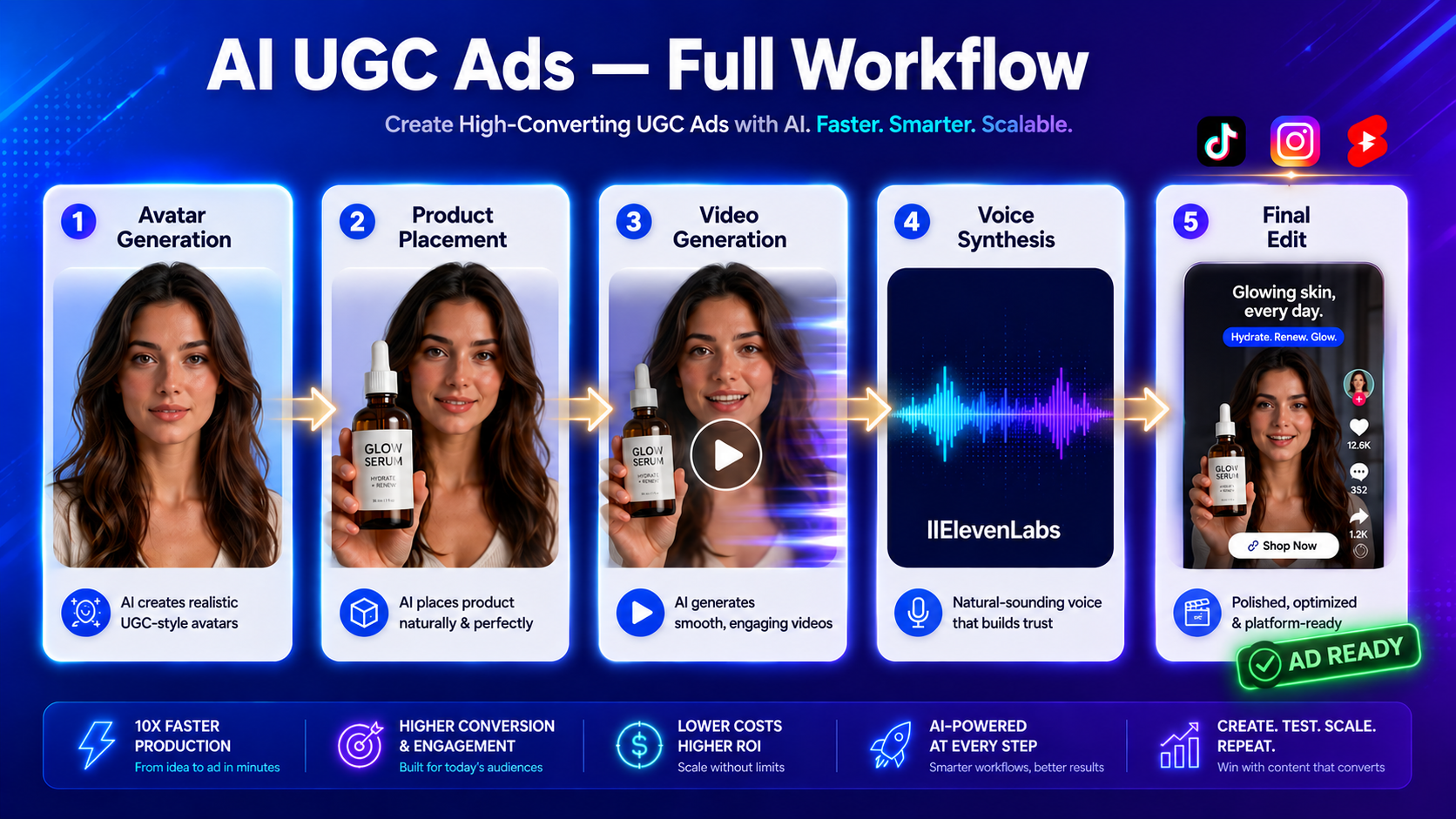
Understanding the AI UGC Ad Workflow
The modern AI UGC ads creation process follows a structured sequence. Unlike traditional UGC production where you film everything at once, AI workflows separate creation into distinct phases: avatar generation, product integration, video generation, voice synthesis, and final editing.
Each phase serves a specific purpose. Avatar generation establishes your character and sets the visual foundation. Product integration determines how naturally your offering appears in the final video. Video generation brings movement and life to static images. Voice synthesis adds the human element that makes UGC ads relatable. Final editing ties everything together into a polished advertisement.
The key insight that separates successful AI UGC creators from those producing obviously artificial content is this: start with an image-first approach to enhance realism and continuity across your AI ads. Most failed AI UGC attempts begin with text-to-video generation, which produces inconsistent results and unnatural movements.
Key takeaway
The strongest AI UGC workflows do not start with text-to-video. They begin with controlled images, then use video generation to add movement while preserving character appearance, lighting, product placement, and continuity.
Choosing Between All-in-One Platforms and Multi-Tool Workflows
Before diving into specific steps, you need to decide your approach. Two primary paths exist for creating AI UGC ads in 2026.
All-in-one platforms like ElevenLabs and Arcads offer complete pipelines within a single interface. These platforms handle avatar creation, script delivery, product placement, and basic editing without requiring you to export and import files between multiple tools. The advantage is speed and simplicity. The limitation is less control over individual elements and dependence on the platform’s specific capabilities.
Multi-tool workflows combine specialized platforms: Nano Banana Pro for avatar generation, Veo 3.1 or Kling 2.6 for video generation, Seedance 2.0 through Higgsfield for cinematic output, ElevenLabs for voice synthesis, and external editors for final assembly. This approach offers maximum control and quality but requires understanding how each tool functions and how to move assets between platforms efficiently.
For beginners, starting with an all-in-one platform makes sense. For agencies handling multiple clients or creators producing high-volume content, multi-tool workflows provide better scalability and quality control.
| Workflow type | Best for | Advantage | Limitation |
|---|---|---|---|
| All-in-one platforms | Beginners, fast testing, simple campaigns | Speed and simplicity inside one interface | Less control over individual creative elements |
| Multi-tool workflows | Agencies, high-volume creators, quality-focused teams | Maximum control, scalability, and quality management | Requires understanding tool handoffs and asset movement |
Step 1: Generate Your AI Avatar
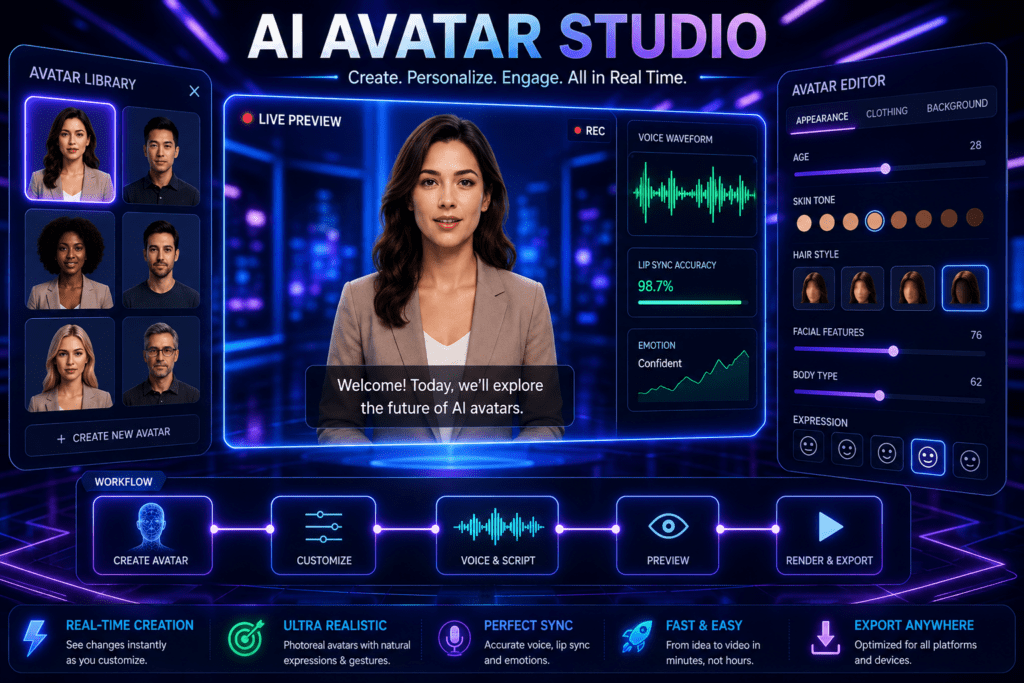
Your avatar is the foundation of your UGC ad. This character will appear across multiple ads, so consistency matters.
Using Nano Banana Pro for Realistic Avatars
Nano Banana Pro has emerged as a leading choice for generating realistic AI avatars with natural skin textures and authentic facial features. The platform excels at creating selfie-style camera angles that mimic how real users film UGC content.
When prompting for your avatar, focus on specific details: lighting conditions, camera angle, facial expression, background environment, and clothing style. Generic prompts produce generic results. Instead of “a woman holding a product,” use “a woman in her late 20s with natural makeup, filmed in soft morning light from a front-facing phone camera, casual expression, light grey background, wearing a simple white t-shirt.”
The product grid technique significantly improves product-to-hand placement and lighting accuracy. Before generating your avatar holding your product, create a reference grid showing your product from multiple angles with consistent lighting. This grid serves as a visual guide when you generate the avatar-product combination, ensuring the product appears natural in the character’s hand rather than awkwardly photoshopped.
Alternative Avatar Generation Options
If you are using an all-in-one platform like Arcads, the avatar generation happens within the platform itself. Arcads focuses heavily on character consistency across multiple videos, which becomes valuable when you need to produce variations of the same ad concept.
For vertical video formats specifically designed for TikTok, Instagram Reels, and YouTube Shorts, platforms optimized for vertical output will save reformatting time.
Tip
Selfie-style realism depends on details: natural skin texture, soft lighting, believable facial expression, casual clothing, and phone-camera framing. Generic avatar prompts create generic ads.
Step 2: Perfect Your Product Placement
Product placement separates functional UGC ads from impressive but non-converting AI art. Your audience needs to clearly see, understand, and remember your product.
The Product Grid Method
Implement the product grid technique to ensure standout product placements and lighting consistency. This method involves creating a reference sheet showing your product in a 3×3 or 4×4 grid layout with various angles, lighting conditions, and hand positions.
Generate this grid first using image generation models. Then use it as a reference when creating your main avatar images. The AI model learns proper product proportions, lighting behavior, and natural hand-to-product interaction from the grid, resulting in more realistic final output.
Lighting Integration
Poor lighting integration is the fastest way to reveal AI-generated content. When your avatar appears in one lighting environment but the product in their hand shows completely different shadows and highlights, viewers immediately recognize the artificial nature.
Address this by ensuring your product images and avatar images share similar lighting conditions before combining them. If your avatar is lit with soft, diffused light from the left, your product should show the same lighting characteristics.
Watch out
Mismatched product lighting is one of the fastest ways to make AI UGC ads look artificial. Align product shadows, highlights, and hand placement before generating video.
Step 3: Generate Video from Your Avatar Images
How to Make Viral AI UGC Ads in 2026 (Full Workflow)
With your avatar and product images prepared, the next phase transforms static images into moving video.
Image-to-Video vs Text-to-Video
The consistent pattern across successful AI UGC workflows in 2026 is starting from images rather than text. Text-to-video generation has improved significantly but still produces less consistent results than image-to-video workflows.
When you start with a carefully crafted image, the video generation model has a concrete reference for character appearance, positioning, lighting, and product placement. It only needs to add motion. When you start with text alone, the model must invent all visual elements simultaneously, leading to inconsistent outputs.
Using Veo 3.1 for Character Performance
Veo 3.1 excels at generating natural character movements and facial expressions. When prompting Veo 3.1, focus your prompt on the action and emotion you want rather than describing the character or environment—those are already established in your input image.
Effective Veo 3.1 prompts for UGC ads include specific actions: “looking directly at the camera with excitement, raising the product slightly, natural smile emerging, slight head tilt.” The model interprets these action-focused prompts while maintaining the character consistency from your input image.
Seedance 2.0 Through Higgsfield for Cinematic Quality
For horizontal formats or when you need more cinematic output quality, Seedance 2.0 accessed through Higgsfield provides strong results. Combine ElevenLabs and Seedance 2.0 for dynamic voice and video generation that truly captivates audiences.
Seedance 2.0 handles complex camera movements and maintains better consistency across longer clips. If your UGC ad concept requires the camera to move or the character to perform more elaborate actions, Seedance 2.0 becomes the better choice over faster but more limited models.
Kling 2.6 for Motion Design Elements
Kling 2.6 serves a specific purpose in the workflow: generating motion design end screens, product animations, and transitional elements. While not ideal for the main character-focused UGC content, Kling 2.6 creates smooth, professional-looking animated elements that bookend your ad or highlight specific features.
| Tool or approach | Best use in AI UGC workflow |
|---|---|
| Nano Banana Pro | Generate realistic selfie-style avatars with natural skin texture and consistent visual identity. |
| Product grid technique | Improve product proportions, lighting behavior, and hand-to-product interaction. |
| Veo 3.1 | Create natural character movement, facial expression, and emotion from still images. |
| Seedance 2.0 through Higgsfield | Generate cinematic output, complex camera movement, and longer consistent clips. |
| Kling 2.6 | Create motion design end screens, product animations, and transitional elements. |
| ElevenLabs | Generate realistic voice synthesis and assemble ad assets efficiently. |
| VidAU AI | Create platform-ready ad videos, product ad variations, and AI-assisted marketing content. |
Step 4: Add Voice and Script Delivery
Visual content alone does not make a UGC ad. Voice delivery brings the human element that makes these ads relatable and persuasive.
Voice Synthesis with ElevenLabs
ElevenLabs has become the standard for AI voice generation in UGC workflows. The platform offers natural-sounding voices with proper emotional inflection, pacing variation, and the slight imperfections that make synthetic voices sound authentically human.
When creating your script, write how people actually speak in UGC videos rather than how brands write marketing copy. Include pauses, conversational filler words, and natural speech patterns. A script that reads well on paper often sounds unnatural when spoken.
Test multiple voice options even within the same demographic. ElevenLabs provides extensive voice variety, and the right voice match for your avatar significantly impacts perceived authenticity.
Create Ads for Tiktok Videos
Use VidAU AI to create TikTok-ready ad videos with AI-assisted scripts, product visuals, UGC-style hooks, avatars, voiceovers, captions, and campaign-ready formats for social platforms.
VidAU workflow
From AI UGC concept to TikTok-ready ad
- Start with the product and hook: Define the TikTok ad angle, product benefit, customer pain point, and UGC-style opening line.
- Create visual inputs: Use product images, avatar references, or image-first assets to support realistic video output.
- Add creator-style delivery: Generate a conversational script, avatar presentation, captions, and voiceover that feel native to short-form social ads.
- Build variations: Test multiple hooks, voices, CTAs, product placements, and formats instead of relying on one generated ad.
- Export for TikTok and beyond: Create 9:16 versions for TikTok, Instagram Reels, YouTube Shorts, and paid social campaigns.
Step 5: Edit and Assemble Your Final Ad
With generated video clips and voice assets prepared, final editing brings everything together into a polished advertisement.
Using ElevenLabs Studio for Complete Assembly
ElevenLabs Studio functions as both a generation platform and an editing environment. You can import your generated clips, arrange them on a timeline, add your voice synthesis, generate custom background music, and create motion-design elements all within one interface.
This integrated approach eliminates the export-import cycles that slow down multi-platform workflows. For creators producing high volumes of ad variations, this efficiency compounds significantly.
Advanced Editing in External Tools
For more complex editing requirements, external video editors provide additional control. Standard editing software handles color grading, advanced transitions, text overlays, and multi-layer compositing that basic platform editors may not support.
The key is determining which edits truly improve your ad performance versus which simply consume time. Many successful AI UGC ads use minimal editing—the raw AI output performs well because the foundational work in avatar generation and product placement was done correctly.
Free Versus Paid Tool Considerations
The supporting keyword research includes queries about free tools with no sign-up requirements. Understanding what free tiers can and cannot do helps set realistic expectations.
Most platforms offer free tiers with significant limitations. These typically include watermarks, reduced resolution, limited generation credits, restricted export formats, and queue-based processing that can take hours.
For testing concepts or learning workflows, free tiers work well. For production use where you need consistent output quality, predictable turnaround times, and professional presentation, paid tiers become necessary.
Some platforms like Qwen offer surprisingly capable free features hidden within broader interfaces. These require more setup time but can produce quality results without immediate payment.
Watch out
An ai ad generator free no sign up option may help with testing, but production-quality ads usually require reliable exports, consistent resolution, no watermarks, faster queues, and stronger control than most free tiers provide.
Optimizing for Different Ad Formats
UGC ads appear across multiple platforms with different format requirements. Your workflow should account for these variations from the start.
Vertical Video for Social Platforms
TikTok, Instagram Reels, and YouTube Shorts require 9:16 vertical format. Generate your initial avatar images in vertical orientation to avoid cropping or reformatting later. Many tools now offer vertical presets specifically for social media content.
Vertical UGC ads typically perform better with tighter framing, the character should fill more of the frame than in horizontal formats. This creates intimacy and mimics how users naturally film selfie-style content.
Horizontal Video for YouTube and Website Use
Horizontal 16:9 format works for YouTube pre-roll ads, website landing pages, and some Facebook placements, Horizontal framing allows for more environmental context and works better for product demonstration shots where you want to show the product in use within a broader scene.
| Format | Best use | Creative note |
|---|---|---|
| 9:16 vertical | TikTok, Instagram Reels, YouTube Shorts, mobile-first paid social | Use tighter framing so the character fills more of the screen. |
| 16:9 horizontal | YouTube pre-roll, website landing pages, some Facebook placements | Use more environmental context and product demonstration space. |
Common Mistakes That Reveal AI-Generated Content
Certain errors immediately signal to viewers that they are watching AI-generated content rather than authentic UGC.
Generic Prompting
Vague prompts produce vague results. “A person holding a product” generates generic characters in generic environments with generic lighting. Specific prompts with detailed descriptions of lighting conditions, emotional states, environmental context, and character details produce output that looks intentional rather than algorithmically generated.
Skipping the Image Step
Jumping directly to text-to-video generation without creating quality reference images first is the most common workflow mistake. This approach might seem faster but produces inconsistent characters, unnatural product placement, and obvious artificial qualities that hurt ad performance.
Inconsistent Characters Across Ad Variations
When testing ad variations, keeping the same character across versions improves testing accuracy. If Character A with Angle 1 outperforms Character B with Angle 2, you cannot determine whether the character or the angle drove the difference. Platforms like Arcads specifically address this by maintaining character consistency across multiple script variations.
Ignoring Voice-Visual Synchronization
When your character’s mouth movements do not match the voice delivery, viewers notice. Either ensure proper lip-sync if your platform supports it, or frame your shots so the character’s mouth is less prominent, many effective UGC ads show the character in profile or with the product partially obscuring their face during key talking points.
Testing and Optimization Strategies
AI workflows enable rapid variation testing that was previously cost-prohibitive with human creators.
Creating Systematic Variations
Generate multiple versions of the same core ad concept by varying one element at a time: different hooks, different character emotions, different product angles, different background environments, or different pacing. This systematic approach lets you identify which specific elements drive performance.
Using Virality Predictors
Some platforms now include virality prediction features that score your video before publication based on factors like hook strength, pacing, visual interest, and emotional engagement. While not perfectly accurate, these tools provide useful guidance during the editing phase.
Connecting AI UGC to Campaign Performance
The ultimate test is campaign performance. Track which AI-generated ads drive actual conversions, not just engagement metrics. An ad that generates high view counts but low conversion rates needs revision. Conversely, ads with moderate engagement but strong conversion rates deserve scaling.
Tip
AI makes variation cheap. Test one variable at a time so you can identify whether the winning result came from the hook, character, emotion, product angle, background, pacing, or voice delivery.
Alternative Platforms and Tools
Beyond the primary tools discussed, several other platforms serve specific use cases in AI UGC workflows.
VidAU AI offers AI-powered video creation for ads and marketing content, functioning as another option in the broader AI video creation category. Different platforms excel at different tasks, some prioritize speed, others quality, others ease of use.
When selecting tools, consider your specific needs: Are you producing high volumes of variations quickly, or creating a smaller number of premium-quality ads? Do you need multilingual versions? Do you require specific export formats or resolutions? Matching tool capabilities to your actual requirements prevents workflow friction.
Key takeaway
Conclusion
Creating professional AI UGC ads in 2026 requires understanding the complete workflow rather than mastering isolated tools. Start with an image-first approach using quality avatar generation. Perfect product placement through the product grid technique before generating video. Choose image-to-video over text-to-video for consistency. Add natural voice synthesis that matches conversational UGC patterns. Edit efficiently, focusing on elements that improve performance rather than adding complexity.
The difference between amateur AI content and professional results lies in systematic workflow design. Each step builds on the previous one. Skipping steps or rushing through foundational work like avatar generation and product lighting integration creates problems that editing cannot fix later.
As tools continue evolving, the principles remain constant: specificity in prompting, consistency across assets, natural integration of products, authentic voice delivery, and efficient assembly. Master the workflow, not just the tools, and you will produce AI UGC ads that perform regardless of which specific platforms dominate at any given moment.
FAQ
Here are answers to common questions about AI UGC ads, creating TikTok video ads with AI, free AI ad generators, image-first workflows, product grids, avatar consistency, Veo 3.1, Kling 2.6, Seedance 2.0, ElevenLabs, and VidAU AI.
What is AI UGC and how does it differ from traditional UGC?
AI UGC refers to user-generated-content-style videos created using artificial intelligence tools rather than filming with real creators. The goal is producing content that looks and feels like authentic user testimonials or product demonstrations while using AI avatars, voice synthesis, and automated video generation. The main difference is production method—AI UGC eliminates the need for hiring creators, coordinating shoots, and managing traditional video production workflows while maintaining the authentic, relatable style that makes UGC effective.
Can I create AI UGC ads completely free with no sign-up?
Most quality AI UGC tools require at least account creation, though some offer free tiers with limitations. Completely no-sign-up options are rare and typically provide very basic functionality. Free tiers usually include watermarks, lower resolution output, limited generation credits per month, and slower processing times. For testing concepts or learning workflows, free tiers work adequately. For production-quality ads without watermarks and with reliable turnaround times, paid plans become necessary. Some platforms like Qwen offer surprisingly capable free features but require initial account setup.
Should I use text-to-video or image-to-video for AI UGC ads?
Image-to-video consistently produces better results for AI UGC ads. Starting with a carefully crafted image gives the video generation model a concrete reference for character appearance, product placement, lighting, and composition—it only needs to add motion. Text-to-video requires the model to invent all visual elements simultaneously, leading to inconsistent characters, unnatural product integration, and obvious AI artifacts. The image-first workflow has become the standard approach in 2026 because it provides better control and more realistic output.
How do I maintain character consistency across multiple AI UGC ad variations?
Maintaining character consistency requires either using platforms specifically designed for this purpose or carefully managing your source images. Platforms like Arcads focus heavily on character consistency features. In multi-tool workflows, save your initial avatar generation with detailed parameters, then use that exact image as the starting point for all variations. When you need the same character performing different actions or delivering different scripts, start from the same base avatar image and only vary the action prompts or script content. Avoid regenerating the character from scratch for each variation.
What is the product grid technique and why does it matter?
The product grid technique involves creating a reference image showing your product from multiple angles in a grid layout—typically 3×3 or 4×4—with consistent lighting and clear details. You generate this grid first, then use it as a reference when creating images of your avatar holding or using the product. This technique dramatically improves how naturally the product appears in the final video because the AI model learns proper proportions, lighting behavior, and realistic hand-to-product interaction from the grid. Without this step, products often look awkwardly placed or poorly lit compared to the character holding them.
Which AI video generator is best for UGC ads: Veo 3.1, Kling 2.6, or Seedance 2.0?
Each serves different purposes rather than one being universally best. Veo 3.1 excels at natural character movements and facial expressions for the main UGC content where your avatar is talking or demonstrating the product. Seedance 2.0 through Higgsfield provides more cinematic quality and handles complex camera movements better, making it ideal for horizontal formats or when you need premium visual quality. Kling 2.6 works best for motion design elements like animated end screens or product feature highlights rather than the main character-focused content. Choose based on your specific shot requirements rather than overall platform reputation.
How important is voice synthesis quality in AI UGC ads?
Voice synthesis quality significantly impacts perceived authenticity. Robotic or obviously synthetic voices immediately signal AI-generated content and reduce trust. Modern voice synthesis from platforms like ElevenLabs produces natural-sounding speech with emotional inflection, pacing variation, and the slight imperfections that make synthetic voices sound human. The voice must match the avatar’s apparent age, gender, and personality. Script writing also matters—write how people actually speak in UGC videos with natural pauses and conversational patterns rather than formal marketing copy. Poor voice quality can undermine even perfectly generated visuals.
Do AI UGC ads perform as well as real UGC in paid campaigns?
Performance varies based on execution quality and audience. Well-executed AI UGC ads with realistic avatars, natural voice delivery, and authentic product integration often perform comparably to real UGC in paid campaigns. The advantage of AI UGC is rapid testing capability—you can generate and test dozens of variations in the time it takes to produce one real UGC video. This testing volume often leads to finding higher-performing concepts faster. However, poorly executed AI UGC with obvious artificial qualities underperforms significantly. The key is production quality and ensuring your AI workflow produces output that does not immediately register as artificial to viewers.
What are the most common mistakes when creating AI UGC ads?
The most common mistakes include using generic prompts that produce bland results, skipping the image-first workflow and jumping straight to text-to-video generation, ignoring lighting consistency between the character and product, using obviously synthetic voices, creating inconsistent characters across ad variations which makes testing unreliable, adding too much obvious editing that makes the content feel produced rather than authentic, and failing to match the script tone to how real users actually speak in UGC content. Most failed AI UGC results from workflow mistakes rather than tool limitations.
How long does it take to create one AI UGC ad from start to finish?
Timeline depends on your workflow and tools. Using an all-in-one platform like ElevenLabs or Arcads, you can generate a complete AI UGC ad in 15-30 minutes once you have your script prepared. Multi-tool workflows take longer—typically 45-90 minutes for a single ad when accounting for avatar generation, product grid creation, video generation across multiple clips, voice synthesis, and final editing. However, the timeline improves dramatically when creating variations since you reuse the same avatar and product assets. After initial setup, generating additional script variations of the same ad concept takes only 10-15 minutes.
Should I use vertical or horizontal format for AI UGC ads?
Format choice depends on your distribution platforms. Vertical 9:16 format is essential for TikTok, Instagram Reels, YouTube Shorts, and mobile-first platforms where users expect full-screen vertical content. Horizontal 16:9 format works for YouTube pre-roll ads, website landing pages, and traditional advertising placements. Many successful campaigns create both formats of the same ad concept. Generate your initial avatar images in the primary format you need to avoid cropping issues later. Vertical formats typically perform better with tighter framing and the character filling more of the screen, while horizontal formats allow more environmental context.
How do I make AI UGC ads look more authentic and less obviously AI-generated?
Authenticity comes from attention to detail throughout the workflow. Use specific detailed prompts rather than generic descriptions. Start with high-quality avatar generation that includes natural skin texture and realistic lighting. Apply the product grid technique to ensure natural product placement and lighting consistency. Choose voice synthesis that matches your avatar’s characteristics and use conversational script patterns. Avoid perfect camera movements—real UGC has slight shakiness and imperfections. Frame shots so any lip-sync imperfections are less noticeable. Keep editing minimal since overproduced content feels less authentic. Most importantly, ensure your avatar, voice, script tone, and product presentation all align with how real users create genuine UGC content for your product category.


