What is OpenArt AI?
OpenArt AI is an all-in-one generative AI platform that centralizes tools for creating high-end images, videos, and custom AI models. It acts as a “creative sandbox” where you can manage entire workflows, from initial concept to cinematic video, without switching between multiple apps
How OpenArt AI Works ?
Simply describe what you want to see, and the system turns your words into vibrant visuals. Whether you’re an artist, content creator, designer, or storyteller, it gives you creative freedom powered by artificial intelligence.
How to Use OpenArt AI (Step-by-Step Workflow)
Step 1: Create an Account
- Sign up on OpenArt AI platform
- Choose free or premium plan depending on usage needs
Step 2: Select AI Model
- Choose from available models (e.g., Stable Diffusion variants)
- Each model impacts realism, style, and detail quality
Step 3: Enter Your Prompt
- Type a descriptive text prompt
- Include subject, style, lighting, and mood
Step 4: Adjust Settings
- Resolution
- Aspect ratio (1:1, 16:9, etc.)
- Creativity strength / guidance scale
Step 5: Generate Image
- Click “Generate”
- Wait for AI output (usually 5–30 seconds)
Step 6: Refine Output
- Use variations or regenerate
- Apply inpainting or edits if needed
Step 7: Download & Export
- Save high-resolution image
- Export for social media or commercial use
Prompt Engineering Examples
Realistic Portrait Prompt
“Ultra-realistic portrait of a young woman, cinematic lighting, 85mm lens, soft shadows, high detail skin texture, DSLR quality”
Viral Instagram Style Prompt
“Aesthetic neon city at night, cyberpunk style, reflections on wet streets, ultra-detailed, trending on Instagram”
Anime Style Prompt
“Anime character standing on a mountain cliff, wind blowing hair, sunset background, Studio Ghibli inspired style”
Product Marketing Prompt
“Luxury perfume bottle on marble surface, soft studio lighting, minimal aesthetic, high-end advertising photography”
TikTok Viral Art Prompt
“Surreal glowing butterfly emerging from human hand, fantasy style, vibrant colors, dramatic lighting”
OpenArt AI Key Features Explained
1. Text-to-Image Generation
- Converts prompts into high-quality visuals
- Supports multiple artistic styles
2. Inpainting (AI Image Editing)
- Replace or modify specific parts of an image
- Useful for fixing faces, objects, or backgrounds
3. Image-to-Image Transformation
- Upload image → AI restyles it
- Used for anime, realism, or artistic variations
4. AI Model Selection
- Different models = different art outputs
- Example: realistic vs stylized outputs
5. Batch Generation
- Generate multiple images at once
- Useful for content creators & marketers
6. AI Upscaling Tools
- Enhances resolution without quality loss
- Important for print or commercial use
7. Style Presets
- Pre-built aesthetics (cinematic, anime, fantasy, etc.)
OpenArt AI vs Other AI Art Tools
OpenArt AI vs Midjourney
| Feature | OpenArt AI | Midjourney |
|---|---|---|
| Ease of use | Easier (web-based) | Requires Discord |
| Customization | High | High |
| Learning curve | Low | Medium |
| Best for | Beginners + marketers | Advanced creators |
OpenArt AI vs Stable Diffusion
| Feature | OpenArt AI | Stable Diffusion |
|---|---|---|
| Interface | No-code platform | Requires setup |
| Flexibility | Medium | Very high |
| Accessibility | Beginner-friendly | Technical |
OpenArt AI vs Leonardo AI
| Feature | OpenArt AI | Leonardo AI |
|---|---|---|
| Speed | Fast | Fast |
| Asset tools | Moderate | Advanced game assets |
| Community | Growing | Strong |
Real-World Use Cases of OpenArt AI
1. TikTok Viral Content Creation
- Create surreal or trending visuals
- Used for storytelling clips and aesthetic edits
- Helps increase engagement and shareability
2. Instagram Aesthetic Posts
- Generate themed feeds (neon, minimal, luxury)
- Boosts follower growth through visual consistency
3. YouTube Thumbnails
- High CTR thumbnail generation
- Dramatic expressions and contrast-heavy visuals
4. Digital Marketing Ads
- Create product mockups and promotional visuals
- Reduces design cost for startups
5. NFT & Digital Art Projects
- Generate unique AI artwork collections
- Used in creative digital marketplaces
Is OpenArt AI Worth It?
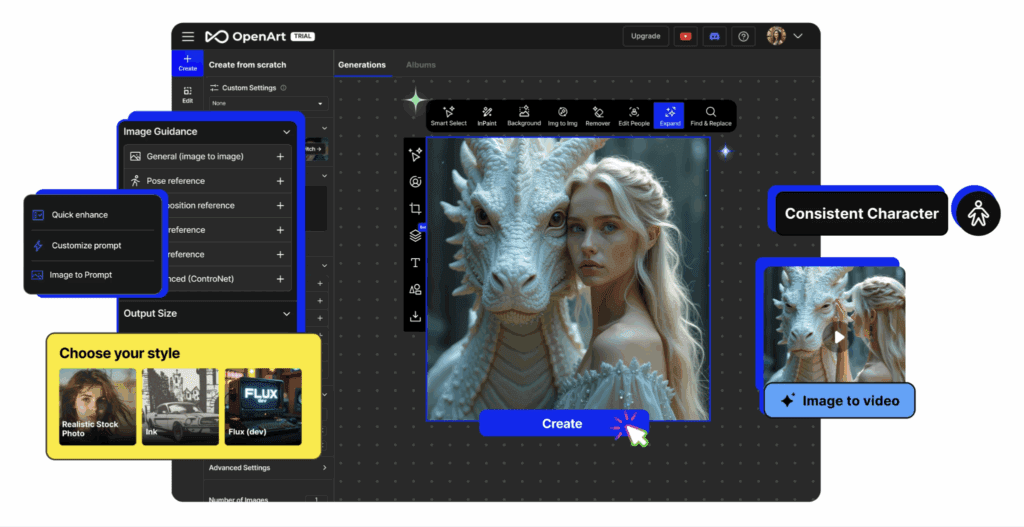
If you’re looking for a creative, user-friendly tool to experiment with AI-generated art, OpenArt AI is absolutely worth trying. Its intuitive design, consistent character rendering, and growing community make it one of the most accessible tools for beginners and pros alike.
However, always review its credit usage, subscription options, and cancellation process carefully, especially if you plan on scaling your projects.
VidAU and OpenArt AI: Exploring the Next Generation of AI Creativity

While the AI specialises in AI image generation and character consistency, VidAU takes those visuals and extends them into motion and storytelling using the Url to video ads
How VidAU and OpenArt AI Differ
| Feature | OpenArt AI | VidAU |
| Primary Function | AI image & video generation | AI text-to-video creation |
| Best For | Artists, illustrators, and storytellers | Marketers, educators, and video creators |
| Interface | Web app with editing & prompt tools | Web-based video automation dashboard |
| Output Type | Images, character art, short AI videos | Full video clips with motion & narration |
| Creative Focus | Visual design & artwork | Storytelling & marketing videos |
Conclusion
This AI bridges the gap between creativity and technology. Whether you’re designing, storytelling, or just exploring AI art for fun, this tool helps turn your imagination into reality. Its credit system, consistent characters, and active community make it stand out in a crowded space, proving that AI art creation can be both powerful and approachable.
FAQs
What is OpenArt AI used for?
OpenArt AI is used for generating images, videos, and digital art using AI from text prompts.
Is OpenArt AI free?
Yes, OpenArt AI offers a free plan with limited credits. Paid options unlock more features.
Can I create videos with OpenArt AI?
Yes! You can turn static prompts into dynamic motion using its video generation feature.
How is OpenArt AI different from Midjourney or Stable Diffusion?
It is more beginner-friendly, offers editing tools, and allows consistent character creation, something other platforms often lack.
Where can I join the community?
You can connect with other creators on Discord, follow @openart_ai on Instagram, and explore tutorials on YouTube.