UGC Creator Guide · Social Ads, Brand Content & AI UGC Workflows
What Is a UGC Creator? Definition, Examples, and How to Start (Plus AI UGC Options)
Find out what a UGC creator is, how to start creating content for brands, and how AI UGC generators simplify video production in 2026.
By the VidAU Editorial Team · UGC creator guide · Human UGC, AI UGC videos, usage rights, whitelisting, and social ad workflows
Wondering what is a UGC creator in 2026 and how they fit into TikTok, Instagram Reels, and YouTube Shorts ads? A UGC creator produces authentic, product-centered content for brands without needing a large personal following. VidAU is an AI video ad platform that generates video ads from product URLs, images, or scripts in 49 languages.
A UGC creator produces authentic, product-focused videos and photos that brands license for ads and organic posts across TikTok, Instagram Reels, and YouTube Shorts. VidAU is an AI video ad platform that generates video ads from product URLs, images, or scripts in 49 languages.
This guide explains what a UGC creator does, why brands value UGC, and how to start with clear steps, deliverables, rights basics, and a realistic section on creating ai ugc videos using 2026 workflows like Google Gemini Omni and Claude plus Seedance 2.0.
Quick Summary
- A UGC creator is a paid content partner who makes authentic, short-form product videos that brands license for social ads and posts.
- For fast production, an ai ugc generator workflow in 2026 often pairs Google Gemini Omni for scripts with Claude plus Seedance 2.0 for multi-scene talking-head outputs.
- Short, vertical 9:16 videos with clear usage rights, whitelisting, and exclusivity terms are standard for TikTok, Instagram, and YouTube.
- Shopify and Amazon sellers, D2C brands, and new creators benefit most from UGC because it reduces ad fatigue and adds social proof.

What Is a UGC Creator?
A UGC creator is a content producer who makes brand-requested, authentic-feeling videos and photos that look like user posts but are commissioned and licensed for marketing. Brands buy the content and rights, then run it in TikTok Ads, Instagram Reels, YouTube Shorts, or organic feeds to add social proof and relieve ad fatigue.
Definition
A UGC creator produces authentic-feeling, brand-requested videos and photos that look like everyday user posts but are commissioned and licensed for marketing across paid ads and organic feeds.
Why Do Brands Use UGC and What Examples Work Best?
Brands use UGC because it feels native to social feeds and converts when traditional ads stall. High-performing formats include unboxings, quick demos, before or after clips, short how-tos, try-on or taste-test reactions, and bite-sized testimonials with on-screen captions and callouts.
- Best for D2C brands, Shopify and Amazon sellers trying to validate hooks fast.
- Works well for A or B testing multiple angles and offers in the ad account.
- Fits short, vertical formats where authenticity beats studio polish.
Key Takeaways
- UGC feels native to social feeds and can help when traditional ads stall.
- Unboxings, demos, before or after clips, how-tos, try-ons, taste tests, and testimonials are common high-performing formats.
- Short, vertical formats work best when the goal is authentic product storytelling.
Who Is This For and What Do You Need to Start?
This path fits creators exploring a side hustle, freelancers, and US small businesses that need scrappy ad creatives. Start with:
- Niche focus: skincare, home, food or beverage, apparel, fitness, tech accessories, or pets.
- Sample deliverables: 5 to 10 short videos across unbox, demo, testimonial, and how-to.
- Basic gear: smartphone with good rear camera, window light or LED panel, clip-on mic, tripod.
- Rights and disclosures: align on usage rights length, whitelisting permissions, and any exclusivity; include FTC disclosure when content appears like an endorsement.
Starter checklist
Pick a niche, create 5 to 10 sample videos, use basic smartphone gear, and clarify usage rights, whitelisting, exclusivity, and FTC disclosure before content goes live.
How Do You Start as a UGC Creator? A Practical, 7-Step Plan
Step 1: Pick a niche and promise one outcome
Pick a niche and promise one outcome. For example, fast demos for beauty or honest try-ons for apparel.
Step 2: Build a tight portfolio
Build a tight portfolio. Create 5 to 10 spec videos that match TikTok, Reels, and Shorts styles, showing different hooks and CTAs.
Step 3: Define packages and rights
Define packages and rights. Price by deliverables and specify usage rights window, platforms, whitelisting, and any exclusivity premium.
Step 4: Collect a simple brief template
Collect a simple brief template. Ask for product USPs, do or do nots, competitor references, and performance goals for A or B testing.
Step 5: Shoot and edit for mobile
Shoot and edit for mobile. Record natural voiceover, add captions, and cut jumpy pacing; finish in CapCut or similar for quick turnarounds.
Step 6: Deliver files and variations
Deliver files and variations. Provide 9:16 masters, optionally 1:1 crops, plus caption files and on-screen text-free versions for localization.
Step 7: Track wins and iterate
Track wins and iterate. Request results where possible and refine hooks, intros, and CTAs based on what actually gets spend.
Starting tip
Start narrow: one niche, one content promise, and a portfolio of 5 to 10 short videos that prove you can create hooks, demos, testimonials, and clear CTAs for social placements.
How Do You Create UGC Content With AI in 2026?
You can create ugc content with ai to ideate, script, and scale outputs, or to produce fully synthetic talking-head ads when budgets or timelines are tight.
- Gemini Omni for scripting and consistency: Use it to generate scripts, hook options, and to keep the same face and product references across scenes. This helps produce ai ugc videos that feel coherent.
- Claude plus Seedance 2.0 for multi-scene and cloning: Build shot lists from a winning ad, swap in your product, and output a sequence with lip sync and natural dialogue. This pairs well with a lightweight editor like CapCut for timing tweaks.
- Google Veo for visuals: When you need more cinematic or stylized scenes, Veo can help synthesize cutaways or texture shots you blend into UGC-style edits.
- One-click platforms to evaluate: Some teams explore CreateUGC or Arcads as an ai ugc generator, especially when they want prebuilt talking-head templates; test them against your brand’s look before committing.
Our team reviewed recent tutorials and creator threads and found that so-called long-form AI still performs best when planned scene by scene, then stitched in an editor, rather than expecting a single prompt to carry minutes of narrative. Treat each scene as a beat with clear on-screen text, then assemble and A or B test variations.
Mid-article CTA: If you need ad-ready UGC-style videos from your product page, try these workflows with URL to Video, Text to Video, UGC Avatars, and VidAU AI Video. Add natural voiceover with Text to Speech and improve clarity with the Video Enhancer.
AI UGC workflow
- Use AI to ideate, script, and scale outputs.
- Plan AI UGC scene by scene instead of relying on one long prompt.
- Use editors like CapCut for timing, captions, and assembly.
Human vs AI UGC: When Should You Choose Which?
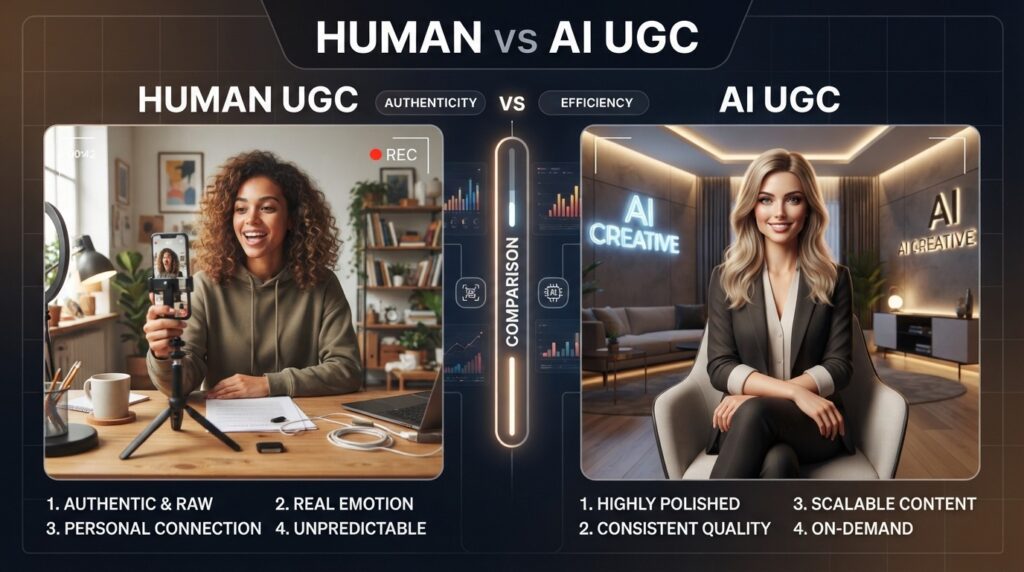
Use human UGC when trust, nuance, or real product handling matters; consider AI when speed, cost, or scale testing is the priority.
| Scenario | Use Human UGC | Use AI UGC |
|---|---|---|
| Complex demos | Hands-on clarity | Limited cutaways |
| Regulated claims | Real spokesperson | Safer to avoid claims |
| Fast creative testing | Limited throughput | Rapid variations |
| Tight budgets | Day-rate constraints | Lower per-variant cost |
| Localization | Real accents needed | AI dubbing and lip sync |
Key Takeaways
- Mix human and AI assets to balance trust with speed.
- Script scene by scene for consistent outputs.
- Always align rights before production.
Create UGC-Style Video Ads Faster With VidAU
Use VidAU AI Video, URL to Video, Text to Video, UGC Avatars, Text to Speech, Video Enhancer, Vid Remix, and Vid Remake to turn product URLs, scripts, images, and winning ad structures into ad-ready UGC-style creatives.
VidAU workflow
Where VidAU Fits in UGC and AI UGC Production
- Use human UGC when trust and hands-on clarity matter: Film authentic product handling, nuanced demos, testimonials, try-ons, taste tests, and real reactions when the brand needs human credibility.
- Use AI UGC for speed and scale testing: Build scripts, scene beats, talking-head variants, cutaways, and localized versions when timelines or budgets are tight.
- Use VidAU AI Video and URL to Video for product-led ads: Turn product URLs, images, or scripts into ad-ready UGC-style videos without starting from scratch.
- Use UGC Avatars and Text to Speech for synthetic spokesperson formats: Create talking-head outputs, multilingual voiceovers, and lip-sync-style variants for rapid testing.
- Use Vid Remix, Vid Remake, and Video Enhancer to scale winners: Repurpose winning structures, recreate proven formats with new scripts, and improve clarity before launch.
What Mistakes and Legal Basics Should You Avoid?
- Assuming a single AI prompt can deliver long, continuous videos. Plan multi-scene and assemble in editing; that is how most creators achieve continuity.
- Over-indexing on export settings alone. From our review of creator discussions, source lighting, framing, and platform compression matter more than toggling 4K if your footage was not captured at that quality.
- Skipping rights clarity. Always specify usage rights window, platforms, whitelisting, and exclusivity; misalignment here derails deals.
- Forgetting FTC disclosure. If a post looks like an endorsement or is paid, disclose clearly per US FTC guidance.
Legal basics
Clarify usage rights, whitelisting, exclusivity, platforms, and disclosure before production. Rights confusion can derail otherwise strong UGC deals.
Advanced Tips for Testing, Editing, and Scaling
- A or B test hooks, first lines, and CTAs in-platform; kill losers quickly and fund winners.
- Keep vertical 9:16 masters and produce 1:1 variants for placements that need them.
- Batch variations. Use VidAU Vid Remix to repurpose winning structures and VidAU Vid Remake to recreate proven formats with new scripts.
- Track performance notes per product: openers, angles, and visuals that consistently earn spend.
- For multilingual markets, generate alternate voiceovers with Text to Speech and swap captions; keep the on-screen text editable by also exporting a clean version.
Scaling tip
Track performance by product, hook, angle, and CTA. Then use winning structures to create variations instead of reinventing every UGC creative from zero.
Key takeaway
Final Thoughts
A UGC creator delivers short, believable product stories that brands can license for social ads and posts. Start with a niche, a small but sharp portfolio, clear rights, and a repeatable workflow. Use AI to ideate, script, and scale variants, and film human UGC when trust and nuance matter most.
When you are ready to produce at pace, explore VidAU AI Video, UGC Avatars, URL to Video, and Text to Video to turn product URLs, images, or scripts into ad-ready creatives.
FAQ
Here are answers to common questions about what a UGC creator is, whether you need a big following, UGC pricing and scope, ai ugc videos, the best ai ugc video generator, usage rights, whitelisting, exclusivity, whether small businesses should hire creators or use AI, and how long UGC videos should be for ads.
What is a UGC creator?
A UGC creator makes brand-commissioned content that looks like everyday user posts but is produced on brief and licensed for marketing. Brands then run this content across TikTok, Instagram Reels, and YouTube Shorts or use it organically to add social proof and reduce audience ad fatigue.
Do I need a big following to become a UGC creator?
No. UGC creators are hired for content quality, on-camera clarity, and fit with a brand’s audience, not their follower count. Many campaigns never post on the creator’s channel; the brand buys usage rights to run the content from brand handles and in paid ads.
How do brands price and scope UGC work?
Most deals define a set number of deliverables and a rights window. Pricing varies by niche and complexity and increases with longer usage rights, whitelisting permissions, and any exclusivity. Clarify platforms, duration, and whether the brand will run paid ads behind the content.
Can I create ai ugc videos that look real?
Yes, to an extent. Teams use Gemini Omni for scripts and face or product consistency and Claude plus Seedance 2.0 for multi-scene talking heads with voiceover and lip sync. Keep expectations practical by planning scene by scene and finishing in an editor for timing and captions.
What is the best ai ugc video generator?
There is no universal best. Some creators evaluate CreateUGC or Arcads for rapid talking-head outputs, while others mix Gemini Omni, Claude plus Seedance 2.0, Veo, and a simple editor like CapCut. Test options against your brand style, legal needs, and how quickly you must produce.
What are usage rights, whitelisting, and exclusivity?
Usage rights define where and how long a brand can use your content. Whitelisting allows the brand to run paid ads via your handle. Exclusivity prevents you from working with competitors for a period. Write these into the agreement so everyone understands the limits and costs.
Should small businesses hire a creator or use AI?
Hire a human when you need nuanced demos and trust-building; consider AI when speed, testing, or budget is the priority. Many teams blend both: human hero assets plus AI variants for rapid A or B testing across TikTok, Instagram Reels, and YouTube Shorts placements.
How long should UGC videos be for ads?
Keep them short, vertical, and concise with a clear hook in the opening seconds. Aim for formats that fit TikTok, Instagram Reels, and YouTube Shorts placements, then produce a few variations to test different intros, benefits, and calls to action in the ad account.