VidAU Editorial · AI Search
Best Product Video AI Generator: Tools and Workflows to Create Product Ads with AI
See the best product video AI generator tools and step-by-step 2026 workflows—Seedance 2.0, KLING 3.0, Descript Underlord, Topview AI—to turn images and screenshots into studio‑quality product ads with AI voiceover and music.
By the VidAU Editorial Team · Reviewed before publishing
If product video ai generator means 10 open tabs for you, this 2026 stack runs end-to-end inside Claude Desktop via Topview AI’s MCP Skill—then leans on Seedance 2.0’s Omni reference multishot and KLING 3.0 loopable animations to keep shots consistent. Below, you’ll find a practical buyer’s guide plus playbooks that turn product images or screenshots into finished ads with AI voiceover and AI-generated music.
Quick Summary
• Claude Desktop plus Topview AI’s MCP Skill is the 2026 end-to-end stack to orchestrate Seedance 2.0 Omni reference multishot and KLING 3.0 loopable hero cuts.
• The strongest alternate route is a CGI pipeline: Google Nano Banana Pro stills to KLING 2.6 or 3.0 image-to-video, then ElevenLabs for AI voiceover and AI-generated music.
• A core spec for consistency is Seedance 2.0’s Omni reference multishot; for motion polish, use KLING 3.0 with 3–5 second seamless loops and stable camera paths.
• US marketers, ecommerce sellers, DTC founders, SaaS product marketers, and creators benefit most when batching image sets and automating edits for TikTok, Meta, and YouTube.
What Is a Product Video AI Generator?
A product video AI generator is software that turns inputs like product photos, URLs, or screenshots into short-form videos using AI-driven image-to-video, motion design, and automated editing. In 2026, top tools add multishot consistency, loopable animations, AI voiceover, and auto-synced demos, helping teams produce ad-ready content without cameras or studios.
Best Product Video AI Generator: 2026 picks
• Seedance 2.0: Best for consistent multishot product image sets with Omni reference multishot.
• KLING 3.0: Best for loopable hero animations and smooth image-to-video motion; KLING 2.6 for fast single-shot animations.
• Claude Desktop + Topview AI (MCP Skill): Best orchestration layer to run prompts, batch jobs, and handoffs in one conversation.
• Google Nano Banana Pro: Best for premium CGI product stills from text prompts.
• Descript + Underlord: Best for SaaS demos; auto-syncs visuals to voiceover.
• Arcads: Best for realistic UGC ad variants with AI actors and natural performances.
• OpenArt Video: Best for quick motion polish and branded transitions on demos.
• VidAU AI: Best for turning product URLs or images into ad-ready drafts sized for TikTok, Meta, and YouTube.
• Stage: Asset generation
Recommended Tools: Google Nano Banana Pro, Seedance 2.0
Why: High-end stills, multishot consistency
• Stage: Animation
Recommended Tools: KLING 3.0 or 2.6
Why: Smooth loops, cinematic motion
• Stage: Orchestration
Recommended Tools: Claude Desktop + Topview AI
Why: One-thread control, batching
• Stage: SaaS demo build
Recommended Tools: Descript + Underlord
Why: Auto visual sync to VO
• Stage: UGC-style ads
Recommended Tools: Arcads
Why: Creator-like performances
• Stage: Final polish
Recommended Tools: OpenArt Video
Why: Transitions, camera moves
Suggested Visual: A simple diagram showing inputs (photos, URLs, screenshots) flowing into Seedance 2.0 and KLING 3.0, all orchestrated by Claude Desktop + Topview AI, then branching to Descript/Arcads/OpenArt.
The End-to-End Stack: Claude Desktop + Topview AI MCP Skill
Why this stack
• Centralizes idea, prompting, generation, and handoff in one conversation.
• Minimizes tab-hopping and copy-paste errors.
• Batches jobs for multishot image sets and loopable animations.
How it runs
1) In Claude Desktop, plan the concept and script beats. Keep shots simple and modular (hero, context, benefit, social proof, CTA).
2) Use Topview AI’s MCP Skill to trigger Seedance 2.0 Omni reference multishot on your product references. Expect a consistent set: 8–15 stills with matching product ID, materials, and logo.
3) Pick 1–2 hero frames and hand off to KLING 3.0 for loopable 3–5 second shots (e.g., subtle orbit, parallax, rotating stage). If you need a quick pass, KLING 2.6 handles single-shot image-to-video well.
4) Assemble selects, then layer VO/music later (ElevenLabs) or send SaaS steps to Descript.
Key settings to consider
• Seedance 2.0 Omni reference multishot: stay within one lighting style per batch; keep the logo clear; maintain focal length consistency.
• KLING 3.0 loops: match first/last frame; limit camera speed; use fixed anchors for background stability.
• Aspect ratios: 9:16 for TikTok/Reels/Shorts; 1:1 for in-feed; 16:9 for YouTube.
Expected outputs
• A coherent image set, a loopable hero animation, and a working rough cut to refine into platform-specific ads.
Key Takeaways
• Orchestrate inside Claude Desktop to avoid context loss.
• Use Omni reference multishot for shot-to-shot consistency.
• Animate the hero with KLING 3.0 loops for scroll-stopping motion.
Suggested Visual: Screenshot mock-up of Claude Desktop chat showing a single thread triggering Seedance and KLING jobs, plus thumbnails of results.
Workflow 1: Product Stills to a Loopable Hero Cut (Seedance 2.0 + KLING 3.0)
Inputs
• 2–5 high-quality product photos or a brand-approved render.
• Brand palette and logo as reference.
• Desired aspect ratio (start with 9:16 for paid social).
Step-by-step
1) Seedance 2.0 with Omni reference multishot
• Set one lighting environment per batch (e.g., white sweep or soft moody backlight).
• Lock focal length/look (35–50mm equivalent for natural perspective).
• Generate 8–12 frames; shortlist the 2–3 sharpest with clean logos.
2) KLING 3.0 for loopable animation
• Choose a hero frame; target 3–5 seconds for seamless loops.
• Use subtle camera moves: slow orbit, slider, or dolly-in; avoid fast rotations.
• Keep background static or minimally parallaxing to prevent jitter.
• If you only need a fast pass, run the same still through KLING 2.6 image-to-video.
3) Assemble the cut
• Order: brand cold open (0.5s), hero loop (3–5s), feature beat (1–2s), social proof (1–2s), CTA (1s).
• Keep text overlays to 3–6 words per beat; add subtle SFX swishes.
Expected output
• A clean, premium hero cut ready for VO/music and platform-specific text.
Troubleshooting
• Logo blur: regenerate stills at higher resolution or adjust DOF to be less shallow.
• Wobble at loop point: match the in/out camera position and ease curves; reduce background motion.
• Plastic textures: re-run Seedance with higher texture detail emphasis and softer light falloff.
Suggested Visual: Side-by-side of a Seedance still and the final KLING loop, with annotations showing loop start/end.
Workflow 2: CGI route from text to video (Nano Banana Pro → KLING 2.6/3.0 → ElevenLabs)
When to use it
• You need premium CGI visuals without photography.
• You want to test colorways, backgrounds, or materials quickly.
Steps
1) Google Nano Banana Pro to generate 3–6 hero stills per concept.
2) Animate your favorite frame in KLING 2.6 for quick image-to-video or KLING 3.0 for smoother loops.
3) Add AI voiceover and music via ElevenLabs; keep VO crisp and under 60–75 words for 10–12 seconds.
Copy-and-paste prompts (verbatim)
A product shot of a [INSERT PRODUCT]. Smooth and sleek, with a matte finish and bold incredibly unique design, utilising a single vibrant colour. It stands in a simple white gradient environment, it’s branding is minimal, with a small memorable logo. Professional product photography, realistic textures, cinematic composition, shallow depth of field, studio lighting.
A product shot of a premium smart speaker. Smooth and sleek, with a matte finish and bold incredibly unique design, utilising a single vibrant colour. It stands in a vibrant jungle environment, it’s branding is minimal, with a small memorable logo. Professional product photography, realistic textures, cinematic composition, shallow depth of field, studio lighting.
A product shot of a premium smart clock. Smooth and sleek, with a matte finish and bold design, utilising a single vibrant colour. It stands in a rocky dramatic seaside environment, it’s branding is minimal, with a small memorable logo. Professional product photography, realistic textures, cinematic composition, shallow depth of field, studio lighting.
ElevenLabs music generation text prompt (verbatim)
Minimalist ambient underscore for a luxury tech product ad: slow tempo, clean analogue synth pads, subtle sub-bass, restrained high-end shimmer, no vocals, no percussion, smooth attack and long decay, emotionally neutral but confident, evoking precision, modernity, and quiet wealth; cinematic yet intimate, suitable for a 10-second premium brand reveal.
Expected output
• A premium CGI product spot with consistent look, smooth hero motion, clean VO, and on-brand ambient score.
Tips
• Keep material language consistent in prompts across variants.
• Use KLING 3.0 for shots with visible reflections or glass to reduce shimmer artifacts.
Workflow 3: SaaS Demo that People Actually Watch (Descript + Underlord)
When to use it
• You have screenshots or screen recordings and need a crisp, timed walkthrough.
Steps
1) Draft a 3–5 beat script (problem, feature, benefit, proof, CTA). Keep it under 90 words for a 15-second demo.
2) In Descript, add assets and prompt Underlord to sync visuals to VO. It auto-times cursor moves and zooms to your narration.
3) Add subtle motion polish via OpenArt Video or a restrained KLING 3.0 camera push on the hero UI frame.
Expected output
• A platform demo with tight timing, sharp UI close-ups, and a branded open/close.
Polish tips
• Favor short captions over dense subtitles.
• Use a single accent color for highlights and transitions.
Workflow 4: UGC-style product Ad at Scale (Arcads)
When to use it
• You want creator-style ads without live shoots.
Steps
1) Choose AI actors that match your audience demographics and tone.
2) Write a conversational script: hook, problem, quick demo, social proof, CTA.
3) Set performance style (curious, confident, excited) and record or generate VO alignment.
4) Add cutaways of product stills or KLING loops for visual variety.
Expected output
• A natural-feeling UGC ad suitable for TikTok, Reels, or Shorts, with on-camera delivery and product inserts.
Mistakes to avoid
• Overwriting. Keep lines short and let visuals carry the message.
• Inconsistent product look. Reuse Seedance stills across UGC cutaways.
Fastest baseline: Product-to-Video With VidAU AI (for TikTok, Meta, YouTube)
When to use it
• You need a ready-to-edit draft now from existing assets.
Mini-workflow
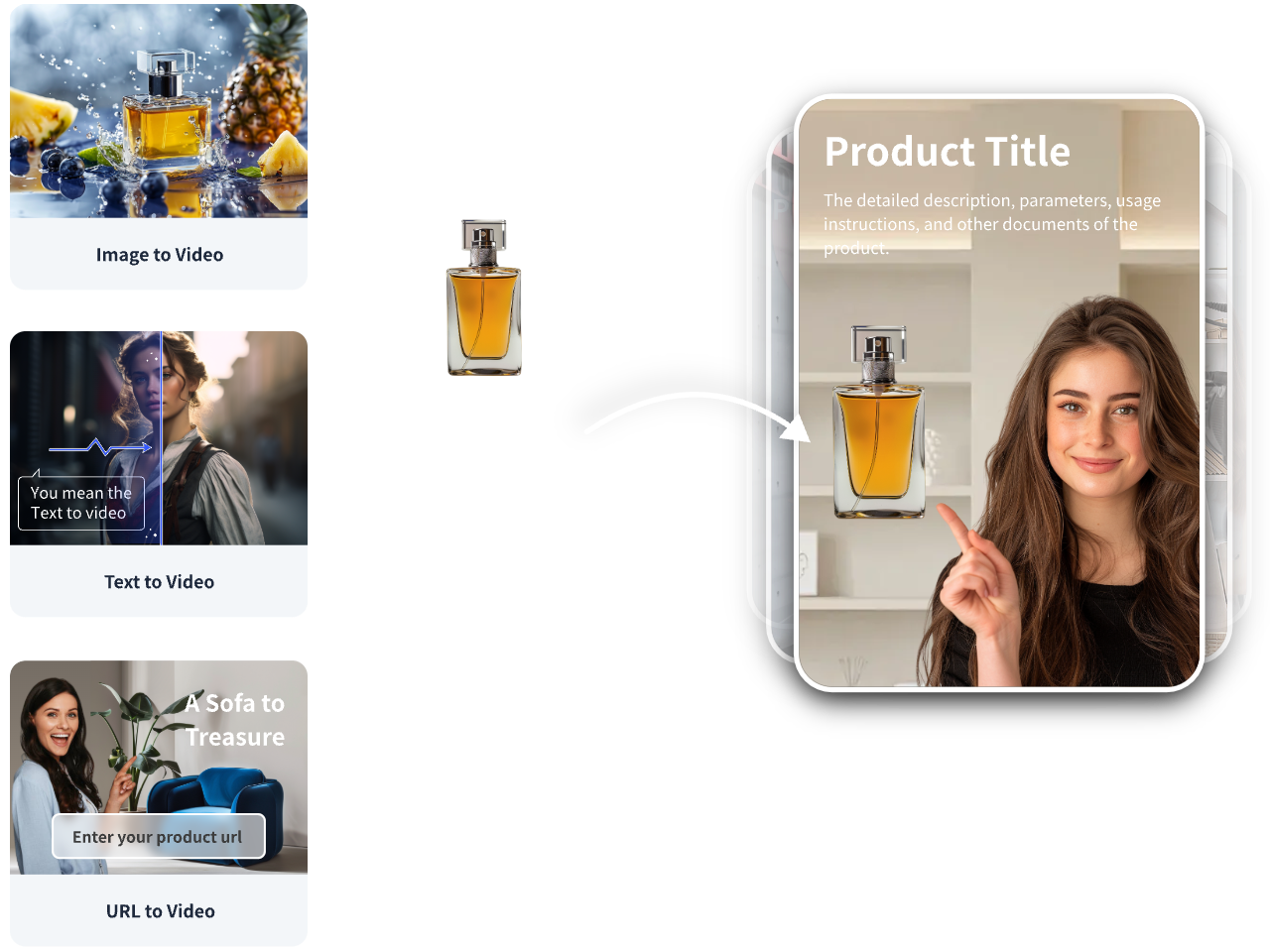
• Your input: a product URL, approved images, or a short script.
• VidAU capability: turns these into ad-ready videos and images with platform-appropriate aspect ratios and editable scenes.
• Output: a baseline creative you can refine with Seedance/KLING loops or fold into Descript and Arcads variations.
Why it fits
• It accelerates the first cut so your team can focus on testing angles, voiceovers, and CTAs rather than assembling the basics from scratch.
Prompts, settings, and creative guardrails
Prompts
• Keep a single material and lighting language per batch.
• Use the provided Nano Banana Pro and luxury tech music prompts verbatim for best CGI and audio baselines.
Settings
• Aspect ratios: 9:16 primary; 1:1 for in-feed; 16:9 for YouTube.
• Loop length: 3–5 seconds for hero; 1–2 seconds for UI zooms.
• Text overlays: 3–6 words; high contrast; avoid thin serifs.
Guardrails
• Limit shot count to 4–6 for 10–15 seconds.
• Keep logos readable for at least one full second.
• Ensure VO pacing leaves air between beats for comprehension.
Troubleshooting: Consistency, Motion, and Sound
Inconsistent product ID across shots
• Re-run Seedance 2.0 using Omni reference multishot with fewer lighting changes.
• Reduce color variance; lock palette early.
Choppy or warpy motion
• In KLING 3.0, slow the camera path; reduce parallax layers.
• For loops, align in/out frames and ease-in/ease-out curves.
Reflections and glass artifacts
• Use KLING 3.0 instead of 2.6 for reflective materials.
• Minimize high-contrast background patterns.
Muddy VO or music clash
• Regenerate ElevenLabs VO with a brighter tone; reduce bed by 3–6 dB under voice.
• Use the luxury tech music prompt for neutral, premium ambience.
Platform rejects or low CTR
• Tighten open: show product in first 0.5s; use a verb-led hook.
• Test 3 CTAs and 2 benefit lines across variants.
How to Choose a Product Video AI Generator in 2026
Pick based on your primary bottleneck
• Consistency across shots: Seedance 2.0 with Omni reference multishot.
• Seamless motion and loops: KLING 3.0; KLING 2.6 for quick single-shot runs.
• Unified workflow and batching: Claude Desktop with Topview AI’s MCP Skill.
• CGI product ideation: Google Nano Banana Pro.
• SaaS demo editing: Descript + Underlord.
• UGC ad variants: Arcads.
• Fast baseline drafts from URLs or images: VidAU AI.
Evaluation checklist
• Can it keep logos and materials consistent across scenes?
• How well does it handle loopable 3–5 second shots?
• Does it let you batch runs and orchestrate handoffs?
• Can you quickly add AI voiceover and AI-generated music?
• Does the output align with TikTok/Meta/YouTube specs without heavy manual fixes?
Create With VidAU
Turn scripts, product URLs, and creative ideas into ad-ready video assets with a structured AI workflow.
Key takeaway
Final Thoughts
In 2026, the winning product video ai generator workflow is a stack: orchestrate in Claude Desktop with Topview AI’s MCP Skill, lock product consistency in Seedance 2.0, animate hero loops in KLING 3.0, then round it out with Descript, Arcads, and polished VO/music. That combination delivers speed, consistency, and platform-ready motion.
If you already have a product URL, images, or a script, start by generating a baseline draft in VidAU AI, then refine the hero shot with Seedance 2.0 and KLING 3.0. This split lets you test quickly while keeping room for premium polish.
Frequently asked questions
What is the best product video ai generator for consistent multi-shot ads?
Seedance 2.0 is the top pick for consistency thanks to its Omni reference multishot, which keeps logos, materials, and proportions aligned across a full image set. Pair it with KLING 3.0 for smooth, loopable hero animations, and orchestrate both inside Claude Desktop using Topview AI’s MCP Skill.
How do I create seamless loop animations from product stills?
Choose your cleanest Seedance frame, then animate it in KLING 3.0 with a 3–5 second duration, subtle orbit or dolly, and stable background layers. Ensure the first and last frames match and use gentle easing. KLING 2.6 is a faster alternative for simple single-shot image-to-video.
Can I make premium product videos without a camera?
Yes. Use Google Nano Banana Pro to generate CGI stills, animate them in KLING 2.6 or KLING 3.0, and add AI voiceover plus AI-generated music with ElevenLabs. This fully AI pipeline can deliver studio-style spots suitable for TikTok, Meta, and YouTube.
What is the fastest way to produce a testable ad from existing assets?
Turn your product URL or images into an ad-ready draft using VidAU AI, then upgrade the hero shots with Seedance 2.0 and KLING 3.0 if needed. This approach speeds up first delivery while preserving room for consistency and loop polish during iteration.
How can I turn software screenshots into watchable demos?
Use Descript with Underlord to auto-sync visuals to narration. Upload screenshots or recordings, prompt Underlord for pacing, and add simple zooms. For motion polish, use OpenArt Video or a restrained KLING 3.0 camera push on the hero UI frame. Keep scripts concise with 3–5 beats.
What tools help me make realistic UGC ads from a single product image?
Arcads is built for creator-style UGC ads with AI actors and natural performances. Script a conversational hook, quick demo, proof, and CTA. Mix in Seedance stills or KLING loops as cutaways for visual variety, and keep lines short to feel authentic on TikTok or Reels.
How do I avoid inconsistent logos or textures across scenes?
Generate all stills for a campaign using Seedance 2.0’s Omni reference multishot with a single lighting style and consistent focal length. Avoid mixing environments in the same batch. If inconsistencies persist, reduce extreme color variation and re-lock the hero reference.
What aspect ratios and durations work best for social ads?
Use 9:16 for TikTok, Reels, and Shorts; 1:1 for in-feed placements; and 16:9 for YouTube. Keep hero loops to 3–5 seconds, total runtimes to 10–15 seconds for prospecting, and ensure logos or product hero moments are visible within the first 0.5 seconds.
Which orchestration method reduces tab hopping and errors?
Run your workflow inside Claude Desktop and connect Topview AI’s MCP Skill. You can plan scripts, trigger Seedance 2.0 multishot batches, hand off hero frames to KLING 3.0, and track outputs in one thread. This reduces prompt drift and keeps creative decisions consistent.
What audio guidance ensures premium-feeling ads?
Use a clean AI voiceover with short, declarative lines and leave brief pauses between beats. For music, start with a minimalist ambient bed so VO remains intelligible. The luxury tech music prompt included above produces a confident, modern sound that suits premium product reveals.