VidAU Editorial · AI Search
Pexo AI: Features, How It Works, and How to Access the AI Video Platform
Learn how to use an AI video generator to create videos, shorts, prompts, export settings, and how to access the platform.
By the VidAU Editorial Team · Reviewed before publishing

Pexo AI is one of the platforms attracting attention from people exploring AI-powered video creation. For content creators, marketers, and digital artists, understanding its features, access requirements, and video generation workflow helps determine whether the platform suits their creative needs.
In this guide, we explore Pexo AI, how its video generation process works, what to expect from its tools, and how to approach access through a Pexo AI invitation code.
Quick Summary
• Pexo AI is a conversational AI video agent that turns ideas, images, links, scripts, and audio into complete videos.
• The pexo ai video generator combines creative planning, AI model selection, scene generation, editing, voiceovers, captions, and music.
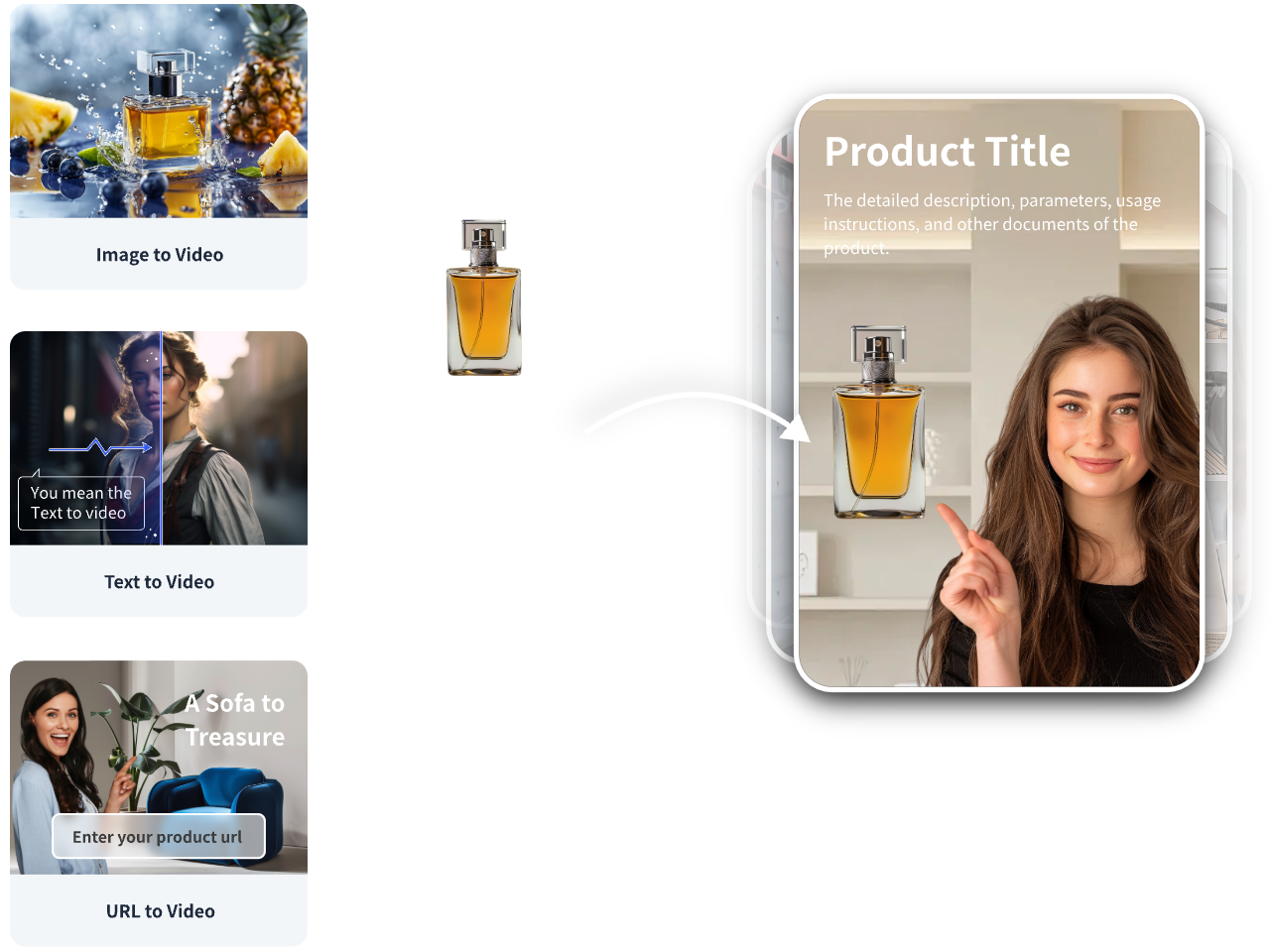
• Pexo supports several workflows, including text-to-video, image-to-video, URL-to-video, script-to-video, and audio-to-video.
• A pexo ai invitation code might be required during account activation, depending on the current registration requirements.
• Pexo suits marketers, e-commerce businesses, content creators, and agencies looking to simplify video production through an AI-assisted workflow.
What Makes Pexo AI Different From Other AI Video Generators?
Traditional AI video generators often require users to select a model, write detailed prompts, generate individual clips, and edit the results separately.
Pexo takes a different approach. It operates as a conversational AI video agent that manages several production stages within one workflow. You describe your idea, review its proposed direction, and guide the production through feedback.
Conversational Video Creation
You do not need to write complicated prompts to get started. Explain your idea in everyday language and Pexo interprets your instructions.
For example, you could enter:
Create a 30-second cinematic advertisement for a premium sneaker brand. Open with a close-up of the sneakers, followed by a person walking through a neon-lit city at night. Use energetic background music, smooth camera movements, bold captions, and a modern commercial style. End with a clear product shot and a call to action.
Pexo uses your description to develop a creative direction and organize the video production.
AI-Powered Storyboarding and Scene Planning
Rather than generating disconnected clips immediately, Pexo develops a production plan for your video.
This includes:
- Developing the creative concept.
- Organizing scenes and shots.
- Selecting visual references.
- Planning narration and dialogue.
- Determining music and transitions.
- Structuring the final video.
You can review the proposed direction and request changes before proceeding with production.
Automated Video Editing
Pexo handles several editing tasks that normally require separate software.
These include voiceovers, captions, transitions, music, pacing, and scene arrangement. You can also request revisions through conversation instead of manually rebuilding the entire video.
This approach helps creators spend more time directing the content and less time managing individual editing operations.
Multiple AI Models Behind One Platform
Another important feature is Pexo’s ability to select AI models for different creative tasks.
Its model ecosystem includes options such as Seedance, Kling, Veo, Sora, Nano Banana, and GPT Image, depending on the available tools and workflows.
Consequently, users do not need to build their entire production workflow around one generation model. Pexo coordinates the available tools according to the creative requirements.
How to Use Pexo AI to Create Videos
Step 1: Visit the Official Pexo Website
Visit Pexo AI and review the available account access options.
Depending on the current registration requirements, you might need an invitation code to activate your account.
Step 2: Enter Your Video Idea
After accessing the platform, describe the video you want to create.
You might request a product advertisement, educational video, cinematic short, animated story, or social media video.
Be clear about your intended audience, video length, visual style, and message.
Step 3: Review the Creative Plan
Pexo develops a proposed production direction based on your instructions.
Review the scenes, narration, visual references, and overall structure. If something does not match your expectations, request adjustments before continuing.
Step 4: Generate Your Video
Once you approve the direction, Pexo coordinates the required generation and editing tasks.
Depending on your project, the platform handles:
- Scene generation.
- Character and visual creation.
- Voiceover and narration.
- Background music.
- Captions and subtitles.
- Transitions and scene arrangement.
Step 5: Refine and Export
Review the finished video and identify areas that need improvement.
You might request a different opening scene, adjust the narration, replace a visual, or change the background music.
After reviewing the final output, export your video using the available settings. Pexo supports different aspect ratios and platform-ready video formats.
Best Ways to Use Pexo AI for Content Creation

Pexo supports several creative workflows, making the platform relevant to individuals, businesses, and marketing teams.
Product Advertisements and E-Commerce Videos
Online businesses need product videos to demonstrate features, communicate benefits, and attract potential customers.
Pexo lets you provide a product link, images, or a description and turn the information into a promotional video.
For example, an online fashion store could provide product photographs and request a 30-second advertisement featuring a model wearing the clothing, product close-ups, promotional text, and background music.
This approach helps sellers develop promotional concepts without organizing a complete video shoot.
Social Media Videos
Social media creators need a steady supply of content for platforms such as TikTok, Instagram, YouTube, and X.
Pexo supports short-form content production, including scripts, scenes, captions, narration, and music.
You can develop different creative versions of the same idea and adapt the output to the requirements of each platform.
Explainer and Educational Videos
Businesses and educators often need to explain complicated subjects in a simple format.
Pexo helps turn written information into structured videos with narration, visual scenes, and captions.
For example, a software company could provide information about a new feature and request an explainer video showing how the feature works.
Cinematic Videos and Short Stories
Pexo also supports creative storytelling.
You can describe a story, introduce characters, establish a location, and explain how each scene should unfold.
The platform helps organize the production into scenes, narration, music, and transitions. This makes the workflow useful for short films, animated stories, trailers, and promotional storytelling.
Music Videos and Audio-Based Content
Music creators can use Pexo to turn songs and audio recordings into visual content.
The platform supports audio-to-video generation, allowing users to provide an audio file and describe the visual direction they want.
This offers a useful starting point for music videos, promotional clips, podcast visuals, and other audio-led content.
Pexo AI Video generator: Features, Capabilities, and Benefits

The pexo ai video generator combines several AI-powered creative tools into one production environment. Instead of focusing exclusively on generating short clips, Pexo aims to deliver complete videos that users can review and publish.
Here are some of its main capabilities.
Text-to-Video Generation
Describe a scene or video concept using natural language. Pexo interprets your instructions and develops the video around your creative direction.
This feature suits users who have an idea but lack the technical experience to operate traditional video editing software.
Image-to-Video Generation
Upload an image and describe the movement you want. Pexo uses the image as a visual reference and turns it into an animated video.
This feature works well for:
- Product photography.
- Character animation.
- Social media graphics.
- Promotional visuals.
- Creative storytelling.
URL-to-Video Generation
Pexo supports URL-to-video generation. You provide a webpage or product link, and the platform uses the available information to develop a video.
For e-commerce businesses, this provides a convenient way to turn product pages into promotional videos without manually writing an entire script.
Script-to-Video Generation
If you already have a script, Pexo helps transform the written content into a video.
It develops visual scenes, voiceovers, captions, and other production elements around your script.
This feature suits:
- YouTube content.
- Educational videos.
- Product explainers.
- Promotional campaigns.
- Storytelling projects.
AI Avatar and Lip Sync
Pexo also provides AI avatar generation and lip-sync capabilities.
Users can create talking avatars from text or photographs and develop videos featuring spoken content. The lip-sync workflow coordinates voice and character movement to create talking-head content.
AI Image and Music Generation
Beyond video production, Pexo includes image and music generation tools.
Its image generation features support text-to-image creation, while music generation helps users produce original background music for their projects.
Combining these capabilities reduces the need to move between multiple creative applications during production.
Pexo AI invitation code: How to Get Access
One of the questions people ask when exploring Pexo is how to obtain a pexo ai invitation code.
Pexo has used invitation-based account activation during its beta access period. Its official onboarding guide instructs new users to sign in and enter an invitation code when prompted.
How to Get a Pexo AI Invitation Code
Here are practical ways to approach registration:
- Visit the official Pexo website.
- Select the registration or sign-in option.
- Check whether the platform requests an invitation code.
- Follow Pexo’s official social media accounts for access announcements.
- Check its official community channels and creator announcements for invitation opportunities.
You can also check the invitation requirements through the platform’s official onboarding guide.
Where Can You Find Pexo AI Invitation Codes?
Potential sources include:
- Official Pexo announcements.
- Pexo’s social media accounts.
- Creator demonstrations and tutorial videos.
- Community discussions.
- Direct invitations from existing users, where supported.
Some creators have shared invitation codes alongside their Pexo tutorials. For example, the video titled This AI Video Generator Changes Everything | Pexo AI includes an invitation code in its description. Availability and validity are not guaranteed.
How to Activate Your Pexo AI Invitation Code
Once you obtain a valid code:
- Open the official Pexo website.
- Sign in or create your account.
- Enter the invitation code in the requested field.
- Complete the activation process.
- Follow the onboarding instructions to access the video creation workspace.
If your code does not work, check whether it has expired, reached its usage limit, or applies to a different registration process.
Is Pexo AI Free?
Pexo provides a free starting option, although available credits, generation limits, and premium features depend on its current pricing arrangements.
Before starting a project, review the platform’s pricing and credit rules. This helps you understand how much video generation, editing, and exporting your account supports.
Pexo AI vs Traditional AI Video Generators
Pexo approaches video creation differently from conventional AI video generators.
Most traditional generators focus on producing individual clips. Users often need separate applications to write scripts, generate voiceovers, arrange scenes, add music, and edit the final video.
Pexo combines these production activities through a conversational AI agent.
| Comparison | Pexo AI | Traditional AI Video Generator |
| Input | Text, links, images, audio, scripts | Usually text or images |
| Creative planning | AI-assisted planning | Often user-directed |
| Model selection | Automated model selection | Often manual |
| Video editing | Integrated workflow | Often requires separate editing |
| Voiceovers | Integrated | Depends on the tool |
| Captions | Integrated | Depends on the tool |
| Music | AI music generation | Depends on the tool |
| Revisions | Conversational instructions | Often requires manual regeneration |
| Final output | Complete video production | Often individual clips |
Why the AI Agent Approach Matters
The main distinction is the amount of production work the platform manages.
With a conventional generator, you often direct individual generation tasks and assemble the results yourself.
With Pexo, you communicate your intended result and let the AI agent organize much of the production process.
However, automated production does not eliminate the need for human review. You should still check factual accuracy, brand consistency, visual quality, narration, and licensing before publishing.
Is Pexo AI Worth Trying?
Pexo is worth exploring if you regularly create videos and want a more conversational production workflow.
Its ability to combine creative planning, model selection, video generation, editing, narration, and music addresses several tasks that normally require separate tools.
Advantages of Pexo AI
- Conversational video creation without complex prompt writing.
- Multiple input options, including text, images, URLs, audio, and scripts.
- AI-assisted storyboarding and production planning.
- Integrated voiceovers, captions, music, and editing.
- Support for different video formats and creative applications.
- Integration with external AI agent environments.
Things to Consider Before Using Pexo
Despite its features, consider a few practical factors:
- Review credit consumption before generating lengthy videos.
- Check the quality of AI-generated scenes and characters.
- Verify text, logos, and product details.
- Review the available models and their generation limits.
- Check commercial usage and licensing terms.
- Expect to make revisions before publishing.
Ultimately, Pexo’s value depends on how much production time it saves and whether its output meets your requirements.
Create With VidAU
Turn scripts, product URLs, and creative ideas into ad-ready video assets with a structured AI workflow.
Key takeaway
Final Thoughts
Pexo AI introduces a conversational approach to video production by bringing creative planning, AI generation, editing, narration, and music into one workflow.
Whether you create product advertisements, social media content, educational videos, or cinematic stories, the platform offers several ways to turn your ideas into finished videos.
Its biggest appeal lies in reducing the manual work involved in traditional AI video production. If you want to explore a workflow where you describe your creative direction and let an AI agent handle much of the production, visit Pexo AI and check its current access requirements.
Frequently asked questions
What is Pexo AI used for?
Pexo AI helps users create complete videos through conversational instructions. You can use it for product advertisements, social media content, educational videos, explainers, music videos, and short films.
Is Pexo AI free to use?
Pexo offers a free starting option. However, generation credits, usage limits, and access to premium features depend on the current pricing structure. Check its official website for the latest details.
How do I get a Pexo AI invitation code?
Check Pexo’s official website, social media accounts, community announcements, and creator tutorials. Some existing users and creators also share invitation opportunities. Confirm that a code works before relying on it.
What makes the Pexo ai video generator different?
Pexo operates as a conversational AI video agent. Instead of requiring you to generate and edit every clip manually, it helps plan scenes, select AI models, generate visuals, add voiceovers, arrange music, and produce complete videos.
Does Pexo AI support text-to-video and image-to-video?
Yes. Pexo supports both workflows. You can describe a video using text or upload an image and explain how you want the image animated. It also supports URL-to-video, script-to-video, and audio-to-video generation.