AI Image Editing · Prompt Guide
AI Image Editor with Prompt: How to Use Text Prompts to Generate and Edit Images
Learn how to write better AI image prompts, choose the right free tools, troubleshoot prompt problems, and create visuals for social media, ecommerce, presentations, marketing, and video workflows.
By Sarah Iruoje · Updated 2026 · 15 min read
Harness the power of AI with the right text prompts and transform your image editing skills. This guide explores free platforms like ChatGPT and Canva, showing step-by-step how to create and refine captivating visuals using text.
Text prompts have revolutionized how we create and edit images. Instead of mastering complex software or hiring designers, you can now describe what you want in plain language and watch AI bring your vision to life. This shift has made professional-quality image creation accessible to content creators, social media managers, students, and hobbyists worldwide.
The challenge isn’t accessing these tools, many powerful options are free. The real barrier is knowing how to communicate effectively with AI through text prompts. A vague prompt produces generic results. A well-structured prompt generates exactly what you need on the first try.
This guide teaches you the practical skills needed to use AI image editors with text prompts effectively. You’ll learn prompt structure fundamentals, discover which free platforms work best for specific tasks, and gain hands-on techniques for creating everything from aesthetic collages to product photos.
Quick summary
- AI image editors with prompt capabilities let users create or modify images by typing descriptions instead of relying only on traditional design tools.
- Strong prompts include subject, style, composition, lighting, color, mood, and technical parameters so the AI has clear visual instructions.
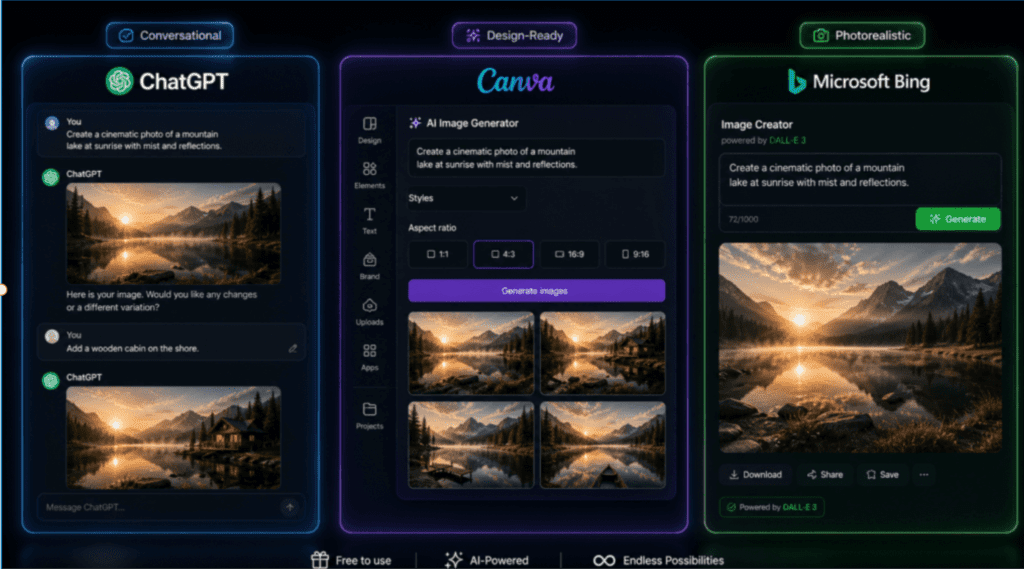
- Different tools serve different workflows: ChatGPT is strong for conversational iteration, Canva is useful for design-ready assets, and Bing Image Creator works well for free photorealistic generation.
- Better results come from structured prompting, troubleshooting, platform selection, brand consistency, ethical use, and combining AI outputs with traditional design workflows.
Contents
- Understanding AI Image Editors and Text Prompts
- Core Prompt Structure That Works Across Platforms
- Why AI Sometimes Ignores Your Prompts
- Platform-Specific Workflows for Free Tools
- Writing Effective Prompts for Different Image Types
- Advanced Prompt Techniques and Modifiers
- Troubleshooting Common Prompt Problems
- Optimizing Prompts for Different Use Cases
- Integrating AI Image Generation into Creative Workflows
- Understanding Platform Limitations and Choosing the Right Tool
- Practical Prompt Examples for Common Projects
- Ethical Considerations and Best Practices
- Advanced Topics and Future Directions
- Conclusion
- FAQ

Understanding AI Image Editors and Text Prompts
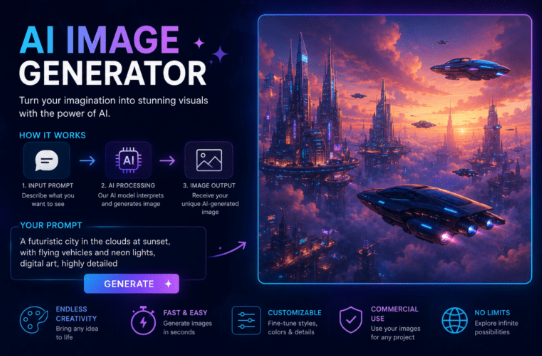
AI image editors with text prompt capabilities allow you to generate or modify images by typing descriptions instead of using traditional editing tools. These platforms use advanced neural networks trained on millions of images to interpret your text and create corresponding visuals.
The core advantage is speed and accessibility. What once required hours in Photoshop can now happen in seconds through a simple text description. The technology excels at creating original compositions, applying artistic styles, and making complex edits that would challenge even experienced designers.
Text-to-image generation works through prompt engineering—the practice of crafting specific instructions that guide the AI toward your desired outcome. The more precise your prompt, the better your results. Understanding this relationship between input quality and output quality is fundamental to success with these tools.
Different platforms interpret prompts differently. ChatGPT image generation focuses on conversational ease and quick iterations. Canva AI Image Generator integrates prompt-based creation into a full design workspace. Microsoft Bing Image Creator offers free unlimited generation with strong photorealistic capabilities. Each platform has strengths that match different use cases.
The learning curve is manageable. Unlike traditional image editing that requires technical skills, prompt-based creation relies on clear communication. If you can describe what you want in detail, you can create it. The key is learning which details matter most to the AI.
Why this matters
Prompt-based image editing shifts the skill from technical software operation to clear creative communication. The better you can describe subject, style, composition, lighting, and mood, the more control you gain over the final image.
Core Prompt Structure That Works Across Platforms
Every effective AI image prompt follows a basic structure that tells the AI what to create, how to style it, and how to compose it. This framework works across most platforms and serves as your foundation for reliable results.
Start with the subject—the main focus of your image. Be specific about what you want to see. Instead of “a dog,” write “a golden retriever puppy sitting on grass.” The AI needs concrete nouns and clear descriptions to generate accurate images.
Add style specifications to control the visual aesthetic. This includes art styles like “photorealistic,” “watercolor painting,” “3D render,” or “vector illustration.” Style choices dramatically affect the final output. A photorealistic prompt produces something that looks like a photograph, while a watercolor prompt creates something painterly and artistic.
Include composition details that guide how elements are arranged. Specify camera angles like “eye-level view,” “bird’s eye view,” or “low angle shot.” Mention perspective, framing, and focal points. These directions help the AI understand spatial relationships and visual hierarchy.
Describe lighting conditions to set mood and realism. Terms like “soft natural lighting,” “dramatic shadows,” “golden hour sunlight,” or “studio lighting” directly impact atmosphere. Lighting is one of the most powerful prompt elements for creating professional-looking images.
Specify color grading and palette when relevant. Phrases like “warm color palette,” “high contrast,” “muted tones,” or “vibrant colors” guide the overall color scheme. This level of control helps maintain brand consistency or achieve specific aesthetic goals.
Include technical parameters when your platform supports them. Aspect ratio affects composition—16:9 for wide landscape images, 9:16 for vertical social media content, 1:1 for square formats. Some platforms let you control detail level, stylization strength, or image quality through additional parameters.
The complete structure looks like this: [Subject] + [Style] + [Composition] + [Lighting] + [Color] + [Mood] + [Technical parameters]. Not every prompt needs every element, but this framework gives you control over all major visual factors.
Example of a weak prompt: “Create a coffee shop.”
Example of a strong prompt: “A cozy coffee shop interior, photorealistic style, warm lighting from pendant lamps, wooden furniture and indoor plants, captured from a corner angle showing the counter and seating area, warm color palette with browns and soft yellows, inviting atmosphere, 16:9 aspect ratio.”
The strong prompt gives the AI specific direction for every visual element. This specificity eliminates guesswork and produces consistent results.
| Prompt element | What it controls | Example language |
|---|---|---|
| Subject | Main focus of the image | “a golden retriever puppy sitting on grass” |
| Style | Visual aesthetic and medium | “photorealistic,” “watercolor painting,” “3D render” |
| Composition | Arrangement, framing, and camera angle | “eye-level view,” “bird’s eye view,” “low angle shot” |
| Lighting | Mood, realism, and atmosphere | “soft natural lighting,” “dramatic shadows,” “studio lighting” |
| Color | Palette and grading | “warm color palette,” “muted tones,” “vibrant colors” |
| Technical parameters | Format, aspect ratio, quality, or stylization | “16:9,” “9:16,” “1:1,” “high detail” |
Why AI Sometimes Ignores Your Prompts
Understanding why prompts fail helps you avoid common mistakes. AI image generators have limitations in how they interpret instructions, and knowing these boundaries prevents frustration.
Overly complex prompts confuse the AI. When you pack too many competing ideas into one description, the model struggles to prioritize. Instead of one detailed prompt with fifteen different elements, break complex scenes into multiple generation attempts or simplify your concept.
Conflicting instructions create unpredictable results. Asking for “minimalist design with intricate details” or “dark moody lighting with bright cheerful colors” gives the AI contradictory goals. Review your prompt for internal consistency before generating.
Vague language leaves too much to interpretation. Words like “nice,” “good,” or “interesting” don’t translate to specific visual attributes. Replace subjective descriptions with concrete visual terms the AI can execute.
Prompt order affects priority on some platforms. Many AI models weight the beginning of your prompt more heavily than the end. Place your most important elements at the start of the description. If the main subject is a product, mention it first before adding environmental details.
Some concepts are simply outside the training data. If you request something extremely niche or recently invented, the AI may not have learned it yet. This is why prompts for trending subjects or new technologies sometimes produce unexpected results.
Negative prompts can backfire. Telling the AI what not to include sometimes has the opposite effect—the model focuses on the mentioned concept even when you’ve negated it. Instead of listing what to avoid, describe clearly what you want to see.
Platform limitations vary significantly. ChatGPT has built-in content filters that block certain subjects. Canva prioritizes design-ready outputs optimized for templates. Midjourney excels at artistic interpretation but may over-stylize realistic subjects. Match your prompt complexity to your platform’s strengths.
Watch out
If your image output ignores part of the prompt, check for vague wording, conflicting instructions, excessive detail, unsupported concepts, or platform limitations before rewriting everything.
Platform-Specific Workflows for Free Tools

Using ChatGPT for AI Image Generation
ChatGPT offers one of the most accessible entries into AI image generation. The conversational interface lets you describe what you want naturally, then refine results through follow-up instructions.
Access image generation through ChatGPT by simply typing a descriptive prompt into the chat. You don’t need special commands or syntax—just describe the image you want. ChatGPT interprets your text and generates an image directly in the conversation.
The free tier provides basic image generation capabilities. Paid ChatGPT Plus subscribers get access to DALL-E 3, which produces higher quality and more accurate results. Even on the free version, you can create usable images for most content needs.
Start with a clear base prompt that establishes your subject and style. For example: “Create a modern home office setup with a laptop, coffee cup, and notebook on a wooden desk, natural window light, minimalist aesthetic, photorealistic style.”
Review the generated image and provide specific refinement instructions. Instead of saying “make it better,” give precise direction: “Make the lighting warmer, add a small plant on the desk, and change the laptop to a silver color.”
ChatGPT remembers context within the conversation, so you can iterate progressively. Each refinement builds on previous results without repeating your entire description. This conversational approach makes experimentation natural and fast.
For best results with ChatGPT, structure your initial prompt with clear visual details, then use follow-up messages to adjust specific elements. The platform excels at understanding intent and making logical modifications based on conversational feedback.
Export your final image by right-clicking and saving, or by clicking the download icon if available. ChatGPT generates images at fixed sizes, so plan for upscaling if you need larger dimensions for print or high-resolution use.
Using Canva AI Image Generator
Canva AI Image Generator integrates prompt-based image creation into a full design workspace. This combination makes it ideal for creating images that you’ll immediately use in social media posts, presentations, or marketing materials.
Access the AI image generator within Canva by opening any design project, selecting “Apps” from the sidebar, and choosing “Text to Image.” You can also find it under the “Elements” tab by searching for “AI image generator.”
Enter your prompt in the text box. Canva’s interface guides you with example prompts and style suggestions, making it beginner-friendly. The platform offers preset styles like “photo,” “concept art,” “painting,” and others that apply consistent aesthetic filters.
Select your preferred aspect ratio before generating. This step is crucial because the ratio affects composition. Choose 1:1 for Instagram posts, 9:16 for Stories and Reels, 16:9 for YouTube thumbnails, or custom dimensions for specific needs.
Click “Generate” and wait while Canva creates multiple variations. The platform typically produces four different interpretations of your prompt simultaneously. This batch approach lets you compare options and select the strongest result.
Use Canva’s built-in editing tools to refine your selected image. You can adjust brightness, contrast, saturation, apply filters, remove backgrounds, or add text overlays without leaving the platform. This integrated workflow accelerates the path from concept to finished design.
For prompt optimization in Canva, focus on style-specific keywords that match Canva’s aesthetic strengths. The platform performs particularly well with clean, design-ready visuals suited for marketing and social content. Prompts emphasizing “clean,” “professional,” and “modern” aesthetics tend to produce strong results.
Save your generated image to your Canva library for reuse across projects. This feature helps maintain visual consistency in brand materials by giving you access to previously generated assets.
Using Microsoft Bing Image Creator
Microsoft Bing Image Creator offers unlimited free image generation with strong photorealistic capabilities. The platform runs on DALL-E technology and provides generous daily credits for high-quality outputs.
Access Bing Image Creator by visiting bing.com/create or searching for “Bing Image Creator” in your browser. Sign in with a Microsoft account to unlock full functionality and save your generation history.
The interface is straightforward: a single text box where you enter your complete prompt. Unlike conversational tools, Bing Image Creator works best with fully-formed prompts that include all necessary details upfront.
Bing excels at photorealistic generation and handles complex lighting scenarios particularly well. Structure your prompts with detailed lighting descriptions when you want realistic images. For example: “A professional product photo of wireless headphones on a white surface, soft box lighting from the left creating gentle shadows, clean white background, studio photography style, high detail.”
After entering your prompt, click “Create” and wait for generation. Bing produces four image variations in a grid layout. Processing typically takes 15-30 seconds depending on complexity and current server load.
The platform uses a “boost” credit system. New users receive a set number of daily boosts for faster generation. Regular users continue generating images after boosts are depleted, but with slightly longer wait times. This model enables truly unlimited creation without paywalls.
Download individual images by clicking on them and selecting the download option. Bing generates images at relatively high resolution suitable for most digital applications. For print use, consider upscaling the output through additional tools.
Bing Image Creator particularly shines for product photography, architectural visualization, and realistic portrait generation. When your project needs photorealistic quality and you want unlimited attempts to refine your prompt, this platform delivers consistent results.
| Free tool | Primary strength | Best use |
|---|---|---|
| ChatGPT image generation | Conversational prompting and follow-up refinements | Quick iterations, concept development, and refining image ideas through chat |
| Canva AI Image Generator | Image generation inside a full design workspace | Social posts, presentations, marketing materials, and design-ready images |
| Microsoft Bing Image Creator | Free photorealistic generation with multiple variations | Product photography, realistic portraits, architecture, and unlimited prompt testing |
Writing Effective Prompts for Different Image Types
Product Photography Prompts
Product photos require specific attention to lighting, angles, and backgrounds that showcase items professionally. Your prompt structure should emphasize clarity and commercial appeal.
Basic product photo prompt formula: “Product [specific item], [material/color details], [background type], [lighting setup], [camera angle], professional product photography style, high detail.”
Example: “Black leather handbag with gold hardware, displayed on white marble surface, soft diffused lighting from above, 45-degree angle view, professional product photography style, clean and minimal, high detail, 1:1 aspect ratio.”
For lifestyle product shots, add context and environmental elements: “Stainless steel water bottle on a wooden picnic table, outdoor setting with blurred forest background, natural daylight, held by hand in casual outdoor scene, lifestyle product photography, authentic feel.”
Control reflections and materials by specifying texture: “Glossy ceramic coffee mug with matte finish interior, photographed on reflective black surface, dramatic side lighting creating subtle reflections, studio product photography.”
Portrait and Character Prompts
Portrait generation requires attention to facial features, expressions, age, ethnicity, and styling to create believable human subjects. Be specific about all physical characteristics and avoid relying on the AI to fill in critical details.
Basic portrait formula: “[Age] [gender] [ethnicity], [physical features], [expression], [clothing/styling], [background], [lighting], portrait photography style.”
Example: “Middle-aged woman with shoulder-length brown hair, warm smile, wearing casual denim jacket, blurred outdoor background, golden hour lighting, natural portrait photography, eye-level perspective, shallow depth of field.”
For character consistency across multiple images, document your exact prompt details and reuse them precisely. Many AI platforms struggle with generating the same character twice, so specificity and prompt consistency are essential.
Adjust formality through clothing and setting descriptions: “Professional headshot of a 30-year-old man in navy business suit, neutral expression, clean office background, even studio lighting, corporate portrait photography style.”
Landscape and Environment Prompts
Landscape prompts benefit from detailed atmospheric and time-of-day descriptions. Weather, season, and lighting dramatically affect mood and realism.
Basic landscape formula: “[Location type], [time of day], [weather/sky conditions], [foreground elements], [lighting quality], landscape photography style, [mood descriptors].”
Example: “Mountain lake at sunrise, calm water with perfect reflections, mist rising from surface, pine trees in foreground, soft pink and orange sky, peaceful atmosphere, landscape photography with wide angle perspective.”
Architectural elements need structural specificity: “Modern glass office building, geometric facade design, photographed from low angle against blue sky, strong afternoon sunlight creating shadow patterns, architectural photography style, ultra-wide perspective.”
For interior scenes, lighting and spatial details create believable rooms: “Cozy living room interior, large windows with natural light, comfortable gray sofa, wooden coffee table, indoor plants, warm color palette, architectural photography from corner perspective showing room depth.”
Abstract and Artistic Prompts
Abstract images give you creative freedom but require clear style direction to achieve intentional results rather than random outputs. Specify artistic movement, color theory, and composition principles.
Basic abstract formula: “[Art style/movement], [color palette], [composition type], [texture descriptions], [mood/feeling], abstract art style.”
Example: “Abstract geometric composition, bold primary colors with black outlines, balanced asymmetrical layout, flat color blocks, inspired by Bauhaus design, modern abstract art style, clean and graphic.”
Texture-focused prompts create interesting backgrounds: “Organic fluid texture, swirling patterns in deep blue and emerald green, marbled effect, smooth gradients, abstract background art, high detail macro view.”
For pattern design, specify repeat and density: “Seamless repeating pattern, small wildflowers in pink and yellow, white background, evenly distributed, pattern design for fabric, delicate and feminine aesthetic.”
Cinematic and Dramatic Prompts
Cinematic images require specific camera language and lighting terminology borrowed from film production. These prompts create images with strong narrative quality and visual impact.
Basic cinematic formula: “[Scene description], [camera movement/type], [lens type], [lighting setup], [color grading], cinematic [genre] style, [aspect ratio].”
Example: “Lone figure walking down empty city street at night, shot from behind with wide angle lens, neon signs reflecting on wet pavement, moody blue and purple color grading, cinematic noir style, dramatic atmosphere, 16:9 anamorphic.”
Controlling depth of field adds professional polish: “Close-up portrait with shallow depth of field, subject sharp in foreground, background heavily blurred, bokeh effect from city lights, cinematic portrait style with film grain texture.”
Dramatic lighting creates mood: “Silhouette against bright window, strong backlighting creating rim light effect, high contrast, dramatic chiaroscuro lighting, cinematic thriller style, tense atmosphere.”
Advanced Prompt Techniques and Modifiers
Using Art Style References
Art style references help the AI understand aesthetic direction through established visual languages. Referencing known styles, movements, or artists provides shorthand for complex visual attributes.
Art movement references: “Impressionist landscape,” “Art Deco poster design,” “Minimalist Scandinavian interior,” “Baroque painting style,” “Futuristic cyberpunk aesthetic.” Each movement carries understood characteristics the AI can apply.
Medium-specific styles: “Oil painting texture,” “watercolor illustration,” “charcoal sketch,” “digital vector art,” “3D clay render,” “ink wash drawing.” These specify both technique and visual finish.
Era and cultural references: “1960s vintage photography,” “Victorian era illustration,” “Japanese ukiyo-e print,” “retro 1980s poster,” “mid-century modern design.” Historical and cultural context provides rich stylistic direction.
Combining multiple style references creates unique aesthetics: “Art Nouveau illustration meets modern minimalism” or “Japanese woodblock print style with contemporary color palette.” Hybrid styles can produce distinctive results that stand out.
Avoid over-constraining with too many conflicting styles. Two complementary style references work better than five competing ones. Let the AI interpret creatively within your boundaries rather than fighting contradictory instructions.
Camera and Technical Photography Terms
Photography terminology gives precise control over technical aspects that create professional-looking images. These terms directly affect composition, focus, and perspective.
Lens specifications: “Wide angle 24mm lens” creates expansive views with slight distortion. “50mm standard lens” provides natural perspective. “85mm portrait lens” delivers flattering compression. “Telephoto 200mm lens” brings distant subjects closer with compressed depth.
Aperture references control depth of field: “f/1.8 shallow depth of field” creates strong background blur. “f/8 medium depth of field” balances sharpness across planes. “f/16 deep depth of field” keeps everything sharp from foreground to background.
Camera angle terminology: “Eye-level perspective” provides neutral viewpoint. “Low angle shot” looks upward, making subjects appear powerful. “High angle shot” looks downward, creating vulnerability. “Dutch angle” tilts the horizon for dynamic unease.
Composition techniques: “Rule of thirds composition” places subjects at intersection points. “Leading lines” guide the eye through the frame. “Symmetrical composition” creates balance and formality. “Negative space” emphasizes subject through emptiness.
Film stock references add vintage character: “Kodak Portra 400 film stock” creates warm, nostalgic tones. “Fuji Provia slide film” produces saturated, contrasty colors. “Black and white Tri-X 400” delivers classic grain and contrast.
Color Grading and Mood Terms
Color significantly affects emotional response and professional polish. Specific color terminology helps you achieve consistent aesthetic results.
Color palette descriptions: “Warm color palette with oranges and yellows” creates inviting comfort. “Cool color palette with blues and purples” feels calm or melancholic. “Monochromatic color scheme” uses variations of one color for cohesion. “Complementary colors” creates vibrant contrast.
Color grading terms from cinema: “Teal and orange color grade” provides modern blockbuster look. “Desaturated color grade” creates gritty realism. “High contrast color grade” intensifies drama. “Pastel color grade” softens and feminizes.
Lighting color temperature: “Warm golden light” suggests sunset or tungsten lamps. “Cool blue light” indicates overcast conditions or moonlight. “Neutral daylight” provides accurate color rendering.
Saturation control: “Highly saturated colors” create punchy, graphic results. “Muted colors” feel sophisticated and restrained. “Desaturated with color pops” focuses attention on specific elements.
Negative Space and Composition Balance
Composition terms guide how elements are arranged and balanced within the frame. These principles create visual hierarchy and guide viewer attention.
Negative space emphasis: “Minimalist composition with lots of negative space around subject” creates breathing room and elegance. Useful for hero images and feature graphics.
Balance types: “Symmetrical balance” creates formal stability. “Asymmetrical balance” feels dynamic while maintaining equilibrium. “Radial balance” draws focus to a central point.
Visual weight distribution: “Bottom-heavy composition” feels grounded. “Top-heavy composition” creates anticipation. “Center-weighted composition” focuses attention powerfully.
Foreground-middle-background relationships: “Layered composition with distinct foreground, middle ground, and background elements” creates depth and dimensional interest in flat images.
Troubleshooting Common Prompt Problems
When Images Look Generic or Stock-Like
Generic outputs usually result from prompts lacking distinctive details. The AI defaults to the most common interpretation of your subject, producing images that look like uninspired stock photos.
Add specific unusual details that differentiate your concept: Instead of “a woman in an office,” try “a woman in a vintage-styled office with 1970s furniture, orange and brown color scheme, typing on a turquoise typewriter.”
Specify unique angles or perspectives: Replace “coffee cup on table” with “extreme close-up macro view of coffee cup rim with steam rising, shallow depth of field, morning light.”
Include unexpected combinations: “Minimalist product photo of running shoes displayed on marble pedestal in art gallery setting” creates visual interest through context mismatch.
Use distinctive style references: Generic “realistic style” becomes more interesting as “realistic style with subtle film grain and warm vintage color grade inspired by 1990s fashion photography.”
When Proportions or Details Look Wrong
AI models sometimes struggle with complex anatomy, perspective, or technical accuracy. Certain subjects consistently produce errors that require prompt adjustments.
For human anatomy issues, simplify poses and viewing angles. Hands, feet, and faces in unusual positions frequently produce mistakes. Use prompts that minimize these problems: “Portrait showing face and shoulders only, hands out of frame” avoids hand-generation issues.
Specify exact quantities when numbers matter: “Exactly four people standing in a row” works better than “group of people.” AI models often struggle with precise counting.
Correct perspective problems by being explicit: “Photographed straight-on from front view” or “perfect side profile view” reduces perspective errors. Avoid complex three-quarter angles that confuse spatial relationships.
Break complex scenes into simpler components. Generate a clean background separately from foreground subjects, then composite them together using the platform’s editing tools.
When Colors Don’t Match Your Vision
Color control requires specific terminology. Vague descriptions produce unpredictable color results.
Use precise color names: “Forest green” differs from “emerald green” or “sage green.” Specificity matters.
Reference known color systems: “Pantone 294 blue” or “hex color #FF6B6B coral” give exact direction on platforms that support technical color specifications.
Describe color relationships: “Navy blue background with gold accent details” establishes hierarchy. “Analogous color scheme of blue, blue-green, and green” uses color theory language.
Control color intensity: “Subtle, muted pink tones” produces different results than “vibrant hot pink” or “dusty rose.”
When Style Doesn’t Match Your Intent
Style mismatches occur when the AI interprets your style description differently than you intended. This happens frequently with ambiguous artistic terms.
Replace subjective style words with technical descriptors: Instead of “modern,” specify “clean geometric design with flat colors and minimal detail.” Instead of “elegant,” try “sophisticated with muted color palette and flowing curves.”
Reference specific examples: “Photographic style similar to product catalogs” or “illustration style like children’s book artwork” grounds interpretation in known visual languages.
Stack multiple style indicators: “Photorealistic + studio lighting + commercial photography style” reinforces your intent through redundancy.
Test style terms individually. Generate one image with just “watercolor style,” another with just “loose brushstrokes,” and a third combining both. This reveals how your platform interprets each term.
Tip
When an output is close but not right, change one variable at a time. This helps you learn whether the issue comes from subject wording, style language, color terms, composition, or platform behavior.
Optimizing Prompts for Different Use Cases
Social Media Content Creation
Social media images need immediate visual impact, clear messaging, and format-specific composition. Your prompts should account for how content displays on each platform.
Instagram feed posts use 1:1 square or 4:5 vertical ratios. Prompt for centered composition: “Product styled in center frame, simple clean background, strong visual hierarchy, Instagram-ready composition, 4:5 aspect ratio.”
Stories and Reels require 9:16 vertical format. Use prompts that emphasize vertical composition: “Fashion model full-length portrait, vertical composition optimized for mobile viewing, subject centered in frame, 9:16 aspect ratio.”
Thumbnail images need bold, simple visuals that read well at small sizes: “Bold text saying ‘NEW’ on vibrant gradient background, simple geometric shapes, high contrast, designed for thumbnail visibility.”
For engagement-focused content, prompt for emotion and relatability: “Authentic lifestyle scene showing person enjoying coffee in cozy home setting, natural candid photography style, warm and inviting atmosphere.”
Marketing and Advertising Materials
Marketing images need professional polish, brand alignment, and clear focal points that support messaging. Prompts should create versatile assets that work across campaigns.
Hero images require dramatic impact: “Premium product hero image, product positioned prominently in center, dramatic lighting with gradient background, commercial advertising style, high-end luxury aesthetic.”
Banner and header images use wide formats: “Website header background, abstract geometric pattern in corporate blue tones, modern professional aesthetic, 16:4 ultra-wide aspect ratio, space for text overlay on left third.”
Ad creative needs clear visual hierarchy: “E-commerce ad featuring product with bold text space, clean white background, professional product photography, optimized for Facebook ad format, 1:1 square.”
For brand consistency, document successful prompts and reuse exact terminology: Save prompts that produce on-brand colors, lighting, and style, then adapt them for new subjects while maintaining visual consistency.
Educational and Presentation Content
Educational materials need clarity, appropriate complexity, and visual support for concepts. Prompts should create images that enhance understanding rather than distract.
Diagram-style illustrations benefit from simplicity: “Simple diagram showing process flow with three steps, clean minimal illustration style, arrows connecting elements, educational infographic aesthetic, clear and easy to understand.”
Concept visualization requires metaphorical thinking: “Abstract representation of teamwork concept, interconnected geometric shapes forming unified structure, professional business illustration, clean modern style.”
Presentation backgrounds need subtlety: “Professional presentation background, subtle gradient from light blue to white, minimal geometric pattern in corner, lots of open space for text, corporate aesthetic.”
For technical subjects, specify appropriate detail level: “Simplified cross-section diagram of engine, educational illustration style, labeled components, clean lines and flat colors, appropriate for general audience.”
E-commerce and Product Listings
E-commerce images must show products clearly, accurately, and appealingly. Your prompts should create commercial-ready photos that drive conversions.
Main product images need clean presentation: “Product on pure white background, centered composition, even studio lighting, high detail showing texture and features, professional e-commerce photography style.”
Lifestyle shots show products in context: “Product in use in realistic home setting, natural lighting, lifestyle photography showing scale and application, authentic everyday scene.”
Detail shots highlight features: “Extreme close-up macro photography of product texture detail, shallow depth of field, dramatic side lighting showing material quality, high resolution.”
Variation images show options: “Product in multiple color options arranged in grid layout, consistent lighting and angles across all variations, clean commercial photography style.”
| Use case | Prompt priority | Useful format guidance |
|---|---|---|
| Social media | Immediate visual impact, emotion, platform-friendly composition | 1:1, 4:5, or 9:16 depending on platform |
| Marketing and ads | Brand alignment, focal point, professional polish, space for text | 1:1 for ads, 16:4 for banners, 16:9 for hero assets |
| Educational content | Clarity, simple visuals, labeled concepts, readable structure | Presentation or infographic-friendly ratios |
| E-commerce | Product clarity, accurate details, clean background, commercial lighting | 1:1 product images and lifestyle variations |
Integrating AI Image Generation into Creative Workflows
Rapid Concept Development and Iteration
AI image generation accelerates the concept phase of creative projects. Use these tools to visualize ideas quickly before committing to final production.
Start with broad concept exploration. Generate multiple style variations of the same subject to discover unexpected directions: Create five versions of your concept with different art styles, lighting approaches, or color palettes. Review results to identify promising directions.
Iterate systematically rather than randomly. Change one variable at a time in your prompts to understand cause and effect. If a result is close but not quite right, modify only the problematic element rather than rewriting the entire prompt.
Build a prompt library for your recurring needs. Document successful prompts that produce on-brand results. Organize them by category (product photos, backgrounds, lifestyle shots) for quick access and consistent outputs.
Use AI generation for mood boards and style guides. Create visual references quickly to align stakeholders on aesthetic direction before investing in custom photography or illustration.
Combining AI with Traditional Design Tools
AI-generated images work best as components in larger designs rather than final deliverables. Integration with traditional tools expands creative possibilities.
Generate backgrounds and textures with AI, then add precise typography and graphics in traditional design software. This combination leverages AI’s strength in creating visual interest while maintaining exact control over text and layout.
Create multiple element variations quickly. Generate several versions of a product photo with different angles or backgrounds, then select the best option for your layout without waiting for photoshoot scheduling.
Use AI for ideation, traditional tools for refinement. Generate initial concepts with prompts, then polish details, adjust colors, and perfect alignment in software like Photoshop or Illustrator where precision tools excel.
For video content workflows, AI image generation can create storyboard frames, title cards, or background elements that complement live footage. Tools like VidAU AI can further enhance these workflows by enabling text-to-video conversion and adding AI avatars or voiceovers to your generated visuals, bridging the gap between static images and dynamic video content.
Maintaining Brand Consistency Across AI Generations
Consistent visual identity across AI-generated images requires systematic prompt management and quality control processes.
Create prompt templates with fixed brand elements. Document exact color descriptions, lighting setups, and style terminology that align with your brand guidelines. Insert variable subject descriptions into these templates for consistent aesthetic across different images.
Build a reference library of successful brand-aligned outputs. Use these images as visual benchmarks when evaluating new generations. Some platforms allow image-to-image prompting where you can upload a reference image and ask the AI to match its style.
Establish approval workflows that include brand guideline checks. Review generated images against color palettes, typography standards, and mood specifications before using them in public-facing materials.
Document platform-specific quirks. Different AI tools interpret the same prompt differently. Note which platforms work best for your brand’s aesthetic and use them consistently for related content.
Scaling Content Production with AI Assistance
AI image generation enables content creation at scales previously requiring large creative teams or significant budgets. Strategic implementation multiplies productivity.
Batch generate variations for A/B testing. Create multiple versions of marketing images with different colors, compositions, or styles. Test performance across platforms to identify which approaches resonate with your audience.
Develop seasonal content libraries in advance. Generate holiday-themed images, seasonal backgrounds, and timely visuals during slow periods, then deploy them when relevant. This prevents last-minute content creation pressure.
Create localized variations efficiently. Generate the same concept with different cultural elements, architectural styles, or demographic representation to serve diverse audiences without separate photoshoots.
Automate repetitive design tasks through prompt templates. For recurring content types like blog headers, social posts, or email graphics, create standardized prompts that produce appropriate images with minimal customization.
Animate with One Prompt Now
Use VidAU AI to turn image concepts, prompt-generated visuals, avatars, voiceovers, and product assets into dynamic videos for campaigns, social media, and branded content.
VidAU workflow
From prompt-generated visuals to dynamic video assets
- Start with the visual concept: Use structured prompts to create product photos, storyboard frames, title cards, backgrounds, lifestyle visuals, or campaign concepts.
- Refine the image assets: Adjust style, lighting, color, composition, and brand consistency before using visuals in larger content workflows.
- Animate and expand: Use VidAU AI to convert static image concepts into motion, avatar-led videos, voiceover-supported clips, or social-ready video content.
- Scale campaign output: Adapt visuals and videos for ads, ecommerce product pages, social platforms, presentations, and localized marketing materials.
Understanding Platform Limitations and Choosing the Right Tool
Each AI image generation platform has distinct strengths, weaknesses, and optimal use cases. Choosing the right tool for your specific need improves results and saves time.
ChatGPT excels at conversational iteration and integrated research workflows. Use it when you need to generate images while simultaneously brainstorming ideas, refining concepts through conversation, or creating visuals that relate to written content you’re developing in the same chat. The platform’s strength is contextual understanding, it remembers what you’ve discussed and applies that knowledge to image generation. Limitations include fixed output sizes and sometimes overly cautious content filtering.
Canva AI Image Generator works best when you need images immediately incorporated into design projects. The integrated workspace means you can generate, edit, add text, apply filters, and export final designs without switching tools. This efficiency makes Canva ideal for social media content, presentations, and marketing materials where the image is one component of a larger design. Canva’s aesthetic leans toward clean, modern, design-friendly outputs rather than complex artistic renderings.
Microsoft Bing Image Creator provides strong photorealistic results and truly unlimited generation. Choose this platform when you need multiple attempts to perfect a prompt, when photorealism is critical, or when you’re experimenting with complex concepts that require iteration. The quality of realistic portraits, product photos, and architectural renderings from Bing consistently ranks among the best free options. The limitation is the single-prompt interface, you can’t refine results conversationally like ChatGPT.
FLUX Kontext represents newer editing-focused AI that allows you to modify existing images with prompts rather than only generating from scratch. This tool excels at tasks like background replacement, object removal, style transfer, and detail refinement. Use FLUX Kontext when you have a base image that needs specific modifications rather than complete generation. The watermark removal, colorization, and design transfer capabilities handle tasks traditional AI generators can’t address.
Ideogram specializes in text generation within images, a notorious weakness of most AI platforms. When your image needs readable text, logos, or signage, Ideogram produces clearer, more accurate results than alternatives. The platform also offers strong design capabilities for posters, flyers, and graphics where typography integrates with imagery.
Google ImageFX provides experimental access to Google’s latest image models. The platform frequently updates with new capabilities and tends to have fewer content restrictions than some alternatives. Consider ImageFX when you want to experiment with cutting-edge AI technology or when other platforms have rejected your prompts due to content policies.
Midjourney remains the gold standard for artistic, stylized, and highly aesthetic outputs despite requiring a paid subscription. The platform’s strength is creating images that look intentionally artistic rather than photographic. When you need illustrations, concept art, or highly stylized visuals with sophisticated composition, Midjourney’s results often surpass free alternatives. Access requires Discord and a monthly subscription, making it less accessible than free options but worthwhile for users with consistent artistic needs.
| Platform | Strength described in the article | Best fit |
|---|---|---|
| ChatGPT | Conversational iteration and contextual understanding | Brainstorming, image refinement, and visuals tied to written content |
| Canva AI Image Generator | Integrated design workspace and clean design-ready outputs | Social media, presentations, marketing materials, and templates |
| Microsoft Bing Image Creator | Photorealistic generation and unlimited free attempts | Product photos, realistic portraits, architecture, and prompt testing |
| FLUX Kontext | Editing existing images with prompts | Background replacement, object removal, style transfer, and detail refinement |
| Ideogram | Readable text generation inside images | Posters, flyers, logos, signage, and typography-heavy graphics |
| Google ImageFX | Experimental access to newer Google image models | Testing cutting-edge capabilities and alternative prompt handling |
| Midjourney | Artistic, stylized, and highly aesthetic outputs | Illustrations, concept art, and sophisticated artistic visuals |
Practical Prompt Examples for Common Projects
Creating an Aesthetic Collage
Aesthetic collages blend multiple elements into cohesive mood-driven compositions. These prompts create images optimized for social media sharing.
“Aesthetic collage featuring vintage camera, coffee cup, flowers, and notebook arranged artistically on pastel pink background, soft natural lighting, flatlay composition, cottagecore aesthetic, dreamy and romantic mood, high detail, 4:5 aspect ratio for Instagram.”
“Minimalist aesthetic collage with geometric shapes, dried flowers, handwritten notes, and modern accessories, neutral beige and cream color palette, clean and organized composition, scandinavian aesthetic, overhead view, 1:1 square format.”
“Dark academia aesthetic collage featuring antique books, vintage fountain pen, tea cup, and aged paper, moody lighting with warm tones, rich browns and golds, scholarly atmosphere, artistically arranged, detailed textures.”
Designing Product Mockups
Product mockups show how designs appear in real-world contexts. These prompts create presentation-ready mockups for portfolios and client presentations.
“White iPhone mockup held in hand against solid color background, clean studio lighting, screen showing app interface, professional product photography style, minimalist composition, 9:16 aspect ratio.”
“Laptop mockup on wooden desk in modern office, screen displaying website design, coffee cup and notebook beside it, natural window light, workspace lifestyle photography, realistic and authentic, 16:9 format.”
“T-shirt mockup on young person in casual outdoor setting, shirt displaying graphic design clearly, natural daylight, lifestyle photography style, authentic and relatable, medium shot showing torso, soft background blur.”
Generating Blog Post Headers
Blog headers set tone and break up text while reinforcing the article topic visually. These prompts create images that complement written content.
“Blog header image for productivity article, minimalist desk setup with laptop and coffee, soft natural morning light, clean and inspiring aesthetic, horizontal composition with space for text overlay on left, 16:9 aspect ratio.”
“Abstract geometric background for technology blog header, modern digital aesthetic with blues and purples, subtle grid pattern, professional and technical feel, wide horizontal format, space for title text, clean and contemporary.”
“Nature landscape header image for wellness blog, peaceful mountain lake at sunrise, soft warm colors, calming and serene mood, wide angle landscape photography, space for centered text overlay, 16:4 ultra-wide format.”
Creating Cinematic Portraits
Cinematic portraits use film-inspired lighting and composition for dramatic, professional character images. These prompts produce images with strong narrative quality.
“Cinematic portrait of young entrepreneur in modern office, shot with shallow depth of field, natural window light creating dramatic side lighting, serious confident expression, professional business attire, film-like color grading with teal and orange tones, 2:3 portrait ratio.”
“Moody cinematic portrait of artist in studio, backlit by large window, silhouette with rim lighting, atmospheric and contemplative, dark background, chiaroscuro lighting style, dramatic shadows, film grain texture, vertical portrait format.”
“Environmental portrait of chef in restaurant kitchen, medium shot showing subject and context, warm practical lighting from overhead lamps, busy kitchen background with soft blur, authentic documentary photography style, natural candid expression, cinematic color grade.”
Ethical Considerations and Best Practices
AI image generation raises important questions about copyright, authenticity, and responsible use. Understanding these issues helps you use these tools ethically and legally.
Copyright and ownership of AI-generated images varies by platform. Most tools grant you usage rights to images you generate, but some retain partial ownership or license rights. Read terms of service carefully, especially if you plan commercial use. ChatGPT and Canva generally grant broad usage rights, while other platforms may have restrictions.
Training data concerns affect ethical use. AI models learn from vast image databases that may include copyrighted work without explicit permission from original creators. This ongoing legal and ethical debate means you should stay informed about developments in AI copyright law that could affect how you use generated images.
Disclosure practices vary by context. For journalistic or documentary use, disclose that images are AI-generated. For commercial and creative applications, disclosure requirements are less clear but transparency builds trust. Consider your audience expectations and industry norms when deciding whether to identify AI-generated content.
Style imitation raises ethical questions. Prompts that mimic specific living artists’ styles without permission may be legal but ethically questionable. Consider referencing art movements or historical periods rather than contemporary individual artists when possible.
Deepfakes and misrepresentation create serious ethical problems. Generating realistic images of real people without consent, creating fake news imagery, or producing misleading realistic photos damages trust and can cause real harm. Use AI generation responsibly and avoid creating deceptive realistic content.
Bias in AI models reflects biases in training data. Generated images may perpetuate stereotypes about gender, race, age, or other characteristics. Review outputs critically and reject images that reinforce harmful stereotypes, even if technically well-executed.
Environmental impact of AI generation involves energy consumption. While individual image generation has minimal impact, large-scale usage consumes significant computational resources. Use AI tools efficiently by refining prompts rather than generating hundreds of variations unnecessarily.
Watch out
Use AI-generated images responsibly. Avoid misleading realistic content, review outputs for stereotypes, understand platform usage rights, and consider disclosure when the context requires transparency.
Advanced Topics and Future Directions
Image-to-Image Prompting
Image-to-image capabilities let you start with an existing image and use prompts to modify or transform it. This technique bridges the gap between generation and editing.
Upload a reference image and add a text prompt describing desired changes. For example, upload a photo and prompt: “Transform this into watercolor painting style, emphasizing soft colors and loose brushstrokes.”
Use image-to-image for style transfer where you maintain composition but change artistic treatment. This technique helps you visualize how existing photos would look in different styles without starting from scratch.
Variation generation creates similar but distinct versions of successful images. Upload an image you like and prompt: “Create variations with different color schemes” or “Generate similar compositions with different subjects.”
Image-to-image workflows excel at iteration. Generate a base image with text-only prompts, then refine it through successive image-to-image modifications that dial in specific details.
Prompt Chaining and Multi-Step Generation
Complex projects benefit from breaking creation into sequential steps rather than attempting everything in one prompt. This approach produces higher quality through focused attention on each element.
Generate background environments first with prompts focused on setting: “Cozy coffee shop interior, warm lighting, empty space, photorealistic.” Then generate foreground subjects separately: “Person working on laptop, casual clothing, natural expression, isolated on transparent background.” Composite elements in editing software for precise control.
Create consistent characters across multiple images by documenting exact physical descriptions and reusing them verbatim. Build a character prompt library with specific details about appearance, then insert that description into new scene prompts.
Develop scene variations efficiently by fixing most elements and varying one aspect. Create a base prompt for a product photo, then generate versions changing only background color, lighting angle, or camera perspective while keeping other factors constant.
Emerging Capabilities and Platforms
AI image generation continues evolving rapidly with new capabilities appearing regularly. Staying current with developments helps you leverage cutting-edge tools for competitive advantage.
Video generation from images creates motion from static prompts. Emerging tools animate generated images or create short video clips from text descriptions. This technology bridges AI image and video generation.
Higher resolution outputs improve as models advance. Current platforms generate images suitable for digital use but sometimes limited for large-format print. Newer versions produce higher resolution starting points that require less upscaling.
Finer control through advanced parameters gives users more precise direction. Platforms increasingly expose settings for strength, chaos, style weight, and other technical factors that previously operated behind the scenes.
Real-time generation speeds continue improving. What once took minutes now happens in seconds, enabling more conversational and experimental workflows where you iterate rapidly.
Custom model training allows users to create personalized AI models trained on their own image sets. This capability enables truly consistent brand aesthetics and character generation but requires technical knowledge and computational resources.
Key takeaway
Conclusion
AI image editors with text prompts make professional-quality visual creation faster and more accessible, but strong results depend on clear communication. The most reliable prompts define the subject, style, composition, lighting, color, mood, and technical format instead of relying on vague descriptions.
Each platform has different strengths, so the best workflow depends on the goal. ChatGPT supports conversational refinement, Canva fits design-ready content, Bing Image Creator helps with free photorealistic generation, and tools like FLUX Kontext, Ideogram, ImageFX, and Midjourney serve more specialized needs. With structured prompts, ethical use, prompt libraries, and tools like VidAU AI for turning static visuals into video assets, creators can build more consistent and scalable image-to-content workflows.
FAQ
Here are answers to common questions about AI image editors with prompts, writing effective prompts, free AI image generators, commercial use, consistency, social media aspect ratios, distorted details, photorealistic versus artistic prompts, background editing, readable text, and product photos.
What is an AI image editor with prompt?
An AI image editor with prompt is a tool that allows you to create or modify images by typing text descriptions instead of using traditional editing tools. You describe what you want to see, and the AI generates or edits an image based on your instructions. These tools use machine learning models trained on millions of images to interpret natural language prompts and produce corresponding visuals. Popular examples include ChatGPT image generation, Canva AI Image Generator, and Microsoft Bing Image Creator.
How do I write effective prompts for AI image generation?
Start with a clear subject, then add style descriptors, composition details, lighting conditions, color information, and mood. A strong prompt structure follows this pattern: subject + style + composition + lighting + color + mood + technical parameters. For example: “A golden retriever puppy sitting on grass, photorealistic style, eye-level perspective, soft natural lighting, warm color palette, cheerful mood, 1:1 aspect ratio.” Be specific about visual details and avoid vague terms like “nice” or “good” that don’t translate to concrete visual attributes.
Which free AI image generators work best for beginners?
ChatGPT, Canva AI Image Generator, and Microsoft Bing Image Creator are the most beginner-friendly free options. ChatGPT offers conversational iteration where you can refine results through follow-up instructions. Canva provides an integrated design workspace with preset styles and aspect ratios that guide new users. Bing Image Creator delivers strong photorealistic results with unlimited free generation. All three platforms have simple interfaces that don’t require technical knowledge or complex setup.
Why does the AI sometimes ignore parts of my prompt?
AI models may ignore prompt elements when instructions are contradictory, overly complex, or when prompt elements conflict with each other. The AI also prioritizes words at the beginning of prompts more heavily than those at the end, so important details should appear early. Very long prompts with fifteen or more distinct instructions can overwhelm the model’s ability to balance competing requirements. Additionally, some concepts may be outside the model’s training data or blocked by content filters. Simplify your prompt, check for contradictions, and place your most important elements first for better adherence.
Can I use AI-generated images commercially?
Most major platforms grant commercial usage rights for images you generate, but terms vary by service. ChatGPT, Canva, and Bing generally allow commercial use of images created through their platforms, but you should review each service’s specific terms of service. Some platforms retain partial ownership or require attribution. Copyright law regarding AI-generated content continues evolving, so stay informed about legal developments. For high-stakes commercial projects, consider consulting a legal professional familiar with intellectual property and AI-generated content.
How do I create consistent images across multiple generations?
Document your exact prompt wording and reuse it precisely for each generation, changing only the specific elements you want varied. Create prompt templates with fixed brand elements (color palette, lighting setup, style descriptors) and variable subject slots. Save successful prompts in a organized library categorized by project type. Some platforms support image-to-image generation where you can upload a reference image and ask the AI to match its style with new subjects. Consistency improves when you use the same platform for related images, as different tools interpret identical prompts differently.
What aspect ratio should I use for different social media platforms?
Instagram feed posts work best with 1:1 square or 4:5 vertical. Instagram Stories and Reels require 9:16 vertical format. Facebook posts support 1:1 square or 4:5 vertical. Twitter/X images display well at 16:9 landscape or 1:1 square. YouTube thumbnails need 16:9 landscape. Pinterest prefers 2:3 vertical format. TikTok uses 9:16 vertical. LinkedIn posts work with 1.91:1 landscape or 1:1 square. Always specify aspect ratio in your prompt or select it in platform settings before generating to ensure proper composition for your intended use.
How can I fix images where hands or faces look distorted?
Simplify poses and viewing angles to minimize generation errors. Use prompts that keep hands out of frame or in simple positions like “hands clasped together” or “hands resting on table.” For faces, specify straightforward angles like “front-facing portrait” or “profile view” rather than complex three-quarter perspectives. Generate multiple variations and select the best result rather than expecting perfection on first attempt. Consider using image-to-image editing on platforms like FLUX Kontext to fix specific problem areas in otherwise good images. For critical projects, combine AI generation with manual editing in traditional software to correct remaining issues.
What’s the difference between photorealistic and artistic style prompts?
Photorealistic prompts aim to create images that look like photographs, emphasizing accurate lighting, realistic textures, proper perspective, and natural colors. These prompts use photography terminology like “studio lighting,” “shallow depth of field,” and “natural color rendering.” Artistic style prompts create images that look intentionally non-photographic, embracing painterly effects, stylization, abstraction, or specific art movement characteristics. Artistic prompts reference mediums like “watercolor painting,” “vector illustration,” or movements like “impressionist style.” Choose photorealistic when you need images that appear camera-captured, and artistic styles when you want distinctive visual treatment that clearly looks created rather than photographed.
How do I remove or change backgrounds in AI-generated images?
Many AI platforms offer built-in background editing. In Canva, use the Background Remover tool after generation, then replace with a solid color or new generated background. ChatGPT allows follow-up prompts like “remove the background and make it white” to modify existing generations. FLUX Kontext specializes in background replacement through targeted prompt editing. Alternatively, generate your subject on a simple background initially, then use traditional editing software like Photoshop or free tools like Remove.bg to isolate subjects and composite them onto new backgrounds. For cleanest results, prompt for “white background” or “isolated on plain background” during initial generation.
Can AI image generators create images with readable text?
Most AI image generators struggle with text accuracy, often producing garbled letters or misspelled words. Ideogram currently offers the best text generation capabilities among mainstream platforms and handles signage, logos, and typography more reliably. For projects requiring specific readable text, generate the image without text, then add typography using traditional design software where you have exact control. If you must generate text within the image, keep requested text very short, specify it exactly in quotes within your prompt, and generate multiple variations since success rate varies. Review text carefully before using any generated image containing words.
How do I create product photos using AI image generation?
Use prompts focused on commercial photography standards: specify clean backgrounds (usually white or neutral), professional lighting (“studio lighting” or “soft box lighting”), appropriate angles (“45-degree angle” or “straight-on view”), and high detail. Example prompt: “Professional product photo of [specific product], clean white background, soft even studio lighting, centered composition, commercial photography style, high detail.” For lifestyle product shots, add context: “[Product] in realistic home setting, natural lighting, lifestyle photography showing scale and use.” Generate multiple angles and lighting variations. Refine results using image editing to adjust colors, remove imperfections, or add shadows for more realistic integration.