VidAU Editorial · AI Search
Oracle Fusion: What It Is, Modules, and How to Get Started
Learn how to create AI storyboards and turn ideas into videos.
By the VidAU Editorial Team · Reviewed before publishing
New to Oracle Fusion? This practical explainer shows what Oracle Fusion Cloud Applications include, which modules matter for finance, HR, supply chain, and CX, and exactly how to get hands-on, covering access options, beginner navigation, and a safe first API check in Postman.
Quick Summary
• Oracle Fusion Cloud Applications: Start with Oracle Cloud ERP for finance and use Oracle Guided Learning and Global Search to navigate core tasks in 2024–2025.
• Postman-based REST API check: Validate connectivity with a read-only GET call as an alternate first workflow.
• Platform rule: Use non-production tenants and role-based access; follow your tenancy’s auth method (Basic or OAuth 2.0) for REST API requests.
• Best fit: US IT leaders, ERP administrators, and finance/operations managers evaluating Fusion apps and onboarding new users.evelopment, making the production process easier to organize.
What Is Oracle Fusion?
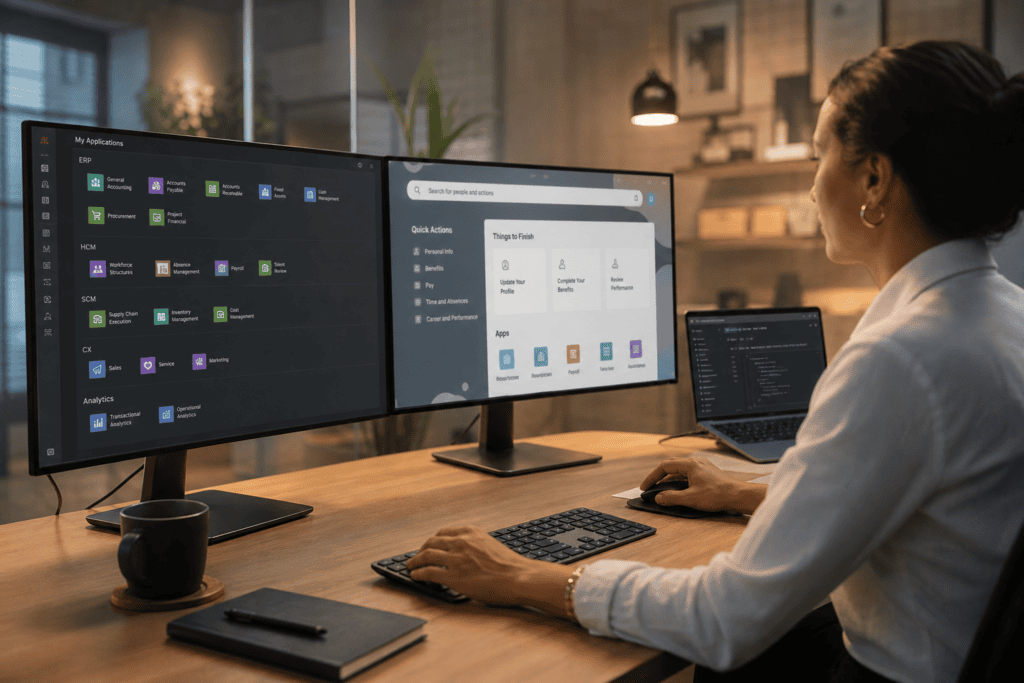
Oracle Fusion is a suite of integrated cloud business applications, formally known as Oracle Fusion Cloud Applications, spanning Enterprise Resource Planning (ERP), Human Capital Management (HCM), Supply Chain Management (SCM), Customer Experience (CX), and Oracle Fusion Analytics. These fusion oracle capabilities run on Oracle Cloud, connect end-to-end processes, and support secure, role-based workflows across finance, HR, operations, and customer functions.
Oracle Fusion Modules: ERP, HCM, SCM, CX, Analytics
Think of Oracle Fusion apps as modular suites you can adopt by priority. Core finance lives in Oracle Cloud ERP, HR in HCM, operations in SCM, customer-facing processes in CX, and cross-suite insights in Oracle Fusion Analytics.
• Suite: Oracle Cloud ERP
Key Processes: GL, AP, AR, FA, CM, Procurement, PFM
Typical Owners: Finance & IT
• Suite: HCM
Key Processes: HR, payroll, talent, workforce mgmt
Typical Owners: HR & HRIS
• Suite: SCM
Key Processes: Planning, inventory, manufacturing, logistics
Typical Owners: Operations
• Suite: CX
Key Processes: Sales, service, marketing
Typical Owners: Sales & CX
• Suite: Fusion Analytics
Key Processes: Cross-suite analytics and KPIs
Typical Owners: Finance, Ops, HR
Key ERP modules to know:
• General Ledger (GL): Ledgers, chart of accounts, balances, close.
• Accounts Payable (AP): Invoices, supplier payments, approvals.
• Accounts Receivable (AR): Billing, receipts, customer balances.
• Fixed Assets (FA): Asset creation, depreciation, retirements.
• Cash Management (CM): Bank statements, reconciliations, cash positions.
• Procurement: Requisitions, purchase orders, supplier onboarding.
• Project Financial Management: Project budgets, costs, billing.
How to Get Hands-On with Oracle Fusion (Access Options)
You have several realistic paths to try an oracle fusion application. Availability, cost, and licensing vary by organisation.
• Product tours and demos: Use vendor-led product tours to explore navigation and core flows without admin setup.
• Partner training tenants: Many partners provide instructor-led or self-paced sandboxes for oracle fusion apps practice.
• Oracle labs or trials: From time to time, labs or limited trials may be available through programs or training; terms vary.
• Internal non-production: If your company licenses Fusion, request access to a test or training environment via your ERP admin.
Tip: Start in a training tenant with seeded roles and sample data. It lets you practice without impacting real transactions.
Navigate Oracle Fusion Like a Beginner-Pro

Once inside, a few UI habits help you move fast and avoid errors.
1) Set a theme for clarity
• Open personalization settings and pick a high-contrast theme. Better contrast reduces navigation mistakes during early learning.
2) Know the Global Banner
• Use the top banner to access notifications, your user menu, recent items, help, and personalization.
3) Use Global Search everywhere
• Global Search quickly opens tasks, pages, and business objects. Try: search for ‘Payables’, ‘Suppliers’, or ‘Journals’ to jump directly.
4) Explore the Application section
• The homepage tiles group modules. Pin frequently used pages (for example, GL journal entry, AP invoices) for quicker access.
5) Check Things to Finish
• This card surfaces pending approvals, tasks, and exceptions that need attention. It is ideal for daily triage.
6) Scan Analytics
• Many pages include infolets or dashboards for KPIs and exceptions. Use them to prioritize rather than click through every worklist.
7) Open Oracle Guided Learning
• Use Oracle Guided Learning overlays to follow step-by-step UI cues. It is a fast way to learn flows without leaving the screen.
First Exercises: Safe Tasks and a Read-Only REST API Check in Postman
Start with low-risk, read-only actions in a non-production tenant. These build confidence and context without committing transactions.
Exercise A: Find finance and procurement data
• Use Global Search to open GL dashboards and view balances or recent journals.
• In Procurement, open Suppliers and review a single supplier’s profile. Do not create or update records.
Exercise B: Run or view seeded analytics
• From dashboards, open infolets for AP or AR to see top payables or overdue receivables. Note how filters and prompts refine results.
Exercise C: Validate REST API connectivity with Postman (read-only)
• Goal: Confirm access to the Fusion REST API and retrieve a small, non-sensitive dataset.
• Prereqs: A non-production environment, an integration-friendly user, and proper roles granted by your admin.
Steps in Postman
1) Create a new collection and environment.
2) Set environment variables: baseUrl (your tenant URL), username, and auth method.
3) Auth: Use your tenancy’s method (Basic auth or OAuth 2.0). Never hardcode credentials in shared workspaces.
4) Request: Start with GET to a read-only endpoint such as a suppliers, locations, or reference-data resource in your suite. Keep payloads small using limit parameters.
5) Headers: Accept: application/json.
6) Send: Expect HTTP 200 with a compact JSON response. If you see 401/403, verify roles and authentication.
7) Document: Save the request and note versioning, pagination (offset/limit), and any filters you used.
Good practices
• Use non-production only; never test new API calls in production.
• Keep to GET requests for initial validation; avoid POST/PATCH until governance is defined.
• Confirm data classification rules with your security team before exporting records.
Key Takeaways
• Start in a training tenant and use read-only queries to learn safely.
• Postman plus the REST API offers a quick connectivity check without UI clicks.
• Role-based access and the correct auth method are essential for API success.
Create With VidAU
Turn scripts, product URLs, and creative ideas into ad-ready video assets with a structured AI workflow.
Key takeaway
Final Thoughts
Oracle Fusion Cloud Applications bring ERP, HCM, SCM, CX, and Analytics together on one platform. If you are new, focus on navigation basics, practice in a training tenant, and verify API access with a safe, read-only GET.
Your best next step: secure non-production access, personalize the UI, follow Oracle Guided Learning for a core workflow, and run a small Postman GET to confirm integration readiness.
Frequently asked questions
What is Oracle Fusion in simple terms?
Oracle Fusion, or Oracle Fusion Cloud Applications, is a suite of integrated cloud apps for Enterprise Resource Planning (ERP), Human Capital Management (HCM), Supply Chain Management (SCM), Customer Experience (CX), and analytics. It unifies finance, HR, operations, and customer functions with role-based security and embedded workflows.
Which Oracle Cloud ERP modules matter most for beginners?
Start with General Ledger (GL) to understand your chart of accounts and balances. Then review Accounts Payable (AP), Accounts Receivable (AR), Fixed Assets (FA), Cash Management (CM), Procurement, and Project Financial Management. These modules cover core finance operations and provide the backbone for reporting and close.
How can I get hands-on access to Oracle Fusion?
Use vendor product tours for orientation, partner-led training tenants for guided practice, or an internal non-production environment if your company licenses Fusion. In some cases, labs or trials may be available. Access, features, and costs vary by program and contract.
What are the fastest ways to navigate as a new user?
Personalize your theme, use the Global Banner for notifications and settings, rely on Global Search to jump to tasks, and pin commonly used pages. Check Things to Finish daily for pending items, review analytics infolets for quick insights, and open Oracle Guided Learning for on-screen, step-by-step help.
Does Oracle Fusion support REST API integration?
Yes. Oracle Fusion provides REST API endpoints across suites like ERP and SCM. In non-production, you can validate connectivity with Postman using GET requests, following your tenancy’s authentication method (Basic or OAuth 2.0). Role-based access controls what data you can retrieve or modify.
What is Oracle Fusion Analytics?
Oracle Fusion Analytics delivers packaged, cross-suite analytics for ERP, HCM, SCM, and CX. It provides curated data models, metrics, and dashboards to speed insight without building everything from scratch. Finance, HR, and operations teams use it to track KPIs and drill into trends.