JavaScript Image Tools · Unsplash API, Picsum Fallback & AI Image Mode
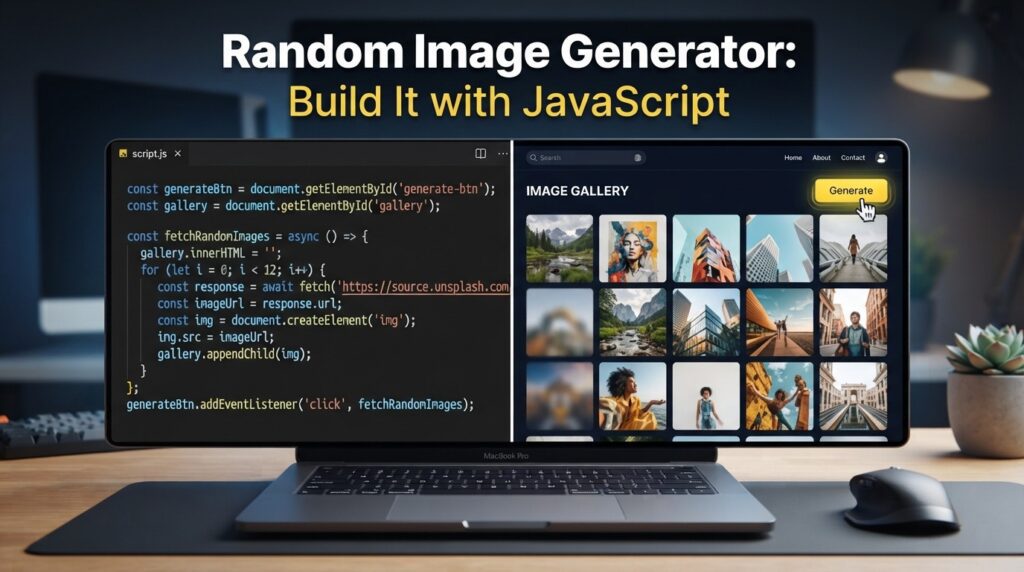
Random Image Generator: Build It with JavaScript (Unsplash API + Picsum)
Looking for a random image generator? Follow this JavaScript guide to fetch random images, add AI image generation, and optimize your website.
By the VidAU Editorial Team · JavaScript image generator guide · Unsplash, Lorem Picsum, Perchance, and VidAU AI Image workflow
Need a random image generator that just works? This step-by-step build uses JavaScript to pull from Unsplash’s Random endpoint with a no-key Lorem Picsum fallback, then adds an AI mode that routes users to Perchance for funny AI generated images.
You can build a random image generator in under 15 minutes with vanilla JavaScript. This guide uses the fetch API to call Unsplash’s Random endpoint first, then falls back to Lorem Picsum with a seed parameter to avoid repeats. We will add alt text, lazy loading, light CORS handling, and an optional Perchance AI mode for funny AI generated images.
I reviewed and analysed common Unsplash and Picsum examples and combined them into a concise, resilient pattern that prevents immediate repeats and stays beginner friendly.
Quick Summary
- Vanilla JavaScript with the fetch API plus Unsplash’s Random endpoint is the fastest production-friendly random image generator in 2026.
- Lorem Picsum is the strongest no-key fallback using its seed parameter to reduce repeats and keep images fresh.
- Required details include alt text for accessibility, loading=’lazy’ for performance, CORS-safe image URLs, and a Set plus localStorage to block repeats.
- This setup fits web devs, makers, and demo authors who need quick, clean placeholders or prompts without heavy dependencies.
What Is a Random Image Generator?
A random image generator is a small JavaScript utility that fetches and displays an unpredictable image on each request, typically from APIs like the Unsplash API or placeholder services like Lorem Picsum. It outputs a URL into an img tag, updates alt text, and avoids repeats using in-memory or local storage tracking.
Definition
A random image generator fetches an unpredictable image, places its URL inside an img tag, updates the alt text, and uses tracking to avoid showing obvious repeats.
Who Is This For?
This guide is for beginner-to-intermediate developers who need dependable demo images, prototypes, landing pages, or creative prompt starters without spinning up a full backend. If you want quick control over sizes, alt text, and deduplication without big libraries, this pattern is for you.
Best fit
Use this pattern when you want quick control over image size, alt text, fallback behavior, and deduplication without adding a large library or backend.
How Do You Build a Random Image Generator with JavaScript?
✨Build AI Text to Image Generator in HTML CSS & JavaScript | AI Image API Project Tutorial
Follow these steps using vanilla JavaScript and the fetch API. I reviewed available examples for Unsplash and the repeat-blocking tricks popularized in simple JS tutorials, then refined them into one compact snippet that balances reliability and clarity.
1) Add minimal HTML
<button id="btn">Surprise me</button>
<img id="photo" alt="Random image" loading="lazy" width="800" height="600" />
<p id="credit"></p>
2) Configure sources
- Primary: Unsplash Random endpoint (JSON metadata, image URL, author, alt).
- Fallback: Lorem Picsum with seed for 800×600: https://picsum.photos/seed/{seed}/800/600
3) Write JavaScript
const UNSPLASH_KEY = ''; // optional: add your key if you have one
const photoEl = document.getElementById('photo');
const creditEl = document.getElementById('credit');
const seen = new Set(JSON.parse(localStorage.getItem('seenIds') || '[]'));

async function fetchUnsplash() {
  if (!UNSPLASH_KEY) throw new Error('no-unsplash-key');

  const url = 'https://api.unsplash.com/photos/random?orientation=landscape&content_filter=high';
  const r = await fetch(url, {
    headers: { Authorization: `Client-ID ${UNSPLASH_KEY}` }
  });

  if (!r.ok) throw new Error('unsplash-failed');

  const d = await r.json();

  return {
    id: `u_${d.id}`,
    src: d.urls && d.urls.regular,
    alt: d.alt_description || `Photo by ${d.user && d.user.name} on Unsplash`,
    credit: d.user && d.user.name ? `Photo by ${d.user.name} on Unsplash` : 'Unsplash',
  };
}

function fetchPicsum() {
  const seed = Math.random().toString(36).slice(2, 10);

  return {
    id: `p_${seed}`,
    src: `https://picsum.photos/seed/${seed}/800/600`,
    alt: 'Random placeholder from Picsum',
    credit: 'Lorem Picsum',
  };
}

async function getRandomImage() {
  try {
    const img = await fetchUnsplash();

    if (!img.src || seen.has(img.id)) throw new Error('dup-or-missing');

    return img;
  } catch (e) {
    let img;

    do {
      img = fetchPicsum();
    } while (seen.has(img.id));

    return img;
  }
}

async function showImage() {
  const img = await getRandomImage();

  photoEl.src = img.src;
  photoEl.alt = img.alt;
  creditEl.textContent = img.credit;

  seen.add(img.id);
  localStorage.setItem('seenIds', JSON.stringify([...seen].slice(-50)));
}

document.getElementById('btn').addEventListener('click', showImage);
window.addEventListener('load', showImage);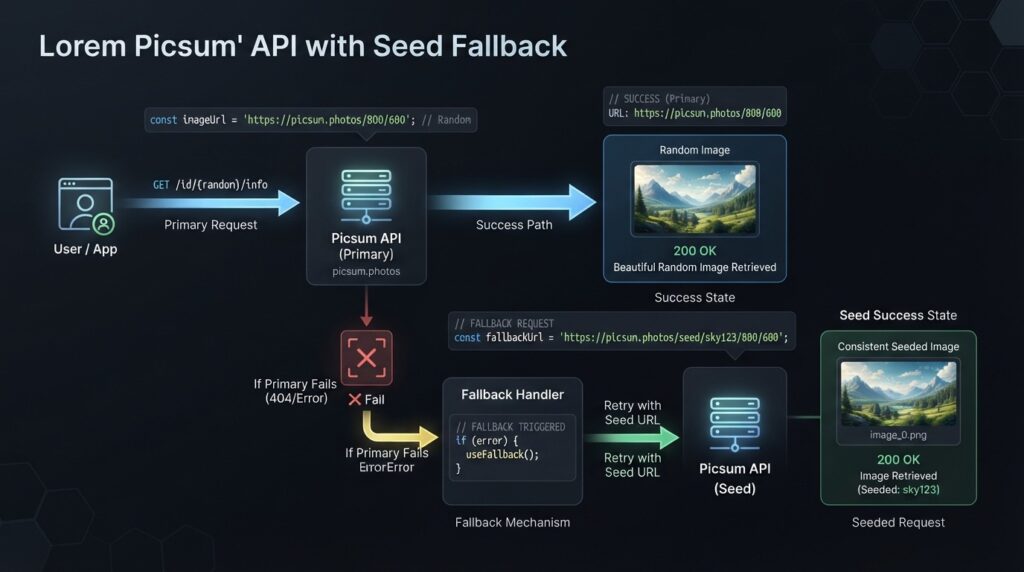
Key Takeaways
- Use Unsplash first for rich metadata; fall back to Picsum if unavailable.
- Store recent image IDs to reduce repeats across clicks and reloads.
- Keep alt text and credits updated from metadata or safe defaults.
How Do You Use Lorem Picsum With a Seed Fallback?
Lorem Picsum supports a seed parameter that returns a consistent image for a given seed. By generating a new seed with Math.random and slicing a short token, you get variety while still tagging each image with a unique ID for deduplication. This avoids obvious repeats without extra state.
Fallback tip
Use the Picsum seed as the image ID. That gives you a simple way to deduplicate fallback images without needing extra metadata.
How Do You Prevent Repeats in a Random Image Generator?
Avoiding repeats is a two-part job: in-memory de-duplication during a session and light persistence across reloads.
- Use a Set to track seen IDs: Unsplash photo IDs, or the Picsum seed.
- Use localStorage to persist a small rolling window, like the last 50 IDs.
- If needed, reset the Set after N clicks to keep memory small.
const seen = new Set(JSON.parse(localStorage.getItem('seenIds') || '[]'));

// After showing an image
seen.add(img.id);
localStorage.setItem('seenIds', JSON.stringify([...seen].slice(-50)));
Repeat protection
Use a Set for the current session and localStorage for a short rolling history across reloads. The last 50 IDs is a practical lightweight default.
What About Accessibility, Lazy Loading, and CORS?
- Alt text: Prefer Unsplash alt_description or a ‘Photo by Name on Unsplash’ fallback. For Picsum, use a generic but descriptive message.
- Lazy loading: Add loading=’lazy’ to defer offscreen images.
- CORS: Use direct image URLs in the img src. Both Unsplash and Picsum serve cross-origin images suitable for img tags. If you proxy or fetch blobs, configure CORS headers server-side.
CORS note
Keep it simple by assigning public image URLs directly to img src. Fetching and transforming image blobs client-side is where CORS surprises become more likely.
How Do You Add an Optional AI Mode With Perchance?
If you want a playful AI option, add a toggle that routes users to Perchance AI for on-demand generations. This keeps your core JS generator intact while giving users an ‘AI’ button for funny ai generated images.
- Simple approach: open a new tab to Perchance’s image generator page and prefill a prompt in the UI instructions.
- Respect that Perchance is a browser tool; do not assume a public API.
- I reviewed a recent discussion about truly free, no-login tools, and the trade-off is clear: browser convenience can mean queues and variability, while local tools like Fooocus or ComfyUI remove limits but require hardware and setup. That aligns with what people search for under ‘ai image generator perchance’ and ‘how to create an ai’ workflow.
Example UI wiring:
document.getElementById('ai').addEventListener('click', () => {
  const idea = 'make a surreal cat in sunglasses, neon, 1980s poster';
  window.open('https://perchance.org/ai-text-to-image', '_blank');
  // Let users paste the idea manually; avoid scraping or automation.
});
Mid-article tip
- • Need production-ready visuals fast? Consider generating campaign visuals with VidAU AI Image. If you later want to turn assets into ad videos, try VidAU AI Video or automate from a page with URL to Video. For repurposing, see VidAU Vid Remix and for cleanup try Object Remover or Video Enhancer.
Perchance integration note
Use a button that opens Perchance and lets users paste the idea manually. Avoid scraping or automating against undocumented endpoints.
Generate Images and Turn Them Into Videos With VidAU
Use VidAU AI Image for campaign visuals, then turn assets into ad videos with Text to Video, VidAU AI Video, URL to Video, Vid Remix, Object Remover, and Video Enhancer when your random or AI-generated images need to become publish-ready creative.
VidAU workflow
Where VidAU fits beside a random image generator
- Use JavaScript for random placeholders: Build the core generator with Unsplash, Picsum, Set, localStorage, alt text, lazy loading, and CORS-safe image URLs.
- Use Perchance for playful AI images: Add a browser-based AI option for funny AI generated images without changing the core random-image flow.
- Use VidAU AI Image for production visuals: Generate on-brand campaign images when placeholder randomness is not enough.
- Use Text to Video and VidAU AI Video for motion: Turn selected images, scripts, or product assets into videos when the visual needs to become a marketing clip.
- Use Vid Remix, Object Remover, and Video Enhancer for reuse and cleanup: Repurpose assets, remove unwanted elements, and improve creative quality after generation.
Common Mistakes and Quick Fixes
- Missing alt text: always set a descriptive fallback to keep pages accessible.
- No repeat protection: store IDs in a Set and localStorage to avoid déjà vu.
- Oversized images: pick sizes that match your layout; Picsum size params help.
- Ignoring errors: wrap Unsplash calls in try/catch and fall back to Picsum.
- CORS surprises: use direct image URLs in img src; avoid fetch-to-blob unless you manage headers.
- Slow initial paint: use loading=’lazy’ and render a low-contrast skeleton behind the image.
Mistake to avoid
Do not skip repeat protection. Store IDs in a Set and a short localStorage history so users do not keep seeing the same image after clicks and reloads.
Key takeaway
Final Thoughts
A reliable random image generator is just a small HTML block, one fetch call, and a smart fallback. Start with Unsplash for quality and metadata, drop to Picsum with a seed for resilience, and keep users happy with alt text, lazy loading, and repeat protection.
If you need on-brand visuals or quick ad-ready assets, generate images with VidAU AI Image and convert them into videos with Text to Video or VidAU AI Video.
FAQ
Here are answers to common questions about random image generator builds, the Unsplash API, Lorem Picsum, localStorage repeat protection, alt text, CORS, Perchance AI image generation, funny AI generated images, and how to create an ai workflow with stricter control.
Do I need an Unsplash API key for this random image generator?
For the Unsplash JSON endpoint, you typically use a client key to access the Random photo metadata and URLs. This guide falls back to Lorem Picsum if a key is missing or a request fails. Always check the latest Unsplash documentation and terms before production use.
Can I use Lorem Picsum without any key?
Yes. Lorem Picsum works as a no-key placeholder source. By adding a seed parameter and explicit width and height, you get predictable sizing and good variety. Use the seed value as your image ID to help prevent repeats and to store a short history in localStorage.
How do I prevent duplicate images across page reloads?
Track IDs in a Set during the session and persist a small rolling array in localStorage, such as the last 50 IDs. Check new candidates against the Set; if already seen, request another image or generate a new Picsum seed. This balances freshness with memory use.
What is the best image size for performance?
Match the requested image size to your layout. For demos, 800×600 is a safe middle ground. If your container is smaller on mobile, request smaller dimensions from Picsum and use Unsplash’s appropriate URL variant to reduce bandwidth while keeping images crisp.
How do I add alt text automatically?
Prefer source metadata. With Unsplash, use alt_description or fall back to ‘Photo by Author on Unsplash’. With Picsum, set a generic but descriptive message. Update the img alt on each fetch so assistive technologies read the correct context for every image.
Will CORS block my image loads from Unsplash or Picsum?
When you set the img tag src to the public URL, images typically load without extra CORS work. If you try to fetch and transform the image data client-side, you may hit CORS limits. Keep it simple: assign the source URL directly to img src for reliability.
Can I integrate Perchance to generate funny AI images from my site?
Perchance runs in the browser and is popular for fun, fast generations. The simplest integration is a button that opens Perchance with a suggested prompt users can paste. Avoid automating against undocumented endpoints. This keeps your app reliable and user friendly.
How do I add a ‘Surprise me’ button that never repeats?
Bind the button to a function that requests an image, checks the seen Set and localStorage, and retries if the ID was previously used. Cap your history to the last N IDs to keep storage small. Over time, recycle the oldest IDs to maintain variety.
Can I seed Unsplash results for consistency?
Unsplash’s Random endpoint focuses on variety, not deterministic seeds. If you need consistent results per seed, use Picsum for placeholders or maintain your own curated list. For AI control, explore a Perchance prompt workflow, but expect variability by design.
How to create an ai workflow if I need stricter control than Perchance?
You can keep a browser-first approach for convenience or move local for control. Some creators run local tools like Fooocus or ComfyUI for unlimited, no-login generations. The trade-off is setup and hardware. Choose what fits your performance, privacy, and cost needs.