VidAU Editorial · AI Search
Local LLM: Best Models and Setup for Coding on Your GPU (16–32GB VRAM)
Run a local LLM for coding the right way. See the best current models by GPU VRAM (16–32GB), choose the right runtime, boost speed, fix context issues, and wire up your editor or Python agents.
By the VidAU Editorial Team · Reviewed before publishing
If you’re choosing a local LLM for coding on 16–32GB VRAM, match your GPU to the right Qwen 3.8 or Gemma 4 build, then fix context and quantization. This implementation guide turns fresh 2026 tests into concrete picks and setup steps that stop blank answers and slow tokens.
If you’re choosing a local LLM for coding on 16–32GB VRAM, match your GPU to the right Qwen 3.8 or Gemma 4 build, then fix context and quantization. This implementation guide turns fresh 2026 tests into concrete picks and setup steps that stop blank answers and slow tokens.
Quick Summary
• RTX 16–32GB workflow: Run Qwen 3.8 Flash Next on 16GB, Qwen 3.8 27B Q4_K_M on 24GB, and Q6_K or Gemma 4 26B/31B on 32GB for dependable coding in 2026.
• Alternate picks: Gemma 4 26B/31B and Qwen Coder on Strata or Gyro offer strong code generation when Flash Next or 27B builds don’t fit your workload.
• Platform constraint: Set OLLAMA_CONTEXT_LENGTH to 16000–32000 and pick GGUF quantizations (Q3_K_M to Q6_K) to avoid stalled or blank completions.
• Best fit: US developers building Python agents or editor copilots on 16–32GB RTX GPUs or Apple Silicon (Mac mini/Studio) who want privacy and speed.
What Is Local LLM?
A local LLM is a language model you run entirely on your own machine- GPU or Apple Silicon—without sending code to external servers. You download open‑weight model files, load them through a runtime (Ollama, LM Studio, llama.cpp, or vLLM), and interact via a chat UI, an API, your editor, or Python scripts. The appeal is privacy, control, and predictable cost; the constraint is VRAM and memory bandwidth.
Why These Models Lead in 2026

The November 2026 momentum centers on Qwen 3.8 Flash Next for 12–16GB cards and Qwen 3.8 27B for 24–32GB, with Gemma 4 26B/31B as a strong alternate. Community coder builds like Strata and Gyro tune Flash Next for coding, pushing solid HumanEval‑style outcomes on constrained VRAM. Larger dense models (Qwen 3.8 27B) remain the best all‑around local coding performers when you can feed them enough memory and context window.
For reality checks, use Terminal‑Bench 4.0 to benchmark coding workloads and HarmBench insights to understand why long “thinking” traces can hit context limits. A common pitfall behind blank answers is running out of context budget—often fixable by raising OLLAMA_CONTEXT_LENGTH.
Pick the Best Local LLM by VRAM (16GB, 24GB, 32GB)
Map your GPU class to a model and quantization that fits VRAM with headroom for context and KV cache. Use GGUF quantizations when running via llama.cpp/LM Studio/Ollama and keep an eye on context length.
• VRAM class: 16GB RTX
Recommended Model + Quant: Qwen 3.8 Flash Next (Strata/Gyro), Q3_K_M
Why: Fast coder on tight VRAM
• VRAM class: 24GB RTX
Recommended Model + Quant: Qwen 3.8 27B, Q4_K_M
Why: Strong code and reasoning
• VRAM class: 32GB RTX
Recommended Model + Quant: Qwen 3.8 27B, Q6_K
Why: Higher fidelity at speed
• VRAM class: 32GB RTX (alt)
Recommended Model + Quant: Gemma 4 26B/31B, Q4_K_M–Q5_K_M
Why: Clean code style, robust tools
• VRAM class: Apple Silicon 32–64GB
Recommended Model + Quant: Flash Next or 27B metal builds
Why: Good perf with unified mem
Notes:
• Q3_K_M maximizes fit for 16GB while staying coding‑usable; try Q4_K_M if memory allows.
• Q6_K on 32GB preserves quality for refactors and multi‑file tasks.
• If you use Qwen Coder variants, validate on your repo tasks; some are tuned for tool‑use over freeform generation.
Quantization guidance
• Start at the lightest quant that fits and delivers acceptable code: Q3_K_M (16GB), Q4_K_M (24GB), Q6_K (32GB).
• If correctness drifts (imports wrong, APIs hallucinated), step up one quant notch.
Runtime Choices for a Local LLM
You have four practical paths. Pick based on simplicity, portability, and agent throughput needs.
• Ollama: One‑command setup, easy model pulls, simple local API. Great for desktop chat, editor bridges, and quick trials.
• LM Studio: GUI for downloads and serving; exposes an OpenAI‑compatible local API. Good for multi‑model switching and editor integration.
• llama.cpp: Lean, portable engine for GGUF with GPU offload; ideal when you care about footprint and broad OS support.
• vLLM: High‑throughput server for Python agents and batch workloads using Hugging Face formats; best when you need concurrency and long contexts.
When in doubt: start with Ollama or LM Studio for convenience, then move agent workloads to vLLM if you need parallel requests.
Key Takeaways
• Desktop copilots: Ollama or LM Studio keeps setup minimal.
• Portable single‑box: llama.cpp with GGUF shines.
• Agents at scale: vLLM delivers concurrency and token throughput.
Local LLM Setup: Step‑by‑Step (RTX 16–32GB)
1) Prep your system
• Update GPU drivers and ensure a recent CUDA runtime if applicable.
• Reserve VRAM headroom: keep other GPU apps closed during runs.
2) Install a runtime
• Ollama: install and start the local service.
• Or install LM Studio and enable the local server.
• Or build llama.cpp with GPU acceleration; confirm it detects your GPU.
3) Get the right model build
• For 16GB: a Qwen 3.8 Flash Next Strata/Gyro coder build in GGUF, quant Q3_K_M.
• For 24GB: Qwen 3.8 27B in GGUF, quant Q4_K_M.
• For 32GB: Qwen 3.8 27B Q6_K; alternate Gemma 4 26B/31B at Q4_K_M–Q5_K_M.
4) Set context length
• Environment: set OLLAMA_CONTEXT_LENGTH to 16000–32000 before serving.
• Reason: long “thinking” traces and multi‑file patches otherwise hit the default cap and return blanks.
5) Serve and test
• Start the runtime with your model and confirm token/s output.
• Run a 20‑prompt smoke test: refactor a file, write tests, fix a bug, add logging, and summarize a diff.
• If quality drops, try one higher quantization; if OOM, step one lighter.
Local LLM on Apple Silicon (Mac mini/Studio)
• Use Ollama, LM Studio, or llama.cpp Metal builds; unified memory acts like large VRAM.
• 32GB unified memory: Flash Next coder builds run well for codegen and refactors.
• 64GB unified memory: 27B‑class models become viable with room for a larger context.
• Keep background apps closed; swap hurts token speed.
Editor Integration for Coding

You can turn your local LLM into a code copilot in minutes.
• VS Code: point a compatible extension to your local API (Ollama or LM Studio server URL). Enable features for inline suggestions, slash commands, and code‑aware chat.
• Neovim/JetBrains: configure an extension or HTTP client to your local endpoint; bind hotkeys for refactor, test scaffolding, and debug‑explain.
• Prompts: keep system prompts short and repo‑aware; include file paths and error traces; avoid over‑verbose chain‑of‑thought that inflates context.
Sanity check with Terminal‑Bench 4.0‑style tasks to validate that the assistant applies diffs correctly and handles multi‑step edits.
Python Agent Workflows with a Local LLM
For local agents, structure the loop to keep context tight and execution reliable.
• Engine: vLLM for throughput, or llama.cpp/Ollama for simplicity.
• Tools: shell, Python REPL, filesystem, test runner; keep tool outputs summarized.
• Loop sketch: plan -> edit -> run tests -> summarize -> next step.
• Budget: cap each step’s tokens; prune history to essentials; persist artifacts to disk, not the context.
Minimal loop outline (pseudo‑workflow):
• Initialize: load repo map, goals, constraints.
• Plan: ask model for the next atomic change with a short patch plan.
• Edit: apply a targeted diff; store the full diff on disk.
• Test: run unit tests; summarize failures to 10–20 lines.
• Reflect: ask for a fix plan; prune history to plan, last diff, last test summary.
• Repeat until tests pass.
Tip: If requests stall, first raise OLLAMA_CONTEXT_LENGTH; if still slow, switch the engine to vLLM and reduce per‑step token limits.
Reliability and Speed Tuning: Fixing Blank or Slow Answers
Long “thinking” traces observed in HarmBench‑style evaluations frequently exceed default context budgets, producing blank or cut‑off outputs. Apply these levers in order:
1) Context window
• Set OLLAMA_CONTEXT_LENGTH to 16000–32000 for coding sessions.
• Trim prompts; drop verbose reasoning unless needed.
2) Quantization quality
• Prefer Q4_K_M on 24GB and Q6_K on 32GB for stronger determinism in imports, APIs, and long diffs.
• If 16GB: Q3_K_M keeps it running; test refactor fidelity carefully.
3) Engine/runtime
• Desktop work: Ollama or LM Studio is fine; if latency stacks up in agents, move to vLLM.
• For llama.cpp, ensure GPU layers are fully offloaded and batch size matches VRAM.
4) Prompt hygiene
• Use short system prompts, precise instructions, and repo context.
• Avoid multi‑page stack traces; summarize to the lines that matter.
5) Token rate
• Keep temperature low for code (0.1–0.3).
• Increase batch size cautiously; watch for CUDA OOM.
Suggested Visual: A one‑page checklist titled “Stop Blank Answers” with context, quant, and prompt hygiene steps.
Troubleshooting: Common Local LLM Pitfalls
• Blank or partial outputs: Raise OLLAMA_CONTEXT_LENGTH; shorten prompt; lower max tokens per response; ensure enough VRAM headroom.
• CUDA OOM: Step down quantization (e.g., Q6_K to Q5_K_M/Q4_K_M); reduce batch size; close GPU‑heavy apps.
• Very slow tokens: Confirm GPU offload is active; reduce context size; try a lighter model or a faster engine (vLLM for agents).
• Poor code accuracy: Increase quantization quality; provide concrete file paths and types; add a schema or type hints; lower temperature.
• Editor can’t connect: Verify local server URL and port; ensure the model is loaded; check CORS or extension settings.
Model Validation: Trust, But Verify
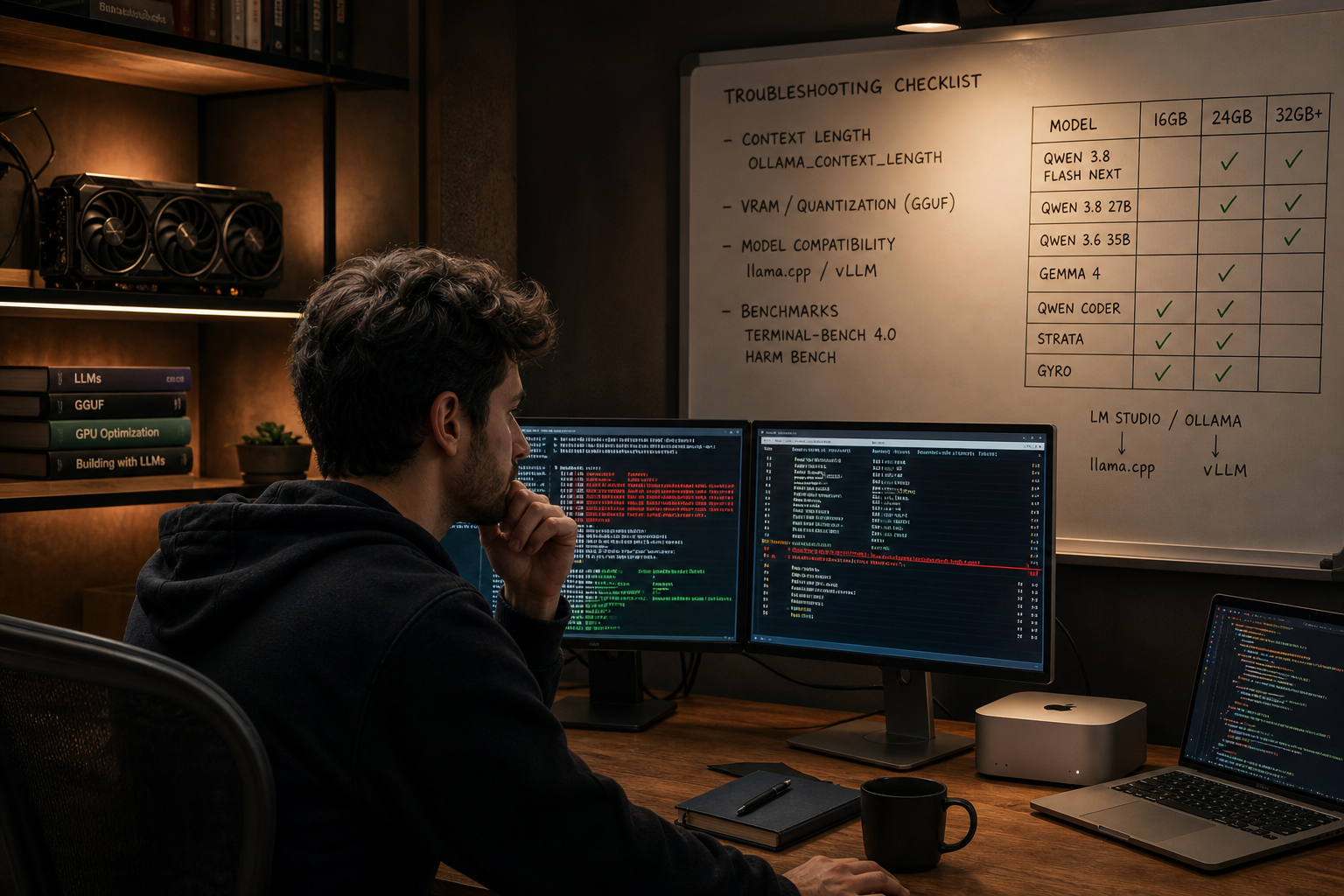
• Benchmark: Use Terminal‑Bench 4.0 tasks to confirm refactoring, tool‑use, and multi‑file edits work end‑to‑end on your repo shape.
• Golden prompts: Keep a fixed 20‑prompt suite (bugfix, test‑gen, API change, docstring, security pass) to compare models and quants.
• Regression checks: Re‑run after any quant or engine change.
Create With VidAU
Turn scripts, product URLs, and creative ideas into ad-ready video assets with a structured AI workflow.
Key takeaway
Final Thoughts
On 16–32GB GPUs, the simplest path to a dependable local LLM for coding is matching VRAM to the right 2026 models and fixing context. Run Qwen 3.8 Flash Next coder builds on 16GB, Qwen 3.8 27B Q4_K_M on 24GB, and Q6_K or Gemma 4 26B/31B on 32GB. Then raise OLLAMA_CONTEXT_LENGTH, keep prompts lean, and benchmark with Terminal‑Bench 4.0‑style tasks.
Your best next step: pick the VRAM‑appropriate model and quant from this guide, set the context window to at least 16k, wire it to your editor, and run a 20‑prompt smoke suite. If you build agents, move the backend to vLLM when you need parallelism.
Frequently asked questions
What is a local LLM and why use it for coding?
A local LLM runs entirely on your machine, keeping code and secrets off third‑party servers. For coding, that means private refactors, reliable tool‑calling without rate limits, and predictable costs. The trade‑off is hardware: your GPU or Apple Silicon must fit the model and its context window comfortably.
What is the best local LLM for coding in 2026 on 16GB VRAM?
On 16GB, Qwen 3.8 Flash Next coder builds (Strata or Gyro) in GGUF at Q3_K_M are the most reliable balance of speed and code quality. They fit within memory, maintain useful reasoning for bugfixes, and avoid frequent stalls seen with heavier models on limited VRAM.
What is the best local LLM for coding in 2026 on 24GB VRAM?
For 24GB, Qwen 3.8 27B in GGUF at Q4_K_M is a strong daily driver. It offers better multi‑file reasoning and refactor fidelity than lighter models, while still leaving room for a 16k–32k context. If outputs truncate, raise OLLAMA_CONTEXT_LENGTH and reduce prompt verbosity.
What should I run on 32GB VRAM for coding?
On 32GB, two great options are Qwen 3.8 27B at Q6_K for higher fidelity, or Gemma 4 26B/31B at Q4_K_M–Q5_K_M for clean code style and tool‑use. Leave headroom for context and KV cache. If you do large refactors or long diffs, prioritize the model that stays accurate under longer contexts.
Which runtime should I pick: Ollama, LM Studio, llama.cpp, or vLLM?
Use Ollama or LM Studio for the fastest desktop setup and editor integration. Choose llama.cpp for portability and lean GGUF execution. Pick vLLM when you run Python agents or batch jobs that need concurrency and higher token throughput. You can mix: desktop via Ollama, agents via vLLM.
How do I stop blank or stalled answers from my local LLM?
Increase the context window first. Set OLLAMA_CONTEXT_LENGTH to at least 16000, and ideally 32000 for agent loops or long patches. Then trim prompts, reduce max tokens, and ensure your quantization isn’t too aggressive for the task. Many stalls are simply context exhaustion during long reasoning.
What quantization should I use for code quality?
Use the lightest quant that preserves correctness on your repo tasks: Q3_K_M on 16GB, Q4_K_M on 24GB, and Q6_K on 32GB are solid defaults. If imports, API calls, or tests drift from ground truth, step up a quant level; if you hit OOM, step down one level.
Does Apple Silicon (Mac mini/Studio) work well for local coding models?
Yes. With 32GB unified memory, Flash Next coder builds run well for typical codegen and refactors. With 64GB, 27B‑class models become practical with larger contexts. Use Ollama, LM Studio, or llama.cpp Metal builds, and keep other memory‑heavy apps closed to maintain token speed.
How can I benchmark a local LLM for real coding work?
Use Terminal‑Bench 4.0‑style tasks and a fixed 20‑prompt suite covering bugfixes, test generation, multi‑file refactors, and API changes. Time end‑to‑end runs and check diff accuracy. Re‑run benchmarks after any engine change, quant tweak, or context adjustment to catch regressions.
When should I switch from Ollama to vLLM?
Switch when you need higher throughput or concurrency for Python agents or batch jobs. If latency stacks up or requests queue under load, move the backend to vLLM, keep context moderate, and summarize tool outputs. For single‑user desktop chat or editor copilots, Ollama or LM Studio is usually sufficient.