Agentic AI Development · 2026
Agentic AI Coding Assistant: Best Tools and Workflows for 2026
Build a reliable agentic AI coding assistant workflow in 2026. Compare Copilot agents, LM Studio, Claude Code, Gemini CLI, and other tools while learning setup steps, guardrails, and ROI checks.
By [Author] · Updated [Date] · [Read time]
If you are evaluating an agentic AI coding assistant for 2026, start with a hybrid workflow that pairs a local LM Studio plus VS Code setup with GitHub Copilot agent modes for reviewed, verifiable changes. I reviewed the latest public demos and tutorials and found this approach balances speed, privacy, and practical guardrails for real engineering work.
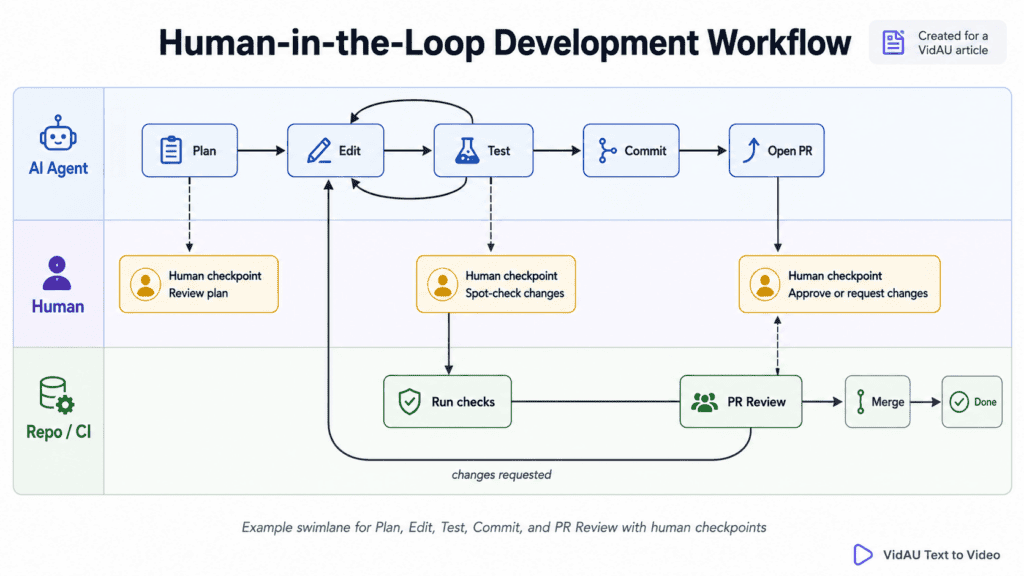
Developers in 2026 want an agentic AI coding assistant that is fast locally, trustworthy in teams, and economical at scale. The most reliable setup pairs a local LM Studio stack inside VS Code with GitHub Copilot agent capabilities for multi-step tasks, plus clear guardrails: tests, PR reviews, and human checkpoints.
I analysed recent 2026 talks and tutorials and recommend a hybrid approach: use local agents for context-aware edits and exploration, and use GitHub Copilot agent mode or the coding agent for structured, reviewable changes. You get predictable latency and cost locally, and battle-tested repo automation in the cloud when it matters.
Quick summary
- Hybrid workflow: VS Code with LM Studio for local agent loops, plus GitHub Copilot agent mode or the coding agent for reviewable multi-step changes in 2026.
- Alternate stack: Claude Code, Gemini CLI, OpenClaw, and CodeRabbit cover terminal agents, long-context analysis, open-source orchestration, and automated PR reviews.
- Non-negotiables: Least-privilege tools via MCP, commit-by-commit checkpoints, reproducible prompts, and test-first validation before merges.
- Best fit: Teams modernizing legacy code, improving test coverage, or standardizing refactors with clear ROI and human-in-the-loop reviews.
What Is an Agentic AI Coding Assistant?
An agentic AI coding assistant is a coding-focused AI that plans and executes multi-step tasks, such as refactors, test generation, and documentation updates, by calling tools like the file system, shell, and test runners. Unlike simple autocomplete, it iterates toward a goal, checks progress, and makes changes under guardrails you define.
Key takeaways
- Agentic means plan-act-check, not just chat or autocomplete.
- Tools matter: file, shell, tests, and repo context shape outcomes.
- Human checkpoints and tests are essential for reliability.
How should you set up an agentic AI coding assistant locally in VS Code?
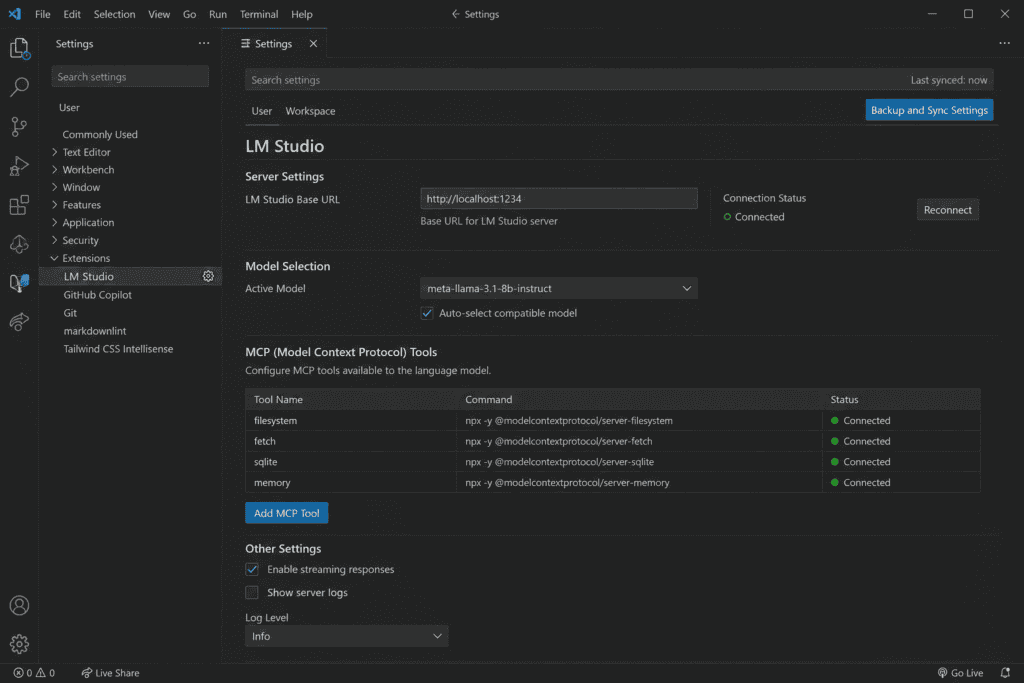
Start with LM Studio for local models and wire it to VS Code so you can run agent loops without cloud calls.
1. Install LM Studio and choose a local model
Install LM Studio and download a coding-tuned local model sized for your GPU or CPU.
2. Connect the model to VS Code
In VS Code, configure the model endpoint as your chat and inline completion provider. Keep temperature low for deterministic edits.
3. Expose least-privilege MCP tools
Expose least-privilege tools via Model Context Protocol (MCP): read-only file access for analysis folders, a constrained shell tool for npm test or pytest only, and a formatter or linter command. Block arbitrary network calls.
4. Add a tests-first workflow
Add a tests-first workflow: define target tests or create scaffolds, then let the agent propose edits to make tests pass.
5. Enable checkpointer prompts
Enable checkpointer prompts: log goals, context, and decisions per step so you can reproduce and roll back easily.
Practical tip
Keep the local setup deterministic and reproducible. Use low-temperature model settings, explicit tool permissions, test-first prompts, and checkpoint logs that make each decision easier to inspect or reverse.
When should you use GitHub Copilot coding agent vs agent mode?
| Option | Best use | Working style |
|---|---|---|
| Copilot coding agent | Structured tasks such as migrating test frameworks, updating license headers, or syncing docs | Assign the task, let it run, then review the results. |
| Copilot agent mode | Feature development, local testing, and edits that require frequent feedback | Co-create features and accept or reject proposed edits step by step in VS Code. |
| Rule of thumb | Choose based on task clarity and required control | If you need iterative control and frequent clarifications, stay in agent mode. If it is a well-scoped batch chore, delegate to the coding agent. |
How do you customize Copilot CLI with instructions, skills, and custom agents?
Customize the GitHub Copilot CLI so agents honor your standards and automate repeatable tasks.
📋
Instructions
Define project-level conventions, coding standards, commit message format, and prohibited patterns. Store them in-repo so every agent run is consistent.
🛠️
Skills
Create reusable actions such as run unit tests, generate changelog, or check accessibility. Keep inputs explicit and outputs machine-readable.
🤖
Custom agents
Bundle instructions and skills for roles like Test Migrator or Docs Sync. Trigger them from CI or developer machines for predictable outcomes.
What are the best tools in 2026 and when to pick each?
Here is a practical comparison by use case. I compared public workflows across 2026 videos and docs and focused on fit rather than hype.
| Tool | Best for | Why to choose it |
|---|---|---|
| GitHub Copilot agents | Repo-wide chores and reviewed changes | Agent mode plus coding agent fit CI and PR workflows. |
| Claude Code | Terminal workflows | Strong reasoning in CLI sessions. |
| LM Studio | Private edits and fast local loops | Low latency, predictable cost, and offline operation. |
| Gemini CLI | Long-context analysis | Large context for monorepos. |
| OpenClaw | Open-source orchestration | Flexible agent automations. |
| CodeRabbit | Pull request reviews | Automated, configurable review feedback. |
GitHub Copilot agents are best for repo-wide chores and reviewed changes. Agent mode plus coding agent fit CI and PRs. If you want to automate creative output alongside code, see how Claude Code pairs with ad automation here.
Claude Code is best for terminal workflows and offers strong reasoning in CLI sessions. Read more about Claude Code capabilities and alternatives.
LM Studio is best for private edits and fast loops. It offers low latency, predictable cost, and offline operation.
Gemini CLI is best for long-context analysis, with a large context suitable for monorepos.
OpenClaw is best for open-source orchestration and flexible agent automations.
CodeRabbit is best for PR reviews and provides automated, configurable review feedback.
Try VidAU now
Once your agentic workflow ships changes, stakeholders still need to understand what happened. VidAU turns your PR summaries, README docs, or changelogs into short explainer clips in minutes.
How do you run legacy code modernization and test generation safely?
Treat modernization as a series of scoped, test-driven increments.
1. Inventory and scoping
Ask the agent to map modules, dependencies, and test coverage; confirm hot paths manually.
2. Create safety nets
Generate missing unit tests first, then add smoke or integration tests to cover workflows.
3. Plan small refactors
Define one goal per run, set success criteria, and commit in small batches.
4. Execute with guardrails
In agent mode, let the assistant propose diffs, run tests, and format.
5. Review the pull request
Open a PR and attach an automated review with CodeRabbit for style and risk flags.
6. Roll out carefully
Use feature flags or staged deployments; track error rates and revert quickly if needed.
What guardrails and ROI checks keep agents reliable?
Guardrails that hold in day-to-day engineering:
- Task-scoping checklist: Goal, files in scope, tests to run, performance constraints, and rollback plan.
- Least-privilege tools: Read-only by default; allow writes only in target folders; permitted shell commands white-listed.
- Dry-runs and diffs: Require a preview of all changes; only then allow writes.
- Tests first: Run unit and integration suites; gate merges on green status.
- PR reviews: Run CodeRabbit and a human reviewer; require sign-off for risky paths.
Do not skip review controls
Agent-generated changes should not bypass test gates, diff previews, automated checks, or human review. Require explicit sign-off for risky paths and keep rollback plans available before merging.
Simple ROI metrics for engineering managers:
| Metric | What to measure |
|---|---|
| Cycle time | Lead time from task open to merge for agent-assisted versus manual work. |
| Revert rate | Percentage of agent changes reverted in 7 or 30 days. |
| Coverage delta | Net change in unit or integration test coverage per sprint. |
| Review time | Average minutes per PR before and after adopting agents. |
Who should use which agentic AI setup in 2026?
- Solo developers and privacy-sensitive teams: Local-first with LM Studio in VS Code; use MCP for tight controls.
- Product teams shipping weekly: Mix LM Studio for quick edits and Copilot agent mode for iterative work.
- Large repos and monorepos: Add Gemini CLI for long-context analysis and Claude Code for terminal sessions.
- Automation-focused organizations: Bring in OpenClaw for custom orchestration and Copilot CLI custom agents.
How VidAU supports agentic development communication
Once an agentic workflow ships changes, stakeholders still need to understand what happened. VidAU can turn PR summaries, README documentation, or changelogs into short explainer clips in minutes.
📝
PR summaries
Turn a reviewed pull request summary into a short explanation of what changed and why.
📚
README documentation
Convert technical documentation into a more accessible explainer for teammates or stakeholders.
📦
Changelogs
Transform release notes and changelog entries into short update videos.
🎥
Explainer clips
Create short videos that help stakeholders understand the results of an agent-assisted engineering workflow.
Key takeaway
Final Thoughts
A dependable agentic AI coding assistant in 2026 is not a single tool; it is a workflow. Keep the core loop hybrid: local LM Studio for fast, private edits and GitHub Copilot agents for structured, reviewable changes. Add MCP, tests, PR reviews, and small checkpoints to make results verifiable.
Create explainer videos with VidAU
Show your team what your workflow changed
Turn your docs into short videos your stakeholders will actually watch.
Frequently asked questions
Agentic AI Coding Assistant FAQ
These answers cover the practical differences between agentic coding tools, local and cloud workflows, safety controls, and ways to measure engineering value.
What is an agentic AI coding assistant in practical terms?
An agentic AI coding assistant plans, executes, and verifies multi-step coding tasks using tools like the file system, shell, and tests. It differs from autocomplete by iterating toward a goal with checkpoints and validation. In practice, agents propose diffs, run tests, and produce PRs under human review.
When should I use GitHub Copilot coding agent versus agent mode?
Use the coding agent for background, well-scoped chores like migrating tests or updating headers, and use agent mode when you need interactive, iterative development inside VS Code. If you expect multiple clarifications or granular control, stay in agent mode; if it is a batch task, the coding agent fits better.
How do I combine a local LM Studio setup with Copilot agents safely?
Run LM Studio as your local model for fast, private loops and expose tools via MCP with least privilege. Keep tests and diff previews mandatory. For repo-wide chores, trigger Copilot agents and review PRs with automated checks and human sign-off. Commit in small batches to simplify rollbacks.
What are the top tools for an agentic workflow in 2026?
Common picks include GitHub Copilot agent mode and the coding agent, LM Studio for local work, Claude Code and Gemini CLI for terminal and long-context analysis, OpenClaw for custom automation, and CodeRabbit for PR reviews. Choose per task: local for quick edits, cloud agents for structured repo changes.
How should I measure ROI on agentic assistants?
Track cycle time to merge, revert rate within 7 or 30 days, net change in test coverage, and average PR review time. Compare agent-assisted versus manual baselines over a few sprints. Favor workflows that shrink review time without increasing reverts or post-merge incidents.
Is a local model enough, or do I need cloud agents too?
Local often wins for speed, privacy, and cost predictability in iterative edits. Cloud agents like Copilot shine on repo-wide chores that benefit from standardization, PR automation, and integration with GitHub. Most teams succeed with a hybrid approach that assigns tasks based on fit.
How do Copilot CLI instructions, skills, and custom agents help?
Instructions encode your team’s standards, skills automate repeatable actions, and custom agents package both for consistent results. This ensures agent runs follow your conventions, produce predictable outputs, and can be triggered by developers or CI jobs without constant manual prompting.
Will agentic AI coding assistants replace developers?
They replace parts of the loop, not the loop owner. Agents can edit files, run tests, and draft PRs, but developers set goals, review diffs, ensure architectural fit, and handle trade-offs. You can outsource typing and some planning, but not your understanding or responsibility for outcomes.